

Google Calendar RAT is a PoC of Command&Control (C2) over Google Calendar Events, This tool has been developed for those circumstances where it is difficult to create an entire red teaming infrastructure. To use GRC, only a Gmail account is required. The script creates a 'Covert Channel' by exploiting the event descriptions in Google Calendar. The target will connect directly to Google."
Recording -
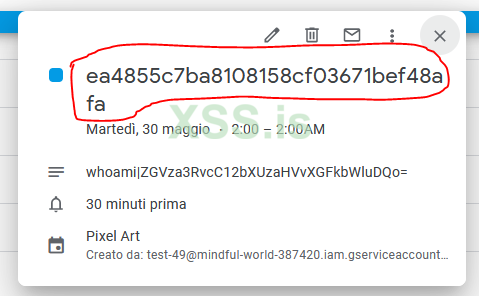
- The Title, which contains the unique ID, it means you can schedule multiple commands creating events having the same unique ID as name
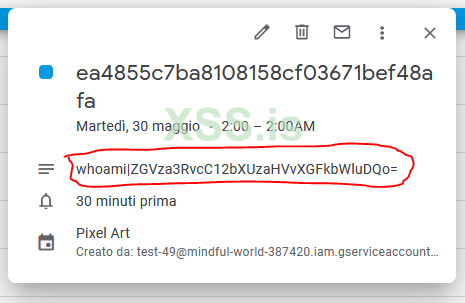
- The Description, which contains the command to execute and the base64 encoded output using the pipe symbol as separator "|"
Link - https://github.com/MrSaighnal/GCR-Google-Calendar-RAT
Recording -
How it works
GCR attempt to connect to a valid shared Google Calendar link and after generating a unique ID check for any yet-to-be-executed commands. If it is not able to find any command, it creates a new one (fixed to "whoami") as a proof of connection. Every event is composed by two part:- The Title, which contains the unique ID, it means you can schedule multiple commands creating events having the same unique ID as name
- The Description, which contains the command to execute and the base64 encoded output using the pipe symbol as separator "|"
How to use it
- Setup a Google service account and obtain the credentials.json file, place the file in the same directory of the script
- Create a new Google calendar and share it with the new created service account
- Edit the script to point your calendar address
- Once executed on the target machine an event with a unique target ID is automatically created autoexecuting the "whoami" command
- Use the following syntax in the event description for the communication => CLEAR_COMMAND|BASE64_OUTPUT
Examples:
- "whoami|"
- "net users|"
- The date is fixed on May 30th, 2023. You can create unlimited events using the unique ID as the event name.
Link - https://github.com/MrSaighnal/GCR-Google-Calendar-RAT


