• XSS.stack #1 – первый литературный журнал от юзеров форума

C# Adding file to startup | Добавление файла в автозагрузку

vril

CD-диск
Пользователь
Регистрация
30.11.2022
Сообщения
17
Реакции
1
I have tried adding my file to registry, using task scheduler, putting a shortcut into the Startup folder, and some more methods. All were detected by antivirus because it is suspicious. Can anyone give tips on ways I can add my file to startup without cause antiviruses machine learning to detect it? Or how I can re FUD one of these current methods? I am not that amazing with Pinvoke but I am trying to learn.


RU:
Я попробовал добавить свой файл в реестр, используя планировщик заданий, поместить ярлык в папку Startup и некоторые другие методы. Все они были обнаружены антивирусом, потому что это подозрительно. Может ли кто-нибудь дать советы о том, как я могу добавить свой файл в автозагрузку без причин, по которым антивирусы машинного обучения обнаруживают его? Или как я могу REFUD одним из этих текущих методов? Я не так удивителен с Pinvoke, но я пытаюсь учиться.
 
https://stackoverflow.com/questions/4897655/create-a-shortcut-on-desktop/4909475#4909475
C#:
[System.Runtime.InteropServices.ComImport]
[System.Runtime.InteropServices.Guid("00021401-0000-0000-C000-000000000046")]
internal class ShellLink { }

[System.Runtime.InteropServices.ComImport]
[System.Runtime.InteropServices.InterfaceType(System.Runtime.InteropServices.ComInterfaceType.InterfaceIsIUnknown)]
[System.Runtime.InteropServices.Guid("000214F9-0000-0000-C000-000000000046")]
internal interface IShellLink
{
    void GetPath([System.Runtime.InteropServices.Out, System.Runtime.InteropServices.MarshalAs(System.Runtime.InteropServices.UnmanagedType.LPWStr)] StringBuilder pszFile, int cchMaxPath, out IntPtr pfd, int fFlags);
    void GetIDList(out IntPtr ppidl);
    void SetIDList(IntPtr pidl);
    void GetDescription([System.Runtime.InteropServices.Out, System.Runtime.InteropServices.MarshalAs(System.Runtime.InteropServices.UnmanagedType.LPWStr)] StringBuilder pszName, int cchMaxName);
    void SetDescription([System.Runtime.InteropServices.MarshalAs(System.Runtime.InteropServices.UnmanagedType.LPWStr)] string pszName);
    void GetWorkingDirectory([System.Runtime.InteropServices.Out, System.Runtime.InteropServices.MarshalAs(System.Runtime.InteropServices.UnmanagedType.LPWStr)] StringBuilder pszDir, int cchMaxPath);
    void SetWorkingDirectory([System.Runtime.InteropServices.MarshalAs(System.Runtime.InteropServices.UnmanagedType.LPWStr)] string pszDir);
    void GetArguments([System.Runtime.InteropServices.Out, System.Runtime.InteropServices.MarshalAs(System.Runtime.InteropServices.UnmanagedType.LPWStr)] StringBuilder pszArgs, int cchMaxPath);
    void SetArguments([System.Runtime.InteropServices.MarshalAs(System.Runtime.InteropServices.UnmanagedType.LPWStr)] string pszArgs);
    void GetHotkey(out short pwHotkey);
    void SetHotkey(short wHotkey);
    void GetShowCmd(out int piShowCmd);
    void SetShowCmd(int iShowCmd);
    void GetIconLocation([System.Runtime.InteropServices.Out, System.Runtime.InteropServices.MarshalAs(System.Runtime.InteropServices.UnmanagedType.LPWStr)] StringBuilder pszIconPath, int cchIconPath, out int piIcon);
    void SetIconLocation([System.Runtime.InteropServices.MarshalAs(System.Runtime.InteropServices.UnmanagedType.LPWStr)] string pszIconPath, int iIcon);
    void SetRelativePath([System.Runtime.InteropServices.MarshalAs(System.Runtime.InteropServices.UnmanagedType.LPWStr)] string pszPathRel, int dwReserved);
    void Resolve(IntPtr hwnd, int fFlags);
    void SetPath([System.Runtime.InteropServices.MarshalAs(System.Runtime.InteropServices.UnmanagedType.LPWStr)] string pszFile);
}

public static void ComAddToStartup(bool addOrDelete, string pathToFile, string startupName, string descript = "")
{
    string fullPath = System.IO.Path.Combine(Environment.GetFolderPath(Environment.SpecialFolder.Startup), $"{startupName}.lnk"); // это не трогаешь (тут путь до автозагрузки с прибавлением к файлу расширение lnk)
    if (addOrDelete) // Проверка что создаём
    {
        IShellLink link = (IShellLink)new ShellLink();
        link.SetDescription(descript); // Описание (комментарий)
        link.SetIconLocation(typeof(Program).Assembly.Location, 0); // Установка иконки от твоего приложения
        link.SetPath(pathToFile); // Установка директории
        link.SetShowCmd(0); // Не показывать окно
        System.Runtime.InteropServices.ComTypes.IPersistFile file = link as System.Runtime.InteropServices.ComTypes.IPersistFile;
        file.Save(fullPath, false); // Сохраняем файл
    }
    else // Если удаляем..
    {
        if (System.IO.File.Exists(fullPath)) // Проверяем файл,
        {
            System.IO.File.Delete(fullPath);
        }
    }
}
Use:
C#:
ComAddToStartup(true, @"D:\Projects\AutoRunEx\bin\Release\autoRun.exe", "FileName", "Comment"); // true - add | false - delete

Или можно ещё так
P.S: Подключаем: IWshRuntimeLibrary -> References -> COM > Windows Script Host Object Model
C#:
static void Main(string[] args)
{
     ComAddToStartup(true, @"D:\Projects\AutoRunEx\bin\Release\autoRun.exe", "FileName", "Comment");
     Console.Read();
}
   
public static void ComAddToStartup(bool addOrDelete, string pathToFile, string startupName, string descript = "")
{
    try
    {
        string fullPath = System.IO.Path.Combine(Environment.GetFolderPath(Environment.SpecialFolder.Startup), $"{startupName}.lnk");
        if (new WshShell().CreateShortcut(fullPath) is IWshShortcut shortcut)
        {
            if (addOrDelete)
            {
                shortcut.Description = !string.IsNullOrWhiteSpace(descript) ? descript : null;
                shortcut.IconLocation = typeof(Program).Assembly.Location;
                shortcut.TargetPath = pathToFile;
                shortcut.WindowStyle = (int)ShortcutWindowStyles.WshHide;
                shortcut.WorkingDirectory = System.IO.Path.GetDirectoryName(pathToFile);
                shortcut.Save();
            }
            else
            {
                if (System.IO.File.Exists(fullPath))
                {
                    System.IO.File.Delete(fullPath);
                }
            }
        }
    }
    catch { }
}

 
 /// <summary>
 /// windows styles
 /// </summary>
 public enum ShortcutWindowStyles : int
 {
     /// <summary>
     /// Hide
     /// </summary>
     WshHide = 0,
     /// <summary>
     /// NormalFocus
     /// </summary>
     WshNormalFocus = 1,
     /// <summary>
     /// MinimizedFocus
     /// </summary>
     WshMinimizedFocus = 2,
     /// <summary>
     /// MaximizedFocus
     /// </summary>
     WshMaximizedFocus = 3,
     /// <summary>
     /// NormalNoFocus
     /// </summary>
     WshNormalNoFocus = 4,
     /// <summary>
     /// MinimizedNoFocus
     /// </summary>
     WshMinimizedNoFocus = 6,
 }
 
Последнее редактирование:
COM/DLL-Hijacking.
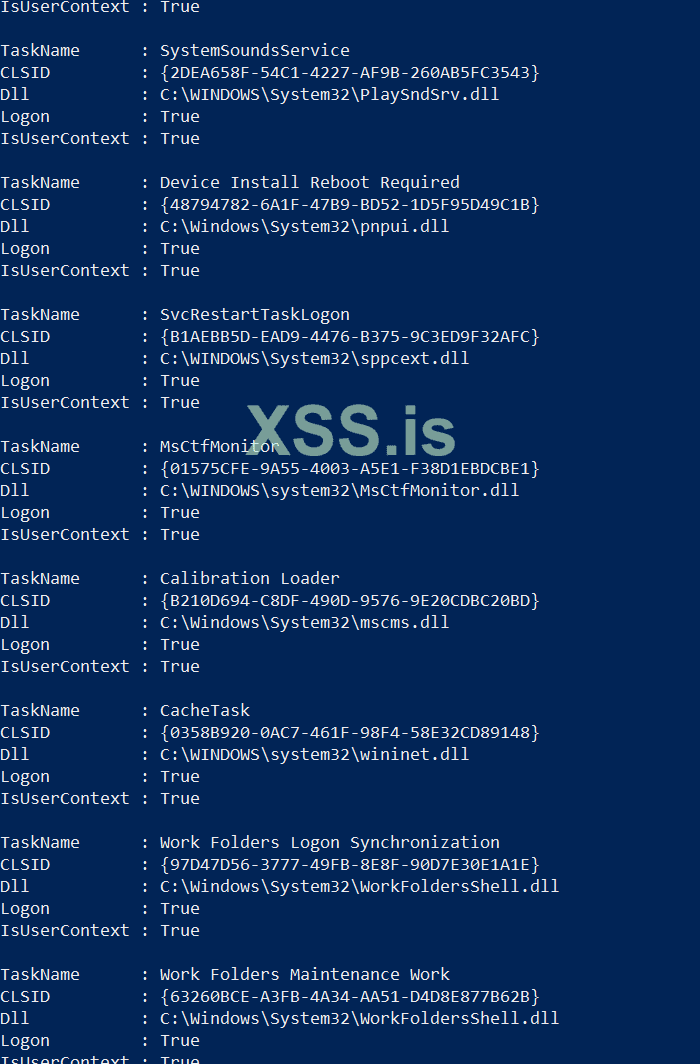
So I got this far. I am using this powershell script to find which tasks are vulnerable to com hijacking:

I am still confused how I would implement this into my stub though. I understand that I have to create a dll and replace on of these right? I am unsure how I will store this DLL though. Should I just put it in my folder with the build? Also which dll below should I replace?

1678515926337.png
 
Пожалуйста, обратите внимание, что пользователь заблокирован
Make an installer for it , make it looks like a real program don't make it like a malware .

How ? the malware when clicked they instantly try install them self and most of the time in random file name . ! don't do that

Make it looks like a game , add installer for it and the installer will install it on registry for you ,
don't start it after installation add an icon for it and add it on desktop , make it run on windows startup not instantly .

If you make it looks like a malware even a non expert target will doubt it , what about a anti virus is programed for detecting unknown malwares .

Its only a suggest there a lot of ways to bypass this detection and its called behavior detection .


Напишите ответ...
  • Вставить:
Прикрепить файлы
Верх