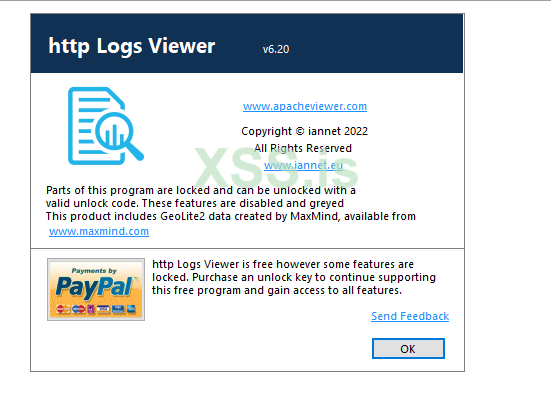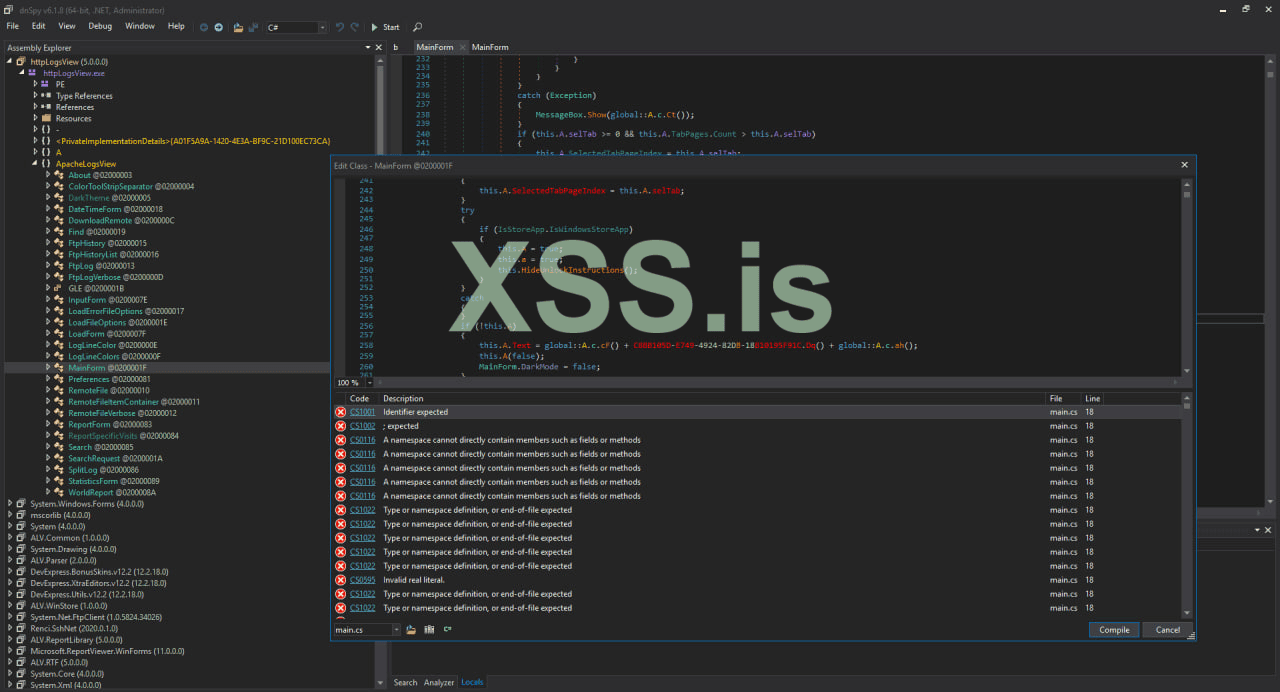
Всем привет, с Наступающим Праздником Всех!, представляю Вам вторую часть статьи по исследованию (крякингу) программ. В этой статье будет подробно рассмотрена защита актуальной, на момент публикации статьи, версии программы http Logs View, версии 6.12.
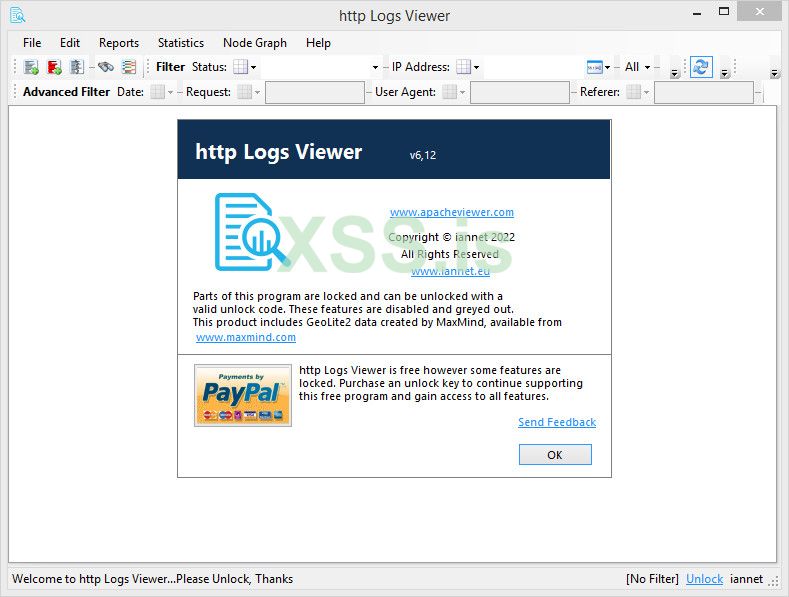
Разработчик программы, толком не сообщил на своем сайте что именно ограничено по функционалу а просто уведомил всех что некоторые функции заблокированы и разблокировать их можно - ключем. Ну что же давайте посмотри на принцип активации программы и попробуем посмотреть, определить для начала визуально - что именно ограничено с функционала.
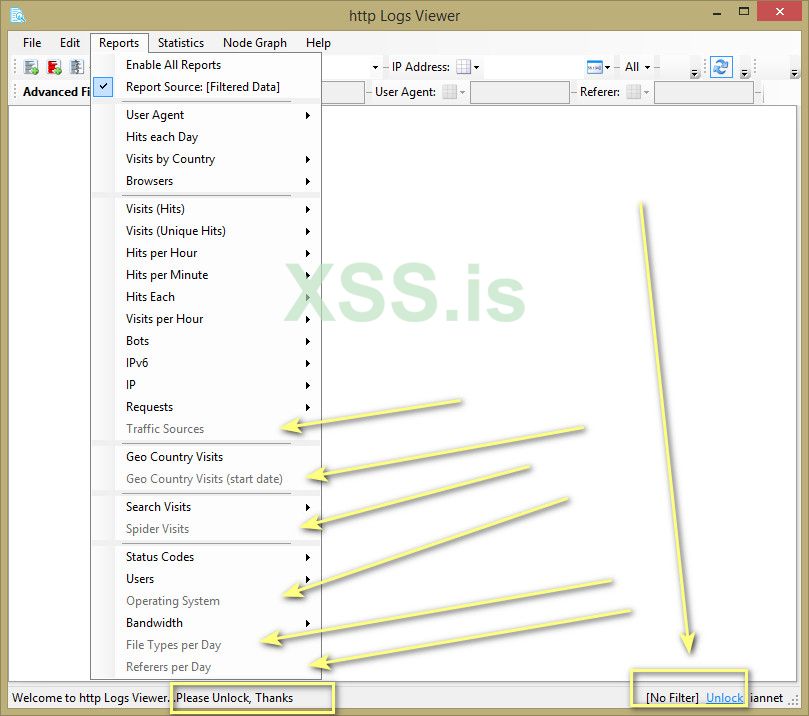
Скачиваем программу, устанавливаем и запускаем. Если посмотреть во вкладку программы Help -> About то там указано что заблокированные функции отключены и выделены серым цветом. Это уже хорошо и уже хоть какая то ясность появилась, теперь знаем уже куда копать.

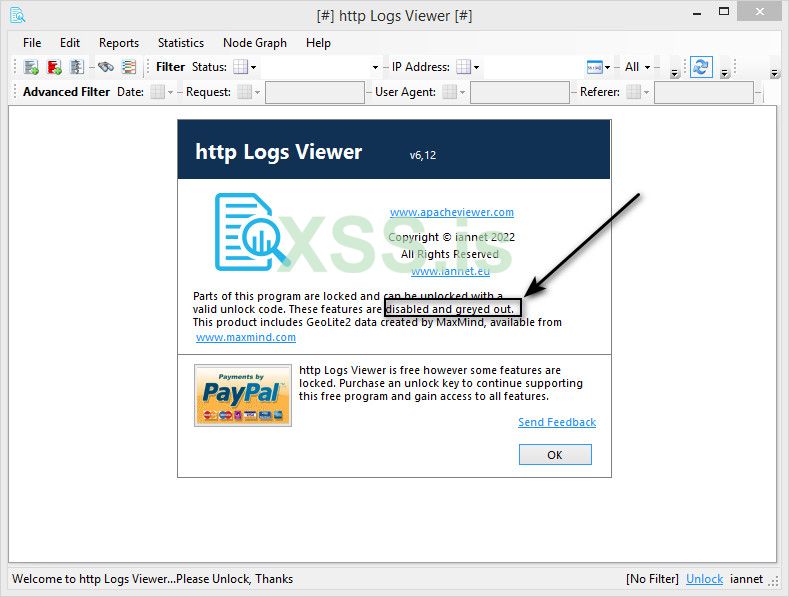
То есть все функции программы у нас неактивны и выделены серым цветом И таких не мало. А еще в самом низу программы красуется надпись о том что программу нужно разблокировать то есть купить. Ну конечно же мы этого делать не будем.
Для примера
По стандарту, для начала нам нужно определить на чем написана наша программа (Язык программирования) и есть ли какой упаковщик или протектор на исполняемом файле программы. В этом нам поможет утилита ExeInfo PE, выделяем и перетаскиваем исполняемый файл в нашу утилиту. И видим вот такую картину.
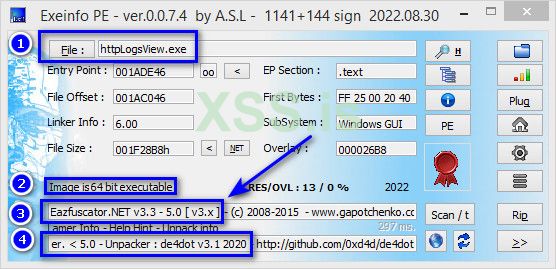
- Информация по исполняемому файлу программы: httpLogsView.exe
- Разрядность: Тут нам показано что это 64 разрядное (64-битное) приложение Windows
- Язык программирования и есть ли обфускация или упаковка (сжатие): Eazfuscator.NET v3.3 - 5.0 [ v3.x ] (Вот тут уже интересно и на это стоит обратить внимание и этот пункт рассмотрим далее.)
- Рекомендации: Для деобфускации файла утилита предлагает использовать de4dot
Для деобфускации я использовал еще одну программу de4dot 5.8 (Eazfuscator Support), сборку заточенную под этот обфускатор. В итоге нам нужно просто перетащить
исполняемый файл исследуемый программы на de4dot.exe. И получаем результат, для примера, кто вообще не в курсе что к чему - выглядит все это дело вот так:
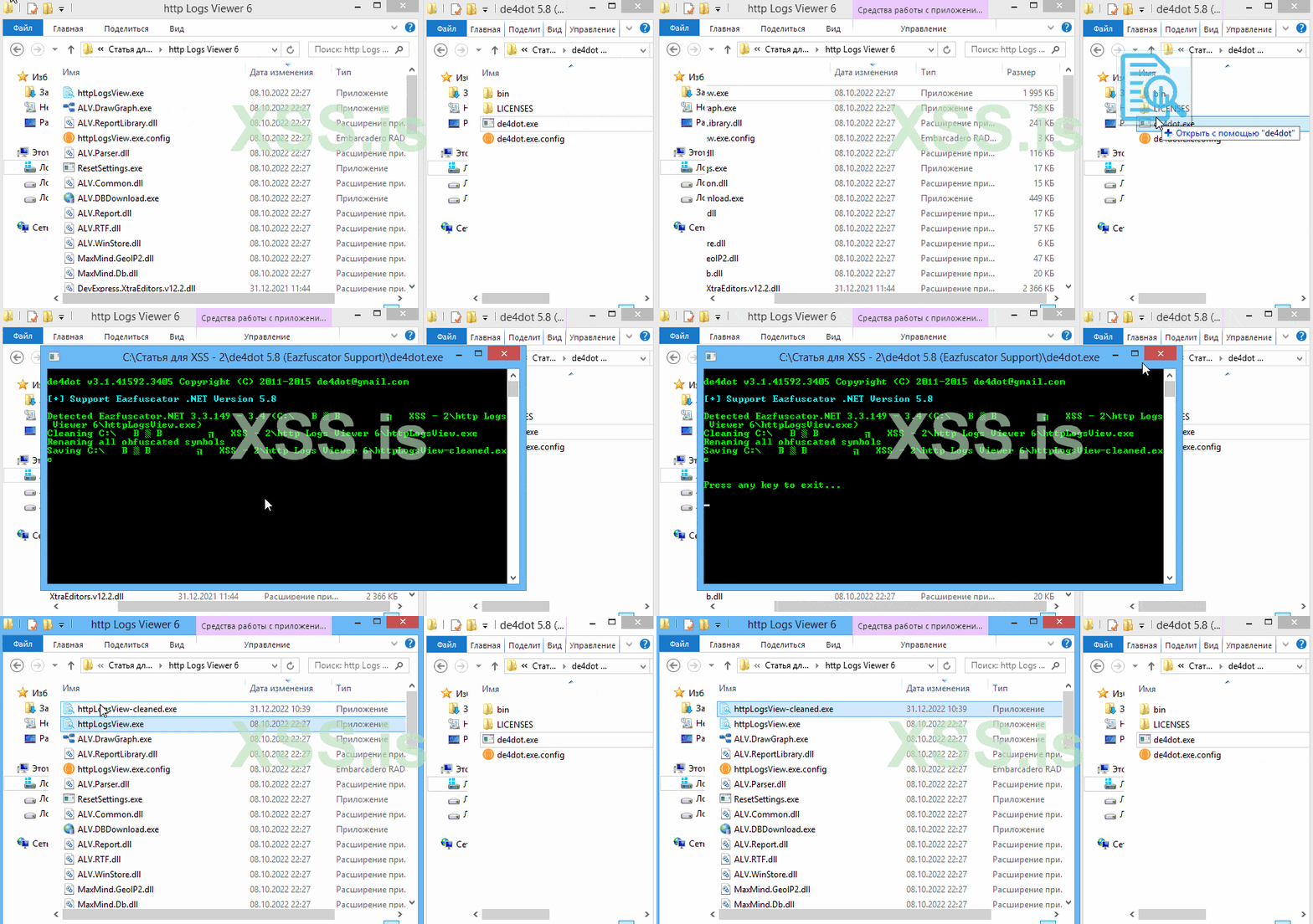
После исследуемого файла, в папке с вашей программой появится файл httpLogsView-cleaned.exe. Это файл в котором наш деобфускатор, возвратил код (Восстановил), в более менее, читаемое состояние.
Давайте для примера сравним результат до и после обработки (деобфускации) исследуемой программы. Для этого загружаем файл в отладчик. А так как мы выяснили, выше, что это 64 разрядное (64-битное) приложение (Используя утилиту ExeInfo PE) то работаем с dnSpy x64.
и смотрим на сравнение.
Это структура кода нашего оригинального файла под обфускатором, где код превращен в своего рода кашу в виде строк \u0002 и \u0002\u2000 и так далее. И анализировать такой код крайне не удобно. Все сделано так что бы при анализе реверс - инженер (крякер, называйте как удобно)
не смог разобраться что за что отвечает и не смог осуществить свой желанный умысел - крякуть софт. 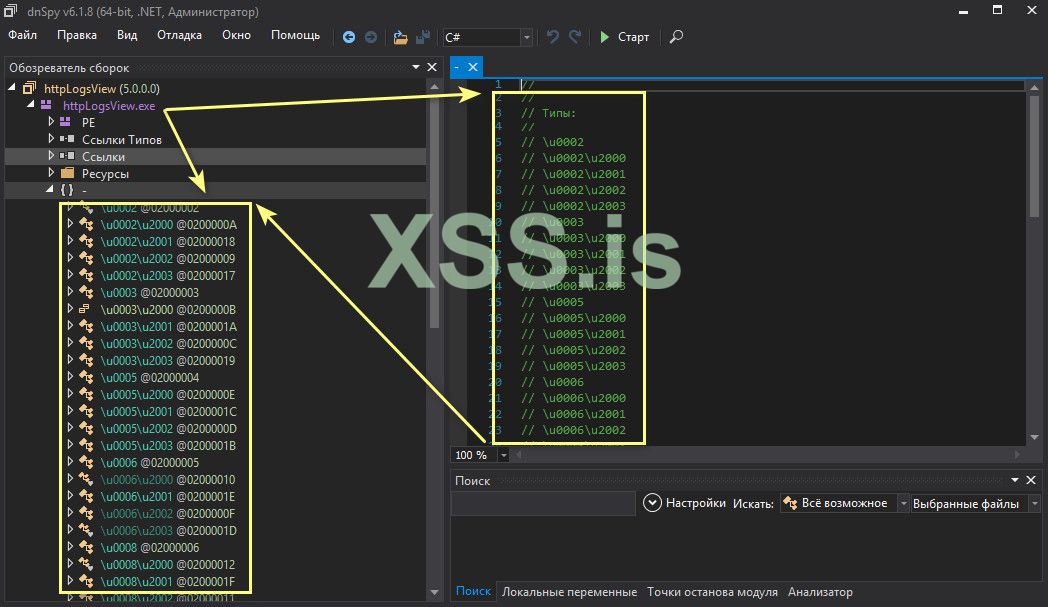
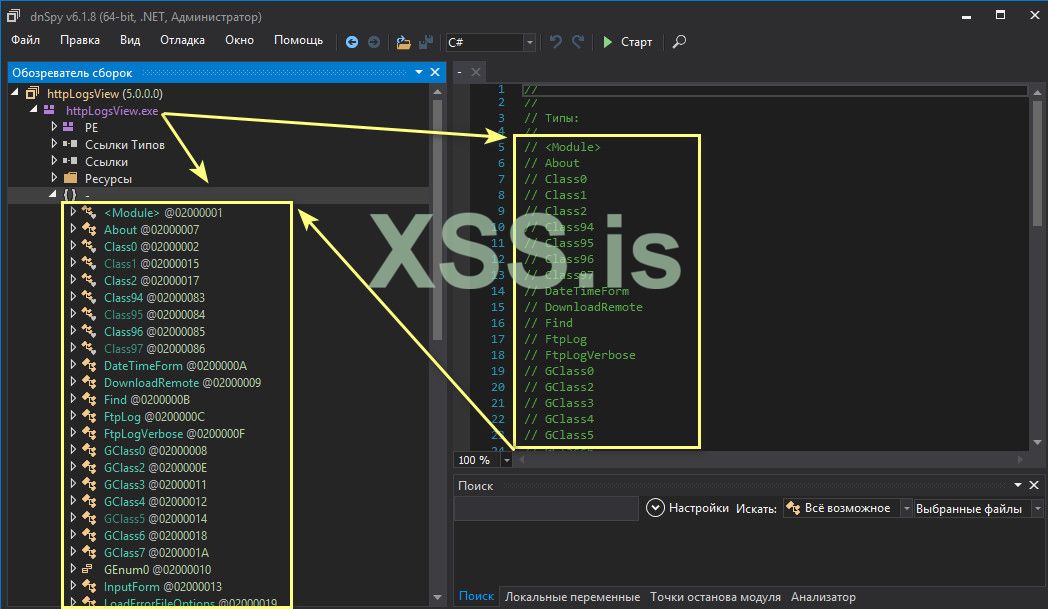
А это уже структура кода после деобфускации (перевод кода из трудно-читаемого в обычный и понятный для анализа). Кстати, стоит заметить что 100% восстановить, вернуть код идеальное состояние не всегда получится. Дело в том что de4dot не может восстанавливает имена локальных переменных после обфускатора. А вот структура кода приводится в нормальный вид, восстанавливается. Прокомментирую почему так происходит. Обфускатор не извлекает имена локальных переменных а генерирует для них своего рода декомпилятор. А вот
что касается аргументов функций то они есть частью интерфейса и поэтому они хранятся. А в скомпилированной сборке (IL) имена локальных переменных не хранятся.
И в результате структура кода после деобфускации выглядит вот так.
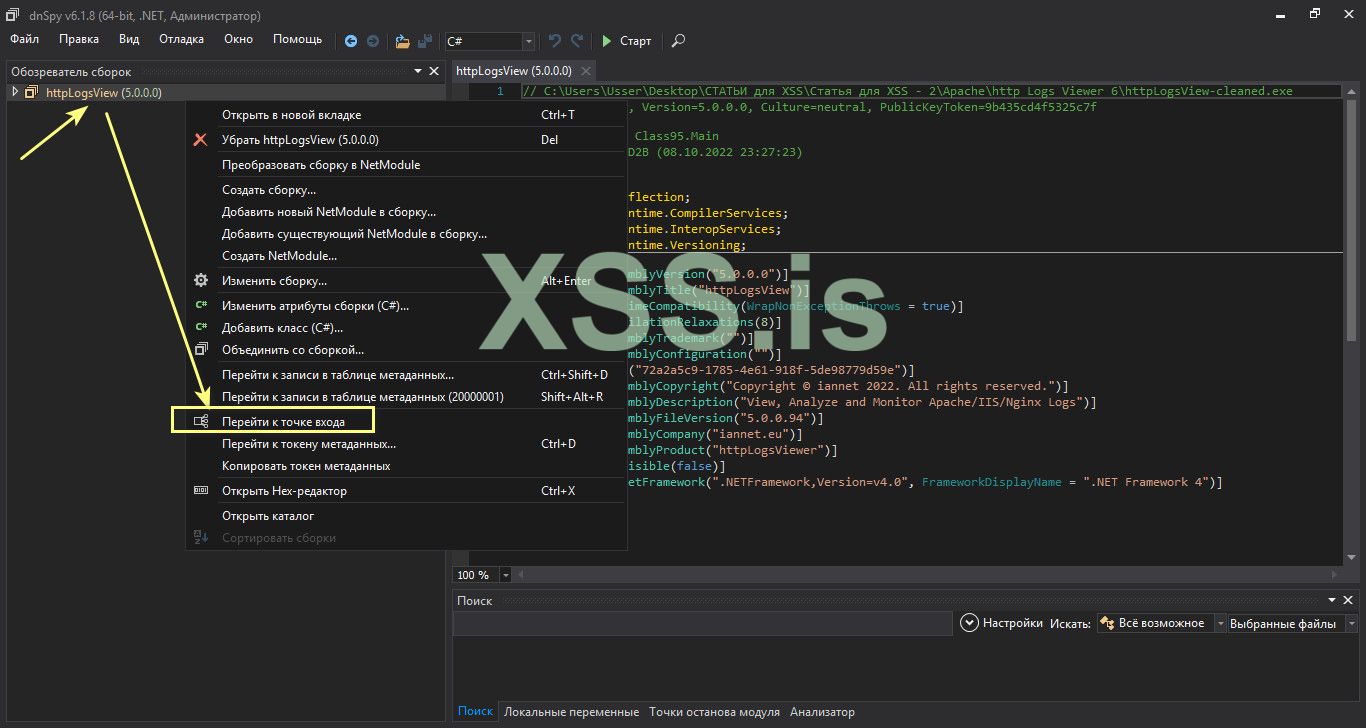
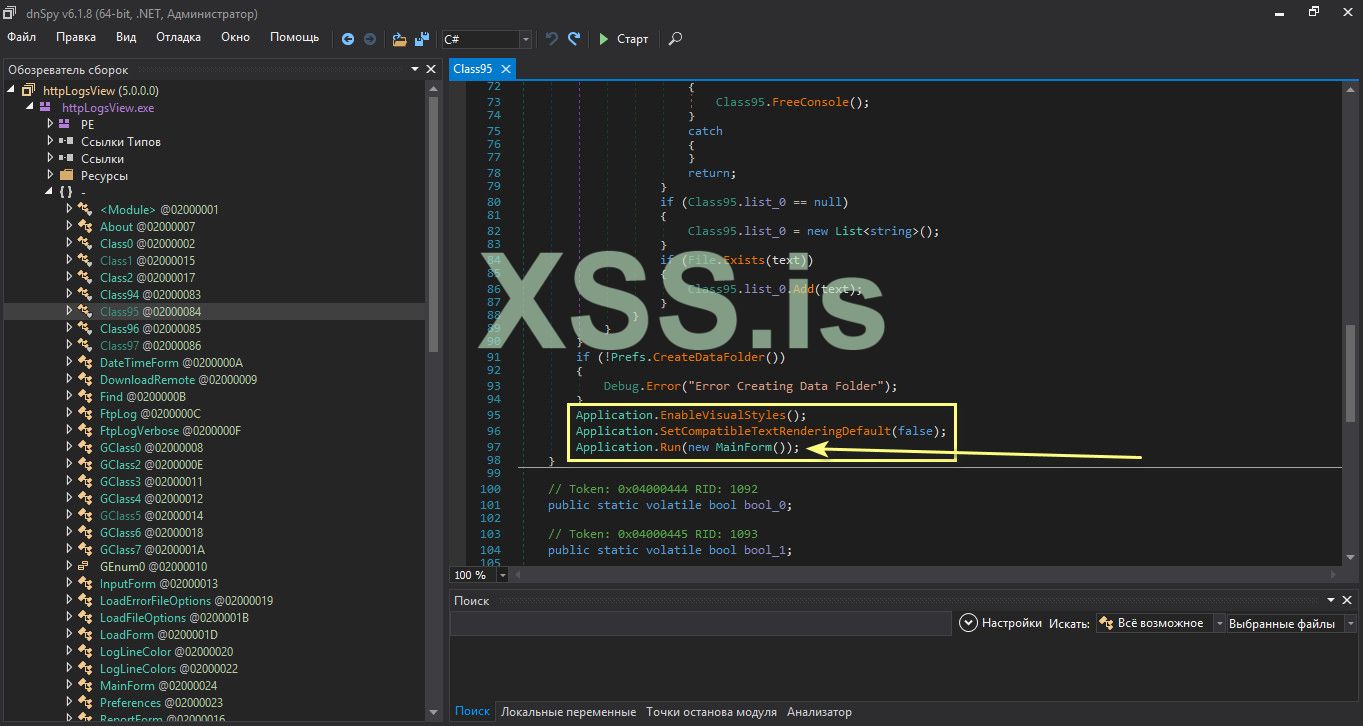
Вот тут, Application.Run(new MainForm()), происходит запуск и инициализация главной формы программы. Ну а теперь, давайте подумаем логически (ЭТО ВАЖНО). При таких ограничений как в нашей, сегодняшней, программе. В 99% случаях при загрузке программы (главного окна), программа проверяет ключ активации и если он верный то функции программы, что ? - будут разблокированы.
А если ключ активации не верный то соответственно не будут доступны. Сказал для того что бы натолкнуть Вас на мысль. Логично же ? Или я не прав ? Я думаю и уверен - что прав, говорю без сарказма, чисто по человечески!
Просто, мне нравится не только по стандарту рассматривать защиту а и Вы ходя из здравого смысла - не просто сломать а и показать плюсы и минусы. В нашем деле, в моем деле (по привычке говорю) - Имея опыт и сражаясь с разными системами защиты - я пытаюсь показать, Вам, как искать изъяны (дыры) в защите, выходя из своего опыта.
Со временем, набравшись опыта - Вы сами поймете о чем я говорю, это касается чисто новичков, так как опытные пользователи (реверс - инженеры уже давно это прошли) это повседневные занятия у них.
Продолжим ? Думаю Всем интересно ? . Если так, то тогда переходим new MainForm(), туда где идет запуск различных функций (Нажатие левой кнопки мыши по new MainForm()).
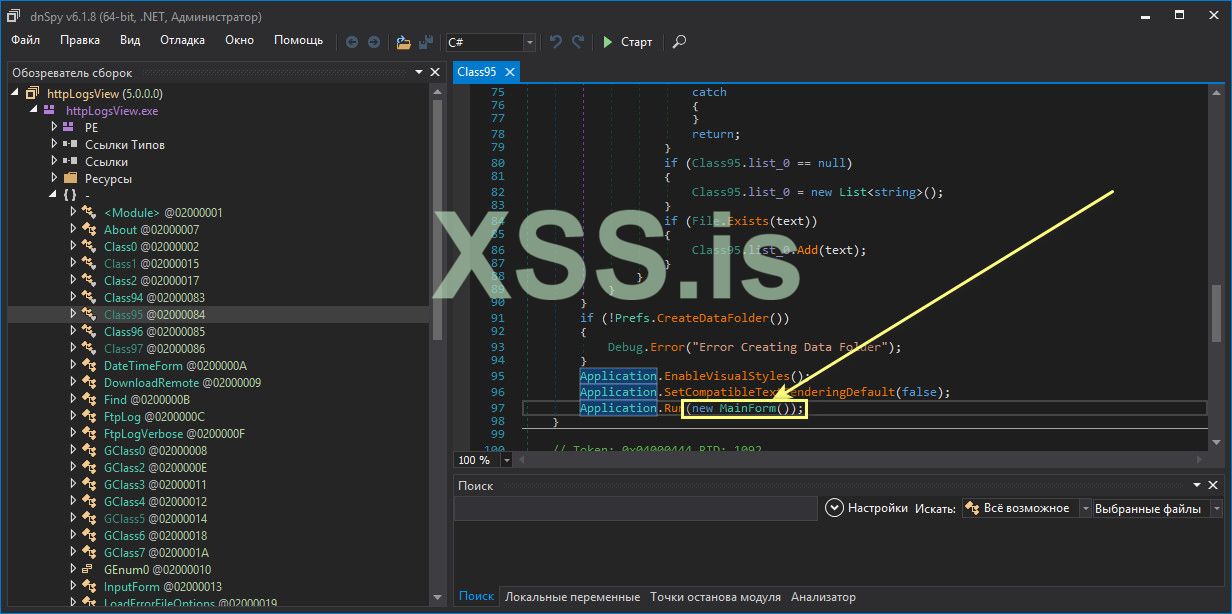
И получаем вот такую картину. Смысл по началу может быть и не всем понятен но в финале Вы поймете его 100%. Идем далее.
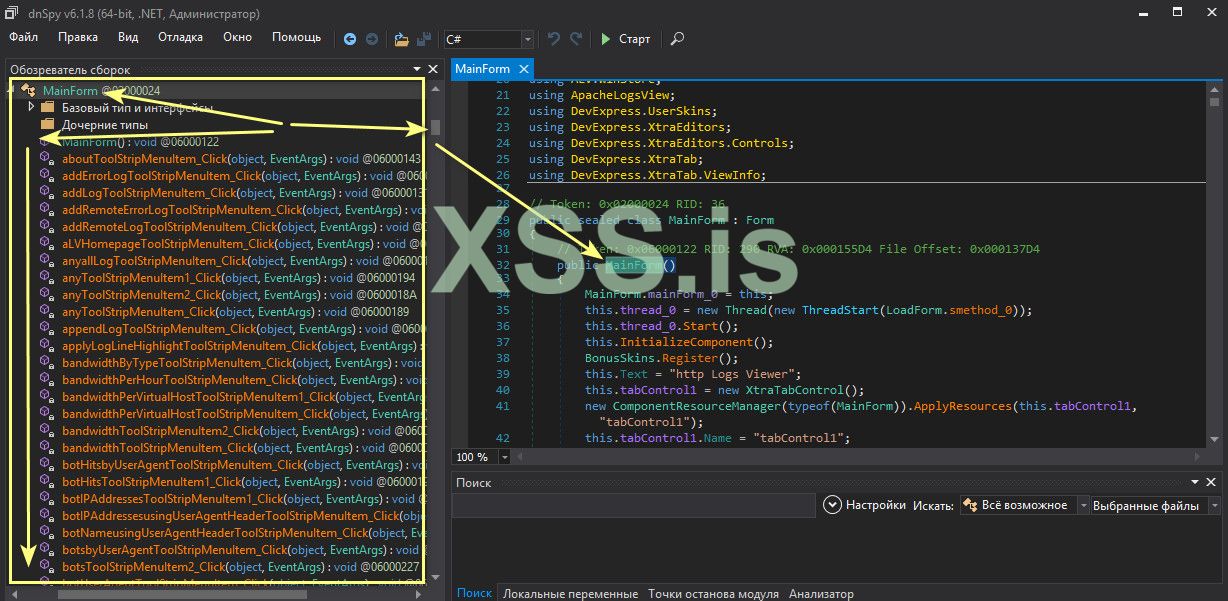
Выходя из того что я говорил, давайте поищем код (функцию, и в ней кусок кода) что отвечает за загрузку (запуск программы и ограничения) и посмотрим что там происходит. Очевидно что MainForm_Load отвечает за загрузку компонентов что загружаются при запуске программы, или я не прав ?. Ну конечно же да. И давате же посмотрим что происходит внутри, уже интересней, согласитесь. Как и и обещал - рассмотрим все нюансы.
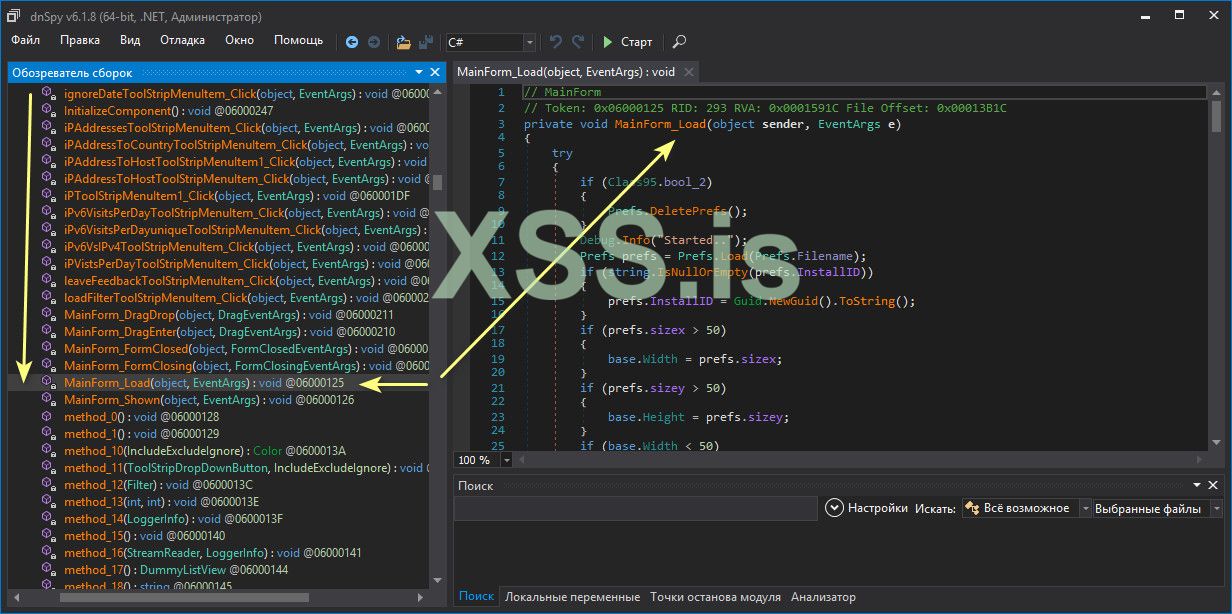
Для полного понимания вот полная функция:
C#:
MainForm
// Token: 0x06000125 RID: 293 RVA: 0x0001591C File Offset: 0x00013B1C
private void MainForm_Load(object sender, EventArgs e)
{
    try
    {
        if (Class95.bool_2)
        {
            Prefs.DeletePrefs();
        }
        Debug.Info("Started..");
        Prefs prefs = Prefs.Load(Prefs.Filename);
        if (string.IsNullOrEmpty(prefs.InstallID))
        {
            prefs.InstallID = Guid.NewGuid().ToString();
        }
        if (prefs.sizex > 50)
        {
            base.Width = prefs.sizex;
        }
        if (prefs.sizey > 50)
        {
            base.Height = prefs.sizey;
        }
        if (base.Width < 50)
        {
            base.Width = 957;
        }
        if (base.Height < 50)
        {
            base.Height = 595;
        }
        if (prefs.maximised)
        {
            base.WindowState = FormWindowState.Maximized;
        }
        if (prefs.x >= 0 && prefs.y >= 0)
        {
            base.Location = new Point(prefs.x, prefs.y);
        }
        this.prefs_0 = prefs;
        try
        {
            if (!string.IsNullOrEmpty(this.prefs_0.Key))
            {
                string string_ = Class1.smethod_0(this.prefs_0.Key);
                this.bool_0 = Class1.smethod_1(string_);
            }
        }
        catch (Exception)
        {
            this.bool_0 = false;
        }
        if (this.bool_0)
        {
            if (this.prefs_0.Theme == "Dark")
            {
                MainForm.bool_2 = true;
            }
            if (MainForm.bool_2)
            {
                this.tabControl1.LookAndFeel.SkinName = "Metropolis Dark";
                this.tabControl1.LookAndFeel.UseDefaultLookAndFeel = false;
                LogLine.DarkMode = MainForm.bool_2;
                this.color_0 = DarkTheme.smethod_0();
                DarkTheme.smethod_2(this);
                DarkTheme.smethod_8(this.contextMenuStripItems);
                DarkTheme.smethod_8(this.contextMenuStripNotifyIcon);
            }
        }
        if (this.prefs_0.logColumns == null || this.prefs_0.logColumns.Count <= 0)
        {
            this.prefs_0.logColumns = LogColumn.ResetLogColumns();
        }
        Debug.Info("Loading Custom Columns");
        this.prefsColumns_0 = PrefsColumns.Load(PrefsColumns.Filename);
        this.method_43();
        DummyListView.prefs = prefs;
        Debug.Info("Loading IP DB");
        this.ip2Country_0 = new IP2Country(true, this.prefs_0.useCity);
        this.parser_0 = new Parser(this.ip2Country_0);
        this.parser_0.ParseCustomColumns = this.prefs_0.parseCustomColumns;
        Statistics.int_0 = this.prefs_0.topNumber;
        try
        {
            if (prefs.monitorAuto)
            {
                Debug.Info("Opening Logs...");
                foreach (LoggerInfo loggerInfo in prefs.logsToView)
                {
                    if (loggerInfo.Highlight != null)
                    {
                        this.method_49(loggerInfo.Highlight, true);
                    }
                    try
                    {
                        this.method_6(loggerInfo);
                        if (Class95.bool_0)
                        {
                            GC.Collect();
                        }
                    }
                    catch
                    {
                    }
                }
            }
            if (Class95.list_0 != null)
            {
                foreach (string text in Class95.list_0)
                {
                    try
                    {
                        bool flag = this.parser_0.IsErrorLog(text);
                        this.method_4(text, !flag, false);
                        if (Class95.bool_0)
                        {
                            GC.Collect();
                        }
                    }
                    catch
                    {
                    }
                }
            }
        }
        catch (Exception)
        {
            MessageBox.Show(Class96.smethod_248());
        }
        if (this.prefs_0.selTab >= 0 && this.tabControl1.TabPages.Count > this.prefs_0.selTab)
        {
            this.tabControl1.SelectedTabPageIndex = this.prefs_0.selTab;
        }
        try
        {
            if (IsStoreApp.IsWindowsStoreApp)
            {
                this.bool_0 = true;
                this.bool_1 = true;
                this.method_0();
            }
        }
        catch
        {
        }
        if (!this.bool_0)
        {
            this.lbStatusStripNotify.Text = Class96.smethod_271() + " http Logs Viewer..." + Class96.smethod_68();
            this.method_2(false);
            MainForm.bool_2 = false;
        }
        else
        {
            this.lbStatusStripNotify.Text = Class96.smethod_271() + " http Logs Viewer";
            this.method_2(true);
        }
        Debug.Info("Apply L...");
        this.method_45(false);
        this.method_1();
        Debug.Info("Apply L Done");
    }
    catch (Exception ex)
    {
        Debug.Error("Error Load: " + ex.Message);
        if (this.prefs_0 == null)
        {
            this.prefs_0 = new Prefs();
        }
    }
    finally
    {
        LoadForm.smethod_1();
    }
    if (this.prefs_0.checkupdates)
    {
        new Thread(new ThreadStart(this.method_26)).Start();
    }
    if (!this.bool_1)
    {
        if (File.Exists(Prefs.Filename + ".chk"))
        {
            Debug.Info("Config Check");
            if (File.ReadAllText(Prefs.Filename + ".chk") == "0")
            {
                MessageBox.Show(this, Class96.smethod_54(), "http Logs Viewer", MessageBoxButtons.OK, MessageBoxIcon.Hand);
                this.prefs_0.Key = string.Empty;
                this.unlockCodeToolStripMenuItem_Click(this, null);
                if (File.Exists(Prefs.Filename + ".chk") && this.bool_0)
                {
                    Application.Exit();
                }
            }
            else if (this.bool_0)
            {
                new Thread(new ThreadStart(this.method_24)).Start();
            }
        }
    }
    else if (this.bool_0)
    {
        new Thread(new ThreadStart(this.method_24)).Start();
    }
    this.timer_0.Interval = this.prefs_0.refreshtimeout * 1000;
    this.timer_0.Enabled = true;
    this.timer_0.Start();
    GC.Collect();
    if (base.Width <= 10)
    {
        base.Width = 668;
    }
    if (base.Height <= 10)
    {
        base.Height = 460;
    }
    this.menuStrip1.Visible = true;
    this.toolStripBtnScroll.CheckState = (this.prefs_0.scroll_last ? CheckState.Checked : CheckState.Unchecked);
    this.toolStripBtnRefresh.CheckState = (this.prefs_0.refreshAuto ? CheckState.Checked : CheckState.Unchecked);
    Debug.Info("Started..OK");
}
И так подолжим, что мы тут видим, говоря без воды, что бы тему не затягивать. Мой принцип показать основу и рассказать почему именно так и никак по другому. И тут два пути решения проблемы (Как минимум). Но мы как всегда начнем с простого , то есть это как раз тот случай если Вы мало что понимаете в этой функции (Но хотя бы есть минимальные знания языка программирования).
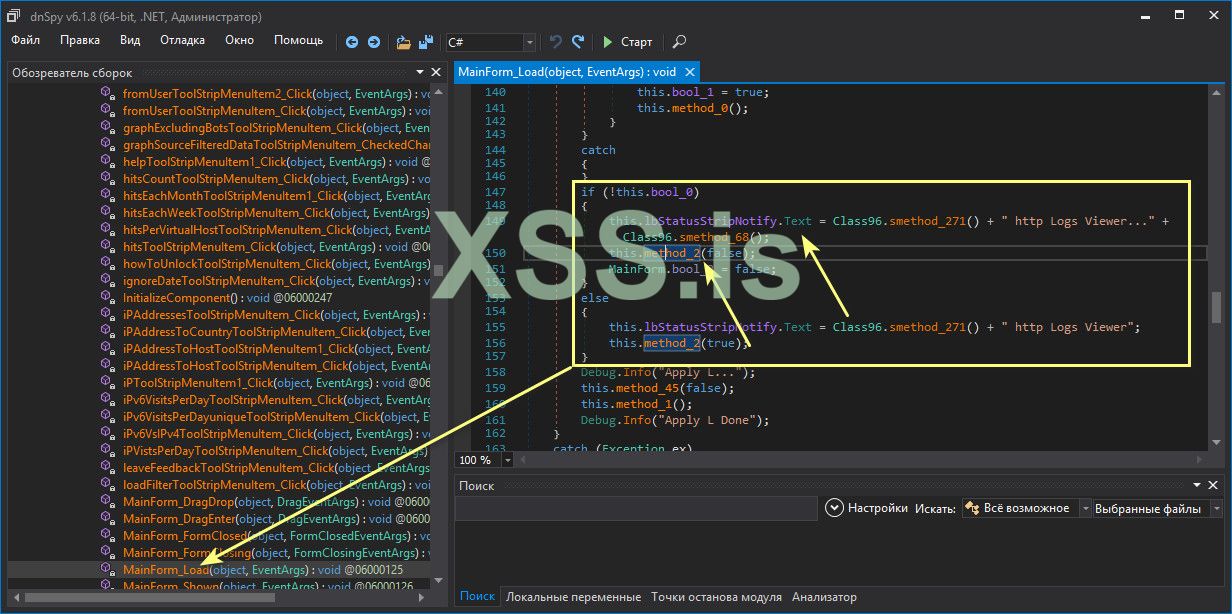
И так, обратите внимание на кусорк кода из MainForm_Load (То есть, по простому, обычному пользователю - говоря):
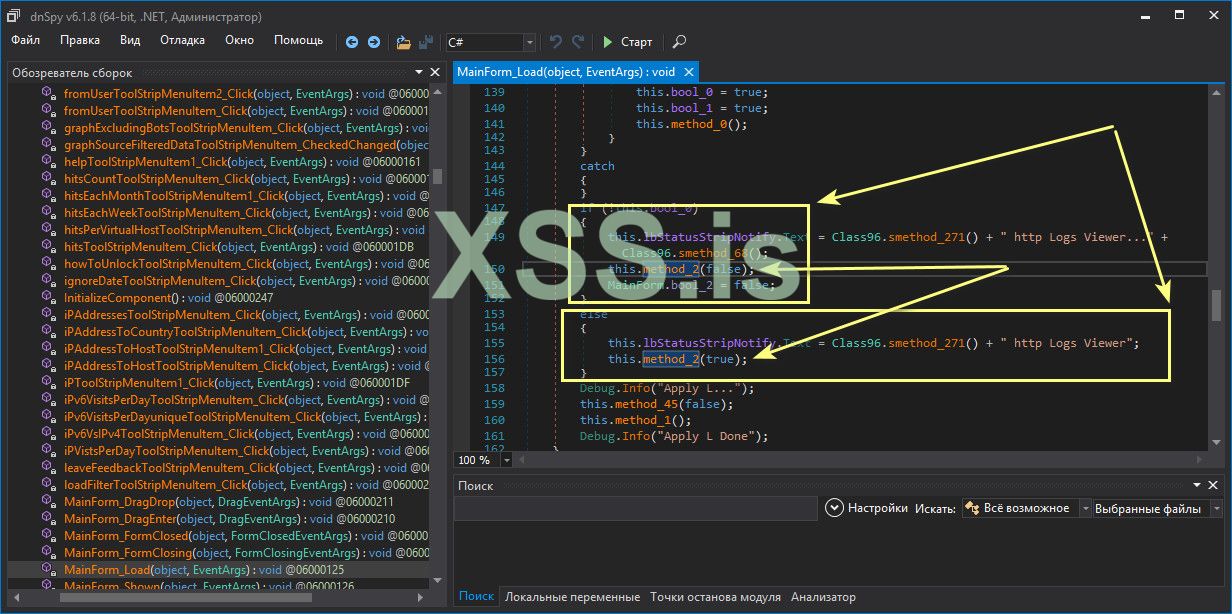
У нас есть условие, прокомментирую что тут происходит, выходя из того что - КАК БЫ, если бы я был новичком в этом деле:
C#:
// Если Выполняется условие
if (!this.bool_0)
        {
        // То получаем это, грубо говоря
            this.lbStatusStripNotify.Text = Class96.smethod_271() + " http Logs Viewer..." + Class96.smethod_68();
            this.method_2(false);
            MainForm.bool_2 = false;
        }
        // А если нет то Мы получаем Вот это. Но так как после деобфускации неопытный человек может растеряется то ему может быть не понятно что тут происходит
        // Хотя понятно что обратное действие условию If
        else
        {
            this.lbStatusStripNotify.Text = Class96.smethod_271() + " http Logs Viewer";
            this.method_2(true);
        }
Ну что давайте разберем: Вариант 1 (Если Вы не опытный человек) и приблизительно интуитивно все понятно, скажем так на общих понятиях. Если перейти в smethod_68(); то нам становится понятно что тут инициализируется вызов в том случае если лицензия не оплачена, нет ключа проще говоря, у нас, нужно задонатить $. Естественно что тогда идет блокировка функций программы вот тут
this.method_2(false);
MainForm.bool_2 = false;
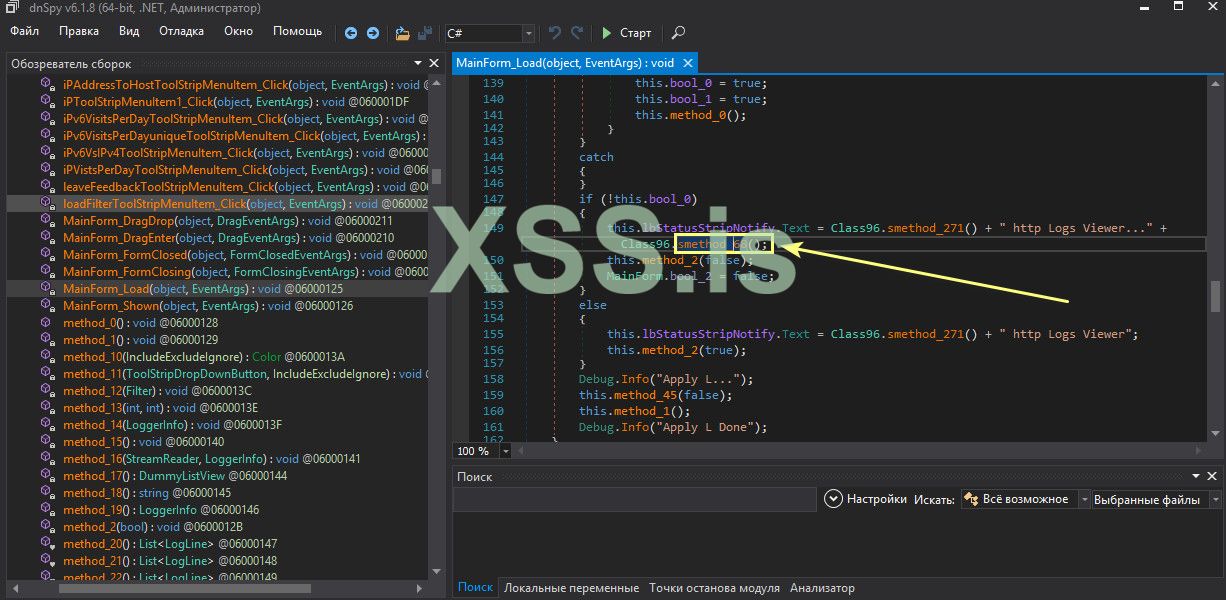
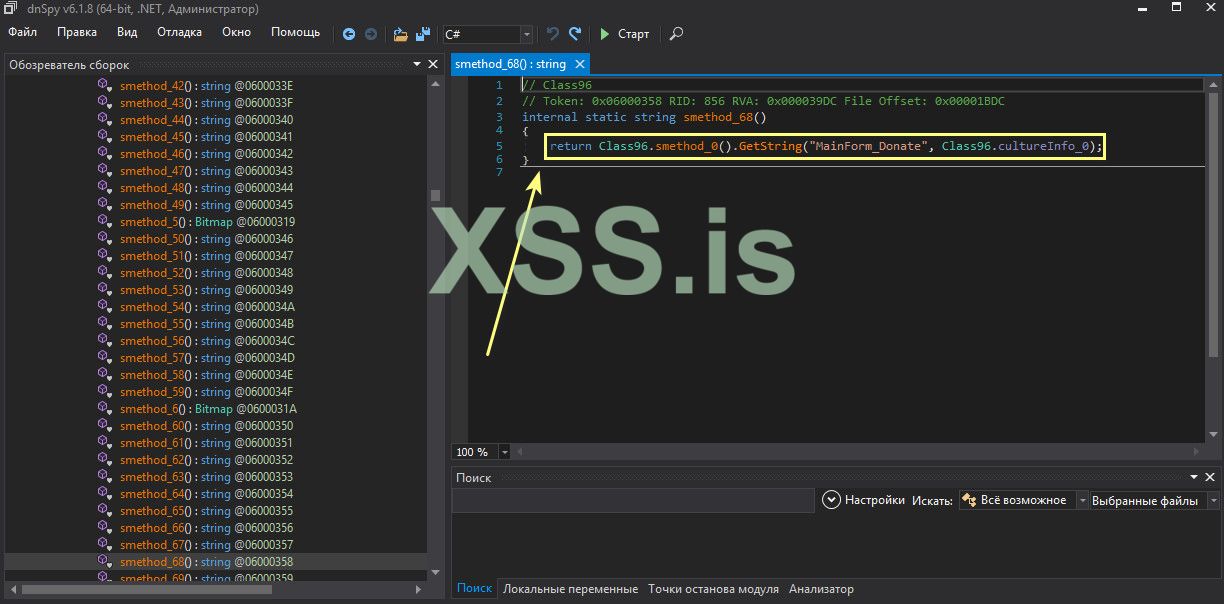
Давайте перейдем (кликом левой кнопки мышки) на this.method_2(false); и посмотерт на код:
C#:
private void method_2(bool bool_5)
    {
        if (bool_5)
        {
            this.toolStripStatusDonate.Text = "iannet";
            this.toolStripStatusLabel1.Visible = false;
        }
        else
        {
            this.toolStripStatusDonate.Text = Class96.smethod_264();
            this.toolStripStatusLabel1.Visible = true;
        }
        MainForm.smethod_1(this.statisticsToolStripMenuItem, bool_5, 5);
        MainForm.smethod_1(this.topToolStripMenuItem, bool_5, 1);
        MainForm.smethod_1(this.distinctToolStripMenuItem, bool_5, -1);
        MainForm.smethod_1(this.timeTakenToolStripMenuItem, bool_5, -1);
        MainForm.smethod_1(this.sizeToolStripMenuItem1, bool_5, -1);
        MainForm.smethod_1(this.botsToolStripMenuItem, bool_5, -1);
        MainForm.smethod_1(this.requestAnalysisToolStripMenuItem1, bool_5, -1);
        MainForm.smethod_1(this.referrerToolStripMenuItem1, bool_5, -1);
        MainForm.smethod_1(this.statusCodesToolStripMenuItem2, bool_5, -1);
        MainForm.smethod_1(this.behaviourToolStripMenuItem, bool_5, -1);
        MainForm.smethod_1(this.virtualHostToolStripMenuItem1, bool_5, -1);
        this.topToolStripMenuItem.Enabled = true;
        this.distinctToolStripMenuItem.Enabled = true;
        this.timeTakenToolStripMenuItem.Enabled = true;
        this.sizeToolStripMenuItem1.Enabled = true;
        this.botsToolStripMenuItem.Enabled = true;
        this.requestAnalysisToolStripMenuItem1.Enabled = true;
        this.referrerToolStripMenuItem1.Enabled = true;
        this.statusCodesToolStripMenuItem2.Enabled = true;
        this.behaviourToolStripMenuItem.Enabled = true;
        this.virtualHostToolStripMenuItem1.Enabled = true;
        MainForm.smethod_1(this.userAgentToolStripMenuItem, bool_5, 1);
        MainForm.smethod_1(this.visitsByCountryToolStripMenuItem1, bool_5, -1);
        MainForm.smethod_1(this.reportsToolStripMenuItem, bool_5, -1);
        MainForm.smethod_1(this.visitsToolStripMenuItem, bool_5, -1);
        MainForm.smethod_1(this.hitsPerHourToolStripMenuItem, bool_5, -1);
        MainForm.smethod_1(this.hitsPerMinuteToolStripMenuItem, bool_5, -1);
        MainForm.smethod_1(this.visitsUniqueHitsToolStripMenuItem, bool_5, -1);
        MainForm.smethod_1(this.iPV6ToolStripMenuItem, bool_5, -1);
        MainForm.smethod_1(this.browsersToolStripMenuItem1, bool_5, -1);
        MainForm.smethod_1(this.statusCodesToolStripMenuItem1, bool_5, -1);
        MainForm.smethod_1(this.bandwidthToolStripMenuItem1, bool_5, -1);
        MainForm.smethod_1(this.searchVisitsToolStripMenuItem, bool_5, -1);
        MainForm.smethod_1(this.iPToolStripMenuItem, bool_5, -1);
        MainForm.smethod_1(this.requestsToolStripMenuItem, bool_5, -1);
        MainForm.smethod_1(this.usersToolStripMenuItem, bool_5, -1);
        MainForm.smethod_1(this.hitsEachToolStripMenuItem, bool_5, -1);
        MainForm.smethod_1(this.botsToolStripMenuItem1, bool_5, -1);
        MainForm.smethod_1(this.visitsPerHourToolStripMenuItem, bool_5, -1);
        this.visitsByCountryToolStripMenuItem1.Enabled = true;
        this.userAgentToolStripMenuItem.Enabled = true;
        this.visitMonthToolStripMenuItem.Enabled = true;
        this.visitsUniqueHitsToolStripMenuItem.Enabled = true;
        this.hitsPerHourToolStripMenuItem.Enabled = true;
        this.hitsPerMinuteToolStripMenuItem.Enabled = true;
        this.visitsByCountryToolStripMenuItem2.Enabled = true;
        this.worldToolStripMenuItem.Enabled = true;
        this.visitsToolStripMenuItem.Enabled = true;
        this.iPV6ToolStripMenuItem.Enabled = true;
        this.browsersToolStripMenuItem1.Enabled = true;
        this.statusCodesToolStripMenuItem1.Enabled = true;
        this.bandwidthToolStripMenuItem1.Enabled = true;
        this.searchVisitsToolStripMenuItem.Enabled = true;
        this.iPToolStripMenuItem.Enabled = true;
        this.requestsToolStripMenuItem.Enabled = true;
        this.usersToolStripMenuItem.Enabled = true;
        this.hitsEachToolStripMenuItem.Enabled = true;
        this.botsToolStripMenuItem1.Enabled = true;
        this.visitsPerHourToolStripMenuItem.Enabled = true;
        this.statisticsSourceFilteredDataToolStripMenuItem.Enabled = true;
        this.reportSourceFilteredDataToolStripMenuItem.Enabled = true;
        MainForm.smethod_1(this.graphToolStripMenuItem, bool_5, 4);
        this.toolStripBtnAFEnabled2.Enabled = bool_5;
        this.toolStripBtnAFEnabled2.ToolTipText = Class96.smethod_39();
        if (!bool_5)
        {
            this.toolStripBtnAFEnabled2.Checked = false;
            this.toolStripBtnAFEnabled2.ToolTipText = Class96.smethod_41();
        }
        this.toolStripTBoxReferer2.Enabled = bool_5;
        this.toolStripTBoxRequest2.Enabled = bool_5;
        this.toolStripTBoxUserAgent2.Enabled = bool_5;
        this.toolStripTBoxUser2.Enabled = bool_5;
        this.toolStripTBoxVHost2.Enabled = bool_5;
        this.tsddReferer.Enabled = bool_5;
        this.tsddUser.Enabled = bool_5;
        this.tsddVHost.Enabled = bool_5;
        this.tsddRequest.Enabled = bool_5;
        this.tsddUserAgent.Enabled = bool_5;
        this.tsddDate.Enabled = bool_5;
        this.enableAllReportsToolStripMenuItem.Visible = !bool_5;
        this.enableAllReportsToolStripMenuItem.Enabled = true;
        this.enableAllStatisticsToolStripMenuItem.Visible = !bool_5;
        this.enableAllStatisticsToolStripMenuItem.Enabled = true;
        this.enableGraphToolStripMenuItem.Visible = !bool_5;
        this.enableGraphToolStripMenuItem.Enabled = true;
    }
Ничего это Вам не напоминает. Сказать что именно тут происходит ??? А все просто - параметр bool_5 вот как раз тут и всю роль играет, по простому говоря. То есть (на картинке ниже показаны зависимости от него True и False - если условие не соблюдено).
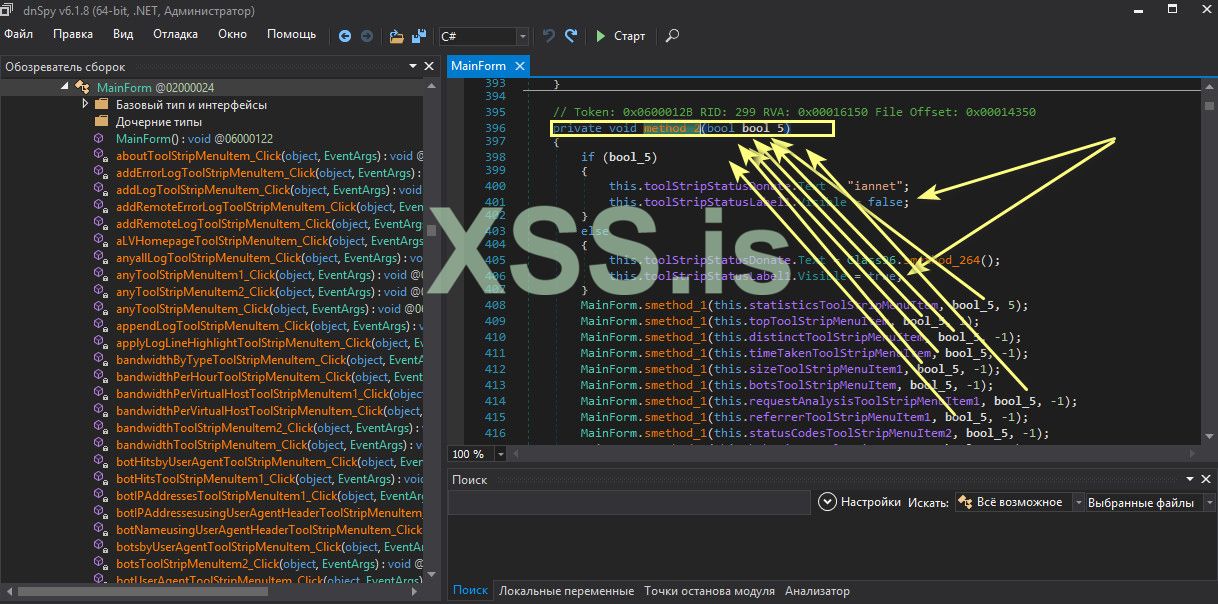
Что делать далее ? Да все очень просто. Самый простой и безобидный вариант это просто сделать так что при любом исходе программа отвечает True. Если уже не профессионально говорить вообще говорить (на уровне IQ = 0), это да - все активировано даже если нет ключа и на все по барабану.
.А именно
Кусок кода
Код:
if (!this.bool_0)
        {
            this.lbStatusStripNotify.Text = Class96.smethod_271() + " http Logs Viewer..." + Class96.smethod_68();
            this.method_2(false);
            MainForm.bool_2 = false;
        }
        else
        {
            this.lbStatusStripNotify.Text = Class96.smethod_271() + " http Logs Viewer";
            this.method_2(true);
        }
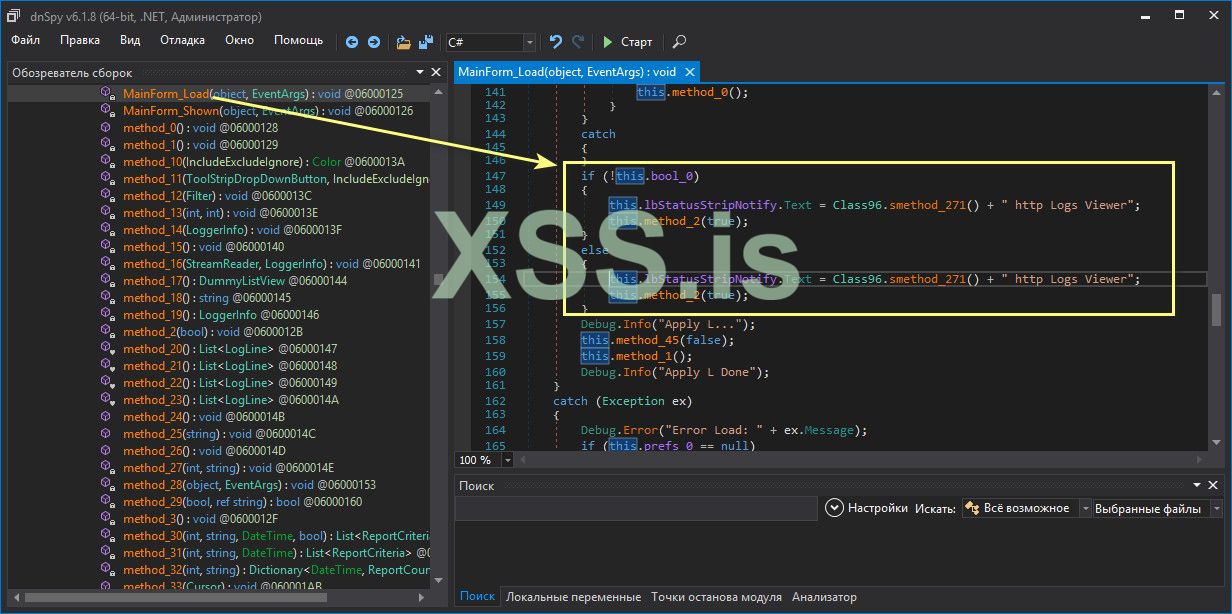
Изменить на True. Только вот так. А это означает как бы условие не сработало, уже побоку, все равно программа активируется
. Это я показал способ на пролом, если прямо сказать:
C#:
if (!this.bool_0)
        {
            this.lbStatusStripNotify.Text = Class96.smethod_271() + " http Logs Viewer";
            this.method_2(true);
        }
        else
        {
            this.lbStatusStripNotify.Text = Class96.smethod_271() + " http Logs Viewer";
            this.method_2(true);
        }
Думаете не сработает ?
А я говорю 1000% будет работать как часы. Давайте проверим, сохраняем результат и запускаем программу. И видим что надписи с просьбой активировать, разблокировать программу - пропали, куда то, не пойму куда и неактивные функции стали активными. Чудеса и только .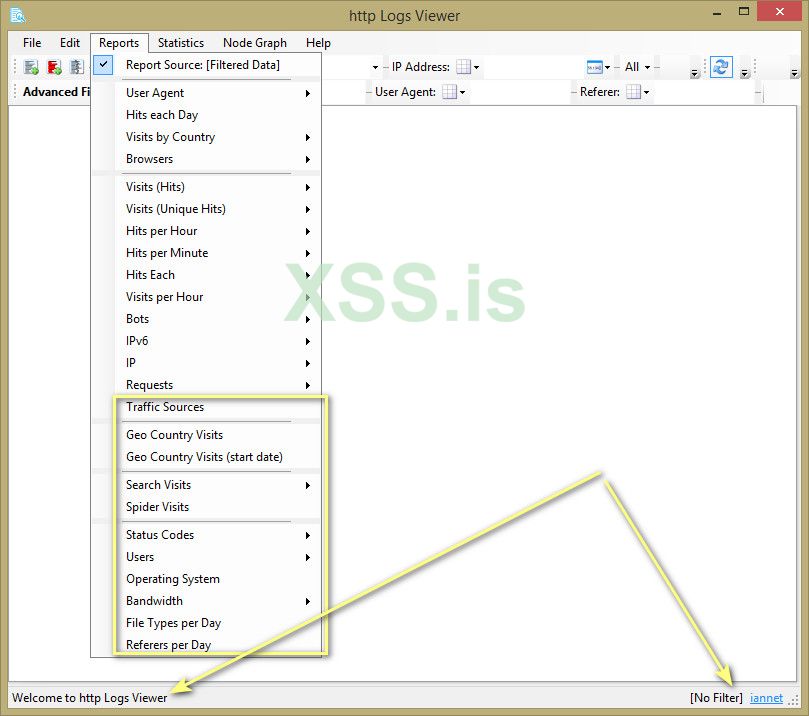
Интересное, напоследок.
то можно пойти - банальным путем. Вернувшись к функции
C#:
private void method_2(bool bool_5)
    {
        if (bool_5)
        {
            this.toolStripStatusDonate.Text = "iannet";
            this.toolStripStatusLabel1.Visible = false;
        }
        else
        {
            this.toolStripStatusDonate.Text = Class96.smethod_264();
            this.toolStripStatusLabel1.Visible = true;
        }
        MainForm.smethod_1(this.statisticsToolStripMenuItem, bool_5, 5);
        MainForm.smethod_1(this.topToolStripMenuItem, bool_5, 1);
        MainForm.smethod_1(this.distinctToolStripMenuItem, bool_5, -1);
        MainForm.smethod_1(this.timeTakenToolStripMenuItem, bool_5, -1);
        MainForm.smethod_1(this.sizeToolStripMenuItem1, bool_5, -1);
        MainForm.smethod_1(this.botsToolStripMenuItem, bool_5, -1);
        MainForm.smethod_1(this.requestAnalysisToolStripMenuItem1, bool_5, -1);
        MainForm.smethod_1(this.referrerToolStripMenuItem1, bool_5, -1);
        MainForm.smethod_1(this.statusCodesToolStripMenuItem2, bool_5, -1);
        MainForm.smethod_1(this.behaviourToolStripMenuItem, bool_5, -1);
        MainForm.smethod_1(this.virtualHostToolStripMenuItem1, bool_5, -1);
        this.topToolStripMenuItem.Enabled = true;
        this.distinctToolStripMenuItem.Enabled = true;
        this.timeTakenToolStripMenuItem.Enabled = true;
        this.sizeToolStripMenuItem1.Enabled = true;
        this.botsToolStripMenuItem.Enabled = true;
        this.requestAnalysisToolStripMenuItem1.Enabled = true;
        this.referrerToolStripMenuItem1.Enabled = true;
        this.statusCodesToolStripMenuItem2.Enabled = true;
        this.behaviourToolStripMenuItem.Enabled = true;
        this.virtualHostToolStripMenuItem1.Enabled = true;
        MainForm.smethod_1(this.userAgentToolStripMenuItem, bool_5, 1);
        MainForm.smethod_1(this.visitsByCountryToolStripMenuItem1, bool_5, -1);
        MainForm.smethod_1(this.reportsToolStripMenuItem, bool_5, -1);
        MainForm.smethod_1(this.visitsToolStripMenuItem, bool_5, -1);
        MainForm.smethod_1(this.hitsPerHourToolStripMenuItem, bool_5, -1);
        MainForm.smethod_1(this.hitsPerMinuteToolStripMenuItem, bool_5, -1);
        MainForm.smethod_1(this.visitsUniqueHitsToolStripMenuItem, bool_5, -1);
        MainForm.smethod_1(this.iPV6ToolStripMenuItem, bool_5, -1);
        MainForm.smethod_1(this.browsersToolStripMenuItem1, bool_5, -1);
        MainForm.smethod_1(this.statusCodesToolStripMenuItem1, bool_5, -1);
        MainForm.smethod_1(this.bandwidthToolStripMenuItem1, bool_5, -1);
        MainForm.smethod_1(this.searchVisitsToolStripMenuItem, bool_5, -1);
        MainForm.smethod_1(this.iPToolStripMenuItem, bool_5, -1);
        MainForm.smethod_1(this.requestsToolStripMenuItem, bool_5, -1);
        MainForm.smethod_1(this.usersToolStripMenuItem, bool_5, -1);
        MainForm.smethod_1(this.hitsEachToolStripMenuItem, bool_5, -1);
        MainForm.smethod_1(this.botsToolStripMenuItem1, bool_5, -1);
        MainForm.smethod_1(this.visitsPerHourToolStripMenuItem, bool_5, -1);
        this.visitsByCountryToolStripMenuItem1.Enabled = true;
        this.userAgentToolStripMenuItem.Enabled = true;
        this.visitMonthToolStripMenuItem.Enabled = true;
        this.visitsUniqueHitsToolStripMenuItem.Enabled = true;
        this.hitsPerHourToolStripMenuItem.Enabled = true;
        this.hitsPerMinuteToolStripMenuItem.Enabled = true;
        this.visitsByCountryToolStripMenuItem2.Enabled = true;
        this.worldToolStripMenuItem.Enabled = true;
        this.visitsToolStripMenuItem.Enabled = true;
        this.iPV6ToolStripMenuItem.Enabled = true;
        this.browsersToolStripMenuItem1.Enabled = true;
        this.statusCodesToolStripMenuItem1.Enabled = true;
        this.bandwidthToolStripMenuItem1.Enabled = true;
        this.searchVisitsToolStripMenuItem.Enabled = true;
        this.iPToolStripMenuItem.Enabled = true;
        this.requestsToolStripMenuItem.Enabled = true;
        this.usersToolStripMenuItem.Enabled = true;
        this.hitsEachToolStripMenuItem.Enabled = true;
        this.botsToolStripMenuItem1.Enabled = true;
        this.visitsPerHourToolStripMenuItem.Enabled = true;
        this.statisticsSourceFilteredDataToolStripMenuItem.Enabled = true;
        this.reportSourceFilteredDataToolStripMenuItem.Enabled = true;
        MainForm.smethod_1(this.graphToolStripMenuItem, bool_5, 4);
        this.toolStripBtnAFEnabled2.Enabled = bool_5;
        this.toolStripBtnAFEnabled2.ToolTipText = Class96.smethod_39();
        if (!bool_5)
        {
            this.toolStripBtnAFEnabled2.Checked = false;
            this.toolStripBtnAFEnabled2.ToolTipText = Class96.smethod_41();
        }
        this.toolStripTBoxReferer2.Enabled = bool_5;
        this.toolStripTBoxRequest2.Enabled = bool_5;
        this.toolStripTBoxUserAgent2.Enabled = bool_5;
        this.toolStripTBoxUser2.Enabled = bool_5;
        this.toolStripTBoxVHost2.Enabled = bool_5;
        this.tsddReferer.Enabled = bool_5;
        this.tsddUser.Enabled = bool_5;
        this.tsddVHost.Enabled = bool_5;
        this.tsddRequest.Enabled = bool_5;
        this.tsddUserAgent.Enabled = bool_5;
        this.tsddDate.Enabled = bool_5;
        this.enableAllReportsToolStripMenuItem.Visible = !bool_5;
        this.enableAllReportsToolStripMenuItem.Enabled = true;
        this.enableAllStatisticsToolStripMenuItem.Visible = !bool_5;
        this.enableAllStatisticsToolStripMenuItem.Enabled = true;
        this.enableGraphToolStripMenuItem.Visible = !bool_5;
        this.enableGraphToolStripMenuItem.Enabled = true;
    }
И отредактировать её просто в ЛОБ вот так. Вернувшись к private void method_2(bool bool_5) который мы выше рассматривали и убрав из кода MainForm.smethod_1 сделав все True (Тем самым разблокировав все функции) и условие if убрать . Это также принесет успех, просто работы больше. Кому как удобней и понятней.
По реверсингу этого софта это все . Единственное что я бы добавил что можно в Окно About (Добавить свое авторство). И сейчас покажу как это сделать. Как раз и смотреться будет очень даже неплохо. Поскольку в этом окне есть надпись для примера http Logs View.
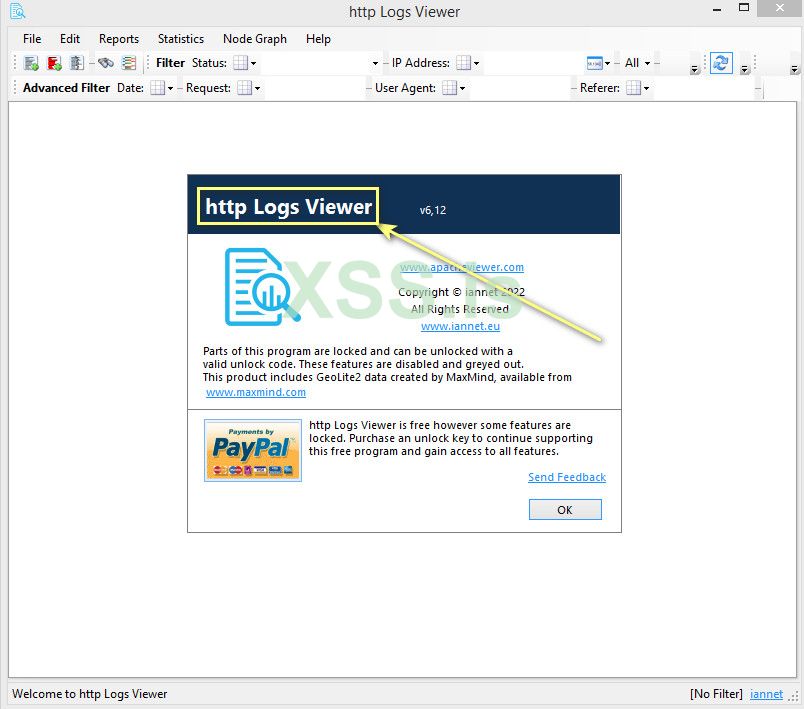
Ищем в ресурсах программы и видем что текстовое поле принадлежит окну About.
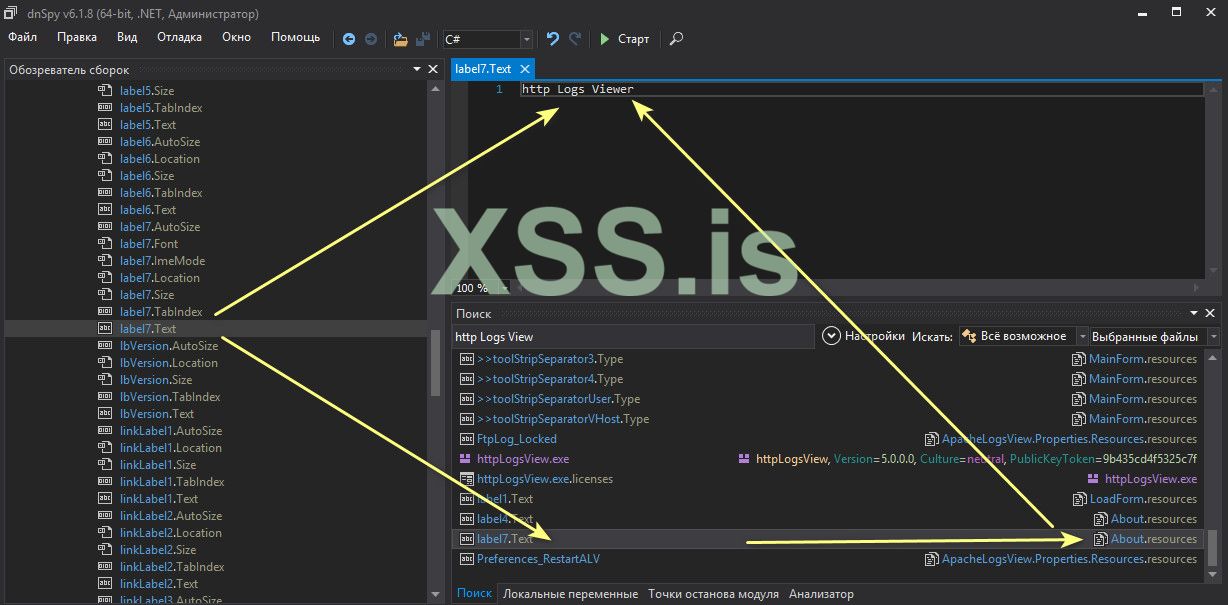
И для красоты давайте заменим и сохраним на: CRACKED by -EXE xss.pro
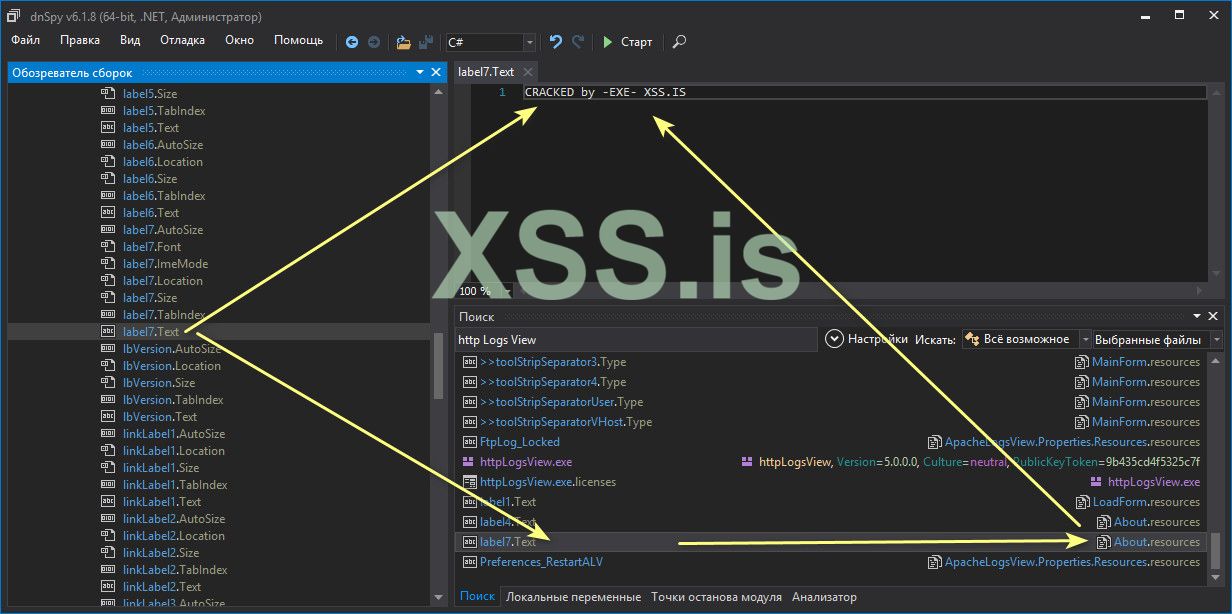
В результате получили то что и задумали . Думаю это уже более красиво и убедительно смотрится.
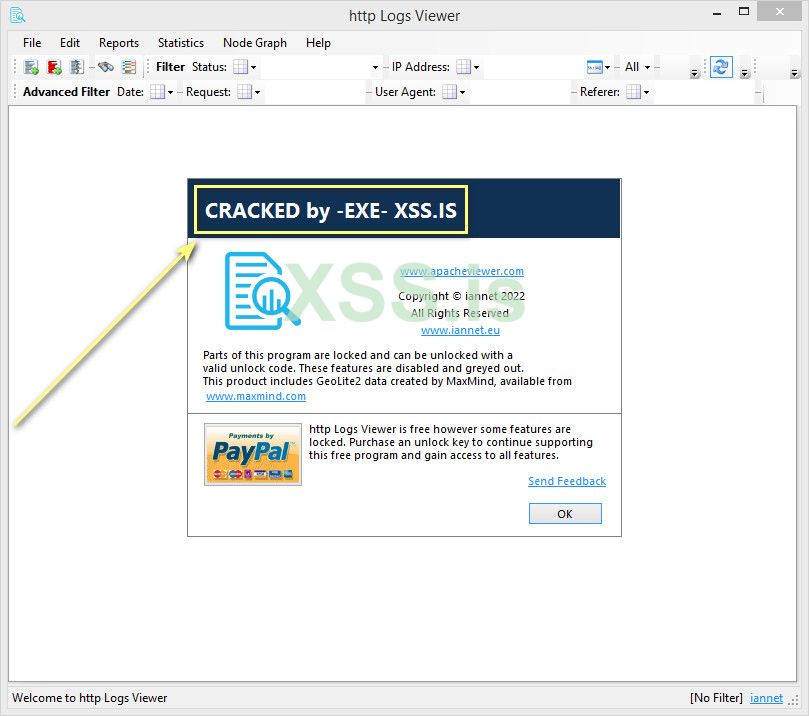
Сколько защит и столько методов их победить, главное внимательно и усердно все анализировать и удача будет на Вашей стороне, на этом у меня Все! И пользуясь случаем: Желаю всем отлично провести новый год, хорошего настроения и успехов в новом году.
Что в архиве, скриншот:
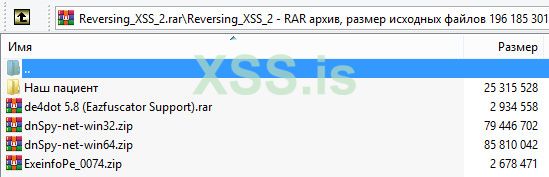
Наш пациент (Программа http Logs View)/ virustotal:
de4dot 5.8 (Eazfuscator Support):
dnSpy x32 / virustotal: https://www.virustotal.com/gui/file/937de02ba7a3522404b82fa09acece6a3063c40df760ba4fc6a3344083d5eb12
dnSpy x64 / virustotal: https://www.virustotal.com/gui/file/bc1c4e0fc49c138bbfc223d3e94231cd4884439c663646d91e48fa005df6704a
ExeinfoPe / virustotal: https://www.virustotal.com/gui/file/32e6df44a529d3bd543aae01365852990c0e7f3b4f84b5a7f9d7dfc18d6a46fd
Файлы к статье:

 mega.nz
. Думаю это уже более красиво и убедительно смотрится.
Сколько защит и столько методов их победить, главное внимательно и усердно все анализировать и удача будет на Вашей стороне, на этом у меня Все! И пользуясь случаем: Желаю всем отлично провести новый год, хорошего настроения и успехов в новом году.
Что в архиве, скриншот:
Наш пациент (Программа http Logs View)/ virustotal:


dnSpy x64 / virustotal: https://www.virustotal.com/gui/file/bc1c4e0fc49c138bbfc223d3e94231cd4884439c663646d91e48fa005df6704a
ExeinfoPe / virustotal: https://www.virustotal.com/gui/file/32e6df44a529d3bd543aae01365852990c0e7f3b4f84b5a7f9d7dfc18d6a46fd
Файлы к статье:
Скрытый контент для зарегистрированных пользователей.
187.1 MB file on MEGA
mega.nz