

pls share the link, thx !
Would you share the link with me please?
Thank you very much! Nice work for that.

Hidden content
Enjoy guys!

hi! i would love to receive the files
thnx
orКод:apt-get install openjdk-18-jdk
Код:apt-get install openjdk-17-jdk
or manuall.
Код:wget https://download.java.net/java/GA/jdk18/43f95e8614114aeaa8e8a5fcf20a682d/36/GPL/openjdk-18_linux-x64_bin.tar.gz tar -xvf openjdk-18_linux-x64_bin.tar.gz sudo mv jdk-18* /opt/ nano ~/.bashrc # install JAVA JDK export JAVA_HOME=/opt/jdk-18 export CLASSPATH=.:${JAVA_HOME}/lib export PATH=${JAVA_HOME}/bin:$PATH # update terminal source ~/.bashrc update-alternatives --install /usr/bin/java java /opt/jdk-18/bin/java 1 update-alternatives --install /usr/bin/javac javac /opt/jdk-18/bin/javac 1 update-alternatives --set java /opt/jdk-18/bin/java update-alternatives --set javac /opt/jdk-18/bin/javac update-alternatives --config java update-alternatives --config javac java -version javac
java -versionopenjdk version "18" 2022-03-22
OpenJDK Runtime Environment (build 18+36-2087)
OpenJDK 64-Bit Server VM (build 18+36-2087, mixed mode, sharing)java -XX:ParallelGCThreads=4 -XX:+AggressiveHeap -XX:+UseParallelGC -Xmx1024M -javaagent:XSSagent.jar -jar cobaltstrike.jar $*To start working in the loader you need to download cobaltstrike.jar or any other version you preffer and paste it in the same directory with XSSagent.jar and change the key in teamserver, start.*
Pls share links, thanks.
When I run this:
java -version
I got back:
openjdk version "18" 2022-03-22
OpenJDK Runtime Environment (build 18+36-2087)
OpenJDK 64-Bit Server VM (build 18+36-2087, mixed mode, sharing)
Then I chmod +x the start.sh file and later I just try to open with ./start.sh But the error "The Cobal Strike Client process cannot be started with a javaagent".
Sounds good, which is mean you are able now to run JAVA!

You need to chmod cobaltstrike.jar + XSSagent.jar and start.sh and then run :
./start.sh
Good luck.
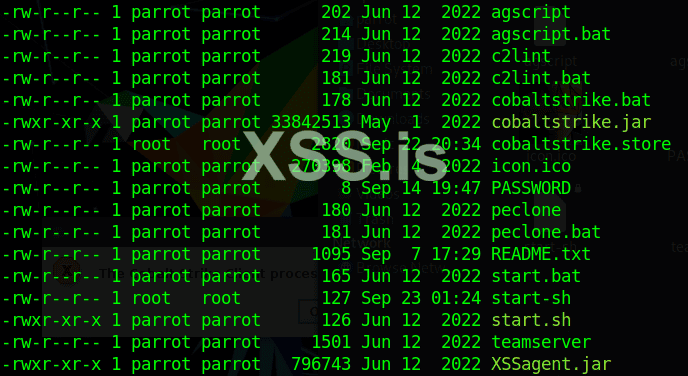
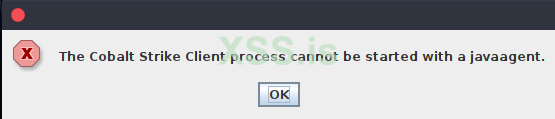
Inside your CS folder run;Посмотреть вложение 66587
Посмотреть вложение 66588
after verifying that everything is correct I run start.sh file trough ./start.sh
Посмотреть вложение 66589
chown parrot:parrot *java -XX:ParallelGCThreads=4 -XX:+AggressiveHeap -XX:+UseParallelGC -Xmx1024M -javaagent:XSSagent.jar -jar cobaltstrike.jar $*Inside your CS folder run;
Code:Код:chown parrot:parrot *
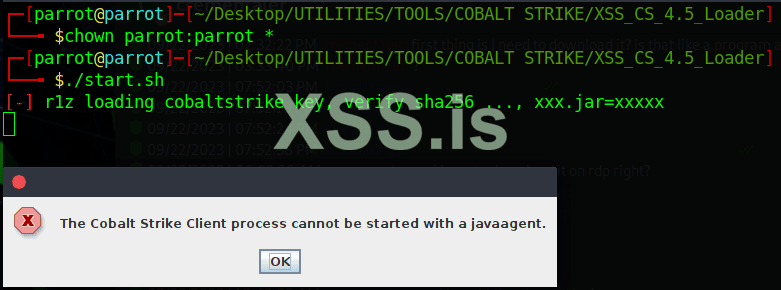
and make sure inside start.sh file this content only;
Code:and run it again.Код:java -XX:ParallelGCThreads=4 -XX:+AggressiveHeap -XX:+UseParallelGC -Xmx1024M -javaagent:XSSagent.jar -jar cobaltstrike.jar $*

no error i fixed it its working ... this f38eb3d1a335b252b58bc2acde81b542 was not in the sh file so i added it
what is this though f38eb3d1a335b252b58bc2acde81b542
can it be changed ?????????????
Hidden content for users named Бафомет, cromxconan.Pass: r1z@xss
Gofile - Free Unlimited File Sharing and Storage
Gofile is a free, secure file sharing and storage platform. With unlimited bandwidth and storage, you can easily store and share files of any type without any limits. Our advanced features, such as CDN support and password protection, make Gofile the ideal choice for individuals and businesses...gofile.io
Mostly your issue because of your java version, remove your java using this command:That was the file I downloaded from you, I don't need anything more right?
sudo apt-get remove openjdk*sudo apt-get install openjdk-19-jdkdamn, juicy asf I'd like to receive all the files if u don't mind bruv
thx
thx a lot! appreciate it ^_^Hidden content
Enjoy!


