
-
XSS.stack #1 – первый литературный журнал от юзеров форума
прочее Voila! Cobalt Strike 4.5 modified Loader ( Original cobaltstrike.jar )

What can you do with cobaltstrike? Is it similar to a rat? And if so, what's different about it?worked , but when running anything payload, target nothing come .. CMIIW
before i use same method on Cobaltstrike 4.4 is worked
may i get your cobalt strike files and the
xxangent please !!!!!!! r1z!Скрытое содержимое
Enjoy!
please your cobalt strike files and xxagent appreciate!!!!

r1z Привет
скинь линк тоже, спасибо заранее
скинь линк тоже, спасибо заранее
- Автор темы
- Добавить закладку
- #186
Пожалуйста, обратите внимание, что пользователь заблокирован
Скрытый контент для пользователей: rotorrr.
And to who say shit that beacon it's not work.. you can look and set .1.
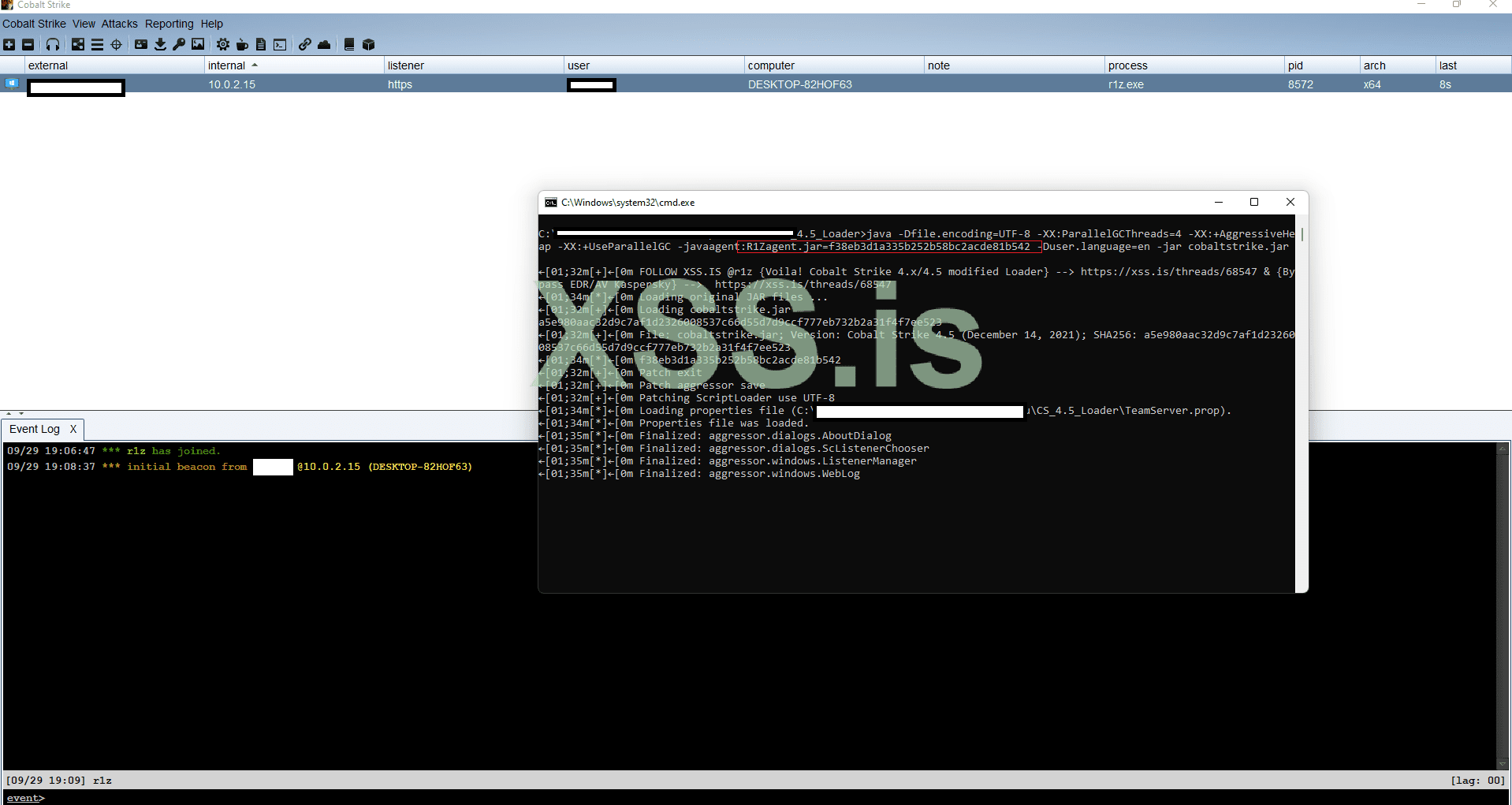
Crypt beacon 0/19 for today scan! ($5k monthly) unlimited builds, or ($2k 1 week) unlimited builds.
Checkzilla
 checkzilla.io
Enjoy guys!
Contact TOX or PM only!
A5852A300E402AD8AA973E1147D024FFE7DCF34BCC203C7B9DFB8560A3B10361000000000003
please i tried to test run the file as it was given to me but my error was th
i got this error
[-] r1z loading cobaltstrike key, verify sha256 ..., xxx.jar=xxxxx
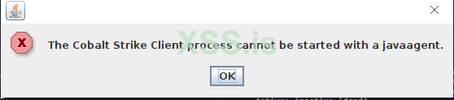
[-] The Cobalt Strike Client process cannot be started with a javaagent.
Скрытое содержимое
And to who say shit that beacon it's not work.. you can look and set .1.
Посмотреть вложение 43742
Crypt beacon 0/19 for today scan! ($5k monthly) unlimited builds, or ($2k 1 week) unlimited builds.
Checkzilla
Enjoy guys!
Contact TOX or PM only!
A5852A300E402AD8AA973E1147D024FFE7DCF34BCC203C7B9DFB8560A3B10361000000000003
i got this error
[-] r1z loading cobaltstrike key, verify sha256 ..., xxx.jar=xxxxx
[-] The Cobalt Strike Client process cannot be started with a javaagent.
- Автор темы
- Добавить закладку
- #188
Пожалуйста, обратите внимание, что пользователь заблокирован
You need to put the full command with Java agent key.please i tried to test run the file as it was given to me but my error was th
i got this error
[-] r1z loading cobaltstrike key, verify sha256 ..., xxx.jar=xxxxx
[-] The Cobalt Strike Client process cannot be started with a javaagent.
how do i do this please and where do i get the java agent key please cus i seen kind of lost please assist r1zYou need to put the full command with Java agent key.
- Автор темы
- Добавить закладку
- #190
Пожалуйста, обратите внимание, что пользователь заблокирован
You don’t need change or add something, just make sure your installed Java18 or Java17 and run the bat file under windows or the cobaltstrike.sh under Unix, and chmod x files before.
This is it.
This is it.
You don’t need change or add something, just make sure your installed Java18 or Java17 and run the bat file under windows or the cobaltstrike.sh under Unix, and chmod x files before. This is it.
Вложения
You don’t need change or add something, just make sure your installed Java18 or Java17 and run the bat file under windows or the cobaltstrike.sh under Unix, and chmod x files before. This is it.
i did as jus said right now but still same result
- Автор темы
- Добавить закладку
- #193
Пожалуйста, обратите внимание, что пользователь заблокирован
Tomorrow will continue, not in my desk.i did as jus said right now but still same result
um i thinks this might not be the cracked but ok tanks would be expecting you tumoro
- Автор темы
- Добавить закладку
- #195
Пожалуйста, обратите внимание, что пользователь заблокирован
write in tox if you still have problem.um i thinks this might not be the cracked but ok tanks would be expecting you tumoro
A5852A300E402AD8AA973E1147D024FFE7DCF34BCC203C7B9DFB8560A3B10361000000000003
thanks i had all necessary updates done on to get the new java 18 jdk i just kept popping up the error above though but stillwrite in tox if you still have problem.
A5852A300E402AD8AA973E1147D024FFE7DCF34BCC203C7B9DFB8560A3B10361000000000003
- Автор темы
- Добавить закладку
- #197
Пожалуйста, обратите внимание, что пользователь заблокирован
thanks i had all necessary updates done on to get the new java 18 jdk i just kept popping up the error above though but still
Код:
apt-get install openjdk-18-jdk
Код:
apt-get install openjdk-17-jdkor manuall.
Код:
wget https://download.java.net/java/GA/jdk18/43f95e8614114aeaa8e8a5fcf20a682d/36/GPL/openjdk-18_linux-x64_bin.tar.gz
tar -xvf openjdk-18_linux-x64_bin.tar.gz
sudo mv jdk-18* /opt/

nano ~/.bashrc
# install JAVA JDK
export JAVA_HOME=/opt/jdk-18
export CLASSPATH=.:${JAVA_HOME}/lib
export PATH=${JAVA_HOME}/bin:$PATH

# update terminal
source ~/.bashrc

update-alternatives --install /usr/bin/java java /opt/jdk-18/bin/java 1
update-alternatives --install /usr/bin/javac javac /opt/jdk-18/bin/javac 1
update-alternatives --set java /opt/jdk-18/bin/java
update-alternatives --set javac /opt/jdk-18/bin/javac

update-alternatives --config java
update-alternatives --config javac

java -version
javacFixed but are you available on the TOX account sharedorКод:apt-get install openjdk-18-jdk
Код:apt-get install openjdk-17-jdk
or manuall.
Код:wget https://download.java.net/java/GA/jdk18/43f95e8614114aeaa8e8a5fcf20a682d/36/GPL/openjdk-18_linux-x64_bin.tar.gz tar -xvf openjdk-18_linux-x64_bin.tar.gz sudo mv jdk-18* /opt/ nano ~/.bashrc # install JAVA JDK export JAVA_HOME=/opt/jdk-18 export CLASSPATH=.:${JAVA_HOME}/lib export PATH=${JAVA_HOME}/bin:$PATH # update terminal source ~/.bashrc update-alternatives --install /usr/bin/java java /opt/jdk-18/bin/java 1 update-alternatives --install /usr/bin/javac javac /opt/jdk-18/bin/javac 1 update-alternatives --set java /opt/jdk-18/bin/java update-alternatives --set javac /opt/jdk-18/bin/javac update-alternatives --config java update-alternatives --config javac java -version javac
or nah and also the solution was the key in the teamserver xxxagent=xxxxxxxx... needs to be in the start up file but then is that changeable or nah ?
- Автор темы
- Добавить закладку
- #199
Пожалуйста, обратите внимание, что пользователь заблокирован
Mention your username In tox, I usually don’t provide support in tox.Fixed but are you available on the TOX account shared
or nah and also the solution was the key in the teamserver xxxagent=xxxxxxxx... needs to be in the start up file but then is that changeable or nah ?
Mention your username In tox, I usually don’t provide supportt no error i fixed it its working ... this f38eb3d1a335b252b58bc2acde81b542 was not in the sh file so i added it
no error i fixed it its working ... this f38eb3d1a335b252b58bc2acde81b542 was not in the sh file so i added it
what is this though f38eb3d1a335b252b58bc2acde81b542
can it be changed ?????????????