

Пожалуйста, обратите внимание, что пользователь заблокирован
"Ребята, не стоит вскрывать эту тему" - подумали системщики из Мелкософт, раскрыв в Windows 11 полный список "классов" для
Начну по порядку, а именно с функции
Стоит также отметить, что практически для каждого поля
В общем, масштабы этой NT-функции впечатляют.
Чтобы не путаться в терминологии под классом я буду понимать просто ту или иную системную информацию, которую мы хотим извлечь. Мое внимание привлек класс
Для наглядности, прототип
Т.е. в данном случае, вызывая
Вернемся обратно к
Я не знаю как работает весь этот CFG (Control Flow Guard), который реализуется через
Указав в качестве буфера размер одной страницы - 0x1000 я получил любопытные данные в шестнадцатеричном дампе.
Прозорливый глаз сразу увидит что-то похожее на сигнатуру в начале дампа. Немного погуглив, оказалось, что это т.н. Firmware Basic Boot Performance Table, описанная спецификацией UEFI.
Создадим необходимые структуры.
Теперь мы можем точно указать размер структуры, который равен, судя по спецификации и полученному дампу, 0x38 или 56 байт (поле Length). А теперь выведем на экран результат. Отмечу, что права администратора в данном случае не нужны.
Возможно, кому-то эта информация пригодится. Кстати, в виртуальной машине вы получите пустую таблицу и, возможно, на машинах с Legacy BIOS тоже что-то будет отличаться.
Тестировал все на машине с Windows 11 и Windows 10 на виртуалке.
UPD.
Прогнал все-таки на виртуалке. Стек вызовов.
NtQuerySystemInformation, а именно через публичные символы структуру _SYSTEM_INFORMATION_CLASS.
Код:
lkd> dt nt!_SYSTEM_INFORMATION_CLASS
   SystemBasicInformation = 0n0
   SystemProcessorInformation = 0n1
   SystemPerformanceInformation = 0n2
   SystemTimeOfDayInformation = 0n3
   SystemPathInformation = 0n4
   SystemProcessInformation = 0n5
   SystemCallCountInformation = 0n6
   SystemDeviceInformation = 0n7
   SystemProcessorPerformanceInformation = 0n8
   SystemFlagsInformation = 0n9
   SystemCallTimeInformation = 0n10
   SystemModuleInformation = 0n11
   SystemLocksInformation = 0n12
   SystemStackTraceInformation = 0n13
   SystemPagedPoolInformation = 0n14
   SystemNonPagedPoolInformation = 0n15
   SystemHandleInformation = 0n16
   SystemObjectInformation = 0n17
   SystemPageFileInformation = 0n18
   SystemVdmInstemulInformation = 0n19
   SystemVdmBopInformation = 0n20
   SystemFileCacheInformation = 0n21
   SystemPoolTagInformation = 0n22
   SystemInterruptInformation = 0n23
   SystemDpcBehaviorInformation = 0n24
   SystemFullMemoryInformation = 0n25
   SystemLoadGdiDriverInformation = 0n26
   SystemUnloadGdiDriverInformation = 0n27
   SystemTimeAdjustmentInformation = 0n28
   SystemSummaryMemoryInformation = 0n29
   SystemMirrorMemoryInformation = 0n30
   SystemPerformanceTraceInformation = 0n31
   SystemObsolete0 = 0n32
   SystemExceptionInformation = 0n33
   SystemCrashDumpStateInformation = 0n34
   SystemKernelDebuggerInformation = 0n35
   SystemContextSwitchInformation = 0n36
   SystemRegistryQuotaInformation = 0n37
   SystemExtendServiceTableInformation = 0n38
   SystemPrioritySeperation = 0n39
   SystemVerifierAddDriverInformation = 0n40
   SystemVerifierRemoveDriverInformation = 0n41
   SystemProcessorIdleInformation = 0n42
   SystemLegacyDriverInformation = 0n43
   SystemCurrentTimeZoneInformation = 0n44
   SystemLookasideInformation = 0n45
   SystemTimeSlipNotification = 0n46
   SystemSessionCreate = 0n47
   SystemSessionDetach = 0n48
   SystemSessionInformation = 0n49
   SystemRangeStartInformation = 0n50
   SystemVerifierInformation = 0n51
   SystemVerifierThunkExtend = 0n52
   SystemSessionProcessInformation = 0n53
   SystemLoadGdiDriverInSystemSpace = 0n54
   SystemNumaProcessorMap = 0n55
   SystemPrefetcherInformation = 0n56
   SystemExtendedProcessInformation = 0n57
   SystemRecommendedSharedDataAlignment = 0n58
   SystemComPlusPackage = 0n59
   SystemNumaAvailableMemory = 0n60
   SystemProcessorPowerInformation = 0n61
   SystemEmulationBasicInformation = 0n62
   SystemEmulationProcessorInformation = 0n63
   SystemExtendedHandleInformation = 0n64
   SystemLostDelayedWriteInformation = 0n65
   SystemBigPoolInformation = 0n66
   SystemSessionPoolTagInformation = 0n67
   SystemSessionMappedViewInformation = 0n68
   SystemHotpatchInformation = 0n69
   SystemObjectSecurityMode = 0n70
   SystemWatchdogTimerHandler = 0n71
   SystemWatchdogTimerInformation = 0n72
   SystemLogicalProcessorInformation = 0n73
   SystemWow64SharedInformationObsolete = 0n74
   SystemRegisterFirmwareTableInformationHandler = 0n75
   SystemFirmwareTableInformation = 0n76
   SystemModuleInformationEx = 0n77
   SystemVerifierTriageInformation = 0n78
   SystemSuperfetchInformation = 0n79
   SystemMemoryListInformation = 0n80
   SystemFileCacheInformationEx = 0n81
   SystemThreadPriorityClientIdInformation = 0n82
   SystemProcessorIdleCycleTimeInformation = 0n83
   SystemVerifierCancellationInformation = 0n84
   SystemProcessorPowerInformationEx = 0n85
   SystemRefTraceInformation = 0n86
   SystemSpecialPoolInformation = 0n87
   SystemProcessIdInformation = 0n88
   SystemErrorPortInformation = 0n89
   SystemBootEnvironmentInformation = 0n90
   SystemHypervisorInformation = 0n91
   SystemVerifierInformationEx = 0n92
   SystemTimeZoneInformation = 0n93
   SystemImageFileExecutionOptionsInformation = 0n94
   SystemCoverageInformation = 0n95
   SystemPrefetchPatchInformation = 0n96
   SystemVerifierFaultsInformation = 0n97
   SystemSystemPartitionInformation = 0n98
   SystemSystemDiskInformation = 0n99
   SystemProcessorPerformanceDistribution = 0n100
   SystemNumaProximityNodeInformation = 0n101
   SystemDynamicTimeZoneInformation = 0n102
   SystemCodeIntegrityInformation = 0n103
   SystemProcessorMicrocodeUpdateInformation = 0n104
   SystemProcessorBrandString = 0n105
   SystemVirtualAddressInformation = 0n106
   SystemLogicalProcessorAndGroupInformation = 0n107
   SystemProcessorCycleTimeInformation = 0n108
   SystemStoreInformation = 0n109
   SystemRegistryAppendString = 0n110
   SystemAitSamplingValue = 0n111
   SystemVhdBootInformation = 0n112
   SystemCpuQuotaInformation = 0n113
   SystemNativeBasicInformation = 0n114
   SystemErrorPortTimeouts = 0n115
   SystemLowPriorityIoInformation = 0n116
   SystemBootEntropyInformation = 0n117
   SystemVerifierCountersInformation = 0n118
   SystemPagedPoolInformationEx = 0n119
   SystemSystemPtesInformationEx = 0n120
   SystemNodeDistanceInformation = 0n121
   SystemAcpiAuditInformation = 0n122
   SystemBasicPerformanceInformation = 0n123
   SystemQueryPerformanceCounterInformation = 0n124
   SystemSessionBigPoolInformation = 0n125
   SystemBootGraphicsInformation = 0n126
   SystemScrubPhysicalMemoryInformation = 0n127
   SystemBadPageInformation = 0n128
   SystemProcessorProfileControlArea = 0n129
   SystemCombinePhysicalMemoryInformation = 0n130
   SystemEntropyInterruptTimingInformation = 0n131
   SystemConsoleInformation = 0n132
   SystemPlatformBinaryInformation = 0n133
   SystemPolicyInformation = 0n134
   SystemHypervisorProcessorCountInformation = 0n135
   SystemDeviceDataInformation = 0n136
   SystemDeviceDataEnumerationInformation = 0n137
   SystemMemoryTopologyInformation = 0n138
   SystemMemoryChannelInformation = 0n139
   SystemBootLogoInformation = 0n140
   SystemProcessorPerformanceInformationEx = 0n141
   SystemCriticalProcessErrorLogInformation = 0n142
   SystemSecureBootPolicyInformation = 0n143
   SystemPageFileInformationEx = 0n144
   SystemSecureBootInformation = 0n145
   SystemEntropyInterruptTimingRawInformation = 0n146
   SystemPortableWorkspaceEfiLauncherInformation = 0n147
   SystemFullProcessInformation = 0n148
   SystemKernelDebuggerInformationEx = 0n149
   SystemBootMetadataInformation = 0n150
   SystemSoftRebootInformation = 0n151
   SystemElamCertificateInformation = 0n152
   SystemOfflineDumpConfigInformation = 0n153
   SystemProcessorFeaturesInformation = 0n154
   SystemRegistryReconciliationInformation = 0n155
   SystemEdidInformation = 0n156
   SystemManufacturingInformation = 0n157
   SystemEnergyEstimationConfigInformation = 0n158
   SystemHypervisorDetailInformation = 0n159
   SystemProcessorCycleStatsInformation = 0n160
   SystemVmGenerationCountInformation = 0n161
   SystemTrustedPlatformModuleInformation = 0n162
   SystemKernelDebuggerFlags = 0n163
   SystemCodeIntegrityPolicyInformation = 0n164
   SystemIsolatedUserModeInformation = 0n165
   SystemHardwareSecurityTestInterfaceResultsInformation = 0n166
   SystemSingleModuleInformation = 0n167
   SystemAllowedCpuSetsInformation = 0n168
   SystemVsmProtectionInformation = 0n169
   SystemInterruptCpuSetsInformation = 0n170
   SystemSecureBootPolicyFullInformation = 0n171
   SystemCodeIntegrityPolicyFullInformation = 0n172
   SystemAffinitizedInterruptProcessorInformation = 0n173
   SystemRootSiloInformation = 0n174
   SystemCpuSetInformation = 0n175
   SystemCpuSetTagInformation = 0n176
   SystemWin32WerStartCallout = 0n177
   SystemSecureKernelProfileInformation = 0n178
   SystemCodeIntegrityPlatformManifestInformation = 0n179
   SystemInterruptSteeringInformation = 0n180
   SystemSupportedProcessorArchitectures = 0n181
   SystemMemoryUsageInformation = 0n182
   SystemCodeIntegrityCertificateInformation = 0n183
   SystemPhysicalMemoryInformation = 0n184
   SystemControlFlowTransition = 0n185
   SystemKernelDebuggingAllowed = 0n186
   SystemActivityModerationExeState = 0n187
   SystemActivityModerationUserSettings = 0n188
   SystemCodeIntegrityPoliciesFullInformation = 0n189
   SystemCodeIntegrityUnlockInformation = 0n190
   SystemIntegrityQuotaInformation = 0n191
   SystemFlushInformation = 0n192
   SystemProcessorIdleMaskInformation = 0n193
   SystemSecureDumpEncryptionInformation = 0n194
   SystemWriteConstraintInformation = 0n195
   SystemKernelVaShadowInformation = 0n196
   SystemHypervisorSharedPageInformation = 0n197
   SystemFirmwareBootPerformanceInformation = 0n198
   SystemCodeIntegrityVerificationInformation = 0n199
   SystemFirmwarePartitionInformation = 0n200
   SystemSpeculationControlInformation = 0n201
   SystemDmaGuardPolicyInformation = 0n202
   SystemEnclaveLaunchControlInformation = 0n203
   SystemWorkloadAllowedCpuSetsInformation = 0n204
   SystemCodeIntegrityUnlockModeInformation = 0n205
   SystemLeapSecondInformation = 0n206
   SystemFlags2Information = 0n207
   SystemSecurityModelInformation = 0n208
   SystemCodeIntegritySyntheticCacheInformation = 0n209
   SystemFeatureConfigurationInformation = 0n210
   SystemFeatureConfigurationSectionInformation = 0n211
   SystemFeatureUsageSubscriptionInformation = 0n212
   SystemSecureSpeculationControlInformation = 0n213
   SystemSpacesBootInformation = 0n214
   SystemFwRamdiskInformation = 0n215
   SystemWheaIpmiHardwareInformation = 0n216
   SystemDifSetRuleClassInformation = 0n217
   SystemDifClearRuleClassInformation = 0n218
   SystemDifApplyPluginVerificationOnDriver = 0n219
   SystemDifRemovePluginVerificationOnDriver = 0n220
   SystemShadowStackInformation = 0n221
   SystemBuildVersionInformation = 0n222
   SystemPoolLimitInformation = 0n223
   SystemCodeIntegrityAddDynamicStore = 0n224
   SystemCodeIntegrityClearDynamicStores = 0n225
   SystemDifPoolTrackingInformation = 0n226
   SystemPoolZeroingInformation = 0n227
   SystemDpcWatchdogInformation = 0n228
   SystemDpcWatchdogInformation2 = 0n229
   SystemSupportedProcessorArchitectures2 = 0n230
   SystemSingleProcessorRelationshipInformation = 0n231
   SystemXfgCheckFailureInformation = 0n232
   MaxSystemInfoClass = 0n233
Начну по порядку, а именно с функции
NtQuerySystemInformation. Согласно msdn эта функция "Извлекает указанную системную информацию". Данная функция экспортируется из ntdll.dll и посредством сискола выполняется в контексте ядра. На самом деле в ядре основную логику выполняет функция ExpQuerySystemInformation размером ~ 3000 строк. В спойлере ниже "причесанный" вывод Hex-Rays. Да, я из тех, кто чаще всего обращается к декомпилятору.
C:
NTSTATUS __stdcall NtQuerySystemInformation(
        SYSTEM_INFORMATION_CLASS SystemInformationClass,
        PVOID SystemInformation,
        ULONG SystemInformationLength,
        PULONG ReturnLength)
{
    __int16 *InputBuffer; // r10
    int InputBufferLength; // r8d
    __int16 Group; // [rsp+40h] [rbp+8h] BYREF

    InputBuffer = 0i64;
    Group = 0;
    if ( SystemInformationClass < SystemWow64SharedInformationObsolete
      || SystemInformationClass >= SystemProcessorIdleCycleTimeInformation )
    {
        switch ( SystemInformationClass )
        {
            case SystemProcessorPerformanceInformation:
            case SystemInterruptInformation:
            case SystemProcessorIdleInformation:
            case SystemProcessorPowerInformation:
            case SystemProcessorIdleCycleTimeInformation:
            case SystemProcessorPerformanceDistribution:
            case SystemProcessorCycleTimeInformation:
            case SystemProcessorPerformanceInformationEx:
                Group = KeGetCurrentPrcb()->Group;
                goto LABEL_8;
            case SystemLogicalProcessorInformation:
LABEL_8:
                InputBuffer = &Group;
                InputBufferLength = 2;
                return ExpQuerySystemInformation(
                           SystemInformationClass,
                           (__int64)InputBuffer,
                           InputBufferLength,
                           SystemInformation,
                           SystemInformationLength,
                           ReturnLength);
            case SystemLogicalProcessorAndGroupInformation:
            case SystemNodeDistanceInformation:
            case SystemInterruptSteeringInformation:
            case SystemFeatureConfigurationInformation:
            case SystemFeatureConfigurationSectionInformation:
                return STATUS_INVALID_INFO_CLASS;
            default:
                break;
        }
    }
    InputBufferLength = 0;
    return ExpQuerySystemInformation(
               SystemInformationClass,
               (__int64)InputBuffer,
               InputBufferLength,
               SystemInformation,
               SystemInformationLength,
               ReturnLength);
}
Стоит также отметить, что практически для каждого поля
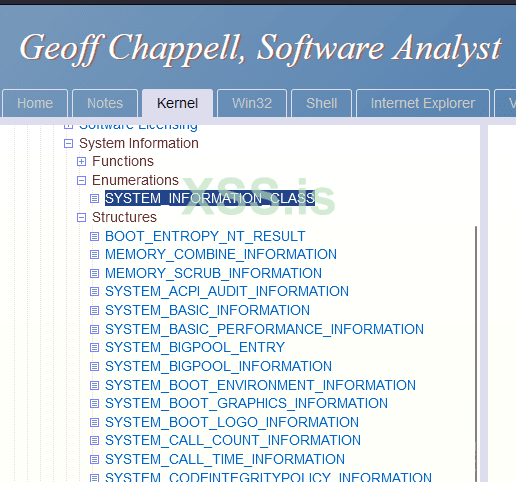
SystemInformationClass в функции ExpQuerySystemInformation вызывается отдельная ядерная функция, которая "добывает" системную информацию и вежливо помещает в юзермодный буфер, который мы выделяем под системную структуру (если мы знаем размер этой структуры и из чего эта структура состоит). Не все структуры отревершены, но многие могут быть найдены в блоге Geoff Chappel'a или же в исходных кодах Windows 2003/XP.
В общем, масштабы этой NT-функции впечатляют.
Чтобы не путаться в терминологии под классом я буду понимать просто ту или иную системную информацию, которую мы хотим извлечь. Мое внимание привлек класс
SystemFirmwareBootPerformanceInformation из структуры _SYSTEM_INFORMATION_CLASS с порядковым номером 198 т.к. я нигде не нашел о нем информации. Собственно, первое, что нам нужно знать - это валидный размер буфера, который мы будем выделять. Этого можно достигнуть путем реверс-инжиниринга, либо сыграть в угадайку. Если мы не укажем валидный размер, то получим ошибку STATUS_INFO_LENGTH_MISMATCH. В коде это выглядит так (на примере класса SystemHypervisorSharedPageInformation) :
C:
                case SystemHypervisorSharedPageInformation:// Returns 0x7ffe3000 - _HYPERVISOR_SHARED_DATA address
                                                //
                                                //
                                                // typedef struct _SYSTEM_HYPERVISOR_SHARED_PAGE_INFORMATION
                                                // {
                                                //     QWORD HyperSharedAddr;
                                                // } SYSTEM_HYPERVISOR_SHARED_PAGE_INFORMATION;
                    ReturnedLength = 8;
                    if ( SystemInformationLength < 8 )
                    {
                        status = STATUS_INFO_LENGTH_MISMATCH;
                    }
                    else
                    {
                        v36 = HyperSharedDataAddr;
                        *(_QWORD *)SystemInformation = 0i64;
                        *(_QWORD *)SystemInformation = v36;
                    }
                    goto ReturnFromFunc;
Для наглядности, прототип
C:
__kernel_entry NTSTATUS NtQuerySystemInformation(
  [in]            SYSTEM_INFORMATION_CLASS SystemInformationClass,
  [in, out]       PVOID                    SystemInformation,
  [in]            ULONG                    SystemInformationLength,
  [out, optional] PULONG                   ReturnLength
);
Т.е. в данном случае, вызывая
NtQuerySystemInformation для класса SystemHypervisorSharedPageInformation, мы должны указать SystemInformationLength >= 8, чтобы функция вернула STATUS_SUCCESS.Вернемся обратно к
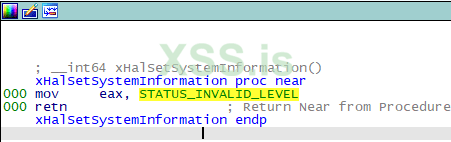
SystemFirmwareBootPerformanceInformation. Что примечательно для этого класса, то ядерная функция, которая извлекает нужную информацию - xHalSetSystemInformation вызывается не напрямую, а через _guard_dispatch_icall, а сама процедура xHalSetSystemInformation в дизассемблере просто возвращает STATUS_INVALID_LEVEL.
Я не знаю как работает весь этот CFG (Control Flow Guard), который реализуется через
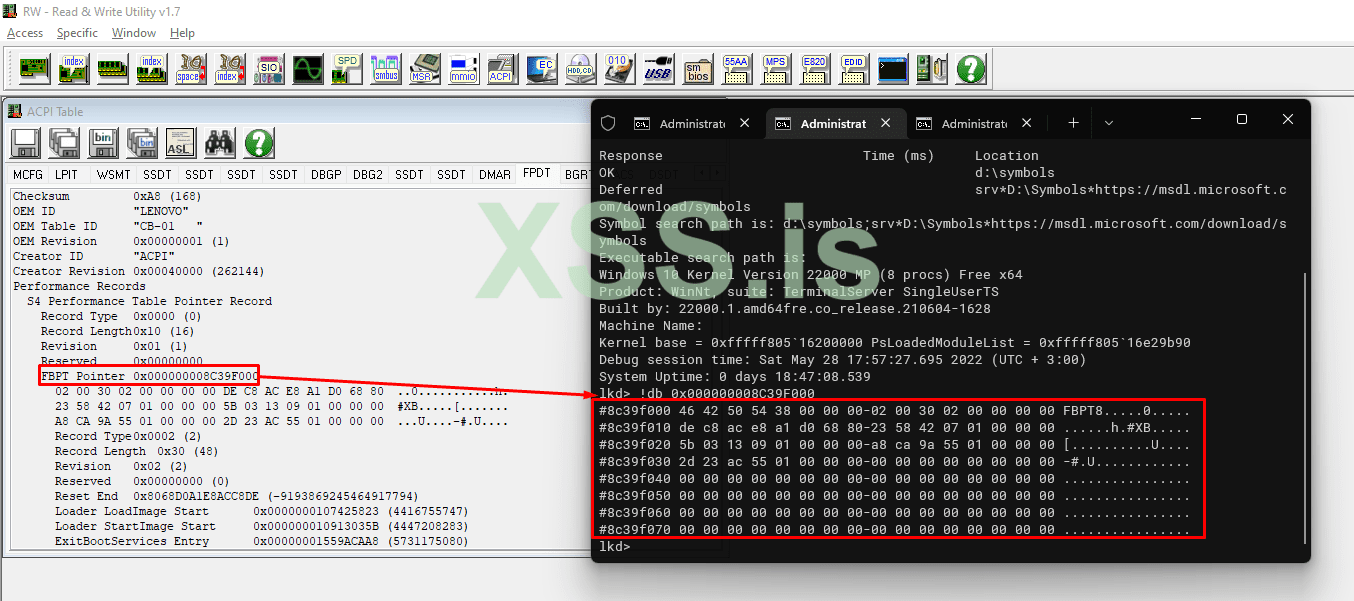
_guard_dispatch_icall, но мне нужно узнать размер и содержимое структуры. Отладчик запускать было, честно говоря, лень. Я пошел другим путем. Да, угадайка (чуйка очка) - сила.Указав в качестве буфера размер одной страницы - 0x1000 я получил любопытные данные в шестнадцатеричном дампе.
Код:
    46 42 50 54 38 00 00 00  02 00 30 02 00 00 00 00  |  FBPT8.....0.....
    DE C8 AC E8 A1 D0 68 80  23 58 42 07 01 00 00 00  |  ......h.#XB.....
    5B 03 13 09 01 00 00 00  A8 CA 9A 55 01 00 00 00  |  [..........U....
    2D 23 AC 55 01 00 00 00                           |  -#.U....
    ....
Прозорливый глаз сразу увидит что-то похожее на сигнатуру в начале дампа. Немного погуглив, оказалось, что это т.н. Firmware Basic Boot Performance Table, описанная спецификацией UEFI.
Создадим необходимые структуры.
C:
/*
Based on https ://uefi.org/specs/ACPI/6.4/05_ACPI_Software_Programming_Model/ACPI_Software_Programming_Model.html

The Firmware Basic Boot Performance Table resides outside of the FPDT.
It includes a header, defined in Table 5.93, and one or more Performance Records.
*/
typedef struct _FIRMWARE_BASIC_BOOT_PERFORMANCE_TABLE_HEADER
{
    DWORD    Signature;                        // ‘FBPT’ is the signature to use.
    BYTE    Length;                            // Length of the Firmware Basic Boot Performance Table.
                                            // This includes the header and allocated size of the subsequent records.
} FIRMWARE_BASIC_BOOT_PERFORMANCE_TABLE_HEADER;

typedef struct _FIRMWARE_BASIC_BOOT_PERFORMANCE_DATA_RECORD
{
    USHORT    PerformanceRecordType;            // 2 - Firmware Basic Boot Performance Data Record. Only one of these records will be produced.
    BYTE    RecordLength;                    // 48 - This value depicts the length of the performance record, in bytes.
    BYTE    Revision;                        // 2 - Revision of this Performance Record
    DWORD    Reserved;                        // Reserved
    DWORD64 ResetEnd;                        // Timer value logged at the beginning of firmware image execution. This may not always be zero or near zero.
    DWORD64 OSLoaderImageStart;                // Timer value logged just prior to loading the OS boot loader into memory.
                                            // For non-UEFI compatible boots, this field must be zero.
    DWORD64 OsLoaderStartImageStart;        // Timer value logged just prior to launching the currently loaded OS boot loader image.
                                            // For non-UEFI compatible boots, the timer value logged will be just prior to the INT 19h handler invocation
    DWORD64 ExitBootServicesEntry;            // Timer value logged at the point when the OS loader calls the ExitBootServices function for UEFI compatible firmware.
                                            // For non-UEFI compatible boots, this field must be zero.
    DWORD64 ExitBootServicesExit;            // Timer value logged at the point just prior to the OS loader gaining control back from the ExitBootServices
                                            // function for UEFI compatible firmware. For non-UEFI compatible boots, this field must be zero.
} FIRMWARE_BASIC_BOOT_PERFORMANCE_DATA_RECORD;

typedef struct _FIRMWARE_BASIC_BOOT_PERFORMANCE_TABLE
{
    FIRMWARE_BASIC_BOOT_PERFORMANCE_TABLE_HEADER Header;
    FIRMWARE_BASIC_BOOT_PERFORMANCE_DATA_RECORD PerfRecord;
} FIRMWARE_BASIC_BOOT_PERFORMANCE_TABLE;
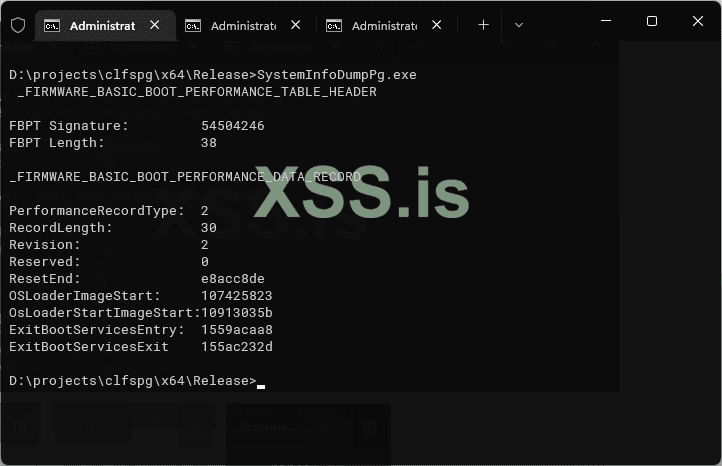
Теперь мы можем точно указать размер структуры, который равен, судя по спецификации и полученному дампу, 0x38 или 56 байт (поле Length). А теперь выведем на экран результат. Отмечу, что права администратора в данном случае не нужны.
C:
// It's just a  PoC
#include <Windows.h>
#include <stdio.h>
#include <winternl.h>

#pragma comment(lib, "ntdllp.lib")

#define SystemFirmwareBootPerformanceInformation 198

/*
Based on https ://uefi.org/specs/ACPI/6.4/05_ACPI_Software_Programming_Model/ACPI_Software_Programming_Model.html

The Firmware Basic Boot Performance Table resides outside of the FPDT.
It includes a header, defined in Table 5.93, and one or more Performance Records.
*/
typedef struct _FIRMWARE_BASIC_BOOT_PERFORMANCE_TABLE_HEADER
{
    DWORD    Signature;                        // ‘FBPT’ is the signature to use.
    BYTE    Length;                            // Length of the Firmware Basic Boot Performance Table.
    // This includes the header and allocated size of the subsequent records.
} FIRMWARE_BASIC_BOOT_PERFORMANCE_TABLE_HEADER;

typedef struct _FIRMWARE_BASIC_BOOT_PERFORMANCE_DATA_RECORD
{
    USHORT    PerformanceRecordType;            // 2 - Firmware Basic Boot Performance Data Record. Only one of these records will be produced.
    BYTE    RecordLength;                    // 48 - This value depicts the length of the performance record, in bytes.
    BYTE    Revision;                        // 2 - Revision of this Performance Record
    DWORD    Reserved;                        // Reserved
    DWORD64 ResetEnd;                        // Timer value logged at the beginning of firmware image execution. This may not always be zero or near zero.
    DWORD64 OSLoaderImageStart;                // Timer value logged just prior to loading the OS boot loader into memory.
    // For non-UEFI compatible boots, this field must be zero.
    DWORD64 OsLoaderStartImageStart;        // Timer value logged just prior to launching the currently loaded OS boot loader image.
    // For non-UEFI compatible boots, the timer value logged will be just prior to the INT 19h handler invocation
    DWORD64 ExitBootServicesEntry;            // Timer value logged at the point when the OS loader calls the ExitBootServices function for UEFI compatible firmware.
    // For non-UEFI compatible boots, this field must be zero.
    DWORD64 ExitBootServicesExit;            // Timer value logged at the point just prior to the OS loader gaining control back from the ExitBootServices
    // function for UEFI compatible firmware. For non-UEFI compatible boots, this field must be zero.
} FIRMWARE_BASIC_BOOT_PERFORMANCE_DATA_RECORD;

typedef struct _FIRMWARE_BASIC_BOOT_PERFORMANCE_TABLE
{
    FIRMWARE_BASIC_BOOT_PERFORMANCE_TABLE_HEADER Header;
    FIRMWARE_BASIC_BOOT_PERFORMANCE_DATA_RECORD PerfRecord;
} FIRMWARE_BASIC_BOOT_PERFORMANCE_TABLE;

int main()
{
    NTSTATUS status;
    FIRMWARE_BASIC_BOOT_PERFORMANCE_TABLE fbpt = { 0 };
    DWORD size = sizeof(fbpt);

    status = NtQuerySystemInformation(SystemFirmwareBootPerformanceInformation, &fbpt, size, NULL);

    if (!NT_SUCCESS(status))
    {
        printf("[-] NtQuerySystemInformation failed with status = %x\n", status);
    }

    //DumpHex(&fbpt, size);
    /*
    46 42 50 54 38 00 00 00  02 00 30 02 00 00 00 00  |  FBPT8.....0.....
    DE C8 AC E8 A1 D0 68 80  23 58 42 07 01 00 00 00  |  ......h.#XB.....
    5B 03 13 09 01 00 00 00  A8 CA 9A 55 01 00 00 00  |  [..........U....
    2D 23 AC 55 01 00 00 00                           |  -#.U....
    */
    printf(" _FIRMWARE_BASIC_BOOT_PERFORMANCE_TABLE_HEADER\n\n");
    printf("FBPT Signature:\t\t%x\nFBPT Length:\t\t%x\n\n", fbpt.Header.Signature, fbpt.Header.Length);
    printf("_FIRMWARE_BASIC_BOOT_PERFORMANCE_DATA_RECORD\n\n");
    printf("PerformanceRecordType:\t%x\n"
        "RecordLength:\t\t%x\n"
        "Revision:\t\t%x\n"
        "Reserved:\t\t%x\n"
        "ResetEnd:\t\t%llx\n"
        "OSLoaderImageStart:\t%llx\n"
        "OsLoaderStartImageStart:%llx\n"
        "ExitBootServicesEntry:\t%llx\n"
        "ExitBootServicesExit\t%llx\n",
        fbpt.PerfRecord.PerformanceRecordType,
        fbpt.PerfRecord.RecordLength,
        fbpt.PerfRecord.Revision,
        fbpt.PerfRecord.Reserved,
        fbpt.PerfRecord.ResetEnd,
        fbpt.PerfRecord.OSLoaderImageStart,
        fbpt.PerfRecord.OsLoaderStartImageStart,
        fbpt.PerfRecord.ExitBootServicesEntry,
        fbpt.PerfRecord.ExitBootServicesExit);
}
Возможно, кому-то эта информация пригодится. Кстати, в виртуальной машине вы получите пустую таблицу и, возможно, на машинах с Legacy BIOS тоже что-то будет отличаться.
Тестировал все на машине с Windows 11 и Windows 10 на виртуалке.
UPD.
Прогнал все-таки на виртуалке. Стек вызовов.
Код:
2: kd> k
 # Child-SP          RetAddr           Call Site
00 fffffd08`b42ae3f8 fffff801`4683c222 nt!HaliQuerySystemInformation
01 fffffd08`b42ae400 fffff801`466f18c7 nt!ExpQuerySystemInformation+0x14a812
02 fffffd08`b42aeac0 fffff801`46405fb5 nt!NtQuerySystemInformation+0x37
03 fffffd08`b42aeb00 00007ffb`014ac454 nt!KiSystemServiceCopyEnd+0x25
04 000000a8`d89efce8 00007ff7`0d7f1105 ntdll!NtQuerySystemInformation+0x14
HaliQuerySystemInformation возвращает STATUS_NOT_IMPLEMENTED. Полагаю, отсюда и пустая таблица.
Последнее редактирование: