

Introdution
This post is a first part of reversing a version of ActionSpy. The tools used are:- BurpSuite
- Binary Ninja
- jadx-gui
- AVD
- apktool
- foremost
Information gathering
Permissions
Using jadx-gui to reverse the APK, it can be observed that the malware use nearly all the Android permissions, some of them are listed bellow:
Код:
    <uses-permission android:name="android.permission.READ_PHONE_STATE"/>
    <uses-permission android:name="android.permission.READ_EXTERNAL_STORAGE"/>
    <uses-permission android:name="android.permission.WRITE_EXTERNAL_STORAGE"/>
    <uses-permission android:name="android.permission.INTERNET"/>
    <uses-permission android:name="android.permission.ACCESS_NETWORK_STATE"/>
    <uses-permission android:name="android.permission.ACCESS_WIFI_STATE"/>
    <uses-permission android:name="android.permission.CHANGE_WIFI_STATE"/>
    <uses-permission android:name="android.permission.CAMERA"/>
    <uses-permission android:name="android.permission.RECORD_AUDIO"/>
    <uses-permission android:name="android.permission.READ_LOGS"/>
    <uses-permission android:name="android.permission.MOUNT_UNMOUNT_FILESYSTEMS"/>
    <uses-permission android:name="android.permission.MODIFY_AUDIO_SETTINGS"/>
    <uses-permission android:name="android.permission.WRITE_SETTINGS"/>
    <uses-permission android:name="com.android.browser.permission.READ_HISTORY_BOOKMARKS"/>
    <uses-permission android:name="android.permission.RECEIVE_BOOT_COMPLETED"/>
    <uses-permission android:name="android.permission.ACCESS_FINE_LOCATION"/>
    <uses-permission android:name="android.permission.ACCESS_COARSE_LOCATION"/>
    <uses-permission android:name="android.permission.READ_CONTACTS"/>
    <uses-permission android:name="android.permission.READ_SMS"/>
    <uses-permission android:name="android.permission.READ_CALL_LOG"/>
    ....
Traffic analysis
Starting by the traffic analysis will give more information about how the malware communicate with the C2C server and which information is sent.Installing the malware on an Android Virtual Device which has Burp Suite as proxy, it can be observed that the server send different HTTP requests to different servers with the domain name gvt1.com 11:
- redirector.gvt1.com 8
- r6---sn-n0ogpnx-b85l.gvt1.com 4
- r3---sn-n0ogpnx-b85l.gvt1.com 2
- r5---sn-n0ogpnx-b85l.gvt1.com 2
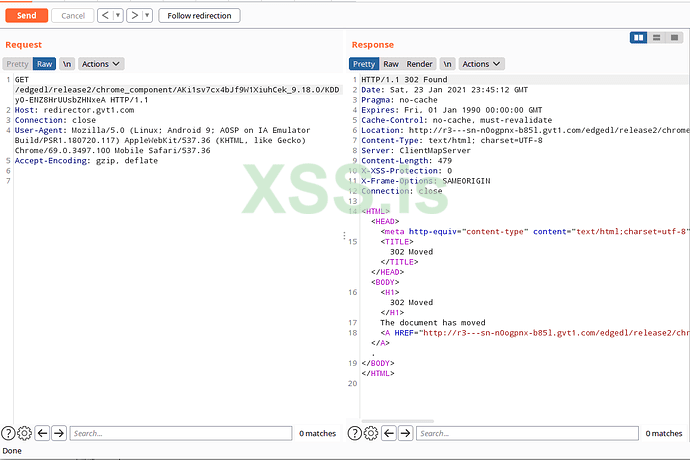
If we follow the redirection, a binary file is downloaded from the C2C server.
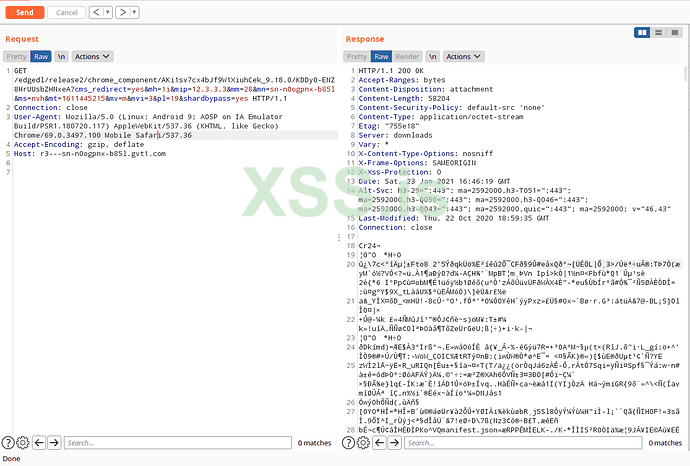
Using wget to download the file in order to check what it contains:
Код:
wget "http://r3---sn-n0ogpnx-b85l.gvt1.com/edgedl/release2/chrome_component/AKi1sv7cx4bJf9W1XiuhCek_9.18.0/KDDyO-ENZ8HrUUsbZHNxeA" -O file1.dataThe malware sends some parameter trough the request including the public IP address of the victim.
The part AKi1sv7cx4bJf9W1XiuhCek_9.18.0/KDDyO-ENZ8HrUUsbZHNxeA of the request change at each time, it suspected that the information is sent encrypted through the request.
Downloaded files Analysis
Starting by identifying the file type of the downloaded file.[CODE
]> file file1.data
file1.data: Google Chrome extension, version 3[/CODE]
The application Google Chrome on Android does not support extensions. To get the data from this file foremoset is used.
Код:
> foremost file1.data -o output_file1/The tool founded one zip file which contains 3 files and one directory:

The file Filtering Rules contains a list of 6291 domain names.
At each request a new list is downloaded with different domain names.
Embedded APKs
The malware embed three APKs located in the folder assets/init. These APKs are:- Camera.apk
- Core.apk
- Location.apk
Static Analysis
Main activity
The main activity is com.jsyjv.klxblnwc.p004u.MainActivity. The function onCreate look as follows: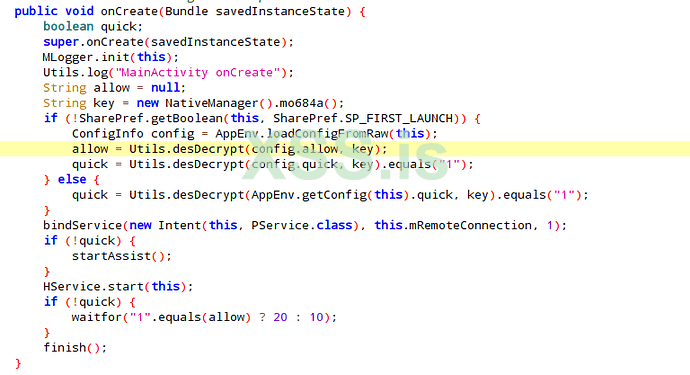
The code calls a native function mo684a from the library hello-jni which generate a key, check if it’s the first time the application is launched by reading the value from the shared preferences file located at
/data/data/com.isyjv.klxblnwc/shared_prefs/com.isyjv.klxblnwc.xml.
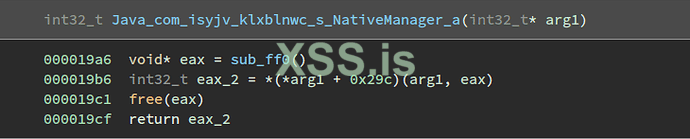
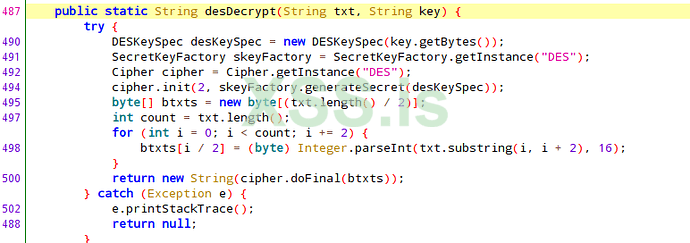
The malware calls the function com.isyjv.klxblnwc.util.Utils.desDecrypt with the generated hex key.
The function is as follows:
Код:
cipher.init(2, skeyFactory.generateSecret(desKeySpec)); // Initialize cipher to decryption modeBefore encrypting the argument, the function divide the string into two characters, convert it each to integer then encrypt it:
Код:
  byte[] btxts = new byte[(txt.length() / 2)];
  int count = txt.length();
  for (int i = 0; i < count; i += 2) {
    btxts[i / 2] = (byte) Integer.parseInt(txt.substring(i, i + 2), 16);
  }
As DES decryption is the inversion of DES encryption, the function desDecrypt here is used as encryption routine.
After the key generation, the malware start a service that init the configuration file and redirect logs of the application to a file. The file name is microlog.txt and located in the folder /sdcard. the content is as follow:
Код:
[DEBUG]22:14:53,00 Utils|main PService onCreate |Microlog 1
[DEBUG]22:14:53,00 Utils|main PService onBind Intent { cmp=com.isyjv.klxblnwc/.s.PService } |Microlog 1
[DEBUG]22:14:53,01 Utils|main PService Binder uid:10149 |Microlog 2
[DEBUG]22:14:53,03 Utils|main PService caller signature md5:3bd158635713d3e220113fb6adc8b6e2 |Microlog 4
[DEBUG]22:14:53,48 AppEnv|main onCreate |Microlog 0
[DEBUG]22:14:53,50 AppEnv|main startJobSheduler ret 1 |Microlog 2
[DEBUG]22:14:53,52 AppEnv|main onCreate List pkgName: com.isyjv.klxblnwc svrName: com.isyjv.klxblnwc.s.HService |Microlog 4
[DEBUG]22:14:53,53 AppEnv|main onStartCommand startId:1 |Microlog 5
[DEBUG]22:14:53,54 AppEnv|Thread-2 startGuard pkgName: com.isyjv.klxblnwc svrName: com.isyjv.klxblnwc.s.HService |Microlog 6
[DEBUG]22:14:53,54 AppEnv|Thread-2 startGuard wating... |Microlog 6
[DEBUG]22:14:54,679 Utils|Binder:4646_3 start to installPlugin /storage/emulated/0/origin/Camera.apk,pkgname:null |Microlog 1680
[DEBUG]22:14:54,712 Utils|Binder:4646_3 install plugin failed, pkgname:null resultCode:0 |Microlog 1713
[DEBUG]22:14:54,722 Utils|Binder:4646_3 start to installPlugin /storage/emulated/0/origin/Core.apk,pkgname:null |Microlog 1723
[DEBUG]22:14:54,798 Utils|Binder:4646_3 install plugin failed, pkgname:null resultCode:0 |Microlog 1799
[DEBUG]22:14:54,813 Utils|Binder:4646_3 start to installPlugin /storage/emulated/0/origin/Location.apk,pkgname:null |Microlog 1814
[DEBUG]22:14:54,869 Utils|Binder:4646_3 install plugin failed, pkgname:null resultCode:0 |Microlog 1870
This service start a second service that will install the packed APKs, list installed Apps and check if the device is rooted. This information is logged to file /sdcard/microlog.txt.
That’s it for this first part and thanks for reading!
##Reference
https://0x00sec.org/t/reversing-actionspy-android-malware/26537