

Today's article will be useful for those who like to "test" software with viruses, we will talk about the free, and most importantly, the standard Windows 10 Sandbox tool. It is built into Windows 10, only Pro versions 18305 and higher. I have seen many topics with the search for sandboxes, but I know that many people know about it, but it turns out that there is someone who does not know, so maybe this topic will be useful to someone. Now let's start installing the sandbox itself.
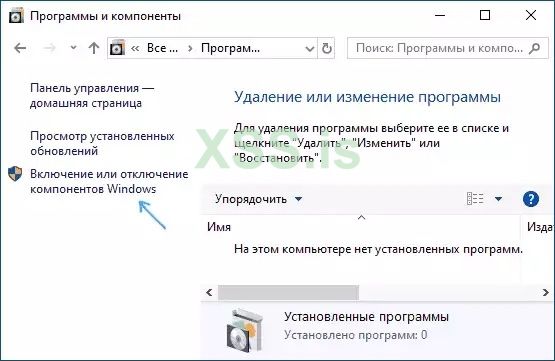
- Open the control panel (for this you can use the search in the taskbar or press Win + R and enter control), switch the control panel view to "Icons", and then open the "Programs and Features" item.
- On the left menu, click Turn Windows features on or off,
- In the list of components, find Windows Sandbox and enable it.
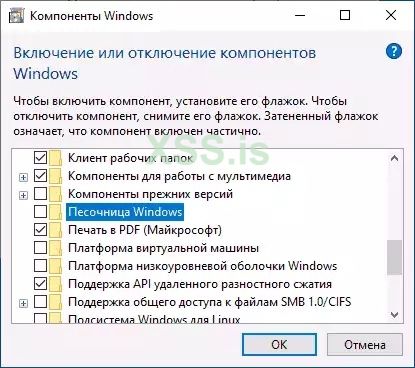
- Click Ok, wait for the installation to complete and restart your computer.
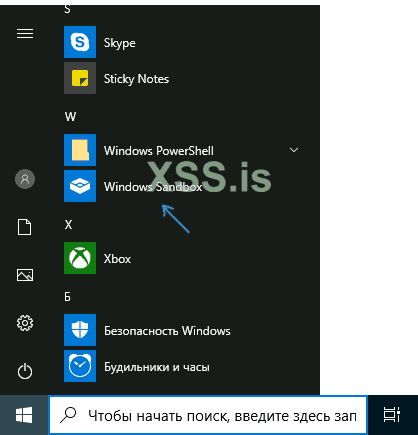
- On this Windows Sandbox is installed and ready to work: the corresponding item will appear in the "Start" menu.
- When you start the sandbox, a clean Windows 10 virtual machine starts with access to the network and the ability to safely run almost any programs inside (there is no access to your programs and files by default).
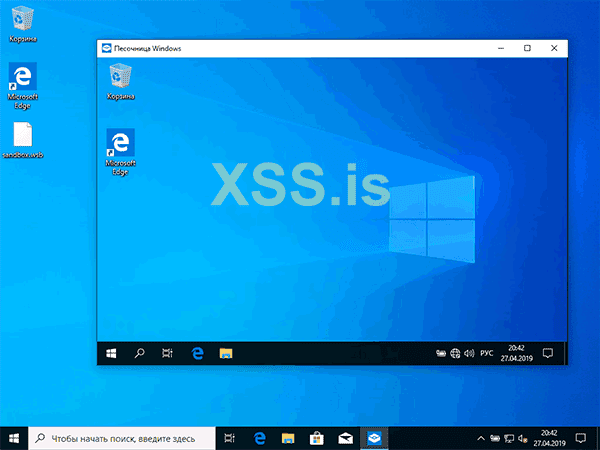
- PS When you close the sandbox, all files are deleted irrevocably. If the "Windows Sandbox" item is inactive, and when you hover over it with the mouse you see the message "Windows Sandbox cannot be installed: the processor does not have the required virtualization capabilities", this may indicate that virtualization is disabled in BIOS / UEFI or your the computer is equipped with an inexpensive processor without virtualization support
Give some thumbs up ?
