

Узнайте, как преобразовать любой код в стабильный шелл-код с помощью Visual Studio 2019 и C++ в простых шагах!
В этой статье мы будем использовать Visual Studio 2019 и C++ для создания независимого машинного 64-битного кода, который можно использовать в качестве шелл-кода, Эта операция требует особых навыков, но после прочтения статьи вы сможете очень легко создать свой шелл-код...
Введение
Шелл-код - одна из самых популярных методик в атаках и взломах, посмотрим что о нём говорится в Wikipedia:
Начнём!
Предисловие
Причины, по которым я взялся за всё это:
1. Прокачать свои знания в программировании и в понимании как работает компьютер;
2. Улучшить безопасность моих программ и игр;
3. Это чертовски весело!
Важное замечание! Всё это можно использовать в плохих целях, но как вы знаете... Это меч! Защитить или навредить... решать вам!
Используя эту технику, вы сможете преобразовать критические и важные участки вашего кода (такие, как проверка лицензии) в шелл-код и зашифровать его в вашем приложении. Когда вам нужно проверить лицензию, вы просто расшифровываете код в куче, выполняете его. После проверки - освобождаете память... это осложняет отладку и не позволяет выполнить статический анализ приложения.
Подготовка проекта и окружения
1. Необходимые инструменты и программы
- Visual Studio 2019
- VC++ Build Tools
- CFF Explorer (PE Viewer/Editor)
- HxD (Hex Editor)
2. Создаём пустые проекты
1. Запускаем Visual Studio 2019
2. Создаём два проекта C++
3. С именами code_gen и code_tester
4. В свойствах конфигурации проекта code_gen установите Тип конфигурации: "Динамическая библиотека (.dll)"
5. Для code_tester - "Приложение (.exe)"
6. Установите для обоих проектов Конфигурацию Release и Платформу x64.
3. Настройка DLL, независимой от API
В данный момент проект code_gen имеет зависимость стандартной библиотеки C++. Выполните следующие шаги, чтобы сделать его полностью независимым.
1 Добавьте cpp-файл (не с-файл) в проект code_gen и напишите следующий код:
2 В свойствах проекта code_gen настройте следующие опции:
- Дополнительно > Использовать отладочные библиотеки: Нет
- Дополнительно > Оптимизация всей программы: Без оптимизации всей программы
- C/C++ > Общие > Формат отладочной информации: Нет
- C/C++ > Общие > Проверка SDL: Нет (/sdl-)
- C/C++ > Создание кода > Включить C++ исключения: Нет
- C/C++ > Создание кода > Библиотека времени выполнения: Многопоточная (/MT)
- C/C++ > Создание кода > Проверка безопасности: Отключить проверку безопасности (/GS-)
- C/C++ > Язык > Режим совместимости: Нет (/permissive)
- C/C++ > Язык > Стандарт языка C++: Стандарт ISO C++17 (/std:c++17)
- Компоновщик > Ввод > Дополнительные зависимости: Пусто
- Компоновщик > Ввод > Игнорировать все стандартные библиотеки: Да (/NODEFAULTLIB)
- Компоновщик > Отладка > Создавать отладочную информацию: Нет
- Компоновщик > Отладка > Создавать файл сопоставления: Да (/MAP)
- Компоновщик > Система > Подсистема: Машинный код (/SUBSYSTEM:NATIVE)
- Компоновщик > Оптимизация > Ссылки: Нет (/OPT:NOREF)
- Компоновщик > Дополнительно > Точка входа: _code
- Компоновщик > Дополнительно > Без точки входа: Да (/NOENTRY)
4. Настройка текстового приложения
Приложение не требует какой-то специфичной настройки, сейчас наше внимание сосредоточено на написании кода, модификации и последующем запуске.
Добавьте main.cpp в проект code_tester и напишите там следующий код:
Итак, всё готово!
Обычный метод
Давайте начнём с чего-то небольшого и простого, используя только математику, изменим функцию _code на указанную:
Сейчас компилируем и в результате вы должны получить DLL-файл, если же нет... проверьте все пункты выше и убедитесь, что всё сделано без ошибок, что конфигурация корректна.
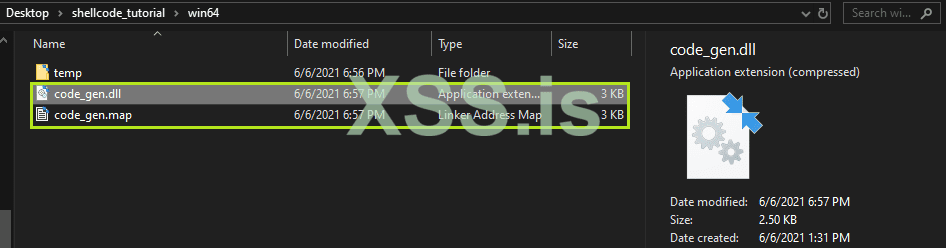
Нам нужны только два файла: .dll и .map. В dll находится исполняемый код, а map-файл содержит информацию об адресах, используемых компоновщиком, но наиболее важное его содержимое - это виртуальные адреса и смещения кода, на которые наш код отображается.
1. Открываем файл code_gen.dll в CFF Explorer.
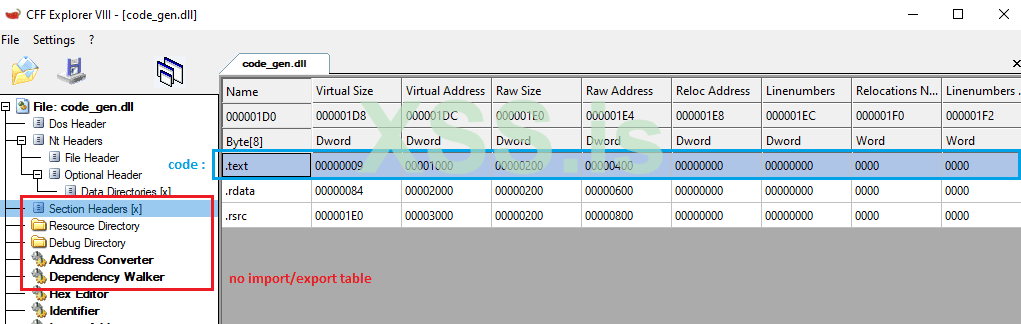
Как можно заметить, у нашей DLL нет таблица адресов Импорта/Экспорта (IAT/EAT) и только три секции, последние две из них не нужны: одна содержит данные для отладки, вторая - ресурсы, такие как информация о версии файла. Код, который мы ищем, находится в секции .text.
И единственная информация, которая нам нужна в этой секции - Virtual Address и Raw Address.
2. Откройте code_gen.dll в HxD или любом другом шестнадцатеричном редакторе, нажмите Ctrl+G или выберите Search->Goto... и введите Raw Address... Это тот самый код, который мы ищем! Довольно просто, не так ли?
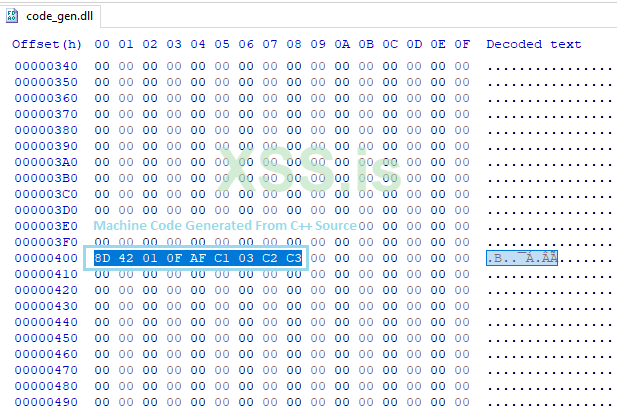
Опкод 0xC3 - это инструкция RETN, которая указывает нам на конец нашей функции, все прочие нулевые байты не нужны.
3. Выделите их, скопируйте через меню Edit->Copy as->C и вставьте в main.cpp.
Код должен выглядеть следующим образом:
4. Сейчас мы должны создать прототип нашей функции, добавьте этот код в глобальной области видимости:
5. Пришло время установить на данные флаг выполнения, чтобы процессор мог выполнить наш код, добавьте следующее в функцию main:
6. И последний шаг, чтобы выполнение происходило проще, добавьте этот код до возврата из функции:
7. Скомпилируйте code_tester и запустите его, бац! Это работает! Результат должен выглядеть так:
Теперь... перейдём на следующий уровень!
Продвинутый метод
Выше у нас был простой код, но когда он станет более сложным (сжатие, шифрование, проверка лицензии и т.п.), то будет уже не так просто получить смещение по любому адресу в двоичном коде. Поэтому нам нужен map-файл.
Также, мы не использовали библиотеку времени исполнения и WinAPI. Но в программах все это нужно всегда. Этот момент мы обсудим во второй части статьи.
В этой части статьи мы создадим два шелл-кода: один для шифрования буфера, а второй для дешифрования буфера.
1. Склонируйте репозиторий tiny_aes_c к себе, скопируйте оттуда только aes.c и aes.h в свой проект code_gen.
2. Измените code.cpp следующим образом:
3. Напишите код шифрования следующим образом и не используйте данные на стеке - у вас не должно быть секции .data в вашем DLL-файле после компиляции. Посмотрите на код, в нём все данные расположены внутри функции.
Вот код для шифрования:
4. Скомпилируйте и откройте code_gen.dll в CFF Explorer:
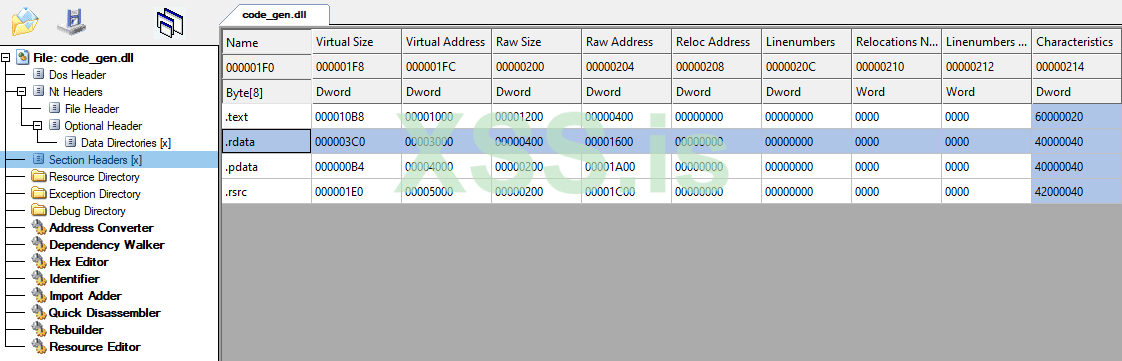
Как вы видите, появилась секция .rdata, причина её появления - данные из файла tiny-aes-c для массивов sbox и rsbox. Без этих данных код работать не будет.
Ручное объединение двух секций, исправление каждого адреса в коде довольно сложно сделать без ошибок и потребуется очень много времени, но...
Есть одна волшебная директива компилятора, которая нам здесь поможет!
Добавьте следующий код в начало code.cpp:
5. Скомпилируйте и снова откройте code_gen.dll в CFF Explorer:
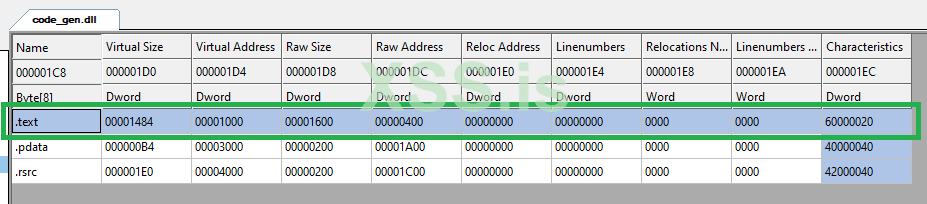
Бум! Исправлено, сейчас наш код расположен за данными, которые ему нужны.
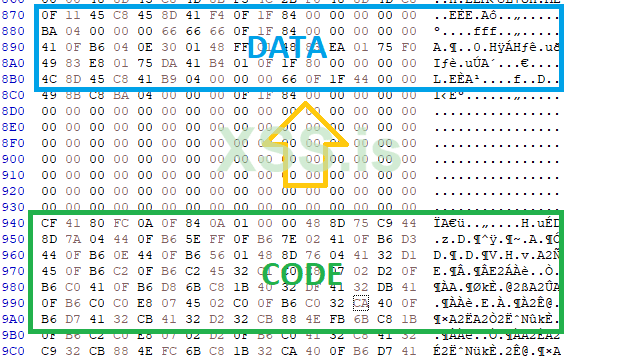
6. Откройте code_gen.dll в HxD или любом другом шестнадцатеричном редакторе, нажмите Ctrl+G или выберите Search->Goto... и выберите секцию .text. Нажмите Ctrl+E или выберите Edit->Select Block, введите реальный размер секции .text. Скопируйте буфер как Си-массив и вставьте его в новый заголовочный файл проекта code_tester как shellcode_encrypter_raw.h. Имя массива должно совпадать с именем файла.
7. Измените в проекте code_tester файл main.cpp следующим образом:
8. OK, следующий шаг - найти смещение функции _encrypt в шелл-коде. Откройте code_gen.map в текстовом редакторе (я использую Notepad++).
9. Ищем _encrypt и должны найти эту строчку:
10. Вернёмся в CFF Explorer и найдём там виртуальный адрес секции .text, который равен 0x1000. Всё что нам остаётся сделать - вычесть один из другого и получить в результате 0x12C0. Это и есть искомое смещение. Обновим наш код:
11. Скомпилируйте и проверьте его с помощью командной строки:
[ЯДЕРНЫЙ ВЗРЫВ!]
Результат выполнения - OK. Это означает, что полученный файл полностью зашифрован алгоритмом AES-256!
12. Итак, чтобы сгенерировать шелл-код дешифратора, выполните точно эти шаги, за исключением:
- Используйте AES_CBC_decrypt_buffer вместо AES_CBC_encrypt_buffer;
- Измените прототип функции следующим образом:
Вот как должен выглядеть код в main.cpp:
13. Скомпилируйте и проверьте его с помощью командной строки:
Вот и всё! Теперь у вас есть два небольших шелл-кода, которые выполняют шифрование/дешифрование!
После использования код можно затереть. Также, вы можете паковать/шифровать его разными ключами, распаковывая/расшифровывая лишь по мере необходимости.
Заключение
Это конец первой части. Во второй части мы создадим EXE/DLL упаковщика/протектора с нуля, используя только C++ тем же способом, но с намного более сложными вещами, такими как resolving, обфускация, перенаправления вызовов и т.д.
Надеюсь, вам понравилась эта статья. Не стесняйтесь задавать свои вопросы в комментариях. Следите за обновлениями!
---
Автор статьи - The Ænema. Оригинал тут - https://www.codeproject.com/Articles/5304605/Creating-Shellcode-from-any-Code-Using-Visual-Stud
Переведено специально для xss.pro.
Мой первый перевод в жизни, буду благодарен за указание неточностей (в личку). Жду вторую часть, постараюсь и её перевести. Всем новых знаний!
В этой статье мы будем использовать Visual Studio 2019 и C++ для создания независимого машинного 64-битного кода, который можно использовать в качестве шелл-кода, Эта операция требует особых навыков, но после прочтения статьи вы сможете очень легко создать свой шелл-код...
Введение
Шелл-код - одна из самых популярных методик в атаках и взломах, посмотрим что о нём говорится в Wikipedia:
Итак. Всё это очень правильно, но я понимаю шелл-код как кусок кода, который может быть выделен и выполнен динамически - без зависимостей от API операционной системы или рантайма. Могу быть не прав, но это лучшее определение того, что мы сейчас будем делать, поэтому...Шелл-код обычно внедряется в память эксплуатируемой программы, после чего на него передается управление путём переполнения стека, или при переполнении буфера в куче, или используя атаки форматной строки. Передача управления шелл-коду осуществляется перезаписью адреса возврата в стеке адресом внедрённого шелл-кода, перезаписью адресов вызываемых функций или изменением обработчиков прерываний. Результатом этого является выполнение шелл-кода, который открывает командную строку для использования взломщиком.
Начнём!
Предисловие
Причины, по которым я взялся за всё это:
1. Прокачать свои знания в программировании и в понимании как работает компьютер;
2. Улучшить безопасность моих программ и игр;
3. Это чертовски весело!
Важное замечание! Всё это можно использовать в плохих целях, но как вы знаете... Это меч! Защитить или навредить... решать вам!
Используя эту технику, вы сможете преобразовать критические и важные участки вашего кода (такие, как проверка лицензии) в шелл-код и зашифровать его в вашем приложении. Когда вам нужно проверить лицензию, вы просто расшифровываете код в куче, выполняете его. После проверки - освобождаете память... это осложняет отладку и не позволяет выполнить статический анализ приложения.
Подготовка проекта и окружения
1. Необходимые инструменты и программы
- Visual Studio 2019
- VC++ Build Tools
- CFF Explorer (PE Viewer/Editor)
- HxD (Hex Editor)
2. Создаём пустые проекты
1. Запускаем Visual Studio 2019
2. Создаём два проекта C++
3. С именами code_gen и code_tester
4. В свойствах конфигурации проекта code_gen установите Тип конфигурации: "Динамическая библиотека (.dll)"
5. Для code_tester - "Приложение (.exe)"
6. Установите для обоих проектов Конфигурацию Release и Платформу x64.
3. Настройка DLL, независимой от API
В данный момент проект code_gen имеет зависимость стандартной библиотеки C++. Выполните следующие шаги, чтобы сделать его полностью независимым.
1 Добавьте cpp-файл (не с-файл) в проект code_gen и напишите следующий код:
C:
extern "C" bool _code()
{
    return true;
}
2 В свойствах проекта code_gen настройте следующие опции:
- Дополнительно > Использовать отладочные библиотеки: Нет
- Дополнительно > Оптимизация всей программы: Без оптимизации всей программы
- C/C++ > Общие > Формат отладочной информации: Нет
- C/C++ > Общие > Проверка SDL: Нет (/sdl-)
- C/C++ > Создание кода > Включить C++ исключения: Нет
- C/C++ > Создание кода > Библиотека времени выполнения: Многопоточная (/MT)
- C/C++ > Создание кода > Проверка безопасности: Отключить проверку безопасности (/GS-)
- C/C++ > Язык > Режим совместимости: Нет (/permissive)
- C/C++ > Язык > Стандарт языка C++: Стандарт ISO C++17 (/std:c++17)
- Компоновщик > Ввод > Дополнительные зависимости: Пусто
- Компоновщик > Ввод > Игнорировать все стандартные библиотеки: Да (/NODEFAULTLIB)
- Компоновщик > Отладка > Создавать отладочную информацию: Нет
- Компоновщик > Отладка > Создавать файл сопоставления: Да (/MAP)
- Компоновщик > Система > Подсистема: Машинный код (/SUBSYSTEM:NATIVE)
- Компоновщик > Оптимизация > Ссылки: Нет (/OPT:NOREF)
- Компоновщик > Дополнительно > Точка входа: _code
- Компоновщик > Дополнительно > Без точки входа: Да (/NOENTRY)
Замечание: изменяя точку входа на _code, мы предотвращаем создание DLL, содержащей только ресурсы, так же компоновщик не будет использовать стандартный main/DllMain в качестве точки входа.
4. Настройка текстового приложения
Приложение не требует какой-то специфичной настройки, сейчас наше внимание сосредоточено на написании кода, модификации и последующем запуске.
Добавьте main.cpp в проект code_tester и напишите там следующий код:
C++:
// main.cpp

#include <windows.h>
#include <iostream>

using namespace std;

int main()
{
    return EXIT_SUCCESS;
}Обычный метод
Давайте начнём с чего-то небольшого и простого, используя только математику, изменим функцию _code на указанную:
C++:
extern "C" int _code(int x, int y)
{
    return x * y + (x + y);
}Нам нужны только два файла: .dll и .map. В dll находится исполняемый код, а map-файл содержит информацию об адресах, используемых компоновщиком, но наиболее важное его содержимое - это виртуальные адреса и смещения кода, на которые наш код отображается.
1. Открываем файл code_gen.dll в CFF Explorer.
Как можно заметить, у нашей DLL нет таблица адресов Импорта/Экспорта (IAT/EAT) и только три секции, последние две из них не нужны: одна содержит данные для отладки, вторая - ресурсы, такие как информация о версии файла. Код, который мы ищем, находится в секции .text.
И единственная информация, которая нам нужна в этой секции - Virtual Address и Raw Address.
2. Откройте code_gen.dll в HxD или любом другом шестнадцатеричном редакторе, нажмите Ctrl+G или выберите Search->Goto... и введите Raw Address... Это тот самый код, который мы ищем! Довольно просто, не так ли?
Опкод 0xC3 - это инструкция RETN, которая указывает нам на конец нашей функции, все прочие нулевые байты не нужны.
3. Выделите их, скопируйте через меню Edit->Copy as->C и вставьте в main.cpp.
Код должен выглядеть следующим образом:
C++:
#include <windows.h>
#include <iostream>

using namespace std;

unsigned char _code_raw[9] = { 0x8D, 0x42, 0x01, 0x0F, 0xAF, 0xC1, 0x03, 0xC2, 0xC3 };

int main()
{
    return EXIT_SUCCESS;
}
4. Сейчас мы должны создать прототип нашей функции, добавьте этот код в глобальной области видимости:
C:
typedef int(*_code_t)(int, int);5. Пришло время установить на данные флаг выполнения, чтобы процессор мог выполнить наш код, добавьте следующее в функцию main:
C++:
DWORD old_flag;
VirtualProtect(_code_raw, sizeof _code_raw, PAGE_EXECUTE_READWRITE, &old_flag);
6. И последний шаг, чтобы выполнение происходило проще, добавьте этот код до возврата из функции:
C++:
_code_t fn_code = (_code_t)(void*)_code_raw;
int x = 500; int y = 1200;
printf("Result of function : %d\n", fn_code(x, y));
7. Скомпилируйте code_tester и запустите его, бац! Это работает! Результат должен выглядеть так:
Что ж, это был очень простой способ без аллокаций памяти, какого-либо шифрования/дешифрования или сжатия/распаковки. Но всё же достаточно хороший, чтобы появилось понимание что здесь происходит.Result of function : 601700
Теперь... перейдём на следующий уровень!
Продвинутый метод
Выше у нас был простой код, но когда он станет более сложным (сжатие, шифрование, проверка лицензии и т.п.), то будет уже не так просто получить смещение по любому адресу в двоичном коде. Поэтому нам нужен map-файл.
Также, мы не использовали библиотеку времени исполнения и WinAPI. Но в программах все это нужно всегда. Этот момент мы обсудим во второй части статьи.
В этой части статьи мы создадим два шелл-кода: один для шифрования буфера, а второй для дешифрования буфера.
1. Склонируйте репозиторий tiny_aes_c к себе, скопируйте оттуда только aes.c и aes.h в свой проект code_gen.
2. Измените code.cpp следующим образом:
C++:
// code.cpp
extern "C"
{
    #include "aes.h"

    bool _encrypt(void* data, size_t size)
    {
        // Encryption Code Area //
        return true;
    }
}tiny-aes-c основан на языке C, и в нём используются лишь некоторые функции среды выполнения C, которые компилятор оптимизирует до чистого машинного кода. Это означает, что наш шелл-код будет оптимизирован компилятором. И это хорошо!Замечание: можно не использовать extern "C", если измените имя файла code.cpp на code.c, но в дальнейшем вы не сможете использовать ни одну функцию C++. В любом случае, большинство библиотек C++ основаны на C, и все они совместимы друг с другом.
3. Напишите код шифрования следующим образом и не используйте данные на стеке - у вас не должно быть секции .data в вашем DLL-файле после компиляции. Посмотрите на код, в нём все данные расположены внутри функции.
Вот код для шифрования:
C++:
// code.cpp
extern "C"
{
    #include "aes.h"

    bool _encrypt(void* data, size_t size)
    {
        // Allocate data on heap
        struct AES_ctx ctx;
        unsigned char key[32] = {
        0xBB, 0x17, 0xCA, 0x8C, 0x69, 0x7F, 0xA1, 0x89,
        0x3B, 0xCF, 0xA8, 0x12, 0x34, 0x6F, 0xB6, 0xE8,
        0x79, 0x89, 0xDA, 0xD0, 0x0B, 0xA9, 0xA1, 0x1B,
        0x5B, 0x38, 0xD0, 0x4A, 0x20, 0x4D, 0xB8, 0x0E};
        unsigned char iv[16] = {
        0xA3, 0xF3, 0xD4, 0xC5, 0x5E, 0xCD, 0x41, 0xA6,
        0x22, 0xC9, 0x8D, 0xE5, 0xA3, 0xBB, 0x29, 0xF1};

        // Initialize encrypt context
        AES_init_ctx_iv(&ctx, key, iv);

        // Encrypt buffer
        AES_CBC_encrypt_buffer(&ctx, (uint8_t*)data, size);
        return true;
    }
}
4. Скомпилируйте и откройте code_gen.dll в CFF Explorer:
Как вы видите, появилась секция .rdata, причина её появления - данные из файла tiny-aes-c для массивов sbox и rsbox. Без этих данных код работать не будет.
Ручное объединение двух секций, исправление каждого адреса в коде довольно сложно сделать без ошибок и потребуется очень много времени, но...
Есть одна волшебная директива компилятора, которая нам здесь поможет!
Добавьте следующий код в начало code.cpp:
C++:
#pragma comment(linker, "/merge:.rdata=.text")5. Скомпилируйте и снова откройте code_gen.dll в CFF Explorer:
Бум! Исправлено, сейчас наш код расположен за данными, которые ему нужны.
6. Откройте code_gen.dll в HxD или любом другом шестнадцатеричном редакторе, нажмите Ctrl+G или выберите Search->Goto... и выберите секцию .text. Нажмите Ctrl+E или выберите Edit->Select Block, введите реальный размер секции .text. Скопируйте буфер как Си-массив и вставьте его в новый заголовочный файл проекта code_tester как shellcode_encrypter_raw.h. Имя массива должно совпадать с именем файла.
Замечание: чтобы облегчить извлечение кода, вы можете прямо в CFF Explorer щёлкнуть правую кнопку мышки на секции и выбрать пункт Dump section. Но иногда размер секции больше ожидаемого, поэтому ручной способ предпочтительней.
7. Измените в проекте code_tester файл main.cpp следующим образом:
C++:
// main.cpp
#include <windows.h>
#include <stdio.h>
#include <fstream>
#include <vector>
#include "shellcode_encrypter_raw.h"

using namespace std;
typedef bool(*_encrypt)(void*, size_t);

#define ENC_SC_RAW shellcode_encrypter_raw
#define FUNCTION_OFFSET 0

int main(int argc, char* argv[])
{
    // Check for commands count
    if (argc != 4) return EXIT_FAILURE;

    // Get commands values
    char* input_file   = argv[1];
    char* process_mode = argv[2];
    char* output_file  = argv[3];

    // Change code protection
    DWORD old_flag;
    VirtualProtect(ENC_SC_RAW, sizeof ENC_SC_RAW, PAGE_EXECUTE_READWRITE, &old_flag);

    // Declaring encrypt function
    _encrypt encrypt = (_encrypt)(void*)&ENC_SC_RAW[FUNCTION_OFFSET];

    // Read input file to vector buffer
    ifstream input_file_reader(argv[1], ios::binary);
    vector<uint8_t> input_file_buffer(istreambuf_iterator<char>(input_file_reader), {});

    // Add padding to input file data
    for (size_t i = 0; i < 16; i++)
         input_file_buffer.insert(input_file_buffer.begin(), 0x0);
    for (size_t i = 0; i < 16; i++) input_file_buffer.push_back(0x0);

    // Encrypting file buffer
    if (strcmp(process_mode, "-e") == 0) encrypt(input_file_buffer.data(),
                                         input_file_buffer.size());

    // Save encrypted buffer to output file
    fstream file_writter;
    file_writter.open(output_file, ios::binary | ios::out);
    file_writter.write((char*)input_file_buffer.data(), input_file_buffer.size());
    file_writter.close();

    // Code successfully executed
    printf("OK"); return EXIT_SUCCESS;
}
8. OK, следующий шаг - найти смещение функции _encrypt в шелл-коде. Откройте code_gen.map в текстовом редакторе (я использую Notepad++).
9. Ищем _encrypt и должны найти эту строчку:
Мы узнали относительный виртуальный адрес нашей функции (0x22C0), но нам нужен фактический адрес.0001:000012c0 _encrypt 00000001800022C0 f code.obj
10. Вернёмся в CFF Explorer и найдём там виртуальный адрес секции .text, который равен 0x1000. Всё что нам остаётся сделать - вычесть один из другого и получить в результате 0x12C0. Это и есть искомое смещение. Обновим наш код:
C++:
#define FUNCTION_OFFSET 0x12C011. Скомпилируйте и проверьте его с помощью командной строки:
code_tester.exe some_image.jpg -e some_image_encrypted.jpg
[ЯДЕРНЫЙ ВЗРЫВ!]
Результат выполнения - OK. Это означает, что полученный файл полностью зашифрован алгоритмом AES-256!
12. Итак, чтобы сгенерировать шелл-код дешифратора, выполните точно эти шаги, за исключением:
- Используйте AES_CBC_decrypt_buffer вместо AES_CBC_encrypt_buffer;
- Измените прототип функции следующим образом:
C++:
typedef bool(*_crypt)(void*, size_t);Вот как должен выглядеть код в main.cpp:
C++:
// main.cpp
#include <windows.h>
#include <stdio.h>
#include <fstream>
#include <vector>
#include "shellcode_encrypter_raw.h"
#include "shellcode_decrypter_raw.h"

using namespace std;
typedef bool(*_crypt)(void*, size_t);

#define ENC_SC_RAW shellcode_encrypter_raw
#define DEC_SC_RAW shellcode_decrypter_raw
#define FUNCTION_OFFSET 0x12C0

int main(int argc, char* argv[])
{
    // Check for commands count
    if (argc != 4) return EXIT_FAILURE;

    // Get commands values
    char* input_file   = argv[1];
    char* process_mode = argv[2];
    char* output_file  = argv[3];

    // Validate process mode
    if (strcmp(process_mode, "-e") != 0 &&
        strcmp(process_mode, "-d") != 0) return EXIT_FAILURE;

    // Change code protection
    DWORD old_flag;
    VirtualProtect(ENC_SC_RAW, sizeof ENC_SC_RAW, PAGE_EXECUTE_READWRITE, &old_flag);
    VirtualProtect(DEC_SC_RAW, sizeof DEC_SC_RAW, PAGE_EXECUTE_READWRITE, &old_flag);

    // Declaring encrypt function
    _crypt encrypt = (_crypt)(void*)&ENC_SC_RAW[FUNCTION_OFFSET];
    _crypt decrypt = (_crypt)(void*)&DEC_SC_RAW[FUNCTION_OFFSET];

    // Read input file to vector buffer
    ifstream input_file_reader(argv[1], ios::binary);
    vector<uint8_t> input_file_buffer(istreambuf_iterator<char>(input_file_reader), {});

    // Add padding to input file data
    if(strcmp(process_mode, "-d") == 0) goto SKIP_PADDING;
    for (size_t i = 0; i < 16; i++)
         input_file_buffer.insert(input_file_buffer.begin(), 0x0);
    for (size_t i = 0; i < 16; i++) input_file_buffer.push_back(0x0);

    // Encrypting/Decrypting file buffer
    SKIP_PADDING:
    if (strcmp(process_mode, "-e") == 0) encrypt(input_file_buffer.data(),
                                                 input_file_buffer.size());
    if (strcmp(process_mode, "-d") == 0) decrypt(input_file_buffer.data(),
                                                 input_file_buffer.size());

    // Save encrypted buffer to output file
    fstream file_writter;
    file_writter.open(output_file, ios::binary | ios::out);
    if (strcmp(process_mode, "-e") == 0)
        file_writter.write((char*)input_file_buffer.data(), input_file_buffer.size());
    if (strcmp(process_mode, "-d") == 0)
        file_writter.write((char*)&input_file_buffer[16],
                            input_file_buffer.size() - 32);
    file_writter.close();

    // Code successfully executed
    printf("OK"); return EXIT_SUCCESS;
}
13. Скомпилируйте и проверьте его с помощью командной строки:
code_tester.exe some_image_encrypted.jpg -d some_image_decrypted.jpg
Вот и всё! Теперь у вас есть два небольших шелл-кода, которые выполняют шифрование/дешифрование!
После использования код можно затереть. Также, вы можете паковать/шифровать его разными ключами, распаковывая/расшифровывая лишь по мере необходимости.
Заключение
Это конец первой части. Во второй части мы создадим EXE/DLL упаковщика/протектора с нуля, используя только C++ тем же способом, но с намного более сложными вещами, такими как resolving, обфускация, перенаправления вызовов и т.д.
Надеюсь, вам понравилась эта статья. Не стесняйтесь задавать свои вопросы в комментариях. Следите за обновлениями!
---
Автор статьи - The Ænema. Оригинал тут - https://www.codeproject.com/Articles/5304605/Creating-Shellcode-from-any-Code-Using-Visual-Stud
Переведено специально для xss.pro.
Мой первый перевод в жизни, буду благодарен за указание неточностей (в личку). Жду вторую часть, постараюсь и её перевести. Всем новых знаний!
Вложения
-
01_shellcode_tutorial_starter_kit_vs16_x64.zip3.1 КБ · Просмотры: 46
-
02_shellcode_tutorial_basic_approach_vs16_x64.zip9.4 КБ · Просмотры: 43
-
03_shellcode_tutorial_advanced_approach_chapter1_vs16_x64.zip32.7 КБ · Просмотры: 40
-
04_shellcode_tutorial_advanced_approach_chapter2_vs16_x64_version_2.zip39.4 КБ · Просмотры: 46


