

DLL Hijacking From a Security Researcher’s Perspective
First of all, as a Windows bug hunter, if you want to find privilege escalation vulnerabilities on the operating system itself, you’ll often want to start from a blank page, with a clean installation of Windows. The objective is to prevent side-effects that could be caused by the installation of third-party applications. That’s already a big difference between a researcher and a pentester.Previously, I said that a default installation of Windows is not vulnerable to DLL hijacking because all the directories that are used in the DLL search are configured with proper permissions so, how this technique can still be useful?
It turns out this technique comes in very handy when it comes to privileged file operations abuse for example, especially arbitrary file write. Let’s say that you found a vulnerability in a service that allows you to move any file you own to any location on the filesystem in the context of NT AUTHORITY\SYSTEM. That’s cool but that’s somewhat limited. What you really want to achieve is arbitrary code execution as NT AUTHORITY\SYSTEM. At this point, DLL hijacking is the missing piece that completes the puzzle.
An arbitrary file write vulnerability opens up many opportunities for DLL hijacking because you are not limited to the %PATH% directories (scenario #3), you could also consider hijacking a DLL in an application’s directory (scenario #2) or even in C:\Winows\System32 if it doesn’t exist there. Both DLL Sideloading and Phantom DLL Hijacking techniques can then be used.
If you search for DLL Sideloading opportunities using Process Monitor on a default installation of Windows, you’ll find a lot of them. Typically, any program which is not installed in C:\Windows\System32 and tries to load a DLL from this folder without specifying its full path will fall into this category.
Enough with the theory, let’s take a real-life example! On the below screenshot, you can see that the WMI service loads the wbemcomn.dll library on startup:
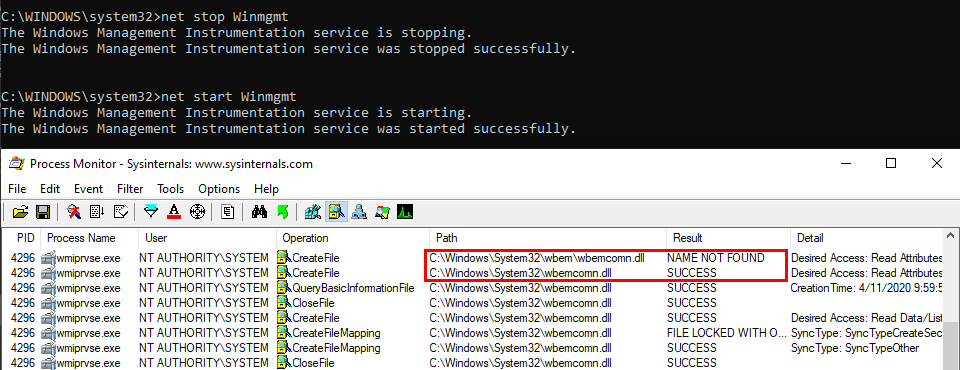
The first result is NAME NOT FOUND. That’s totally normal because wbemcomn.dll is a system library, its actual location is C:\Windows\System32\wbemcomn.dll. Though wmiprvse.exe tries to load it from C:\Windows\System32\wbem because this is the directory where it is installed.
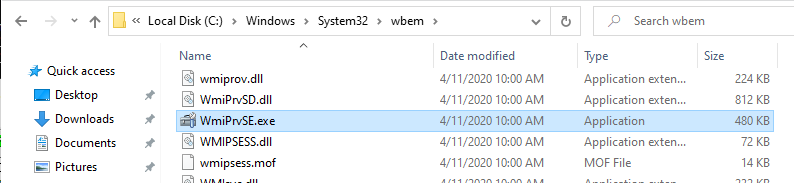
Therefore, provided that you found an arbitary file write vulnerability, you could plant a malicious version of wbemcomn.dll in C:\Windows\System32\wbem. After a machine reboot, your DLL would be loaded by the service as NT AUTHORITY\SYSTEM. Though in practice you wouldn’t rely on this particular DLL hijacking opportunity in your exploit for two major reasons:
- A reboot is required - Let’s say you found a vulnerability that allows you to move a file to an arbitrary location as SYSTEM. Ending you exploit chain with a machine reboot after having successfully planted your DLL would be a shame. You’d rather search for a DLL hijacking you can trigger on demand as a normal user.
- Denial of Service - Let’s say that you finally decided to plant your DLL in the wbem folder because you didn’t find a better candidate. After a machine reboot, your DLL is properly loaded by the service and you get your arbitary code execution as SYSTEM. That’s cool but what about the service? Congratulations, you’ve just crashed it because it wasn’t able to import its required dependencies. Again that’s a shame. One could argue that you could craft a Proxy DLL in order to address this issue. Though in practice this would add to your exploit development workload so you want to avoid that as far as possible
- It could be triggered by a normal user through RPC and you could even choose the name of the DLL you wanted to load. As long as it was in the System32 folder, it would be loaded by the service.
- You could safely execute your own code without risking a service crash.
- On top of that, you didn’t have to write your code in DllMain().
That’s it for DLL hijacking in the context of Windows security research. What about pentesters now?
DLL Hijacking From a Pentester’s Perspective
In the context of a pentest, the initial conditions are usually very different. You are given an environment to compromise and you have to adpat based on what you find along the way. Finding a 0-day vulnerability or leveraging the last privilege escalation exploit that was released publicly is usually the option of last resort. The first things you’re looking for are system misconfigurations. Based on my own experience, I’d say that it probably represents 80% of the job.Security issues caused by misconfigurations are common in corporate environments. That is to some extent quite understandable because installing an operating system without any additional software is pretty useless. And sometimes, these third-party applications introduce vulnerabilities either because they are not installed correctly or they are themselves vulnerable.
Based on what I explained previously, I’ll discuss the two most common DLL hijacking scenarios you’ll face. Now for the setup, here is a common mistake I see very often in corporate environments: a third-party application is installed at the root of the main partition (C:\) or is installed on a seperate partition (D:\ for example).

If you don’t already know that, folders that are created at the root of a partition are granted permissive rights. They allow any “Authenticated User” to create files and folders in them. These permissions are then inherited by subdirectories by default. Therefore, if the program installer doesn’t take care of that or if the administrator doesn’t check them, there is a high chance that the application’s folder is vulnerable.
With this in mind, here are the two most common scenarios you’ll face:
- The program installer created a service which runs as NT AUTHORITY\SYSTEM and executes a program from this directory. In this example, we consider that the permissions of the executable itself are properly configured though. In this case, there is a high chance that it is vulnerable to DLL Sideloading. A local attacker could plant a Windows DLL that is used by this service in the application’s folder.
- The program installer added the application’s directory to the system’s %PATH%. This case is a bit different. You could still use DLL Sideloading in order to execute code in the context of any other user who would run this application but you could also achieve privilege escalation to SYSTEM. What you need in this case is Ghost DLL Hijacking because, as I explained before, a nonexistent DLL lookup will ultimately end up in the %PATH% directories.
But then, what are the criteria for finding the perfect candidate? They can be summarized in these three points:
- It tries to load a nonexistent DLL without specifying its full path.
- It doesn’t use a safe DLL search order.
- It runs as NT AUTHORITY\SYSTEM. Actually it’s not strictly required but I will consider only this case for simplicity. This particular subject will be discussed in an upcoming article.

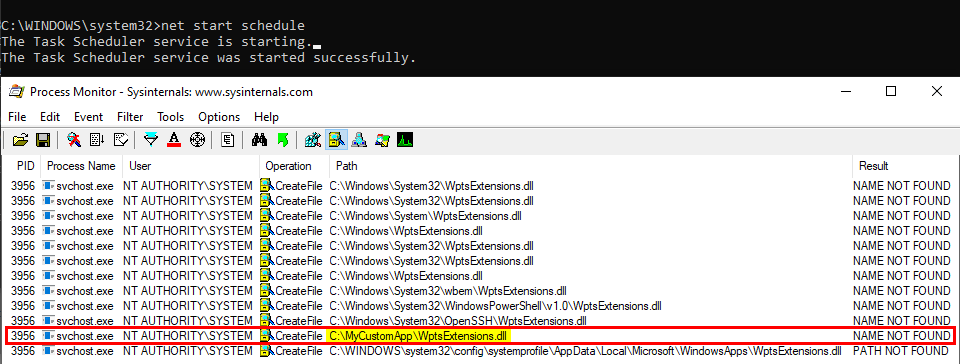
As you can see on the above screenshot, the service tried to load this DLL from C:\MyCustomApp because this directory was added to the system’s %PATH%. Since this directory is configured with weak permissions, any local user can therefore plant a malicious version of this DLL and thus execute code in the context of this service after a machine reboot.
Though, you have to be very careful with this particular DLL hijacking if you want to exploit it during a pentest. Indeed, when this DLL is loaded by the service, it’s not freed so you won’t be able to remove the file. One solution is to stop the service as soon as you get your SYSTEM shell, then remove the file and finally start the service again.Note: once again, the %PATH% is an environment variable so it varies depending on the user profile. As a consequence, the %PATH% of the NT AUTHORITY\SYSTEM account is often different from the %PATH% of a typical user account.
This example applies to Windows 10 workstation but what about Windows servers? Well I won’t discuss this here because I already did that in my previous post: Windows Server 2008R2-2019 NetMan DLL Hijacking. On all versions of Windows Server, starting with 2008 R2, the NetMan service is prone to DLL hijacking in the %PATH% directories because of the missing WLAN API. So, if you find yourself in the situation I just described, you could trigger this service in order to load your malicious DLL as SYSTEM, very convenient.Note: starting/stopping the Task Scheduler service requires SYSTEM privileges.
How to prevent DLL Hijacking?
Hopefully, I made it clear that, whatever the situation, DLL hijacking isn’t a vulnerability. It’s just an exploitation technique for getting code execution in the context of an application or a service for example. An exploitation technique on its own is useless though, what you need is a vulnerability such as weak folder permissions or a privileged file operation abuse.- Weak folder permissions - This issue can be caused by the installation of a third-party application. The installer should take care of that but that’s not always the case so system administrators should pay extra attention to this issue.
- Privileged file operation abuse - This issue is due to a flaw in the design of the application. In this case, developpers should review the code in order to prevent such operation on files and folders that can be controlled by normal users or implement impersonation when possible.
You’ve probably noticed that I used the simple LoadLibrary() function in my example but I didn’t say anything about the second option: LoadLibraryEx(). As a reminder, here is its prototype:
HMODULE LoadLibraryEx(LPCSTR lpLibFileName, HANDLE hFile, DWORD dwFlags);
The first parameter is still the name (or the path) of the DLL but there are two other arguments. According to the documentation, the second one - hFile - is reserved and should be set to NULL. The third argument, however, allows you to specify some flags that will affect the behavior of the function. In our case, the three most interesting flags are:
- LOAD_LIBRARY_SEARCH_APPLICATION_DIR - If this value is used, the application’s installation directory is searched for the DLL and its dependencies. Directories in the standard search path are not searched.
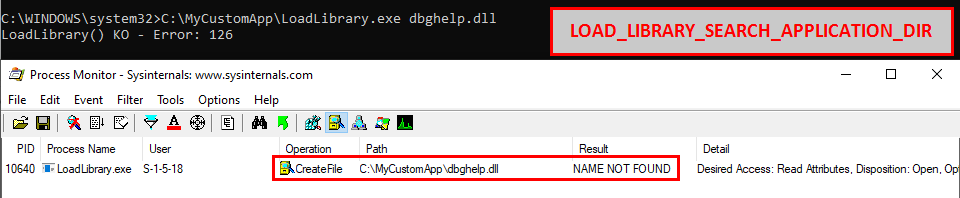
Indeed, if this flag is used, the search is limited to C:\MyCustomApp.
- LOAD_LIBRARY_SEARCH_SYSTEM32 - If this value is used, %windows%\system32 is searched for the DLL and its dependencies. Directories in the standard search path are not searched.

Indeed, if this flag is used, the search is limited to C:\Windows\System32.
- LOAD_LIBRARY_SEARCH_USER_DIRS - If this value is used, directories added using the AddDllDirectory() or the SetDllDirectory() function are searched for the DLL and its dependencies.

You probably know or you’ve probably heard about the IKEEXT DLL hijacking, that was originally published here in 2012 as far as I can tell. Starting with Windows Vista and up to Windows 8, the IKEEXT service loaded the missing wlbsctrl.dll library upon startup without specifying its full path and without using a safe DLL search order. Here is what it looked like back then:
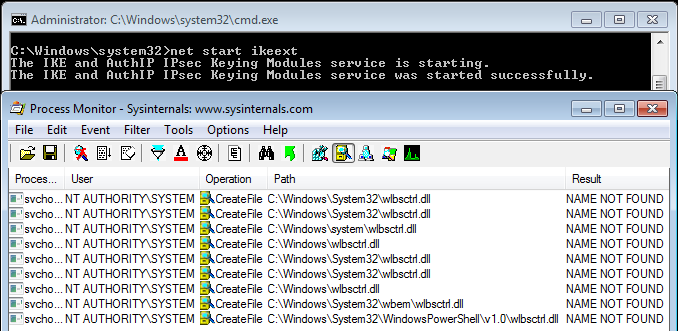
Of course, the researcher who initially reported this to Microsoft was given the same usual answer:
This is the official answer but then, starting with Windows 8.1, this DLL hijacking magically disappeared. Have you ever wondered how and why? Well, let me tell you that IKEEXT still tries to load this missing DLL, even in the latest version of Windows 10. But why don’t we talk about it anymore? First things first, here is what it looks like now on Windows 10:Microsoft has thoroughly investigated the claim and found that this is not a product vulnerability. In the scenario in question, the default security configuration of the system has been weakened by a third-party application. Customers who are concerned with this situation can remove the directory in question from PATH or restrict access to the third-party’s application directory to better protect themselves against these scenarios.
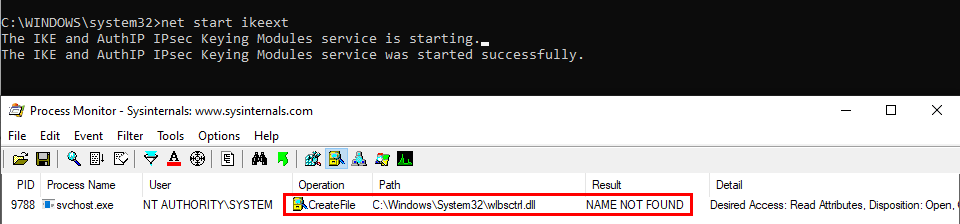
See? The service tries to load the DLL from C:\Windows\System32, doesn’t find it and then stops. Do you recognize this behavior? At this point, and based on what I’ve explained so far, you probably see where I’m going with this.
Let’s take a look at the two versions of the ikeext.dll file…
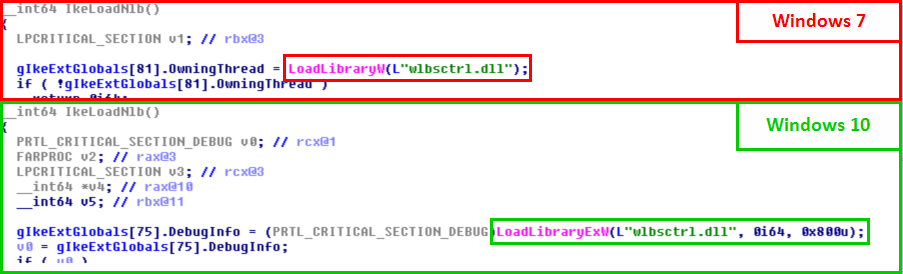
Of course, there is nothing magical about this. It turns out that Microsoft just silently patched this particular DLL hijacking by modifying the code of ikeext.dll. LoadLibraryEx() is now called instead of LoadLibrary() with the flag LOAD_LIBRARY_SEARCH_SYSTEM32, thus restricting the search to %windir%\System32.
LoadLibraryW(L"wlbsctrl.dll"); // Windows 7
LoadLibraryExW(L"wlbsctrl.dll", NULL, LOAD_LIBRARY_SEARCH_SYSTEM32); // Windows 10
What is the cost of this change: one line of code, yes ONLY ONE LINE OF CODE!!!
Conclusion
In the end, DLL hijacking (in the %PATH% directories) is not a vulnerability. It’s what Microsoft keeps replying over and over again to people who report them. OK, we get that and now what?In this post, I discussed two versions of this problem:
- DLL sideloading - If the permissions of an application’s folder are not properly configured, that’s the responsibility of this application only and, most of the time, the impact is limited to this application. So, there’s nothing special to say about it.
- DLL hijacking in the %PATH% directories - Again, if the permissions of an application’s folder are not properly configured, that’s the responsibility of this application. However, if it adds itself to the system’s %PATH%, that’s another story. In this case, the entire system is put at risk. Any Windows service that attempts to load a missing DLL without using a secure DLL search order can then be leveraged for privilege escalation. Is this a normal situation? I don’t think so.
In my opinion, a honest and constructive reply to people who report these issues would be something like: “Thank you for your report, we don’t consider this a critical or important security issue but we will address this in a future public release”. Perhaps I’m a bit naive and my point of view is biased because I don’t have the big picture. I don’t know. Anyway, I’ll conclude this post with an approximate translation of a quote from a French humorist: “If you’re absolutely one hundred percent sure about something, there’s a high chance you are wrong.”
Source: https://itm4n.github.io/windows-dll-hijacking-clarified/