

This approach is used by many APT (mainly by Chinese APTs to load shellcode in memory abusing this methods)
Whenever a “new” DLL hijacking / planting trick is posted on Twitter, it generates a lot of comments. “It’s not a vulnerability!” or “There is a lot of hijackable DLLs on Windows…” are the most common reactions. Though, people often don’t really speak about the same thing, hence the overall confusion which leads us nowhere. I don’t pretend to know the ultimate truth but I felt the need to write this post in order to hopefully clarify some points.
The main argument - lpLibFileName - is the path of the library file you want to load. Though, evaluating the full path of the file at runtime requires some work that we are not always willing to do, especially when the system can retrieve this path by itself. For example, instead of writing LoadLibrary("C:\Windows\System32\mylib.dll"), you could just write LoadLibrary("mylib.dll") and thus let the system find the DLL. This approach makes a lot of sense for third-party applications because they don’t necessarily know this path beforehand.
But then, if you don’t specify the full path of the library you want to load, how does the system know where to find it? The answer is simple, it uses a predefined search order, which is illustrated on the following diagram.
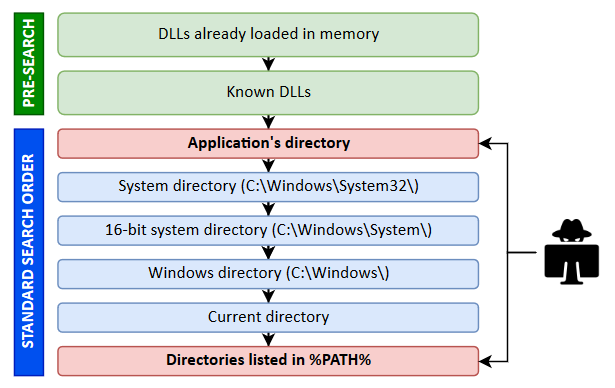
The locations in the “pre-search” are highlighted in green because they are safe (from a privilege escalation perspective). If the name of the DLL doesn’t correspond to a DLL which is already loaded in memory or if it’s not a known DLL, the actual search begins. The program will first try to load it from the application’s directory. If it succeeds, the search stops there otherwise it continues with the C:\Windows\System32 folder and so on…
Scenario 1: loading a DLL which exists in the application’s directory.
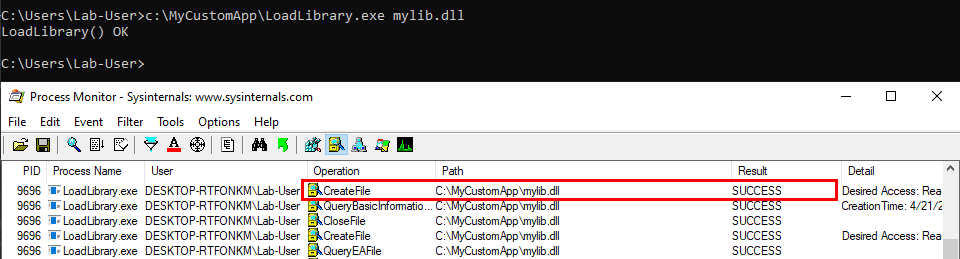
The program finds the DLL in its directory C:\MyCustomApp, that’s the first location in the search order so the library is loaded successfully. Everything is fine.

Scenario 2: loading a Windows DLL, dbghelp.dll for example.
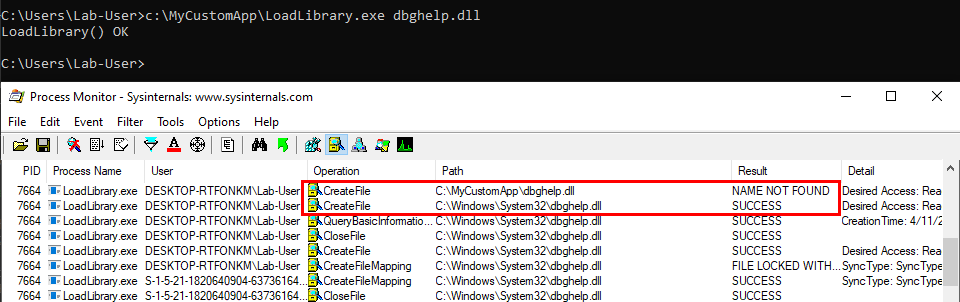
The program first tries to load the DLL from C:\MyCustomApp, the application’s directory, and doesn’t find it there. Therefore, it tries to load it from the system directory C:\Windows\System32, where this library is actually located.
We can see a potential issue here. What if the C:\MyCustomApp directory is configured with incorrect permissions and allows any user to add files? You guessed it, a malicious version of the DLL could be planted in this directory, allowing a local attacker to execute arbitrary code in the context of any other user who would run this application. Although that’s DLL search order hijacking, this first variant is also sometimes rightly or wrongly called DLL Sideloading. It’s mostly used by malwares but it can also be used for privilege escalation (see my article about DLL Proxying).
If the target DLL doesn’t exist, the program continues its search in the other Windows directories. If it can’t find it there, it tries to load it from the current directory. If it still can’t find it, it eventually searches for it in all the directories that are listed in the %PATH% environment variable.
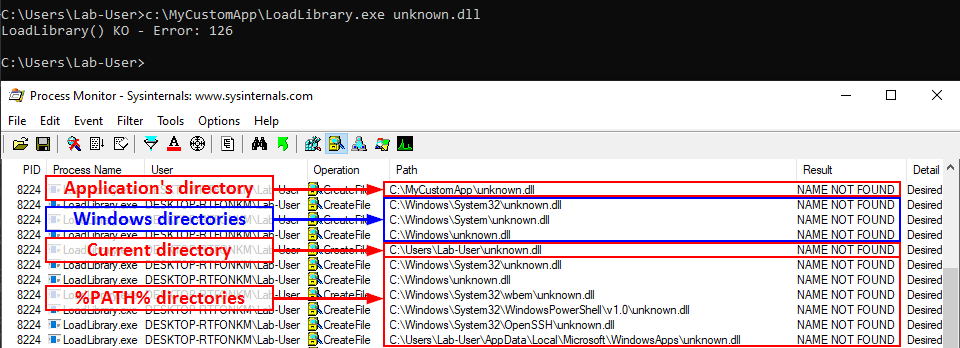
We can see that a lot of DLL hijacking opportunities arise there. If any of the %PATH% directories is writable, then a malicious version of the DLL could be planted and would be loaded by the application whenever it’s executed. This is another variant which is sometimes called Ghost DLL injection or Phantom DLL hijacking.
Scenario 4: loading a nonexistent DLL as NT AUTHORITY\SYSTEM
With this last scenario, we are slowly but surely approaching the objective. In the previous examples, I ran the executable as a low-privileged user so that’s not representative of a privilege escalation scenario. Let’s remediate this and run the last command as NT AUTHORITY\SYSTEM this time.
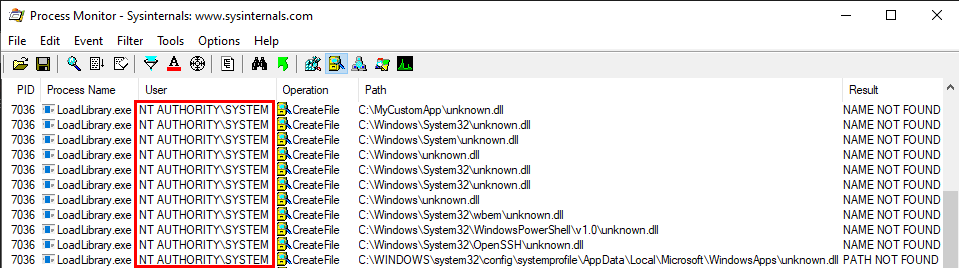
The exact same search order applies to NT AUTHORITY\SYSTEM as well and that’s completely normal. There is a slight difference though. The last directory in the search is different. With the low-privileged user it was C:\Users\Lab-User\AppData\Local\Microsoft\WindowsApps whereas it’s now C:\WINDOWS\system32\config\systemprofile\AppData\Local\Microsoft\WindowsApps. This difference is due to a per-user path that was added starting with Windows 10: %USERPROFILE%\AppData\Local\Microsoft\WindowsApps, where %USERPROFILE% resolves to the path of the user’s home folder.
Anyway, by default, all these folders are configured with proper permissions. So, low-privileged users wouldn’t be able to plant a malicious DLL, preventing them from hijacking the execution flow of a service running as NT AUTHORITY\SYSTEM for example. With this demonstration, I hope that it’s now clear why DLL hijacking is not a vulnerability.
OK, if DLL hijacking isn’t a vulnerability, why all this fuss?
Well, as I said before, DLL hijacking is just a core concept, an exploitation technique if you will. It’s just a means to an end. The end goal is either local privilege escalation or persistence (or even AV evasion) in most cases. Though, the means may differ a lot depending on your perspective. Based on my own experience, I know that this perspective generally differs between pentesters and security researchers, hence the potential confusion. So, I’ll highlight two real-life examples in the next parts.
Whenever a “new” DLL hijacking / planting trick is posted on Twitter, it generates a lot of comments. “It’s not a vulnerability!” or “There is a lot of hijackable DLLs on Windows…” are the most common reactions. Though, people often don’t really speak about the same thing, hence the overall confusion which leads us nowhere. I don’t pretend to know the ultimate truth but I felt the need to write this post in order to hopefully clarify some points.
Introduction
Whenever I write about something that involves DLL hijacking (e.g.: NetMan DLL Hijacking), I assume that it’s common knowledge and that we are all on the same page. It turns out that it’s a big mistake, for multiple reasons! First, DLL hijacking is just a core concept and, in practice, there are some variants. Therefore, whether you are a pentester, a security researcher or a system administrator, your own conception of it may differ from someone else’s. And then, there is this recurring debate: is it a vulnerability? Before giving a factual answer to this question, I’ll first remind what DLL hijacking is about. Then I’ll illustrate two of its variants with real-life examples, depending on what you are trying to achieve. Finally, I’ll try to give some insight into how you can lower the risk of DLL hijacking.DLL Hijacking: What are we talking about?
Dynamically compiled Win32 executables use functions which are exported by built-in or third-party Dynamic Link Libraries (DLL). There are two main ways to achieve this:- At link time - When the program is compiled, an import table is written into the headers of the Portable Executable (PE). To put it simple, it keeps track of which function needs to be imported from which DLL. Therefore, whenever the program is executed, the linker knows what to do and loads all the required libraries transparently on your behalf.
- At runtime - Sometimes, you need to or want to import a library at runtime. At this point, the linker has already done its part of the job, so if you want to do so you’ll have to take care of a few things yourself. In particular, you can call LoadLibrary() or LoadLibraryEx() from the Windows API.
According to the documentation, the prototype of these two functions is as follows:Note: in this post, I’ll consider only Win32 applications. Although they use the same extension, DLLs in the context of .NET applications have a completely different meaning so I won’t talk about them here. I don’t want to add to the confusion.
Код:
HMODULE LoadLibrary(LPCSTR lpLibFileName);
HMODULE LoadLibraryEx(LPCSTR lpLibFileName, HANDLE hFile, DWORD dwFlags);
The main argument - lpLibFileName - is the path of the library file you want to load. Though, evaluating the full path of the file at runtime requires some work that we are not always willing to do, especially when the system can retrieve this path by itself. For example, instead of writing LoadLibrary("C:\Windows\System32\mylib.dll"), you could just write LoadLibrary("mylib.dll") and thus let the system find the DLL. This approach makes a lot of sense for third-party applications because they don’t necessarily know this path beforehand.
But then, if you don’t specify the full path of the library you want to load, how does the system know where to find it? The answer is simple, it uses a predefined search order, which is illustrated on the following diagram.
The locations in the “pre-search” are highlighted in green because they are safe (from a privilege escalation perspective). If the name of the DLL doesn’t correspond to a DLL which is already loaded in memory or if it’s not a known DLL, the actual search begins. The program will first try to load it from the application’s directory. If it succeeds, the search stops there otherwise it continues with the C:\Windows\System32 folder and so on…
I won’t bore you with the theory. Rather, I’ll illustrate this search order with some examples based on the following source code. The following program uses the first command line argument as the name of a library to load with LoadLibrary().Note: in this context, the term “Known DLL” has a very specific meaning. These DLLs are listed in the HKLM\SYSTEM\CurrentControlSet\Control\Session Manager\KnownDLLs registry key and are guaranteed to be loaded from the System folder.
Код:
HMODULE hModule = LoadLibrary(argv[1]);
if (hModule) {
    wprintf(L"LoadLibrary() OK\n");
    FreeLibrary(hModule);
} else {
    wprintf(L"LoadLibrary() KO - Error: %d\n", GetLastError());
}
Scenario 1: loading a DLL which exists in the application’s directory.
The program finds the DLL in its directory C:\MyCustomApp, that’s the first location in the search order so the library is loaded successfully. Everything is fine.
Scenario 2: loading a Windows DLL, dbghelp.dll for example.
The program first tries to load the DLL from C:\MyCustomApp, the application’s directory, and doesn’t find it there. Therefore, it tries to load it from the system directory C:\Windows\System32, where this library is actually located.
We can see a potential issue here. What if the C:\MyCustomApp directory is configured with incorrect permissions and allows any user to add files? You guessed it, a malicious version of the DLL could be planted in this directory, allowing a local attacker to execute arbitrary code in the context of any other user who would run this application. Although that’s DLL search order hijacking, this first variant is also sometimes rightly or wrongly called DLL Sideloading. It’s mostly used by malwares but it can also be used for privilege escalation (see my article about DLL Proxying).
Scenario 3: loading a nonexistent DLLNote: in theory DLL Sideloading has a specific meaning. According to MITRE: “Side-loading vulnerabilities specifically occur when Windows Side-by-Side (WinSxS) manifests are not explicit enough about characteristics of the DLL to be loaded. Adversaries may take advantage of a legitimate program that is vulnerable to side-loading to load a malicious DLL.”
If the target DLL doesn’t exist, the program continues its search in the other Windows directories. If it can’t find it there, it tries to load it from the current directory. If it still can’t find it, it eventually searches for it in all the directories that are listed in the %PATH% environment variable.
We can see that a lot of DLL hijacking opportunities arise there. If any of the %PATH% directories is writable, then a malicious version of the DLL could be planted and would be loaded by the application whenever it’s executed. This is another variant which is sometimes called Ghost DLL injection or Phantom DLL hijacking.
Scenario 4: loading a nonexistent DLL as NT AUTHORITY\SYSTEM
With this last scenario, we are slowly but surely approaching the objective. In the previous examples, I ran the executable as a low-privileged user so that’s not representative of a privilege escalation scenario. Let’s remediate this and run the last command as NT AUTHORITY\SYSTEM this time.
The exact same search order applies to NT AUTHORITY\SYSTEM as well and that’s completely normal. There is a slight difference though. The last directory in the search is different. With the low-privileged user it was C:\Users\Lab-User\AppData\Local\Microsoft\WindowsApps whereas it’s now C:\WINDOWS\system32\config\systemprofile\AppData\Local\Microsoft\WindowsApps. This difference is due to a per-user path that was added starting with Windows 10: %USERPROFILE%\AppData\Local\Microsoft\WindowsApps, where %USERPROFILE% resolves to the path of the user’s home folder.
Anyway, by default, all these folders are configured with proper permissions. So, low-privileged users wouldn’t be able to plant a malicious DLL, preventing them from hijacking the execution flow of a service running as NT AUTHORITY\SYSTEM for example. With this demonstration, I hope that it’s now clear why DLL hijacking is not a vulnerability.
OK, if DLL hijacking isn’t a vulnerability, why all this fuss?
Well, as I said before, DLL hijacking is just a core concept, an exploitation technique if you will. It’s just a means to an end. The end goal is either local privilege escalation or persistence (or even AV evasion) in most cases. Though, the means may differ a lot depending on your perspective. Based on my own experience, I know that this perspective generally differs between pentesters and security researchers, hence the potential confusion. So, I’ll highlight two real-life examples in the next parts.
Последнее редактирование: