

Author: ski
Especially for xss.pro
In this tutorial we will be cracking a registration scheme from a ‘real’ program which doesn’t have a Serial check but rather a sever-check instead; it is a 30 day trial and has a corresponding nag. There are no places to enter a registration. i assume that you know Olly and how to change the flags, edit the asm code, search for constants and so on, just some basic knowledge. If you have never used Fiddler before don’t worry I’ll only use the very basics of this program.
Remember, the best way to learn is to try to Patch the program yourself first, if you don’t succeed (or if you would like to see another approach) then read this tutorial. Have Fun!
Tools: Ollydbg, ExeinfoPE, Fiddler & Regedit
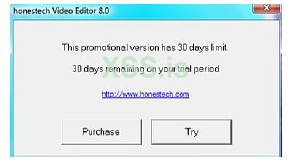
Run the target and you’ll see this:

We can here choose between two versions, Let us start with the “Advanced Mode”
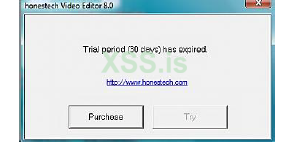
Now we see the 30 trial has expired!! And that the “TRY” is greyed out (if you just installed the target please set you Pc clock forward more than 30 days and restart so you also see this). Let us fix this 30 days trial first.
Run the target in Olly, Click on “Advanced Mode” again. Now you see this
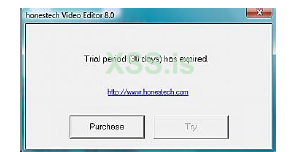
But take a look in Olly! He is terminated!
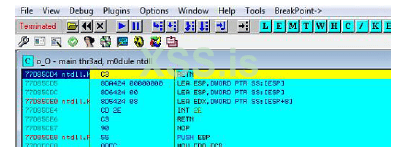
Let’s think about how this could happen? Is this an anti-debugger trick or something like that? Well, actually, it is much simpler than that. Can you remember that we could choose between “Easy” or “advanced” mode? The program we started is only a loader, so when we choose “Advanced” it starts another program and terminates itself. How did I come to that conclusion? You may ask, well when Olly terminated I closed Olly but the program kept running, so It could not have been loaded by Olly.
Let’s us look in directory for the program
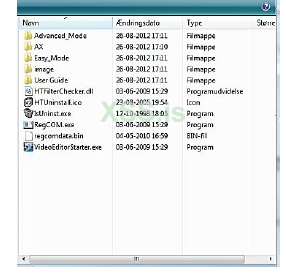
As we can see here there are Folders called “Advance_Mode” and “Easy_Mode” so let us look in to “Advance_Mode” Folder
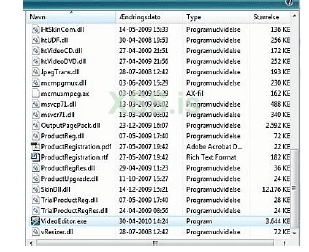
We were right; here is the “Advanced_mode” program. Let’s load that in to Olly.
Let Olly run and you will see:
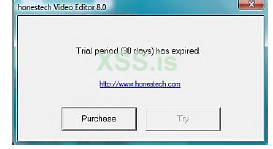
And Olly still runs, perfect! Okay now we can begin to find where to patch this trial. Let’s use the old “Execute to User Code” trick here. Pause Olly and press Alt + F9. As the only Button we can press on is “Purchase” we do that. Close the pop website and return to Olly
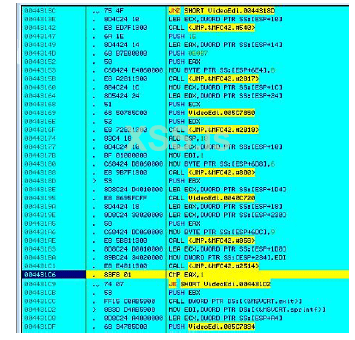
Okay we land here after the call that called the nag. Let us look on the code above the Call. It must decide somewhere which string to show in the nag. All the calls you can see to MFC42 are not interesting because we don’t want to jump out of main file. Then there is the Call @ 00443195 to 0040C720 but if you look in to the call you’ll see there are no Conditional jumps and no call deeper in the code. That is why we end up @ 0044313C where we find a JNZ command. Set a BP on that line and restart Olly.
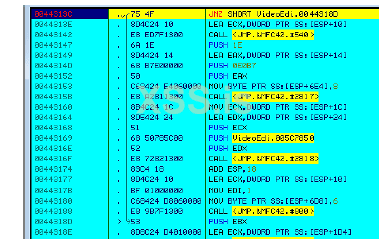
As you can see it will not jump. Try to change the flag and let Olly run (We don’t have to go deep in to the code to patch the Nag, because the EAX that decides this is being set in the Call @ 00443135 (not on the screenshot) and that call is only called from here so patching here will be enough). As you can see now we can click “try”.
Patching the Sever connecting
Let us do that and you see this
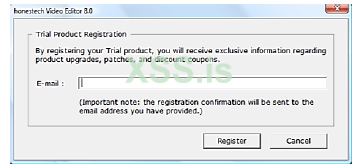
Hmm we don’t want to get our e-mail on some registration list, and to get on some list it must connect to the internet. Okay disconnect from the internet and fire up Fiddler. Go back to and enter a fake Email (we will delete it in the registry later).And Click “Register”. The program loads fine because the program does not need any feedback from the server, it just sends your information to the server, well I don’t want my IP logged not even with a fake E-mail, take a look in Fiddler
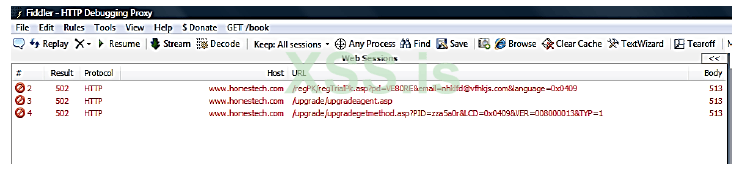
You may have more than these 3 if you’ve got other programs running in the background. As you can see the first line sends your email and language to the server to add you on their list. But the 2 next lines what are they? It seems like it also runs an update in the background every time the program starts. Ok let us kill that first line that sends our email. To do that we need the nag so lets us delete our registry key (you may wonder why I didn’t just kill the internet connection and tried to send my fake e-mail. The answer is that I could not be sure if the program needed feedback from the server, if it did I could have fixed it with Fiddler, I also had to be sure that the program sends the information right away and not just saving it until it could connect) To “clean” your e-mail registration, run regedit.exe and navigate to “HKEY_LOCAL_MACHINE\SOFTWARE\honestech\honestech Video Editor” and delete the folder named “8.0” now next time we Click “try” the nag will pop up again. (How did I find that path to the key? I just made a search for the company name “honestech” in the registry. )
Okay we are ready to run the target in Olly again, so restart it, change the jump again and Click “Try”. Now you should be here again:
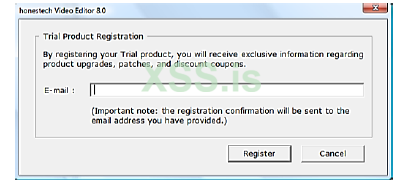
Now return to Olly and let’s use the “animate over” feature to patch this (because we don’t want to press the “Register” button; you can also find the call to this in the stack but to animate is much quicker). So restart Olly and after the first BP where you changed the flag, Press Ctrl + F8. Olly will now animate over the all Call until you see the nag again. If you return to Olly you’ll see this
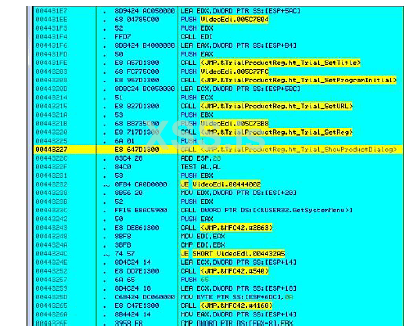
This call shows the dialog, and if you look in Fiddler it has not yet connected to the internet. If we kill this dialog the app will not reg our E-mail or connect to the internet. If we just NOP this call out, the app crashes, and why is that? Well it is because the app needs the user response from the dialog box, as always this is put in EAX, and the app tests it with the “TEST AL,AL” @ 0044322F. If the user clicks “Register” EAX will be 1 and if the user clicks “Cancel” EAX will be 0. So to beat this Dialog we must Nope the call @ 00443227 and set EAX to 1. Always if there is more than one button on the dialog or nag you are trying to kill you must set EAX. After you have changed the code it should look like this:
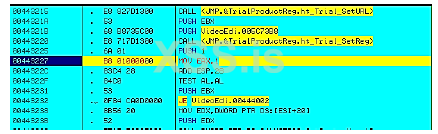
The call was 8 bytes and the Move EAX,1 is 8 bytes so it fits nicely! Now you can restart Olly, apply the patch and change the flag at the first BP and now you see the target runs fine. Let’s take a look in fiddle

Well we can see the program is running in the background because it’s in the Icon tray. Well we know now that this program starts other program (think about the Loader program which loaded the version you chose, Easy or Advanced). I don’t see anything in the program path that has something to do with upgrade. We’ll try to take a look in the Registry again.
HKEY_LOCAL_MACHINE\SOFTWARE\honestech\HTPA
The map HTPA - what should that do? Well take look.

In here you see the path to the upgadeagent (HTPA.exe) and the Upgrade.exe. Just go to that location and delete the two files, because if it can’t find the programs it can’t start them. Clear fiddler, restart Olly and apply and changes flag until the program runs again. If you look in Fiddler now you’ll see that there are no attempts to connect to the internet now. Let’s sum up what we’ve done..
We patched the 30 day trial
We patched any attempt to connect to the server
We removed the Nag for entering our email.
Let’s start with the removing of the need of clicking “Try”. We can do what we learned from the nag for the e-mail. Restart Olly and run to the first BP. Now press Ctrl + F8 and Olly will animate over until you see the Nag and Olly is here:
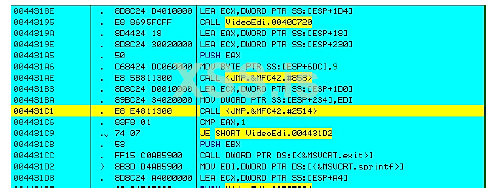
Okay again here you can see the call which shows the nag, and you have a “cmp eax,1” after it. If not EAX=1 then you can see it calls MSVCRT.exit @ 004431CC which end the program. So here we can also just NOP the call and edit the code to “MOV EAX,1”. It should now look like this
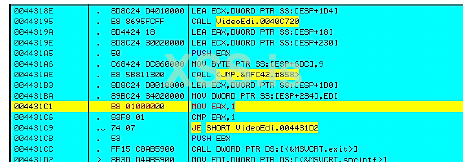
Now you don’t need to press anything or change flag in Olly, this patch makes the program think that the user pressed the Try button, it does not check if the button can be pressed or not. If EAX =1 the TRY is pressed no matter what, that is why this works as a patch.
Patching the about box
Restart Olly apply the two patch and fire up the about box and you’ll see this
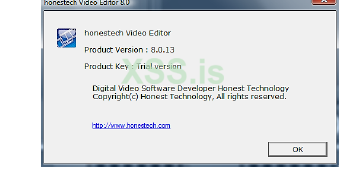
Hmm “Trial Version”… it does not matter because it does not do anything. Anyway I don’t like it in my “Full version” so we are going to change it. When you see this Pause Olly and press ALT + F9 and then click “Ok”
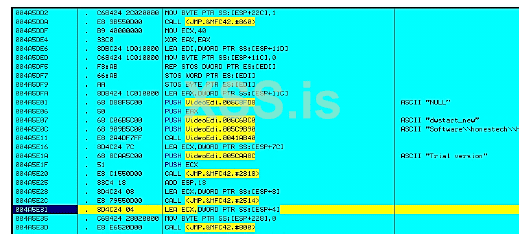
We land here, this time we don’t want to kill the about box just change the text. Can you see the Push 005CAA8C @ 004A5E1A with the ASCII “Trial version”, yes you guessed it, that’s what is written in the about box. We will make this simple Right-click on that push and “Follow in dump” -> “constant”
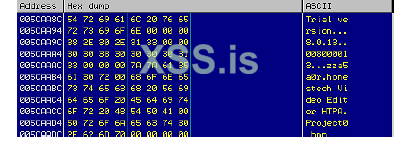
Now just change the bytes to whatever you like, like this
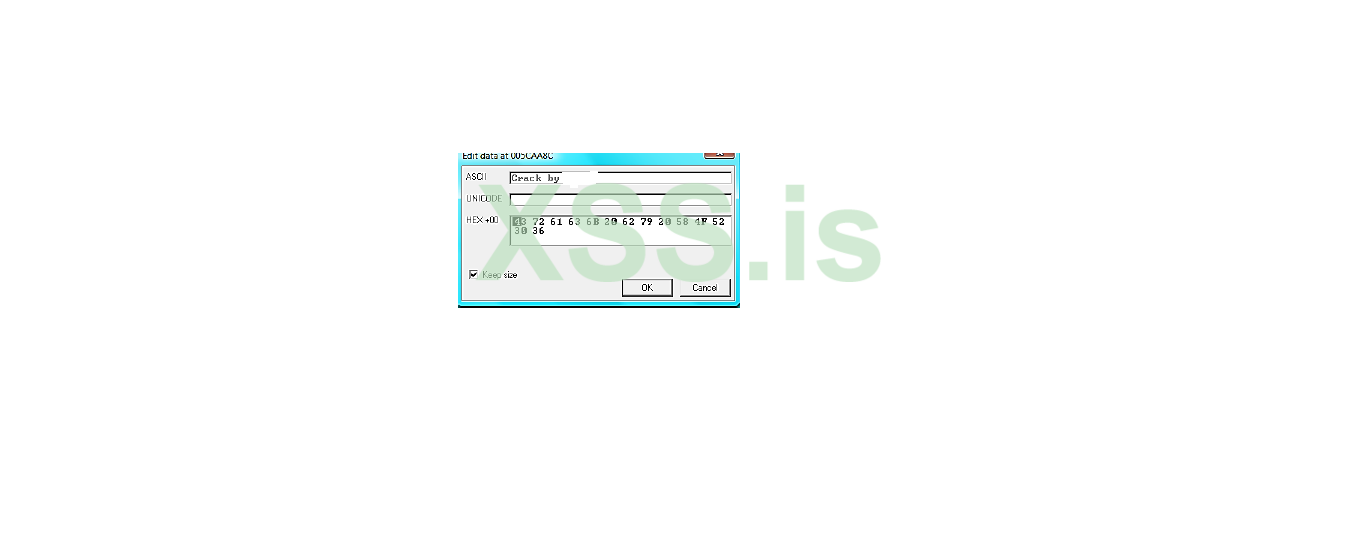
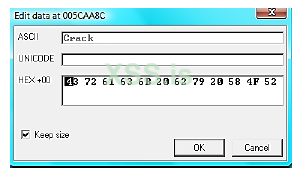
Just remember to have the “Keep size” check. Click “Ok”.Now try to show the about box again I’ll see this
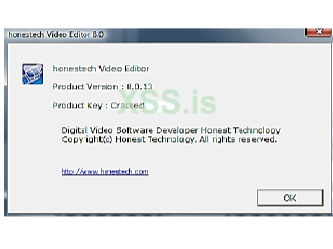
Applying the Patch
Since Olly can’t save in the dissembler and in the dump the same time, to apply all these patches you must first save the first 2 patches (the one for the Try nag and the one for the e-mail nag). Then load the new file into Olly and let it run and go to 005Caa8C in the dump and change the bytes and then save these changes.
Especially for xss.pro
In this tutorial we will be cracking a registration scheme from a ‘real’ program which doesn’t have a Serial check but rather a sever-check instead; it is a 30 day trial and has a corresponding nag. There are no places to enter a registration. i assume that you know Olly and how to change the flags, edit the asm code, search for constants and so on, just some basic knowledge. If you have never used Fiddler before don’t worry I’ll only use the very basics of this program.
Remember, the best way to learn is to try to Patch the program yourself first, if you don’t succeed (or if you would like to see another approach) then read this tutorial. Have Fun!
Tools: Ollydbg, ExeinfoPE, Fiddler & Regedit
Target: Honestech Video Editor 8.0 Trial
Run the target and you’ll see this:
We can here choose between two versions, Let us start with the “Advanced Mode”
Now we see the 30 trial has expired!! And that the “TRY” is greyed out (if you just installed the target please set you Pc clock forward more than 30 days and restart so you also see this). Let us fix this 30 days trial first.
Patching the 30 day trial
Run the target in Olly, Click on “Advanced Mode” again. Now you see this
But take a look in Olly! He is terminated!
Let’s think about how this could happen? Is this an anti-debugger trick or something like that? Well, actually, it is much simpler than that. Can you remember that we could choose between “Easy” or “advanced” mode? The program we started is only a loader, so when we choose “Advanced” it starts another program and terminates itself. How did I come to that conclusion? You may ask, well when Olly terminated I closed Olly but the program kept running, so It could not have been loaded by Olly.
Let’s us look in directory for the program
As we can see here there are Folders called “Advance_Mode” and “Easy_Mode” so let us look in to “Advance_Mode” Folder
We were right; here is the “Advanced_mode” program. Let’s load that in to Olly.
Let Olly run and you will see:
And Olly still runs, perfect! Okay now we can begin to find where to patch this trial. Let’s use the old “Execute to User Code” trick here. Pause Olly and press Alt + F9. As the only Button we can press on is “Purchase” we do that. Close the pop website and return to Olly
Okay we land here after the call that called the nag. Let us look on the code above the Call. It must decide somewhere which string to show in the nag. All the calls you can see to MFC42 are not interesting because we don’t want to jump out of main file. Then there is the Call @ 00443195 to 0040C720 but if you look in to the call you’ll see there are no Conditional jumps and no call deeper in the code. That is why we end up @ 0044313C where we find a JNZ command. Set a BP on that line and restart Olly.
As you can see it will not jump. Try to change the flag and let Olly run (We don’t have to go deep in to the code to patch the Nag, because the EAX that decides this is being set in the Call @ 00443135 (not on the screenshot) and that call is only called from here so patching here will be enough). As you can see now we can click “try”.
Patching the Sever connecting
Let us do that and you see this
Hmm we don’t want to get our e-mail on some registration list, and to get on some list it must connect to the internet. Okay disconnect from the internet and fire up Fiddler. Go back to and enter a fake Email (we will delete it in the registry later).And Click “Register”. The program loads fine because the program does not need any feedback from the server, it just sends your information to the server, well I don’t want my IP logged not even with a fake E-mail, take a look in Fiddler
You may have more than these 3 if you’ve got other programs running in the background. As you can see the first line sends your email and language to the server to add you on their list. But the 2 next lines what are they? It seems like it also runs an update in the background every time the program starts. Ok let us kill that first line that sends our email. To do that we need the nag so lets us delete our registry key (you may wonder why I didn’t just kill the internet connection and tried to send my fake e-mail. The answer is that I could not be sure if the program needed feedback from the server, if it did I could have fixed it with Fiddler, I also had to be sure that the program sends the information right away and not just saving it until it could connect) To “clean” your e-mail registration, run regedit.exe and navigate to “HKEY_LOCAL_MACHINE\SOFTWARE\honestech\honestech Video Editor” and delete the folder named “8.0” now next time we Click “try” the nag will pop up again. (How did I find that path to the key? I just made a search for the company name “honestech” in the registry. )
Okay we are ready to run the target in Olly again, so restart it, change the jump again and Click “Try”. Now you should be here again:
Now return to Olly and let’s use the “animate over” feature to patch this (because we don’t want to press the “Register” button; you can also find the call to this in the stack but to animate is much quicker). So restart Olly and after the first BP where you changed the flag, Press Ctrl + F8. Olly will now animate over the all Call until you see the nag again. If you return to Olly you’ll see this
This call shows the dialog, and if you look in Fiddler it has not yet connected to the internet. If we kill this dialog the app will not reg our E-mail or connect to the internet. If we just NOP this call out, the app crashes, and why is that? Well it is because the app needs the user response from the dialog box, as always this is put in EAX, and the app tests it with the “TEST AL,AL” @ 0044322F. If the user clicks “Register” EAX will be 1 and if the user clicks “Cancel” EAX will be 0. So to beat this Dialog we must Nope the call @ 00443227 and set EAX to 1. Always if there is more than one button on the dialog or nag you are trying to kill you must set EAX. After you have changed the code it should look like this:
The call was 8 bytes and the Move EAX,1 is 8 bytes so it fits nicely! Now you can restart Olly, apply the patch and change the flag at the first BP and now you see the target runs fine. Let’s take a look in fiddle
Well we can see the program is running in the background because it’s in the Icon tray. Well we know now that this program starts other program (think about the Loader program which loaded the version you chose, Easy or Advanced). I don’t see anything in the program path that has something to do with upgrade. We’ll try to take a look in the Registry again.
HKEY_LOCAL_MACHINE\SOFTWARE\honestech\HTPA
The map HTPA - what should that do? Well take look.
In here you see the path to the upgadeagent (HTPA.exe) and the Upgrade.exe. Just go to that location and delete the two files, because if it can’t find the programs it can’t start them. Clear fiddler, restart Olly and apply and changes flag until the program runs again. If you look in Fiddler now you’ll see that there are no attempts to connect to the internet now. Let’s sum up what we’ve done..
We patched the 30 day trial
We patched any attempt to connect to the server
We removed the Nag for entering our email.
Let’s start with the removing of the need of clicking “Try”. We can do what we learned from the nag for the e-mail. Restart Olly and run to the first BP. Now press Ctrl + F8 and Olly will animate over until you see the Nag and Olly is here:
Okay again here you can see the call which shows the nag, and you have a “cmp eax,1” after it. If not EAX=1 then you can see it calls MSVCRT.exit @ 004431CC which end the program. So here we can also just NOP the call and edit the code to “MOV EAX,1”. It should now look like this
Now you don’t need to press anything or change flag in Olly, this patch makes the program think that the user pressed the Try button, it does not check if the button can be pressed or not. If EAX =1 the TRY is pressed no matter what, that is why this works as a patch.
Patching the about box
Restart Olly apply the two patch and fire up the about box and you’ll see this
Hmm “Trial Version”… it does not matter because it does not do anything. Anyway I don’t like it in my “Full version” so we are going to change it. When you see this Pause Olly and press ALT + F9 and then click “Ok”
We land here, this time we don’t want to kill the about box just change the text. Can you see the Push 005CAA8C @ 004A5E1A with the ASCII “Trial version”, yes you guessed it, that’s what is written in the about box. We will make this simple Right-click on that push and “Follow in dump” -> “constant”
Now just change the bytes to whatever you like, like this
Just remember to have the “Keep size” check. Click “Ok”.Now try to show the about box again I’ll see this
Applying the Patch
Since Olly can’t save in the dissembler and in the dump the same time, to apply all these patches you must first save the first 2 patches (the one for the Try nag and the one for the e-mail nag). Then load the new file into Olly and let it run and go to 005Caa8C in the dump and change the bytes and then save these changes.
Последнее редактирование модератором: