I am CRYPTNEEDED member of xss.pro writing this article for xss.pro and there members
Topics:
1. Into Towards Api Hooking
2. api hooking via detours library
3. api hooking via minhooking library
API hooking functions operate as a technique to seize control and modify the operational behavior of API functions. The technique finds common use during debugging processes as well as reverse engineering efforts and game cheating activities. You apply API hooking by replacing an application programming interface function with your own customized version to run additional steps both before it executes the original functionality and after it completes. This method enables people to modify program behavior even when they lack access to modify the source code.
The classical way of implementing API hooking is done via trampolines. A trampoline is a shellcode that is used to alter the code execution path by jumping to another specific address inside the address space of a process. The trampoline's shellcode is inserted at the beginning of the function, resulting in the function becoming hooked. When the hooked function is called, the trampoline shellcode is triggered instead, and the execution flow is passed and altered to another address thus resulting in a different function being executed instead.
Inline patching :
The API hooking method called inline hooking functions like trampoline-based hooking to achieve its goals. Inline hooks operate differently because they enable the legitimate function to resume after returning execution control. The implementation of inline hooks is more complex but provides higher performance than other hooking methods.
API hooking is performed by security solutions to allow them to inspect commonly abused functions more thoroughly. This will be discussed more in-depth in future modules. This module explores how API hooking can enhance a malware's abilities.
Why API Hooking:
API hooking serves primarily for malware analysis and debugging yet developers can leverage it to create malware because of the following reasons:
practical demonstration of Api Hooking and implementations:
There are many ways to implement API hooking, one way is through open-source libraries such as Microsoft's Detours library and Minhook. Another more limited way is using Windows APIs that are meant to do API hooking (although for limited options).
In the next few modules, both Detours and Minhook will be demonstrated. Furthermore, Windows APIs will be used to see what they can offer. Finally, custom hooking code will be created to reduce signatures and IoCs that are commonly used to detect the usage of open-source libraries.
API Hooking - Detours Library
Introduction
The Detours Hooking Library, is a software library developed by Microsoft Research that allows for intercepting and redirecting function calls in Windows. The library redirect calls of specific functions to a user-defined replacement function that can then perform additional tasks or modify the behavior of the original function. Detours is typically used with C/C++ programs and can be used with both 32-bit and 64-bit applications.
The Detours library replaces the first few instructions of the target function, that is the function to be hooked, with an unconditional jump to the user-provided detour function, which is the function to be executed instead. The term unconditional jump is also referred to as trampoline.
The library uses transactions to install and uninstall hooks from a targeted function. Transactions allow hooking routines to group multiple function hooks together and apply them as a single unit, which can be beneficial when making multiple changes to a program's behavior. It also provides the advantage of enabling the user to easily undo all changes if necessary. When using transactions, a new transaction can be started, function hooks added, and then committed. Upon committing the transaction, all function hooks added to the transaction will be applied to the program, as would be the case with unhooking.
Using The Detours Library
To use the Detours library's functions, the Detours repository must be downloaded and compiled to get the static library files (.lib) files needed for the compilation. In addition to that the detours.h header file should be included, this is explained in the Detours wiki under the Using Detours section.
For additional help adding .lib files to a project, review Microsoft's documentation.
32-bit vs 64-bit Detours Library
The shared code in this module has preprocessor code that determines which version of the Detours .lib file to include, depending on the architecture of the machine being used. To do so, the _M_X64 and _M_IX86 macros are used.
Detours API Functions
The first requirement when employing any hooking method is to obtain the WinAPI function address for hooking. The WinAPI function address serves as the starting point to establish where the jump instructions will be placed. The MessageBoxA function serves as the target function for hooking operations in this module.
Here is the API functions the DetoursLibrary offers:
DetourTransactionBegin - Begin a new transaction for attaching or detaching detours. This function should be called first when hooking and unhooking.
DetourUpdateThread - Update the current transaction. This is used by Detours library to Enlist a thread in the current transaction.
DetourAttach - Install the hook on the target function in a current transaction. This won't be committed until DetourTransactionCommit is called.
DetourDetach - Remove the hook from the targetted function in a current transaction. This won't be committed until DetourTransactionCommit is called.
DetourTransactionCommit - Commit the current transaction for attaching or detaching detours.
The functions above return a LONG value which is used to understand the result of the function's execution. A Detours API will return NO_ERROR, which is a 0, if it succeeds and a non-zero value upon failure. The non-zero value can be used as an error code for debugging purposes.
Replacing The Hooked API
The following step is to create a function to replace the hooked API. The replacement function should be of the same data type, and optionally, take the same parameters. This allows for inspection or modification of the parameter values. For example, the following function can be used as a detour function for MessageBoxA which allows one to check the original parameter values.
infinite Loops Programs issue
When a hooked function is called and the hook is triggered, the custom function is executed, however, for the execution flow to continue, the custom function must return a valid value that the original hooked function was meant to return. A naive approach would be to return the same value by calling the original function inside of the hook. This can lead to problems as the replacement function will be called instead, resulting in an infinite loop. This is a general hooking issue and not a bug in the Detours library.
In order to gain a better understanding of this, the code snippet below shows the replacement function, MyMessageBoxA calling MessageBoxA. This results in an infinite loop. The program will get stuck running MyMessageBoxA, that is because MyMessageBoxA is calling MessageBoxA, and MessageBoxA leads to the MyMessageBoxA function again.
Solution 1 - Global Original Function Pointer
The Detours library can solve this problem by saving a pointer to the original function before hooking it. This pointer can be stored in a global variable and called instead of the hooked function inside the detour function.
Solution 2 - Lets Use Another API
Another more general solution worth mentioning is calling a different unhooked function that has the same functionality as the hooked function. For example MessageBoxA and MessageBoxW, VirtualAlloc and VirtualAllocEx.
Detours Hooking Routine
As previously explained, the Detours library works using transactions therefore to hook an API function, one must create a transaction, submit an action (hooking/unhooking) to the transaction, and then commit the transaction. The code snippet below performs these steps.
The Main Function
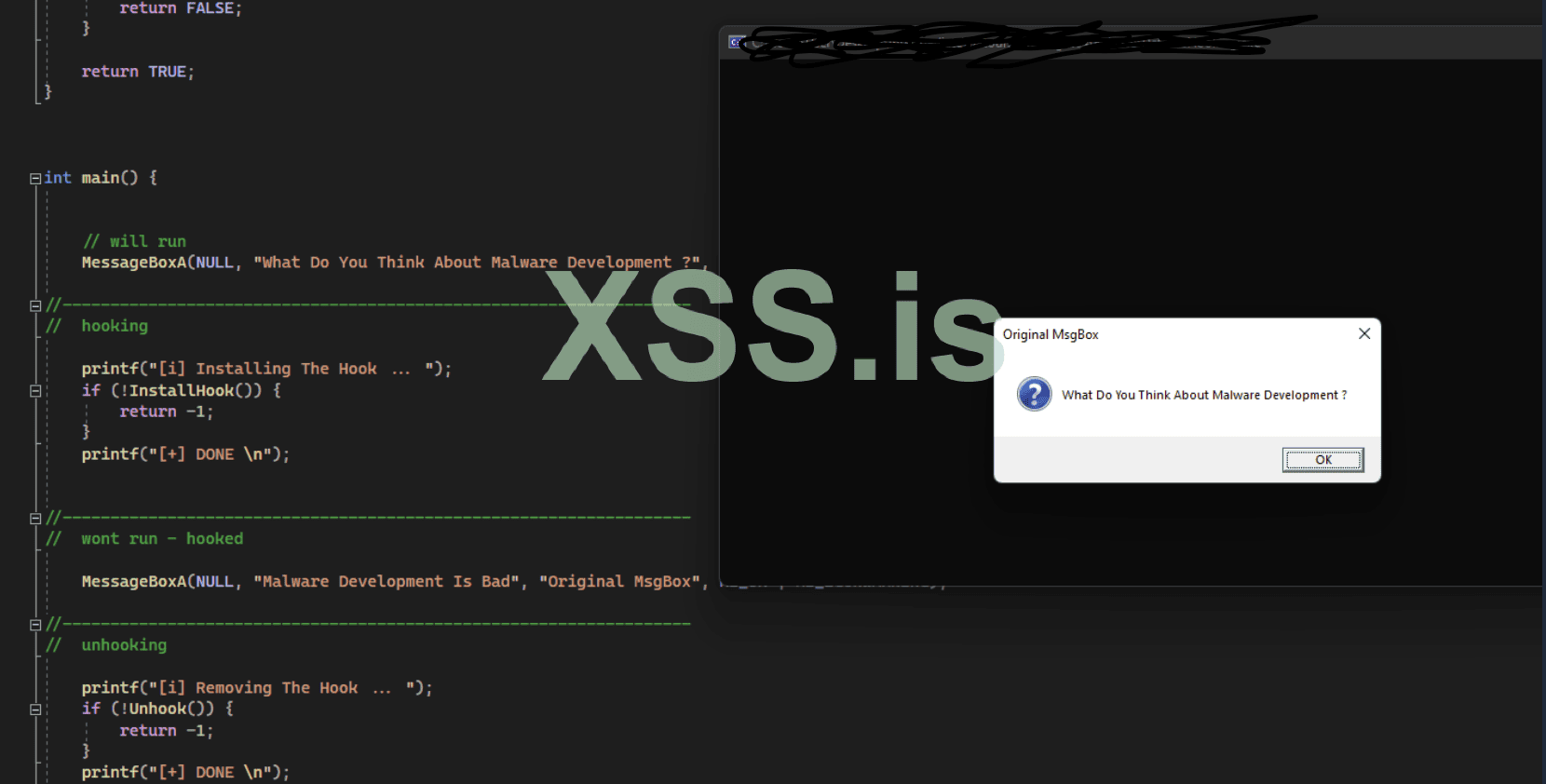
The hooking and unhooking routines previously shown do not include a main function. here is the explanation of main function below which show invokes the unhooked and hooked versions ofMessageBoxA.
Minhook Library
Minhook is a hooking library written in C that can be used to hook API. It is compatible with both 32-bit and 64-bit applications on Windows and uses x86/x64 assembly for inline hooking like Detours library. Compared to other hooking libraries, MinHook is simpler and has lightweight APIs, which makes it easier to work with.
lets use the minhook
Similarly to the Detours library, the Minhook library requires the static .lib file and the MinHook.h header file to be included in the Visual Studio project.
Minhook API Functions
The Minhook library works by initializing a structure that holds the required information needed for the hook's installation or removal. This is done via the MH_Initialize API that initializes the HOOK_ENTRY structure in the library. Next, the MH_CreateHook function is used to create the hooks and MH_EnableHook is used to enable them. MH_DisableHook is used to remove the hooks and finally, MH_Uninitialize is used to clean up the initialized structure. The functions are listed again below for convenience.
MH_Initialize - Initializes the HOOK_ENTRY structure.
MH_CreateHook - Create the hooks.
MH_EnableHook - Enables the created hooks.
MH_DisableHook - Remove the hooks.
MH_Uninitialize - Cleanup the initialized structure.
The Minhook APIs return a MH_STATUS value which is a user-defined enumeration located in Minhook.h. The returned MH_STATUS data type indicates the error code of a specified function. An MH_OK value, which is a 0, is returned if the function succeeds and a non-zero value is returned if an error occurs.
It is worth noting that both MH_Initialize and MH_Uninitialize functions should be only called once, at the beginning and the end of the program, respectively.
The Detour Function
This module will utilize the same MessageBoxA API example from the preceding module, which will be hooked and changed to execute a different message box.
Notice the g_pMessageBoxA global variable is used to run the message box, where g_pMessageBoxA is a pointer to the original, unhooked MessageBoxA API. This is set to NULL because the Minhook MH_CreateHook API call is the one that initializes it for use, as opposed to the Detours library where g_pMessageBoxA was set manually. This is done to prevent the occurrence of a hooking loop issue, which was discussed in the previous module.
Minhook Hooking Routine
The execution of MH_Initialize serves as the first requirement to hook a specific API through Minhook. The MH_CreateHook function allows developers to create hooks which MH_EnableHook activates for execution.
Minhook UnHooking Routine
Unlike the Detours library, the Minhook library does not require the use of transactions. Instead, to remove a hook, the only requirement is to run the MH_DisableHook API with the address of the hooked function. The MH_Uninitialize call is optional, but it cleans up the structure initialized with the previous MH_Initialize call.
The Main Function
The hooking and unhooking routines previously shown do not include a main function. The main function is shown below which simply invokes the unhooked and hooked versions of MessageBoxA.
Topics:
1. Into Towards Api Hooking
2. api hooking via detours library
3. api hooking via minhooking library
API hooking functions operate as a technique to seize control and modify the operational behavior of API functions. The technique finds common use during debugging processes as well as reverse engineering efforts and game cheating activities. You apply API hooking by replacing an application programming interface function with your own customized version to run additional steps both before it executes the original functionality and after it completes. This method enables people to modify program behavior even when they lack access to modify the source code.
The classical way of implementing API hooking is done via trampolines. A trampoline is a shellcode that is used to alter the code execution path by jumping to another specific address inside the address space of a process. The trampoline's shellcode is inserted at the beginning of the function, resulting in the function becoming hooked. When the hooked function is called, the trampoline shellcode is triggered instead, and the execution flow is passed and altered to another address thus resulting in a different function being executed instead.
Inline patching :
The API hooking method called inline hooking functions like trampoline-based hooking to achieve its goals. Inline hooks operate differently because they enable the legitimate function to resume after returning execution control. The implementation of inline hooks is more complex but provides higher performance than other hooking methods.
API hooking is performed by security solutions to allow them to inspect commonly abused functions more thoroughly. This will be discussed more in-depth in future modules. This module explores how API hooking can enhance a malware's abilities.
Why API Hooking:
API hooking serves primarily for malware analysis and debugging yet developers can leverage it to create malware because of the following reasons:
- Gather sensitive information or data (e.g. credentials).
- Modify or intercept function calls for malicious purposes.
- Bypass security measures by altering how the operating system or a program behaves.
practical demonstration of Api Hooking and implementations:
There are many ways to implement API hooking, one way is through open-source libraries such as Microsoft's Detours library and Minhook. Another more limited way is using Windows APIs that are meant to do API hooking (although for limited options).
In the next few modules, both Detours and Minhook will be demonstrated. Furthermore, Windows APIs will be used to see what they can offer. Finally, custom hooking code will be created to reduce signatures and IoCs that are commonly used to detect the usage of open-source libraries.
API Hooking - Detours Library
Introduction
The Detours Hooking Library, is a software library developed by Microsoft Research that allows for intercepting and redirecting function calls in Windows. The library redirect calls of specific functions to a user-defined replacement function that can then perform additional tasks or modify the behavior of the original function. Detours is typically used with C/C++ programs and can be used with both 32-bit and 64-bit applications.
The Detours library replaces the first few instructions of the target function, that is the function to be hooked, with an unconditional jump to the user-provided detour function, which is the function to be executed instead. The term unconditional jump is also referred to as trampoline.
The library uses transactions to install and uninstall hooks from a targeted function. Transactions allow hooking routines to group multiple function hooks together and apply them as a single unit, which can be beneficial when making multiple changes to a program's behavior. It also provides the advantage of enabling the user to easily undo all changes if necessary. When using transactions, a new transaction can be started, function hooks added, and then committed. Upon committing the transaction, all function hooks added to the transaction will be applied to the program, as would be the case with unhooking.
Using The Detours Library
To use the Detours library's functions, the Detours repository must be downloaded and compiled to get the static library files (.lib) files needed for the compilation. In addition to that the detours.h header file should be included, this is explained in the Detours wiki under the Using Detours section.
For additional help adding .lib files to a project, review Microsoft's documentation.
32-bit vs 64-bit Detours Library
The shared code in this module has preprocessor code that determines which version of the Detours .lib file to include, depending on the architecture of the machine being used. To do so, the _M_X64 and _M_IX86 macros are used.
Код:
// If compiling as 64-bit
#ifdef _M_X64
#pragma comment (lib, "detoursx64.lib")
#endif // _M_X64


// If compiling as 32-bit
#ifdef _M_IX86
#pragma comment (lib, "detoursx86.lib")
#endif // _M_IX86
Detours API Functions
The first requirement when employing any hooking method is to obtain the WinAPI function address for hooking. The WinAPI function address serves as the starting point to establish where the jump instructions will be placed. The MessageBoxA function serves as the target function for hooking operations in this module.
Here is the API functions the DetoursLibrary offers:
DetourTransactionBegin - Begin a new transaction for attaching or detaching detours. This function should be called first when hooking and unhooking.
DetourUpdateThread - Update the current transaction. This is used by Detours library to Enlist a thread in the current transaction.
DetourAttach - Install the hook on the target function in a current transaction. This won't be committed until DetourTransactionCommit is called.
DetourDetach - Remove the hook from the targetted function in a current transaction. This won't be committed until DetourTransactionCommit is called.
DetourTransactionCommit - Commit the current transaction for attaching or detaching detours.
The functions above return a LONG value which is used to understand the result of the function's execution. A Detours API will return NO_ERROR, which is a 0, if it succeeds and a non-zero value upon failure. The non-zero value can be used as an error code for debugging purposes.
Replacing The Hooked API
The following step is to create a function to replace the hooked API. The replacement function should be of the same data type, and optionally, take the same parameters. This allows for inspection or modification of the parameter values. For example, the following function can be used as a detour function for MessageBoxA which allows one to check the original parameter values.
infinite Loops Programs issue
When a hooked function is called and the hook is triggered, the custom function is executed, however, for the execution flow to continue, the custom function must return a valid value that the original hooked function was meant to return. A naive approach would be to return the same value by calling the original function inside of the hook. This can lead to problems as the replacement function will be called instead, resulting in an infinite loop. This is a general hooking issue and not a bug in the Detours library.
Код:
INT WINAPI MyMessageBoxA(HWND hWnd, LPCSTR lpText, LPCSTR lpCaption, UINT uType) {
  // Printing original parameters value
  printf("Original lpText Parameter    : %s\n", lpText);
  printf("Original lpCaption Parameter : %s\n", lpCaption);

  // DON'T DO THIS
  // Changing the parameters value
  return MessageBoxA(hWnd, "different lpText", "different lpCaption", uType); // Calling MessageBoxA (this is hooked)
}
In order to gain a better understanding of this, the code snippet below shows the replacement function, MyMessageBoxA calling MessageBoxA. This results in an infinite loop. The program will get stuck running MyMessageBoxA, that is because MyMessageBoxA is calling MessageBoxA, and MessageBoxA leads to the MyMessageBoxA function again.
Solution 1 - Global Original Function Pointer
The Detours library can solve this problem by saving a pointer to the original function before hooking it. This pointer can be stored in a global variable and called instead of the hooked function inside the detour function.
Код:
// Used as a unhooked MessageBoxA in `MyMessageBoxA`
fnMessageBoxA g_pMessageBoxA = MessageBoxA;

INT WINAPI MyMessageBoxA(HWND hWnd, LPCSTR lpText, LPCSTR lpCaption, UINT uType) {
  // Printing original parameters value
  printf("Original lpText Parameter    : %s\n", lpText);
  printf("Original lpCaption Parameter : %s\n", lpCaption);

  // Changing the parameters value
  // Calling an unhooked MessageBoxA
  return g_pMessageBoxA(hWnd, "different lpText", "different lpCaption", uType);
}
Solution 2 - Lets Use Another API
Another more general solution worth mentioning is calling a different unhooked function that has the same functionality as the hooked function. For example MessageBoxA and MessageBoxW, VirtualAlloc and VirtualAllocEx.
Код:
INT WINAPI MyMessageBoxA(HWND hWnd, LPCSTR lpText, LPCSTR lpCaption, UINT uType) {
  // Printing original parameters value
  printf("Original lpText Parameter    : %s\n", lpText);
  printf("Original lpCaption Parameter : %s\n", lpCaption);

  // Changing the parameters value
  return MessageBoxW(hWnd, L"different lpText", L"different lpCaption", uType);
}
Detours Hooking Routine
As previously explained, the Detours library works using transactions therefore to hook an API function, one must create a transaction, submit an action (hooking/unhooking) to the transaction, and then commit the transaction. The code snippet below performs these steps.
The Main Function
The hooking and unhooking routines previously shown do not include a main function. here is the explanation of main function below which show invokes the unhooked and hooked versions ofMessageBoxA.
Код:
int main() {

    // Will run - not hooked
    MessageBoxA(NULL, "What Do You Think About Malware Development ?", "Original MsgBox", MB_OK | MB_ICONQUESTION);


//------------------------------------------------------------------
    //  Hooking
    if (!InstallHook())
        return -1;

//------------------------------------------------------------------
    // Won't run - will run MyMessageBoxA instead
    MessageBoxA(NULL, "Malware Development Is Bad", "Original MsgBox", MB_OK | MB_ICONWARNING);


//------------------------------------------------------------------
    //  Unhooking
    if (!Unhook())
        return -1;

//------------------------------------------------------------------
    //  Will run - hook removed
    MessageBoxA(NULL, "Normal MsgBox Again", "Original MsgBox", MB_OK | MB_ICONINFORMATION);

      return 0;
}
Minhook Library
Minhook is a hooking library written in C that can be used to hook API. It is compatible with both 32-bit and 64-bit applications on Windows and uses x86/x64 assembly for inline hooking like Detours library. Compared to other hooking libraries, MinHook is simpler and has lightweight APIs, which makes it easier to work with.
lets use the minhook
Similarly to the Detours library, the Minhook library requires the static .lib file and the MinHook.h header file to be included in the Visual Studio project.
Minhook API Functions
The Minhook library works by initializing a structure that holds the required information needed for the hook's installation or removal. This is done via the MH_Initialize API that initializes the HOOK_ENTRY structure in the library. Next, the MH_CreateHook function is used to create the hooks and MH_EnableHook is used to enable them. MH_DisableHook is used to remove the hooks and finally, MH_Uninitialize is used to clean up the initialized structure. The functions are listed again below for convenience.
MH_Initialize - Initializes the HOOK_ENTRY structure.
MH_CreateHook - Create the hooks.
MH_EnableHook - Enables the created hooks.
MH_DisableHook - Remove the hooks.
MH_Uninitialize - Cleanup the initialized structure.
The Minhook APIs return a MH_STATUS value which is a user-defined enumeration located in Minhook.h. The returned MH_STATUS data type indicates the error code of a specified function. An MH_OK value, which is a 0, is returned if the function succeeds and a non-zero value is returned if an error occurs.
It is worth noting that both MH_Initialize and MH_Uninitialize functions should be only called once, at the beginning and the end of the program, respectively.
The Detour Function
This module will utilize the same MessageBoxA API example from the preceding module, which will be hooked and changed to execute a different message box.
Код:
fnMessageBoxA g_pMessageBoxA = NULL;

INT WINAPI MyMessageBoxA(HWND hWnd, LPCSTR lpText, LPCSTR lpCaption, UINT uType) {

    printf("[+] Original Parameters : \n");
    printf("\t - lpText    : %s\n", lpText);
    printf("\t - lpCaption    : %s\n", lpCaption);

    return g_pMessageBoxA(hWnd, "Different lpText", "Different lpCaption", uType);
}
Notice the g_pMessageBoxA global variable is used to run the message box, where g_pMessageBoxA is a pointer to the original, unhooked MessageBoxA API. This is set to NULL because the Minhook MH_CreateHook API call is the one that initializes it for use, as opposed to the Detours library where g_pMessageBoxA was set manually. This is done to prevent the occurrence of a hooking loop issue, which was discussed in the previous module.
Minhook Hooking Routine
The execution of MH_Initialize serves as the first requirement to hook a specific API through Minhook. The MH_CreateHook function allows developers to create hooks which MH_EnableHook activates for execution.
Код:
BOOL InstallHook() {

    DWORD     dwMinHookErr = NULL;

    if ((dwMinHookErr = MH_Initialize()) != MH_OK) {
        printf("[!] MH_Initialize Failed With Error : %d \n", dwMinHookErr);
        return FALSE;
    }

    // Installing the hook on MessageBoxA, to run MyMessageBoxA instead
    // g_pMessageBoxA will be a pointer to the original MessageBoxA function
    if ((dwMinHookErr = MH_CreateHook(&MessageBoxA, &MyMessageBoxA, &g_pMessageBoxA)) != MH_OK) {
        printf("[!] MH_CreateHook Failed With Error : %d \n", dwMinHookErr);
        return FALSE;
    }

    // Enabling the hook on MessageBoxA
    if ((dwMinHookErr = MH_EnableHook(&MessageBoxA)) != MH_OK) {
        printf("[!] MH_EnableHook Failed With Error : %d \n", dwMinHookErr);
        return -1;
    }

    return TRUE;
}
Minhook UnHooking Routine
Unlike the Detours library, the Minhook library does not require the use of transactions. Instead, to remove a hook, the only requirement is to run the MH_DisableHook API with the address of the hooked function. The MH_Uninitialize call is optional, but it cleans up the structure initialized with the previous MH_Initialize call.
Код:
BOOL Unhook() {

    DWORD     dwMinHookErr = NULL;

    if ((dwMinHookErr = MH_DisableHook(&MessageBoxA)) != MH_OK) {
        printf("[!] MH_DisableHook Failed With Error : %d \n", dwMinHookErr);
        return FALSE;
    }

    if ((dwMinHookErr = MH_Uninitialize()) != MH_OK) {
        printf("[!] MH_Uninitialize Failed With Error : %d \n", dwMinHookErr);
        return FALSE;
    }

    return TRUE;
}
The Main Function
The hooking and unhooking routines previously shown do not include a main function. The main function is shown below which simply invokes the unhooked and hooked versions of MessageBoxA.
Код:
int main() {

    //  will run
    MessageBoxA(NULL, "What Do You Think About Malware Development ?", "Original MsgBox", MB_OK | MB_ICONQUESTION);

    //  hooking
    if (!InstallHook())
        return -1;

    //  wont run - hooked
    MessageBoxA(NULL, "Malware Development Is Bad", "Original MsgBox", MB_OK | MB_ICONWARNING);

    //  unhooking
    if (!Unhook())
        return -1;

    //  will run - hook disabled
    MessageBoxA(NULL, "Normal MsgBox Again", "Original MsgBox", MB_OK | MB_ICONINFORMATION);

    return 0;
}
Последнее редактирование: