

Авторство: hackeryaroslav
Источник: xss.pro
Интро
Всем привет! Сегодня мы с вами погрузимся в python, а именно в разработку полезных telegram-ботов. Мы создадим бота, с помощью которого можно будет мониторить состояние сервера, собирать статистику, создавать резервные копии, генерировать отчеты, удалять, скачивать и просматривать файлы, а также получать фидбек от ИИ. Для практики добавим смену языков и реализуем защиту бота, используя 2FA для подтверждения личности, и разрешим доступ только выбранным пользователям. Давайте приступим.
Подготовка
Перед тем как начать работать с ботом, нужно выполнить несколько шагов, а именно получить несколько важных ключей и токенов, без которых бот не сможет функционировать.
Первым делом получаем ключ от ИИ — Gemini от Google. Сделать это очень просто:
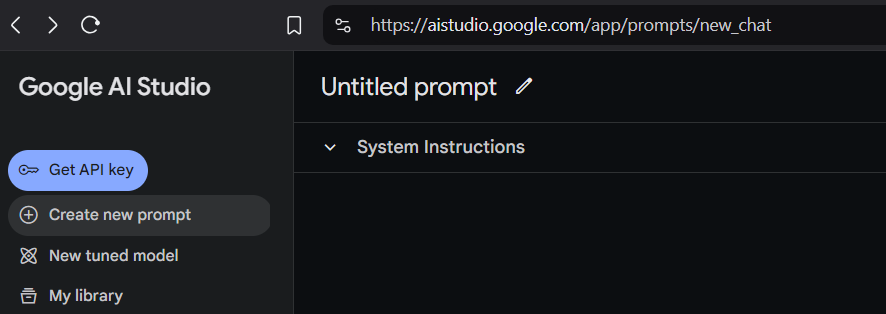
Вторым шагом получаем токен бота. Заходим в Telegram и пишем в поиске BotFather. Далее создаем бота, вводим команду /newbot, задаем имя и юзернейм, а затем копируем полученный токен. Он будет выглядеть примерно так: 7………0:AAE……….Qats.
Последним шагом будет получение API-ключа от Google Drive. Здесь немного сложнее, потому что Google иногда усложняет процессы. Я использовал этот гайд: https://developers.google.com/drive/api/quickstart/python?hl=ru, он краткий и понятный. Когда получите файл credentials.json и создадите папку, скопировав её ID, можно переходить к постройке бота.
Пишем бота
Файлов у нас всего несколько - app.py (наш тестовый сервер), bot.py (весь бот в одном файле), report_template.html (расскажу об этом файле позже) и пару других мелких файлов.
Начнем с импортов:
Python:
import os
import psutil
import requests
import google.generativeai as genai
import datetime
import logging
from telegram import Update, InlineKeyboardButton, InlineKeyboardMarkup, ParseMode
from telegram.ext import (
    Updater,
    CommandHandler,
    CallbackQueryHandler,
    CallbackContext,
    ConversationHandler,
    MessageHandler,
    Filters,
)
from googleapiclient.discovery import build
from googleapiclient.http import MediaFileUpload
from google.oauth2.service_account import Credentials
import random
import string
import traceback
import html
import json
from jinja2 import Environment, FileSystemLoader
import tempfile
Что это? Это набор импортов, из себя он представляет библиотеки для работы с операционной системой (os, psutil), HTTP-запросами (requests), ИИ (google.generativeai), а также для создание и управление тг-ботами (telegram, telegram.ext). Он также включает модули для работы с Google API (googleapiclient, google.oauth2), аутентификации, генерации случайных данных (random, string), обработки ошибок (traceback), работы с HTML (html), форматами данных (json), шаблонизации (jinja2) и создания временных файлов (tempfile). Отлично, идем дальше.
Python:
# === Configuration ===
BOT_TOKEN = "........"
LOG_FILE_PATH = "server.log"
BACKUP_FOLDER = "backup"
GDRIVE_FOLDER_ID = "......."
CREDENTIALS_FILE = "credentials.json"
ADMIN_USER_ID = 111111111
NGROK_URL_FILE = "ngrok_url.txt"


ALLOWED_DIRECTORY = "C:\\Users\\USer\\Server"


genai.configure(api_key=".......")
model = genai.GenerativeModel("gemini-1.5-flash")
На этом этапе мы передаем боту все необходимые API-ключи, пути и другие данные для его работы. Это включает токен бота, полученный из BotFather, файл credentials.json, а также ID папки для бэкапов. ALLOWED_DIRECTORY — это директория на нашем сервере, которую мы указываем для возможности работы с файлами (скачивание, удаление, просмотр).
Python:
# === Logging ===
logging.basicConfig(
    filename=LOG_FILE_PATH,
    level=logging.INFO,
    format="%(asctime)s - %(levelname)s - %(message)s",
)


def restricted_command(func):
    def wrapper(update: Update, context: CallbackContext):
        user_id = update.effective_user.id
        user_language = context.user_data.get("language", "en")


        if user_id != ADMIN_USER_ID:
            if update.callback_query:
                update.callback_query.answer(
                    translations[user_language]["Unauthorized access."]
                )
            else:
                update.message.reply_text(
                    translations[user_language][
                        "You are not authorized to use this command."
                    ]
                )
            return
        return func(update, context)


    return wrapper
Тут настроили логирование с использованием модуля logging для записи сообщений в файл, определённый в переменной LOG_FILE_PATH. Помните переменную сверху ADMIN_USER_ID?
Так вот, это было для того чтобы запретить остальным пользователям выполнять другие любые команды, обертка restricted_command, которая ограничивает доступ к определённым командам для пользователей с конкретным ADMIN_USER_ID. Внутри этой функции проверяется, является ли пользователь администратором, и если нет, то ему отправляется сообщение о несанкционированном доступе на соответствующем языке (в зависимости от настроек пользователя, хранящихся в context.user_data). Если же пользователь — администратор, то вызывается исходная команда. Она нам понадобится перед показом главного меню, в остальных случаях мы будем использовать if сценарии.
Python:
# === Ngrok Functions ===
def get_ngrok_url():
    try:
        with open(NGROK_URL_FILE, "r") as f:
            return f.read().strip()
    except FileNotFoundError:
        logging.error(
            "NGROK_URL_FILE not found. Please run Ngrok and save the URL to ngrok_url.txt"
        )
        return None


def update_ngrok_url(url):
    with open(NGROK_URL_FILE, "w") as f:
        f.write(url)


NGROK_URL = get_ngrok_url()
get_ngrok_url — пытается открыть файл, указанный в переменной NGROK_URL_FILE, и считывает из него URL, который должен быть сохранён в текстовом файле. Если файл не найден, генерируется ошибка в журнал (лог) с сообщением, что необходимо запустить Ngrok и сохранить URL в файл ngrok_url.txt. В случае ошибки функция возвращает None.
update_ngrok_url — принимает URL в качестве аргумента и записывает его в файл NGROK_URL_FILE, тем самым обновляя сохранённый URL. В файл txt нужно заранее вставить ссылку на ngrok адрес тестового сервера. Вернемся к этому в самом конце, когда закончим написание бота.
Python:
# === 2FA States ===
TYPING_CODE = 0


def start_2fa(update: Update, context: CallbackContext) -> int:
    code = "".join(random.choices(string.digits, k=6))
    context.user_data["2fa_code"] = code
    update.message.reply_text(f"Please enter the 2FA code: {code}")
    return TYPING_CODE


def check_2fa_code(update: Update, context: CallbackContext) -> int:
    user_input = update.message.text
    if user_input == context.user_data["2fa_code"]:
        update.message.reply_text("2FA successful!")
        start_cmd(update, context)
        return ConversationHandler.END
    else:
        update.message.reply_text("Incorrect 2FA code. Please try again.")
        return TYPING_CODE


def cancel_2fa(update: Update, context: CallbackContext) -> int:
    update.message.reply_text("2FA Cancelled")
    return ConversationHandler.END
Функция start_2fa генерирует случайный 6-значный код с помощью random.choices(string.digits, k=6) и сохраняет его в context.user_data["2fa_code"]. Затем бот отправляет сообщение с этим кодом и переводит диалог в состояние TYPING_CODE.
Функция check_2fa_code сравнивает введённый пользователем код с сохранённым в context.user_data["2fa_code"]. Если коды совпадают, пользователю отправляется сообщение об успешном прохождении 2FA, вызывается команда start_cmd, и диалог завершается. В случае неправильного кода бот просит попробовать снова и остаётся в состоянии TYPING_CODE.
Функция cancel_2fa позволяет пользователю отменить процесс 2FA. Она отправляет сообщение об отмене и завершает диалог с помощью ConversationHandler.END.
Тут 2FA обеспечит нам дополнительную безопасность на случай кражи токена бота. Дальше, мы напишем функции выбора языка и старта нашего терминала:
Python:
# === Start Command (after successful 2FA) ===
def set_language(update: Update, context: CallbackContext):
    if update.effective_user.id != ADMIN_USER_ID:
        update.message.reply_text("Unauthorized access.")
        return


    if not context.args or len(context.args) != 1:
        update.message.reply_text("Usage: /set_language <en|ru>")
        return


    language = context.args[0].lower()
    if language not in translations:
        update.message.reply_text("Supported languages: en, ru")
        return


    context.user_data["language"] = language
    update.message.reply_text(translations[language]["Language set successfully!"])


@restricted_command
def start_cmd(update: Update, context: CallbackContext):
    user_language = context.user_data.get("language", "en")


    keyboard = [
        [
            InlineKeyboardButton(
                translations[user_language]["System Info"], callback_data="system_menu"
            ),
        ],
        [
            InlineKeyboardButton(
                translations[user_language]["Other Tools"], callback_data="other_menu"
            )
        ],
        [
            InlineKeyboardButton(
                translations[user_language]["Files"], callback_data="files_menu"
            )
        ],
        [InlineKeyboardButton("🌐 Change Language", callback_data="change_language")],
    ]
    reply_markup = InlineKeyboardMarkup(keyboard)
    update.message.reply_text(
        translations[user_language]["Welcome to the Admin Panel!"],
        reply_markup=reply_markup,
    )
Функция set_language позволяет нам изменить язык интерфейса бота. Она проверяет, имеет ли пользователь права администратора, и отказывает в доступе, если это не так. (так и будем продолжать в остальных функциях).
Если команда вызвана без аргументов или аргумент задан неправильно, бот отправляет сообщение с инструкцией по правильному использованию команды: /set_language <en|ru>.
Когда переданный язык поддерживается (есть в словаре translations), он сохраняется в context.user_data["language"], и пользователь получает подтверждение на выбранном языке.
Python:
# === Load Translations from JSON ===
try:
    with open("translations.json", "r", encoding="utf-8") as f:
        translations = json.load(f)
except FileNotFoundError:
    print("translations.json not found. Using default English translations.")
    translations = {
        "en": {
            "Welcome to the Admin Panel!": "Welcome to the Admin Panel!",
            "Language set successfully!": "Language set successfully!",
            "You are not authorized to use this command.": "You are not authorized to use this command.",
            "An error occurred. Please try again later.": "An error occurred. Please try again later.",
            "Server is available at": "Server is available at",
            "System Stats:": "System Stats:",
            "CPU Usage:": "CPU Usage:",
            "RAM Usage:": "RAM Usage:",
            "Disk Usage:": "Disk Usage:",
            "Used:": "Used:",
            "Total:": "Total:",
            "GB": "GB",
            "Server Status:": "Server Status:",
            "Server is unavailable:": "Server is unavailable:",
            "Daily Report:": "Daily Report:",
            "Log Analysis:": "Log Analysis:",
            "Log file not found.": "Log file not found.",
            "Error analyzing logs:": "Error analyzing logs:",
            "Backup failed:": "Backup failed:",
            "Credential file or Backup folder not found:": "Credential file or Backup folder not found:",
            "No files found in the backup folder.": "No files found in the backup folder.",
            "Error: Ngrok URL is unavailable.": "Error: Ngrok URL is unavailable.",
            "Files in": "Files in",
            "No files found.": "No files found.",
            "Directory not found.": "Directory not found.",
            "Error listing files.": "Error listing files.",
            "Please provide a file path:": "Please provide a file path:",
            "File not found.": "File not found.",
            "Error downloading file:": "Error downloading file:",
            "File deleted successfully.": "File deleted successfully.",
            "Error deleting the file. Check permissions or if the file is in use.": "Error deleting the file. Check permissions or if the file is in use.",
            "Please provide the Ngrok URL:": "Please provide the Ngrok URL:",
            "Ngrok URL updated to:": "Ngrok URL updated to:",
            "Backup scheduled successfully!": "Backup scheduled successfully!",
            "Failed to schedule backup:": "Failed to schedule backup:",
            "Please enter directory path:": "Please enter directory path:",
            "Please enter file path to download:": "Please enter file path to download:",
            "Please enter file path to delete:": "Please enter file path to delete:",
            "Unauthorized access.": "Unauthorized access.",
            "You are not authorized to use this command.": "You are not authorized to use this command.",
            "Usage: /set_language <en|ru>": "Usage: /set_language <en|ru>",
            "Analysis Result": "Analysis Result",
            "Backup Result": "Backup Result",
            "Choose an option:": "Choose an option:",
            "System Info": "System Info",
            "Other Tools": "Other Tools",
            "Files": "Files",
            "Stats": "Stats",
            "Status": "Status",
            "Back": "Back",
            "Analyze Logs": "Analyze Logs",
            "Backup Now": "Backup Now",
            "List Files": "List Files",
            "Download File": "Download File",
            "Delete File": "Delete File",
            "Schedule Backup": "Schedule Backup",
            "Please enter the 2FA code:": "Please enter the 2FA code:",
            "2FA successful!": "2FA successful!",
            "Incorrect 2FA code. Please try again.": "Incorrect 2FA code. Please try again.",
            "2FA Cancelled": "2FA Cancelled",
            "File Management Options:": "File Management Options:",
            "Are you sure you want to schedule daily backups at 2:00 AM?": "Are you sure you want to schedule daily backups at 2:00 AM?",
            "Backup scheduling confirmed!": "Backup scheduling confirmed!",
        },
        "ru": {
            "Welcome to the Admin Panel!": "Добро пожаловать в админ панель!",
            "Language set successfully!": "Язык успешно установлен!",
            "You are not authorized to use this command.": "Вы не авторизованы для использования этой команды.",
            "An error occurred. Please try again later.": "Произошла ошибка. Пожалуйста, попробуйте позже.",
            "Server is available at": "Сервер доступен по адресу",
            "System Stats:": "Системная статистика:",
            "CPU Usage:": "Использование процессора:",
            "RAM Usage:": "Использование ОЗУ:",
            "Disk Usage:": "Использование диска:",
            "Used:": "Использовано:",
            "Total:": "Всего:",
            "GB": "ГБ",
            "Server Status:": "Статус сервера:",
            "Server is unavailable:": "Сервер недоступен:",
            "Daily Report:": "Ежедневный отчет:",
            "Log Analysis:": "Анализ логов:",
            "Log file not found.": "Файл журнала не найден.",
            "Error analyzing logs:": "Ошибка анализа журналов:",
            "Backup failed:": "Ошибка резервного копирования:",
            "Credential file or Backup folder not found:": "Файл учетных данных или папка резервного копирования не найдены:",
            "No files found in the backup folder.": "В папке резервного копирования файлов не найдено.",
            "Error: Ngrok URL is unavailable.": "Ошибка: URL-адрес Ngrok недоступен.",
            "Files in": "Файлы в",
            "No files found.": "Файлов не найдено.",
            "Directory not found.": "Директория не найдена.",
            "Error listing files.": "Ошибка при перечислении файлов.",
            "Please provide a file path:": "Пожалуйста, укажите путь к файлу:",
            "File not found.": "Файл не найден.",
            "Error downloading file:": "Ошибка загрузки файла:",
            "File deleted successfully.": "Файл успешно удален.",
            "Error deleting the file. Check permissions or if the file is in use.": "Ошибка удаления файла. Проверьте разрешения или используется ли файл.",
            "Please provide the Ngrok URL:": "Пожалуйста, укажите URL-адрес Ngrok:",
            "Ngrok URL updated to:": "URL-адрес Ngrok обновлен до:",
            "Backup scheduled successfully!": "Резервное копирование успешно запланировано!",
            "Failed to schedule backup:": "Не удалось запланировать резервное копирование:",
            "Please enter directory path:": "Пожалуйста, введите путь к каталогу:",
            "Please enter file path to download:": "Пожалуйста, введите путь к файлу для загрузки:",
            "Please enter file path to delete:": "Пожалуйста, введите путь к файлу для удаления:",
            "Unauthorized access.": "Несанкционированный доступ.",
            "You are not authorized to use this command.": "Вы не авторизованы использовать эту команду.",
            "Usage: /set_language <en|ru>": "Использование: /set_language <en|ru>",
            "Analysis Result": "Результат анализа",
            "Backup Result": "Результат резервного копирования",
            "Choose an option:": "Выберите опцию:",
            "System Info": "Системная информация",
            "Other Tools": "Другие инструменты",
            "Files": "Файлы",
            "Stats": "Статистика",
            "Status": "Статус",
            "Back": "Назад",
            "Analyze Logs": "Анализировать журналы",
            "Backup Now": "Резервное копирование сейчас",
            "List Files": "Список файлов",
            "Download File": "Скачать файл",
            "Delete File": "Удалить файл",
            "Schedule Backup": "Запланировать резервное копирование",
            "Please enter the 2FA code:": "Пожалуйста, введите 2FA код:",
            "2FA successful!": "2FA успешно!",
            "Incorrect 2FA code. Please try again.": "Неверный 2FA код. Пожалуйста, попробуйте еще раз.",
            "2FA Cancelled": "2FA отменено",
            "File Management Options:": "Параметры управления файлами:",
            "Are you sure you want to schedule daily backups at 2:00 AM?": "Вы уверены, что хотите запланировать ежедневное резервное копирование в 2:00 ночи?",
            "Backup scheduling confirmed!": "Резервное копирование успешно запланировано!",
        },
    }
Функция start_cmd отображает панель администратора после успешной аутентификации. Она использует декоратор restricted_command, чтобы ограничить доступ только для администратора.
Давайте теперь перейдем к самому функционалу бота. Начнем с системного функционала, а именно проверка сервера на доступность и его статистику:
Python:
# === System Info Functions ===


def check_server(context: CallbackContext):
    global NGROK_URL
    user_language = context.user_data.get("language", "en")
    NGROK_URL = get_ngrok_url()


    if not NGROK_URL:
        return translations[user_language]["Error: Ngrok URL is unavailable."]


    try:
        response = requests.get(NGROK_URL)
        response.raise_for_status()
        return f"{translations[user_language]['Server is available at']} {NGROK_URL}"
    except requests.exceptions.RequestException as e:
        logging.error(f"Server check failed: {e}")
        return f"{translations[user_language]['Server is unavailable:']}: {e}"


def get_system_stats(context: CallbackContext):
    user_language = context.user_data.get("language", "en")
    cpu = psutil.cpu_percent(interval=1)
    mem = psutil.virtual_memory()
    disk = psutil.disk_usage("/")


    stats_message = f"""
    <b>{translations[user_language]["System Stats:"]}</b>


    <b>{translations[user_language]["CPU Usage:"]}</b> {cpu:.1f}%
    <b>{translations[user_language]["RAM Usage:"]}</b> {mem.percent:.1f}% ({translations[user_language]["Used:"]} {mem.used // (1024**3)}{translations[user_language]["GB"]} / {translations[user_language]["Total:"]}: {mem.total // (1024**3)}{translations[user_language]["GB"]})
    <b>{translations[user_language]["Disk Usage:"]}</b> {disk.percent:.1f}% ( {translations[user_language]["Used:"]}{disk.used // (1024**3)}{translations[user_language]["GB"]} / {translations[user_language]["Total:"]}: {disk.total // (1024**3)}{translations[user_language]["GB"]})


     """
    return stats_message
check_server
Функция проверяет доступность сервера через URL, полученный с помощью get_ngrok_url(). Если URL недоступен, возвращается сообщение об ошибке на языке пользователя. При успешном подключении отправляется сообщение с подтверждением доступности сервера. В случае ошибок подключения информация логируется, и пользователю отображается текст с деталями ошибки.get_system_stats
Функция собирает информацию о текущем состоянии системы: загрузке CPU, использовании оперативной памяти (RAM) и дискового пространства. Данные форматируются в текстовое сообщение, используя выбранный пользователем язык, и содержат ключевые показатели, такие как проценты загрузки и объем использованных/доступных ресурсов.Теперь по очереди анализ логов и загрузка бэкапа на гугл драйв. Тут мы еще отметим один интересный момент.
Python:
def analyze_logs():
    try:
        with open(LOG_FILE_PATH, "r") as f:
            logs = f.readlines()[-10:]
            log_content = "".join(logs)


        response = model.generate_content(
            f"Analyze these logs for errors and provide insights:\n\n{log_content}"
        )
        return response.text.strip()


    except FileNotFoundError:
        return "Log file not found."
    except Exception as e:
        logging.error(f"Log analysis error: {e}")
        return f"Error analyzing logs: {e}"
Функция анализирует последние 10 строк журнала, расположенного в LOG_FILE_PATH. Логи передаются в ИИ для генерации анализа с выявлением ошибок и выводом инсайтов. Если файл логов отсутствует или возникает другая ошибка, функция возвращает соответствующее сообщение. Заметили как легко использовать Gemini по сравнению с ChatGPT? Именно поэтому я отдаю предпочтение Gemini, нежели второму. Вся красота в простоте!
Python:
def backup_to_google_drive():
    try:
        credentials = Credentials.from_service_account_file(CREDENTIALS_FILE)
        service = build("drive", "v3", credentials=credentials)


        log_messages = []
        for filename in os.listdir(BACKUP_FOLDER):
            filepath = os.path.join(BACKUP_FOLDER, filename)
            if os.path.isfile(filepath):
                file_metadata = {"name": filename, "parents": [GDRIVE_FOLDER_ID]}
                media = MediaFileUpload(filepath, resumable=True)
                file = (
                    service.files()
                    .create(body=file_metadata, media_body=media, fields="id")
                    .execute()
                )
                log_messages.append(
                    f"File '{filename}' uploaded to Google Drive (ID: {file.get('id')})"
                )


        return (
            "\n".join(log_messages)
            if log_messages
            else "No files found in the backup folder."
        )


    except FileNotFoundError as e:


        return f"Error: Credential file or Backup folder not found: {e}"
    except Exception as e:
        logging.exception(f"Google Drive backup failed: {e}")
        return f"Backup failed: {e}"
Используя учетные данные из файла CREDENTIALS_FILE, функция подключается к Google Drive API, загружает файлы в указанный каталог (GDRIVE_FOLDER_ID) и возвращает список загруженных файлов. При отсутствии данных или ошибок отображается сообщение с описанием проблемы. Около 40% кода мы прошли, хоть объем и может казаться большим, но мы лишь реализовали базовые функции, вся красота создания telegram ботов и написания на python еще впереди. Перейдем к реализации файлового функционала.
Python:
# === File Management Commands ===


def list_files(update: Update, context: CallbackContext) -> None:
    user_language = context.user_data.get("language", "en")


    if update.effective_user.id != ADMIN_USER_ID:
        update.message.reply_text(
            translations[user_language]["You are not authorized to use this command."]
        )
        return


    requested_path = " ".join(context.args)


    if not requested_path:
        list_dir = ALLOWED_DIRECTORY


    elif os.path.abspath(requested_path).startswith(
        ALLOWED_DIRECTORY
    ) and os.path.isdir(os.path.abspath(requested_path)):
        list_dir = requested_path


    else:
        update.message.reply_text(
            "You do not have permission to access this directory."
        )
        return


    try:
        files = os.listdir(list_dir)
        file_list = "\n".join(files) or translations[user_language]["No files found."]
        update.message.reply_text(
            f"{translations[user_language]['Files in']} '{list_dir}':\n{file_list}"
        )


    except FileNotFoundError:
        update.message.reply_text(translations[user_language]["Directory not found."])
    except Exception as e:
        logging.error(f"Error listing files: {e}")
        update.message.reply_text(translations[user_language]["Error listing files."])


def download_file(update: Update, context: CallbackContext) -> None:
    user_language = context.user_data.get("language", "en")


    if update.effective_user.id != ADMIN_USER_ID:
        update.message.reply_text(
            translations[user_language]["You are not authorized to use this command."]
        )
        return


    file_path = " ".join(context.args)


    if not file_path:
        update.message.reply_text(
            translations[user_language]["Please provide a file path:"]
        )
        return


    full_file_path = os.path.abspath(file_path)
    if not full_file_path.startswith(ALLOWED_DIRECTORY):
        update.message.reply_text("You do not have permission to access this file.")
        return


    try:
        with open(full_file_path, "rb") as f:
            context.bot.send_document(
                chat_id=update.effective_chat.id,
                document=f,
                filename=os.path.basename(full_file_path),
            )
    except FileNotFoundError:
        update.message.reply_text(translations[user_language]["File not found."])
    except Exception as e:
        logging.error(f"Error downloading file: {e}")
        update.message.reply_text(
            f"{translations[user_language]['Error downloading file:']} {e}"
        )


def delete_file(update: Update, context: CallbackContext) -> None:
    user_language = context.user_data.get("language", "en")


    if update.effective_user.id != ADMIN_USER_ID:
        update.message.reply_text(
            translations[user_language]["You are not authorized to use this command."]
        )
        return


    file_path = " ".join(context.args)
    if not file_path:
        update.message.reply_text(
            translations[user_language]["Please provide a file path:"]
        )
        return


    try:
        os.remove(file_path)
        update.message.reply_text(
            translations[user_language]["File deleted successfully."]
        )
    except FileNotFoundError:
        update.message.reply_text(translations[user_language]["File not found."])
    except OSError as e:
        logging.error(f"Error deleting file: {e}")
        update.message.reply_text(
            translations[user_language][
                "Error deleting the file. Check permissions or if the file is in use."
            ]
        )
Идем по порядку:
list_files отвечает за вывод списка файлов в указанной директории. Она проверяет, является ли запрошенный путь в пределах разрешённой директории (ALLOWED_DIRECTORY). Если директория не указана, используется директория по умолчанию. При успешном выполнении бот отправляет список файлов. Если директория недоступна или отсутствует, пользователю отправляется сообщение об ошибке, а детали логируются.
download_file позволяет администратору загружать файлы из разрешённой директории. Она принимает путь к файлу в аргументах команды и проверяет, находится ли он внутри заданной директории. Если файл найден, он отправляется пользователю как документ. В случае отсутствия файла или других ошибок бот информирует пользователя, а информация о сбое записывается в журнал.
delete_file используется для удаления файлов. После проверки прав доступа и корректности пути к файлу, бот пытается удалить файл. Если удаление проходит успешно, пользователю отправляется сообщение об этом. Если файл не найден или возникают проблемы с доступом, бот уведомляет пользователя об ошибке, а причина логируется для дальнейшего анализа.
Дальше мы перейдем к самым важным кускам кода, разомнемся с маленькой, но полезной функции, которая позволяет обновлять ссылку на Ngrok.
Python:
def set_ngrok(update: Update, context: CallbackContext) -> None:
    user_language = context.user_data.get("language", "en")


    if update.effective_user.id != ADMIN_USER_ID:
        update.message.reply_text(
            translations[user_language]["You are not authorized to use this command."]
        )
        return


    if context.args:
        new_url = context.args[0]
        update_ngrok_url(new_url)
        global NGROK_URL
        NGROK_URL = new_url
        update.message.reply_text(
            f"{translations[user_language]['Ngrok URL updated to:']}{new_url}"
        )
    else:
        update.message.reply_text(
            translations[user_language]["Please provide the Ngrok URL:"]
        )
Если команда вызвана с аргументом, указывающим новый URL, он сохраняется через функцию update_ngrok_url, а глобальная переменная NGROK_URL обновляется. После успешного обновления бот отправляет сообщение с подтверждением нового URL.
Python:
def generate_report(update: Update, context: CallbackContext) -> None:
    user_language = context.user_data.get("language", "en")


    if update.effective_user.id != ADMIN_USER_ID:
        update.message.reply_text(
            translations[user_language]["You are not authorized to use this command."]
        )
        return


    try:
        stats = get_system_stats(context)
        status = check_server(context)
        logs_analysis = analyze_logs()
        backup_result = backup_to_google_drive()


        env = Environment(loader=FileSystemLoader("."))
        template = env.get_template("report_template.html")


        report_data = {
            "cpu_usage": psutil.cpu_percent(interval=1),
            "ram_usage": psutil.virtual_memory().percent,
            "ram_used": psutil.virtual_memory().used // (1024**3),
            "ram_total": psutil.virtual_memory().total // (1024**3),
            "disk_usage": psutil.disk_usage("/").percent,
            "disk_used": psutil.disk_usage("/").used // (1024**3),
            "disk_total": psutil.disk_usage("/").total // (1024**3),
            "server_status": status,
            "log_analysis": logs_analysis,
            "backup_result": backup_result,
            "errors": [],
            "now": datetime.datetime.now(),
        }


        html_report = template.render(report_data)


        try:
            with tempfile.NamedTemporaryFile(
                mode="w", suffix=".html", delete=False
            ) as temp_file:
                temp_file.write(html_report)
                temp_file_path = temp_file.name


            with open(temp_file_path, "rb") as f:
                response = requests.post("https://file.io", files={"file": f})
                response.raise_for_status()
                file_url = response.json()["link"]


            os.remove(temp_file_path)


            message = "{report_ready} {file_url}".format(
                report_ready="Your report is ready:", file_url=file_url
            )
            context.bot.send_message(chat_id=update.effective_chat.id, text=message)


        except requests.exceptions.RequestException as e:
            error_message = f"Error uploading report: {e}"
            logging.error(error_message)
            context.bot.send_message(
                chat_id=update.effective_chat.id,
                text=error_message,
                parse_mode=ParseMode.MARKDOWN,
            )
            send_simplified_report(
                update,
                context,
                stats,
                status,
                logs_analysis,
                backup_result,
                error_message,
            )


    except Exception as e:
        error_message = f"{translations[user_language]['An error occurred. Please try again later.']}: {e}"
        logging.exception(f"Error generating or sending report: {e}")
        context.bot.send_message(chat_id=update.effective_chat.id, text=error_message)


def send_simplified_report(
    update, context, stats, status, logs_analysis, backup_result, error_message
):


    user_language = context.user_data.get("language", "en")


    report = f"""
       *{translations[user_language]['Daily Report:']}* (Simplified due to error)


       *System Stats:*
       {stats}


       *Server Status:*
       {status}


       *Error:*
       {error_message}


    """
    context.bot.send_message(
        chat_id=update.effective_chat.id, text=report, parse_mode=ParseMode.MARKDOWN
    )
Одна из главных фишек бота - генерация красивых и подробных отчетов. В этом нам помогает generate_report предназначенная для создания и отправки системного отчёт.. Она проверяет права доступа, собирает данные о состоянии системы, статусе сервера, анализе логов и резервных копий. Данные компонуются в HTML-шаблон с использованием jinja2, создавая удобный для чтения отчёт.
Созданный HTML-отчёт временно сохраняется в файл, который затем загружается на сторонний сервис хранения, например, file.io. После успешной загрузки ссылка на отчёт отправляется администратору. Если загрузка не удалась, генерируется упрощённый текстовый отчёт с ключевой информацией о системе, статусе сервера и ошибках.
Для этого случая мы также создали report_template.html:
HTML:
<!DOCTYPE html>
<html lang="en">
<head>
    <meta charset="UTF-8">
    <meta name="viewport" content="width=device-width, initial-scale=1.0">
    <title>AI Generated Report</title>
    <style>
        body {
            font-family: sans-serif;
            line-height: 1.6;
        }
        table {
            width: 100%;
            border-collapse: collapse;
            margin-bottom: 20px;
        }
        th, td {
            border: 1px solid #ddd;
            padding: 8px;
            text-align: left;
        }
        th {
            background-color: #f2f2f2;
        }
        pre {
            background-color: #f8f8f8;
            border: 1px solid #ccc;
            padding: 10px;
            overflow: auto;
            white-space: pre-wrap;
         }
         .error-message {
             color: red;
         }
    </style>
</head>
<body>


    <h1>Daily Report</h1>
    <p>Generated on: {{ now.strftime('%Y-%m-%d %H:%M:%S') }}</p>


    <h2>System Stats</h2>
    <table>
        <tr>
            <th>Metric</th>
            <th>Value</th>
        </tr>
        <tr>
            <td>CPU Usage</td>
            <td>{{ cpu_usage }}%</td>
        </tr>
        <tr>
            <td>RAM Usage</td>
            <td>{{ ram_usage }}% (Used: {{ ram_used }}GB / Total: {{ ram_total }}GB)</td>
        </tr>
         <tr>
            <td>Disk Usage</td>
            <td>{{ disk_usage }}% (Used: {{disk_used}}GB / Total: {{disk_total}}GB)</td>
        </tr>
    </table>


   <h2>Server Status</h2>
   {% if server_status.startswith('Server is available') %}
        <p style="color: green;">{{ server_status }}</p>
    {% else %}
        <p class="error-message">{{ server_status }}</p>
    {% endif %}


    <h2>Log Analysis</h2>
    <pre>{{ log_analysis }}</pre>


   <h2>Backup Result</h2>
    <pre>{{ backup_result }}</pre>


    {% if errors %}
        <h2>Errors</h2>
        <ul>
        {% for error in errors %}
            <li class="error-message">{{ error }}</li>
        {% endfor %}
        </ul>
    {% endif %}


</body>
</html>
Результат:
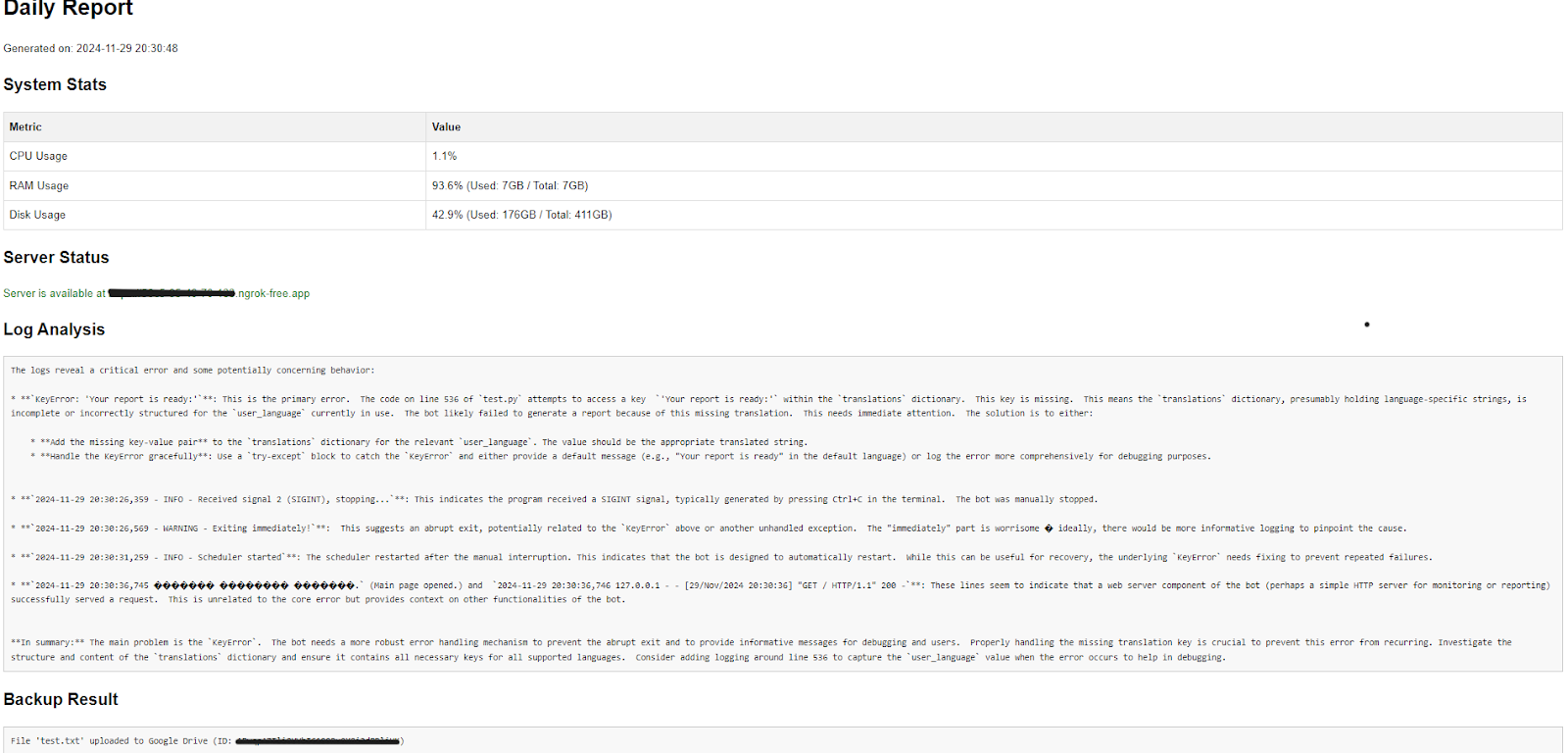
Примечательно, что ИИ предлагает фиксить ошибки, которые возникли во время разработки (забыл добавить фразу в словарь). Как мы видим, это может значительно помочь.
Python:
def schedule_backup(update: Update, context: CallbackContext) -> None:
    user_language = context.user_data.get("language", "en")


    if update.effective_user.id != ADMIN_USER_ID:
        update.callback_query.answer(
            translations[user_language]["Unauthorized access."]
        )
        return


    try:


        def job(context):
            result = backup_to_google_drive()
            context.bot.send_message(
                chat_id=update.effective_chat.id, text=result, parse_mode=ParseMode.HTML
            )


        context.job_queue.run_daily(
            job,
            time=datetime.time(hour=2, minute=00),
            days=(0, 1, 2, 3, 4, 5, 6),
            context=update.effective_chat.id,
        )


        update.callback_query.answer(
            translations[user_language]["Backup scheduled successfully!"],
            show_alert=True,
        )


    except Exception as e:
        logging.error(f"Failed to schedule backup: {e}")
        update.callback_query.answer(
            f"{translations[user_language]['Failed to schedule backup:']}{e}",
            show_alert=True,
        )
schedule_backup предназначена для автоматизации создания резервных копий на Google Drive с использованием задания в Telegram Job Queue. Функция создаёт ежедневное задание на выполнение резервного копирования в 02:00. В момент выполнения задания вызывается функция backup_to_google_drive, а результат операции отправляется администратору через чат.
По очереди дальше идет довольно большая функция для настройки интерфейса бота, давайте ее разберем:
Python:
# === Callback Query Handler ===


def button_handler(update: Update, context: CallbackContext) -> None:
    query = update.callback_query
    query.answer()


    user_language = context.user_data.get("language", "en")


    if query.data == "change_language":
        keyboard = [
            [InlineKeyboardButton("🇬🇧 English", callback_data="lang_en")],
            [InlineKeyboardButton("🇷🇺 Русский", callback_data="lang_ru")],
            [InlineKeyboardButton("⬅️ Back", callback_data="back_main")],
        ]
        reply_markup = InlineKeyboardMarkup(keyboard)
        query.edit_message_text(text="Select your language:", reply_markup=reply_markup)
        return


    if query.data.startswith("lang_"):
        new_language = query.data.split("_")[1]
        context.user_data["language"] = new_language


        keyboard = [
            [
                InlineKeyboardButton(
                    translations[new_language]["System Info"],
                    callback_data="system_menu",
                ),
            ],
            [
                InlineKeyboardButton(
                    translations[new_language]["Other Tools"],
                    callback_data="other_menu",
                )
            ],
            [
                InlineKeyboardButton(
                    translations[new_language]["Files"], callback_data="files_menu"
                )
            ],
            [
                InlineKeyboardButton(
                    "🌐 Change Language", callback_data="change_language"
                )
            ],
        ]
        reply_markup = InlineKeyboardMarkup(keyboard)
        query.edit_message_text(
            text=translations[new_language]["Welcome to the Admin Panel!"],
            reply_markup=reply_markup,
        )
        return


    if query.data == "back_main":
        keyboard = [
            [
                InlineKeyboardButton(
                    translations[user_language]["System Info"],
                    callback_data="system_menu",
                ),
            ],
            [
                InlineKeyboardButton(
                    translations[user_language]["Other Tools"],
                    callback_data="other_menu",
                )
            ],
            [
                InlineKeyboardButton(
                    translations[user_language]["Files"], callback_data="files_menu"
                )
            ],
            [
                InlineKeyboardButton(
                    "🌐 Change Language", callback_data="change_language"
                )
            ],
        ]
        reply_markup = InlineKeyboardMarkup(keyboard)
        query.edit_message_reply_markup(reply_markup=reply_markup)


    elif query.data == "system_menu":
        keyboard = [
            [
                InlineKeyboardButton(
                    translations[user_language]["Status"], callback_data="status"
                )
            ],
            [
                InlineKeyboardButton(
                    translations[user_language]["Stats"], callback_data="stats"
                )
            ],
            [
                InlineKeyboardButton(
                    translations[user_language]["Back"], callback_data="back_main"
                )
            ],
        ]
        reply_markup = InlineKeyboardMarkup(keyboard)
        query.edit_message_reply_markup(reply_markup=reply_markup)


    elif query.data == "other_menu":
        keyboard = [
            [
                InlineKeyboardButton(
                    translations[user_language]["Analyze Logs"],
                    callback_data="analyze_logs",
                )
            ],
            [
                InlineKeyboardButton(
                    translations[user_language]["Backup Now"], callback_data="backup"
                )
            ],
            [
                InlineKeyboardButton(
                    translations[user_language]["Schedule Backup"],
                    callback_data="schedule_backup",
                )
            ],
            [
                InlineKeyboardButton(
                    translations[user_language]["Back"], callback_data="back_main"
                )
            ],
        ]
        reply_markup = InlineKeyboardMarkup(keyboard)
        query.edit_message_reply_markup(reply_markup=reply_markup)
    elif query.data == "files_menu":
        keyboard = [
            [
                InlineKeyboardButton(
                    translations[user_language]["List Files"],
                    callback_data="list_files",
                )
            ],
            [
                InlineKeyboardButton(
                    translations[user_language]["Download File"],
                    callback_data="download_file",
                )
            ],
            [
                InlineKeyboardButton(
                    translations[user_language]["Delete File"],
                    callback_data="delete_file",
                )
            ],
            [
                InlineKeyboardButton(
                    translations[user_language]["Back"], callback_data="back_main"
                )
            ],
        ]


        reply_markup = InlineKeyboardMarkup(keyboard)
        query.edit_message_text(
            text="File Management Options:", reply_markup=reply_markup
        )


    elif query.data == "status":


        status = check_server(context)


        context.bot.send_message(chat_id=update.effective_chat.id, text=status)


    elif query.data == "stats":
        stats = get_system_stats(context)
        context.bot.send_message(
            chat_id=update.effective_chat.id, text=stats, parse_mode=ParseMode.HTML
        )


    elif query.data == "analyze_logs":
        result = analyze_logs()


        context.bot.send_message(chat_id=update.effective_chat.id, text=result)


    elif query.data == "backup":
        result = backup_to_google_drive()
        context.bot.send_message(chat_id=update.effective_chat.id, text=result)


    elif query.data == "schedule_backup":
        keyboard = [
            [InlineKeyboardButton("✅ Confirm", callback_data="confirm_schedule")],
            [InlineKeyboardButton("❌ Cancel", callback_data="back_main")],
        ]
        reply_markup = InlineKeyboardMarkup(keyboard)


        query.edit_message_text(
            text=translations[user_language][
                "Are you sure you want to schedule daily backups at 2:00 AM?"
            ],
            reply_markup=reply_markup,
        )


    elif query.data == "confirm_schedule":
        schedule_backup(update, context)
        query.edit_message_text(
            text=translations[user_language]["Backup scheduling confirmed!"]
        )


    elif query.data == "list_files":
        context.bot.send_message(
            chat_id=update.effective_chat.id,
            text="Please enter directory path: /list_files <path>",
        )


    elif query.data == "download_file":
        context.bot.send_message(
            chat_id=update.effective_chat.id,
            text="Please enter file path to download: /download_file <path>",
        )


    elif query.data == "delete_file":
        context.bot.send_message(
            chat_id=update.effective_chat.id,
            text="Please enter file path to delete: /delete_file <path>",
        )
button_handler обрабатывает нажатия кнопок в интерфейсе Telegram-бота с использованием InlineKeyboardButton. Она предназначена для управления панелью администратора и выполнения различных операций. Вот как она работает:
- Если нажата кнопка для изменения языка (change_language), пользователю предоставляется выбор между английским и русским языками.
- Когда пользователь выбирает новый язык, бот обновляет язык интерфейса и отображает соответствующие кнопки в зависимости от выбранного языка.
- Меню администратора: В зависимости от нажатой кнопки, бот может показывать различные меню:
- System Info (информация о системе).
- Other Tools (дополнительные инструменты, такие как анализ логов и резервное копирование).
- File Management (управление файлами: список, скачивание, удаление).
- Операции с системой: В ответ на нажатия кнопок из меню выполняются соответствующие действия:
- Получение статуса сервера.
- Получение статистики системы.
- Анализ логов.
- Выполнение и планирование резервного копирования.
- Управление файлами (список, скачивание, удаление).
- Подтверждение планирования резервного копирования: Если пользователь решает запланировать резервное копирование, ему предоставляется подтверждение. После подтверждения запускается процесс планирования.
Чтобы обрабатывать ошибки красиво и грамотно мы создадим последнюю функцию перед main для обработки ошибок в виде понятного html:
Python:
# === Error Handling ===


def error_handler(update: Update, context: CallbackContext) -> None:
    user_language = context.user_data.get("language", "en")
    logging.error(msg="Exception while handling an update:", exc_info=context.error)


    try:
        tb_list = traceback.format_exception(
            None, context.error, context.error.__traceback__
        )
        tb_string = "".join(tb_list)
        update_str = update.to_dict() if isinstance(update, Update) else str(update)
        message = (
            f"An exception was raised while handling an update\n"
            f"<pre>update = {html.escape(json.dumps(update_str, indent=2, ensure_ascii=False))}"
            "</pre>\n\n"
            f"<pre>context.chat_data = {html.escape(str(context.chat_data))}</pre>\n\n"
            f"<pre>context.user_data = {html.escape(str(context.user_data))}</pre>\n\n"
            f"<pre>{html.escape(tb_string)}</pre>"
        )


        context.bot.send_message(
            chat_id=ADMIN_USER_ID, text=message, parse_mode=ParseMode.HTML
        )


    except Exception as exc:
        logging.error(f"Failed to send error message to developer : {exc}")


    try:
        if update.message:
            update.message.reply_text(
                translations[user_language][
                    "An error occurred. Please try again later."
                ]
            )
        elif update.callback_query:
            update.callback_query.answer(
                translations[user_language][
                    "An error occurred. Please try again later."
                ]
            )
    except:
        logging.error(f"Failed to send error message to the user: {context.error}")
error_handler обрабатывает ошибки в боте и уведомляет администратора о возникших исключениях. Она логирует ошибку с помощью библиотеки logging, формирует трассировку стека через traceback.format_exception и отправляет подробное сообщение админу в Telegram. Это сообщение включает информацию об ошибке, стеке вызовов, а также данные о пользователе и контексте. Кроме того, функция отправляет пользователю стандартное уведомление о возникшей ошибке, чтобы он мог попробовать снова позже. В случае ошибки при отправке уведомлений также производится логирование.
Наконец, функция main:
Python:
# === Main Function ===


def main():
    updater = Updater(BOT_TOKEN, use_context=True)
    dispatcher = updater.dispatcher


    two_fa_handler = ConversationHandler(
        entry_points=[CommandHandler("start", start_2fa)],
        states={
            TYPING_CODE: [
                MessageHandler(Filters.text & ~Filters.command, check_2fa_code)
            ],
        },
        fallbacks=[CommandHandler("cancel", cancel_2fa)],
    )
    dispatcher.add_handler(two_fa_handler)


    dispatcher.add_handler(CommandHandler("start", start_cmd))
    dispatcher.add_handler(CommandHandler("set_ngrok", set_ngrok))


    dispatcher.add_handler(CommandHandler("list_files", list_files))
    dispatcher.add_handler(CommandHandler("download_file", download_file))
    dispatcher.add_handler(CommandHandler("delete_file", delete_file))
    dispatcher.add_handler(CommandHandler("schedule_backup", schedule_backup))
    dispatcher.add_handler(CommandHandler("report", generate_report))
    dispatcher.add_handler(CommandHandler("set_language", set_language))


    dispatcher.add_handler(CallbackQueryHandler(button_handler))


    dispatcher.add_error_handler(error_handler)


    updater.start_polling()
    updater.idle()


if __name__ == "__main__":
    main()
main является точкой входа для запуска бота. Она создает объект Updater с использованием токена бота и добавляет обработчики команд и событий.
Для теста можно использовать самый простой сервер:
Python:
from flask import Flask, request, jsonify
import logging
import random


app = Flask(__name__)


LOG_FILE = "server.log"
logging.basicConfig(filename=LOG_FILE, level=logging.INFO, format='%(asctime)s %(message)s')


@app.route("/", methods=["GET"])
def home():
    logging.info("Главная страница открыта.")
    return "Добро пожаловать на тестовый сервер!", 200


@app.route("/test_error", methods=["GET"])
def test_error():
    errors = [
        {"code": 400, "message": "Bad Request"},
        {"code": 401, "message": "Unauthorized"},
        {"code": 403, "message": "Forbidden"},
        {"code": 404, "message": "Not Found"},
        {"code": 500, "message": "Internal Server Error"}
    ]
    error = random.choice(errors)
    logging.error(f"Ошибка {error['code']}: {error['message']}")
    return jsonify(error), error["code"]


@app.route("/data", methods=["POST"])
def data():
    data = request.json
    if not data:
        logging.warning("Получен пустой запрос.")
        return jsonify({"error": "Пустой запрос"}), 400
    logging.info(f"Получены данные: {data}")
    return jsonify({"message": "Данные успешно обработаны!", "received": data}), 200


if __name__ == "__main__":
    app.run(host="0.0.0.0", port=5000, debug=False)
Также нам понадобится Ngrok. Переходим на сайт https://download.ngrok.com/windows, следуем инструкциям и скачиваем. Нам предоставят бесплатные ресурсы для тестов. Для большей эффективности скачайте браузер DuckDuckGo и воспользуйтесь генерацией бесплатных приватных email-адресов, привязанных к вашему основному. Когда период закончится, просто зарегистрируйте новый email и обновите токен.
После этого запускайте бота, тестовый сервер и Ngrok, и можно использовать их откуда угодно, как вам удобно. Функционал бота простой, но при желании вы можете легко доработать его или адаптировать под свои нужды. Я уже нашел для него применение и буду использовать. Главное — это ваша фантазия!
Заключение
Спасибо всем, кто дочитал статью до конца! Сегодня мы разобрали довольно необычную тему — нет, это не просто создание очередного telegram-бота, а создание быстрого инструмента для мониторинга вашего сервера, доступного прямо с телефона. Мы рассмотрели, как это сделать, обсудили важные тонкости и технологии, которые стоят за этим процессом.
Надеюсь, вам было интересно и полезно. Не забывайте, что подобные инструменты можно адаптировать под любые задачи, и вы всегда можете добавить что-то новое или улучшить функциональность бота под свои нужды.
Желаю удачи в создании своих проектов!
