

A recent job required having on-demand access to quality rendering of vcc with any info. Perhaps it will aid someone's work also. All that's required is to host the html file (code included at the bottom)
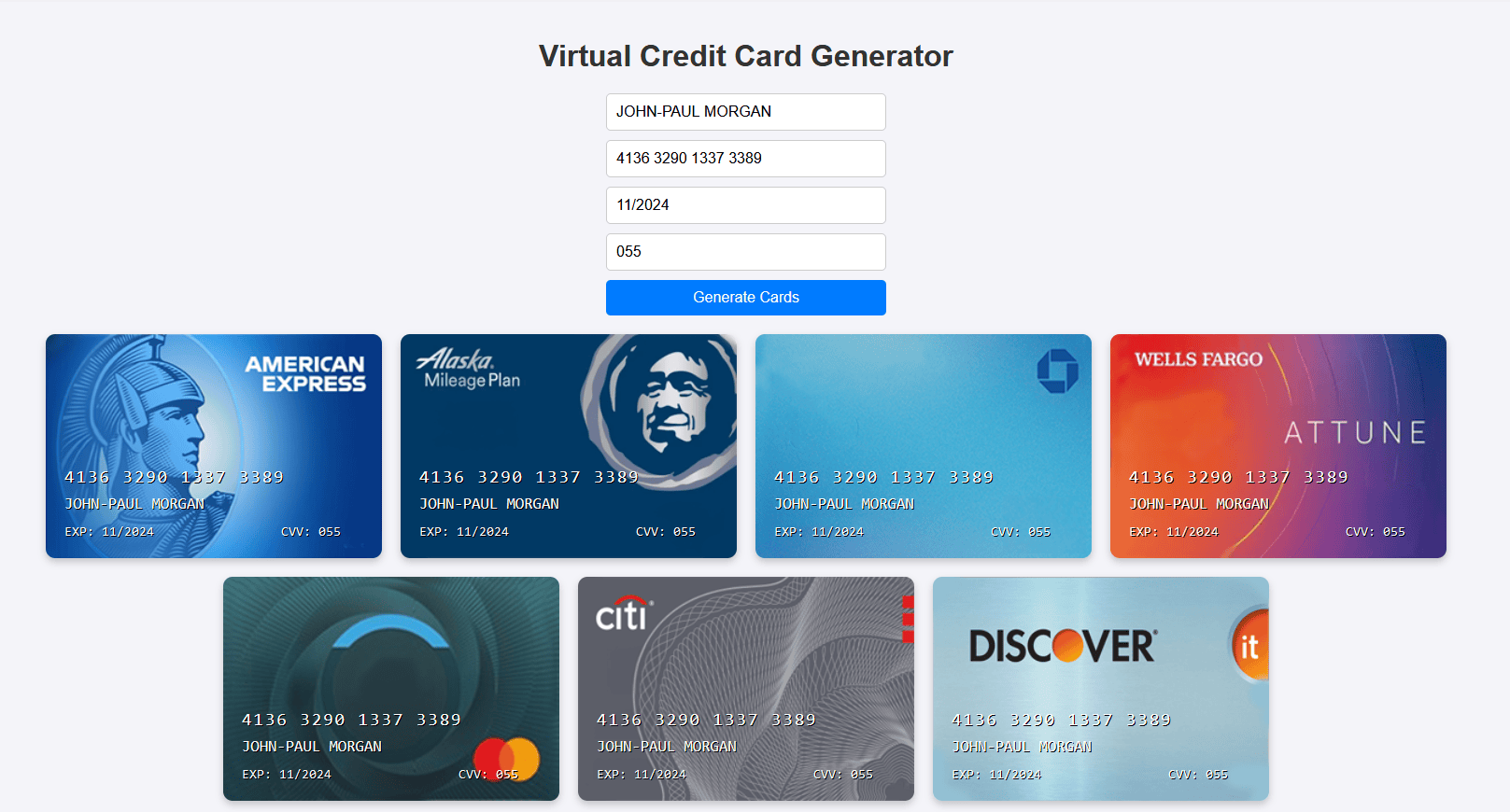
HTML:
<!DOCTYPE html>
<html lang="en">
<head>
    <meta charset="UTF-8">
    <meta name="viewport" content="width=device-width, initial-scale=1.0">
    <title>Virtual Credit Card Generator</title>
    <style>
        @font-face {
            font-family: "OCR-A";
            src: url("https://fonts.cdnfonts.com/s/13986/OCR-A.woff") format("woff");
        }
        body {
            font-family: Arial, sans-serif;
            margin: 0;
            padding: 0;
            display: flex;
            flex-direction: column;
            align-items: center;
            justify-content: center;
            height: 100vh;
            background-color: #f4f4f9;
        }
        h1 {
            color: #333;
        }
        form {
            display: flex;
            flex-direction: column;
            width: 300px;
        }
        input {
            margin-bottom: 10px;
            padding: 10px;
            font-size: 16px;
            border: 1px solid #ccc;
            border-radius: 5px;
        }
        button {
            padding: 10px;
            font-size: 16px;
            color: #fff;
            background-color: #007bff;
            border: none;
            border-radius: 5px;
            cursor: pointer;
        }
        .cards-container {
            margin-top: 20px;
            display: flex;
            flex-wrap: wrap;
            gap: 20px;
            justify-content: center;
        }
        .card {
            width: 320px;
            height: 200px;
            border-radius: 10px;
            display: flex;
            flex-direction: column;
            justify-content: flex-end;
            padding: 20px;
            color: black;
            background-size: cover;
            background-position: center;
            box-shadow: 0 4px 8px rgba(0, 0, 0, 0.2);
            font-family: "OCR-A", monospace;
            position: relative;
        }
        .card-number {
            font-size: 19px;
            letter-spacing: 2px;
            color: white;
            text-shadow: 1px 1px 0px black;
            margin-bottom: 7px;
        }
        .cardholder-name {
            font-size: 17px;
            color: white;
            text-shadow: 1px 1px 0px black;
            margin-bottom: 7px;
        }
        .card-details {
            font-size: 14px;
            color: white;
            text-shadow: 1px 1px 0px black;
            display: flex;
            justify-content: space-between;
            margin-top: 5px;
        }
        .card-details span {
            margin-right: 3ch;
        }
    </style>
</head>
<body>
    <h1>Virtual Credit Card Generator</h1>
    <form id="card-form">
        <input type="text" id="cardholder-name" placeholder="Cardholder Name" required>
        <input type="text" id="card-number" placeholder="Card Number" pattern="\d{16}" title="Enter a 16-digit card number" required>
        <input type="text" id="exp" placeholder="Exp (MM/YY)" pattern="\d{2}/\d{2}" title="Enter expiration date as MM/YY" required>
        <input type="text" id="cvv" placeholder="CVV Code" pattern="\d{3}" title="Enter a 3-digit CVV code" required>
        <button type="button" id="generate-button">Generate Cards</button>
    </form>
    <div class="cards-container" id="cards-container"></div>

    <script>
        document.getElementById('generate-button').addEventListener('click', function() {
            const name = document.getElementById('cardholder-name').value.trim();
            const number = document.getElementById('card-number').value.trim();
            const exp = document.getElementById('exp').value.trim();
            const cvv = document.getElementById('cvv').value.trim();
            const container = document.getElementById('cards-container');

            if (!name || !number || !exp || !cvv) {
                alert('Please fill in all fields!');
                return;
            }

            container.innerHTML = '';

            const images = [
                "https://dl.imgdrop.io/file/aed8b140-8472-4813-922b-7ce35ef93c9e/2024/11/25/amx6d264102b203a88a.png",
                "https://dl.imgdrop.io/file/aed8b140-8472-4813-922b-7ce35ef93c9e/2024/11/25/fiace00af59dbbad21a.png",
                "https://dl.imgdrop.io/file/aed8b140-8472-4813-922b-7ce35ef93c9e/2024/11/25/0Xd794239ad30de162.png",
                "https://dl.imgdrop.io/file/aed8b140-8472-4813-922b-7ce35ef93c9e/2024/11/25/f091e51a5ec2ada5c.png",
                "https://dl.imgdrop.io/file/aed8b140-8472-4813-922b-7ce35ef93c9e/2024/11/25/final33135ed69edefed1.png",
                "https://dl.imgdrop.io/file/aed8b140-8472-4813-922b-7ce35ef93c9e/2024/11/25/cte99fd4a0f037ba5c.png",
                "https://dl.imgdrop.io/file/aed8b140-8472-4813-922b-7ce35ef93c9e/2024/11/25/dscvd40d9034aebed4c6.png"
            ];

            images.forEach((image) => {
                const card = document.createElement('div');
                card.classList.add('card');
                card.style.backgroundImage = `url('${image}')`;
                card.innerHTML = `
                    <div class="card-number">${number}</div>
                    <div class="cardholder-name">${name.toUpperCase()}</div>
                    <div class="card-details">
                        <span>EXP: ${exp}</span>
                        <span>CVV: ${cvv}</span>
                    </div>
                `;
                container.appendChild(card);
            });
        });
    </script>
</body>
</html>