• XSS.stack #1 – первый литературный журнал от юзеров форума

VMs Reset ESXi Root Password

Решение
To Reset the ESXi Root Password with Host Profile
  1. Login to the vCenter vSphere Client
  2. Go to Home and then choose Host Profiles from Operations and Policies Section.
  3. Choose > Extract profile from a host.
  4. In the Extract Host Profile menu wizard > Select the host to update the password for.
  5. Name the Host Profile and click Next and then Finish to complete the capture of the host profile template.
    • The new host profile should appear on the Host Profile Objects Field.
  6. Right Click the new Host Profile or using the Actions menu choose > Edit Settings
  7. In the 'Edit Host Profile' Wizard. Uncheck all boxes.
  8. Then using the search filter...
hello. we have access on vsphere , we want to reset esxi password
we use host profile for reset esxi password
but after all that

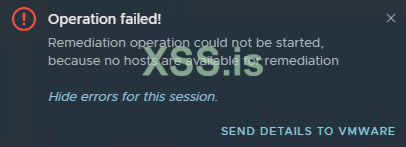
Remediation operation could not be started, because no hosts are available for remediation

How to fix this?
or reset esxi password?
Are you attaching the host profile after you have changed the password?
Once it is attached, only then remediation process is started.
 

  • Version:7.0.3 Updates Available
  • Build:19480866
  • Last Updated:Jan 29, 2023, 2:15 PM , yes have role admin (administrator@vsphere.local)
Are you following these steps?

Select the esxi host you want to reset the password for
Extract it's host profile
Edit the host profile with new root password
Attach the edited host profile to host
Remediate


If you have admin roles, then this process should work, unless you are missing a step or two.
 
Are you following these steps?

Select the esxi host you want to reset the password for
Extract it's host profile
Edit the host profile with new root password
Attach the edited host profile to host
Remediate


If you have admin roles, then this process should work, unless you are missing a step or two.
yes we do all that , in final steps , say this error (Remediation operation could not be started, because no hosts are available for remediation)
idk why
 
To Reset the ESXi Root Password with Host Profile
  1. Login to the vCenter vSphere Client
  2. Go to Home and then choose Host Profiles from Operations and Policies Section.
  3. Choose > Extract profile from a host.
  4. In the Extract Host Profile menu wizard > Select the host to update the password for.
  5. Name the Host Profile and click Next and then Finish to complete the capture of the host profile template.
    • The new host profile should appear on the Host Profile Objects Field.
  6. Right Click the new Host Profile or using the Actions menu choose > Edit Settings
  7. In the 'Edit Host Profile' Wizard. Uncheck all boxes.
  8. Then using the search filter search for > root
  9. Highlight and then select the check box for > root
  10. A configurable window will display the root User configuration.
  11. At the Password subsection, choose > Fixed password configuration
  12. Fill in the new password and confirm it before proceeding.
  13. Double check that all other non applicable boxes have no check marks and proceed to finish.
  14. Once the task completes, highlight the new host profile and from the 'Actions' drop down menu choose > Attach Detach Hosts and Clusters > then Select the host in the wizard.
  15. From the Action Menu, select Check Host Compliance.
  16. From the Action Menu, select Remediate.
  17. Then Check Host Compliance.
  18. Remove the Host Profile from the Host.
    • At this time the host password should be successfully upgraded.
 
Решение


Напишите ответ...
  • Вставить:
Прикрепить файлы
Верх