

This guide will walk you through encrypting your PowerShell scripts with AES, a reliable and robust encryption standard. We’ll cover how to encrypt your script into a secure format and then decrypt it for execution. By following these techniques, you’ll be able to safeguard your scripts effectively, ensuring that only those with the correct decryption key can access and run your code. This is a fundamental skill for anyone serious about maintaining the confidentiality and integrity of their PowerShell scripts.
Encryption is your primary line of defense. By encrypting your
Here’s how you can securely encrypt your PowerShell script using
Let's go :
Generate AES Key and IV :
Key and IV Creation: We start by creating a

Read the original script :
Loading the Script: We load the script from its file into a variable. The

Convert the code to bytes:
Byte Conversion: Convert the script content from a string into a byte array. This transformation is crucial because encryption algorithms operate on binary data, not text.

Create AES Encryption object:
AES Setup: Initialize an AES encryption object and set it up with our generated key and IV. This object will handle the encryption process, ensuring our data is securely transformed into an unreadable format.

Encrypt the data:
Encryption: We create an encryptor object from our AES instance and then use it to encrypt the byte array. The

Convert the encrypted data to a Base64 string for storage:
Base64 Encoding: Convert the encrypted byte array to a Base64 string. This encoding makes the binary data easier to handle and store in text files, which is especially useful when dealing with systems that don’t natively handle binary data.

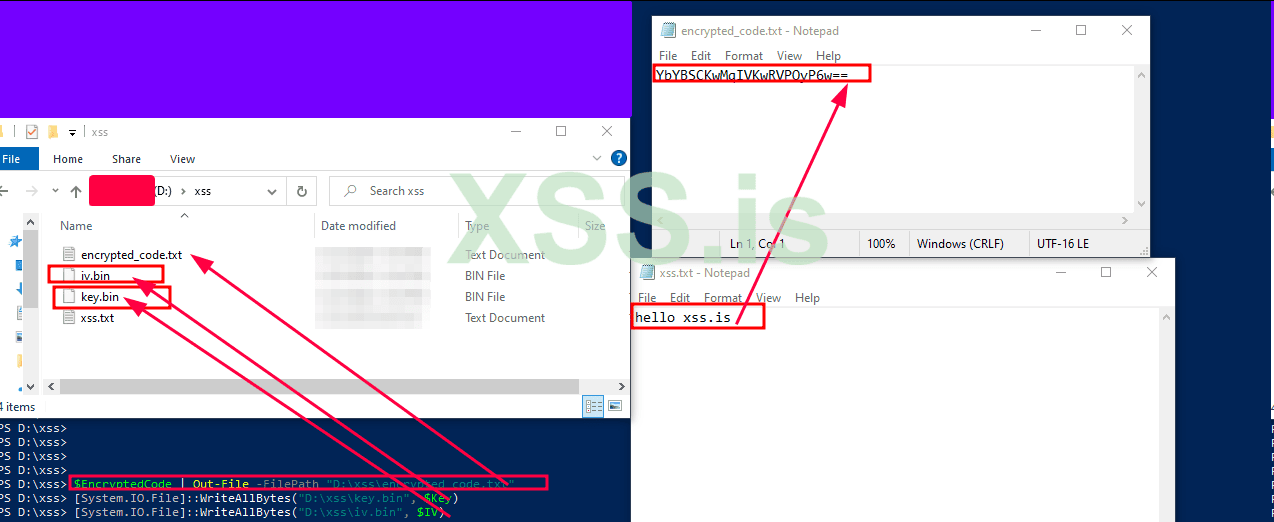
Save the encrypted code, key, and IV :
Saving: Finally, we save the encrypted script, key, and IV to files. The encrypted script goes into a
Decryption is where your script comes back to life, but only when you need it. This part of the process ensures that your encrypted script is converted back into its original, executable form—ready for action.
Read the encrypted code from file:
Loading Encrypted Data: Fetch the encrypted script content from the file. This is the Base64-encoded string we saved during encryption.

Read the key and IV as byte arrays:
Loading Key and IV: Retrieve the encryption key and IV from their respective files. These are crucial for decrypting the script.

Convert Base64 string back to bytes :
Base64 Decoding: Convert the Base64 string back into a byte array. This step reverses the encoding we applied during encryption.

Create AES Decryption object:
AES Decryption Setup: Initialize a new AES object for decryption and set it up with the same key and IV used during encryption. This ensures that the decryption process can correctly reverse the encryption.

Decrypt the data:
Decryption: Create a decryptor object and use it to decrypt the byte array. The

Convert decrypted bytes back to string:
Byte-to-String Conversion: Convert the decrypted byte array back into a string. This is the original script, now ready to be executed.

Execute the decrypted code:

Securing your PowerShell scripts with AES encryption and then decrypting them for execution ensures that your code is protected from unauthorized access and tampering. By following these advanced techniques, you not only safeguard your intellectual property but also bolster your defense against reverse engineering and analysis. In the ever-evolving battlefield of cybersecurity, keeping your scripts hidden and protected is not just a strategy—it's a necessity.
Special for xss.pro
Author : blackhunt
Best Regards.
Part 1 :
Encrypting Your PowerShell Script with AESEncryption is your primary line of defense. By encrypting your
PowerShell script, you’re essentially turning it into a gibberish of bytes that can only be deciphered with the right key. This technique ensures that even if an adversary gets their hands on your script, it’s utterly meaningless without the decryption key. Encryption Script BreakdownHere’s how you can securely encrypt your PowerShell script using
AES (Advanced Encryption Standard), a cipher trusted by industry experts.Let's go :
Generate AES Key and IV :
Код:
$Key = New-Object Byte[] 32
$IV = New-Object Byte[] 16
[Security.Cryptography.RandomNumberGenerator]::Create().GetBytes($Key)
[Security.Cryptography.RandomNumberGenerator]::Create().GetBytes($IV)
Key and IV Creation: We start by creating a
256-bit encryption key and a 128-bit initialization vector (IV). AES encryption relies on both a key and an IV to securely encrypt and decrypt data. The key is like the master key to a high-security vault, while the IV ensures that even identical plaintexts produce different ciphertexts each time they're encrypted.
Read the original script :
Код:
$Code = Get-Content -Path "D:\xss\xss.txt" -RawLoading the Script: We load the script from its file into a variable. The
-Raw flag ensures that we get the entire content as a single string, preserving the script’s formatting.
Convert the code to bytes:
Код:
$CodeBytes = [Text.Encoding]::UTF8.GetBytes($Code)Byte Conversion: Convert the script content from a string into a byte array. This transformation is crucial because encryption algorithms operate on binary data, not text.
Create AES Encryption object:
Код:
$Aes = [System.Security.Cryptography.Aes]::Create()
$Aes.Key = $Key
$Aes.IV = $IV
AES Setup: Initialize an AES encryption object and set it up with our generated key and IV. This object will handle the encryption process, ensuring our data is securely transformed into an unreadable format.
Encrypt the data:
Код:
$Encryptor = $Aes.CreateEncryptor()
$EncryptedBytes = $Encryptor.TransformFinalBlock($CodeBytes, 0, $CodeBytes.Length)Encryption: We create an encryptor object from our AES instance and then use it to encrypt the byte array. The
TransformFinalBlock method handles the actual encryption, producing a new byte array that represents our encrypted script.
Convert the encrypted data to a Base64 string for storage:
Код:
$EncryptedCode = [Convert]::ToBase64String($EncryptedBytes)Base64 Encoding: Convert the encrypted byte array to a Base64 string. This encoding makes the binary data easier to handle and store in text files, which is especially useful when dealing with systems that don’t natively handle binary data.
Save the encrypted code, key, and IV :
Код:
$EncryptedCode | Out-File -FilePath "D:\xss\encrypted_code.txt"
[System.IO.File]::WriteAllBytes("D:\xss\key.bin", $Key)
[System.IO.File]::WriteAllBytes("D:\xss\iv.bin", $IV)Saving: Finally, we save the encrypted script, key, and IV to files. The encrypted script goes into a
.txt file, while the key and IV are saved as binary files. These files will be used later for decryption.
Part 2 :
Decrypting and Executing Your Encrypted ScriptDecryption is where your script comes back to life, but only when you need it. This part of the process ensures that your encrypted script is converted back into its original, executable form—ready for action.
Read the encrypted code from file:
Код:
$EncryptedCode = Get-Content -Path "D:\xss\encrypted_code.txt" -RawLoading Encrypted Data: Fetch the encrypted script content from the file. This is the Base64-encoded string we saved during encryption.
Read the key and IV as byte arrays:
Код:
$Key = [System.IO.File]::ReadAllBytes("D:\xss\key.bin")
$IV = [System.IO.File]::ReadAllBytes("D:\xss\iv.bin")
Loading Key and IV: Retrieve the encryption key and IV from their respective files. These are crucial for decrypting the script.
Convert Base64 string back to bytes :
Код:
$EncryptedBytes = [Convert]::FromBase64String($EncryptedCode)Base64 Decoding: Convert the Base64 string back into a byte array. This step reverses the encoding we applied during encryption.
Create AES Decryption object:
Код:
$Aes = [System.Security.Cryptography.Aes]::Create()
$Aes.Key = $Key
$Aes.IV = $IV
AES Decryption Setup: Initialize a new AES object for decryption and set it up with the same key and IV used during encryption. This ensures that the decryption process can correctly reverse the encryption.
Decrypt the data:
Код:
$Decryptor = $Aes.CreateDecryptor()
$DecryptedBytes = $Decryptor.TransformFinalBlock($EncryptedBytes, 0, $EncryptedBytes.Length)Decryption: Create a decryptor object and use it to decrypt the byte array. The
TransformFinalBlock method reverses the encryption, producing the original byte array.
Convert decrypted bytes back to string:
Код:
$DecryptedCode = [Text.Encoding]::UTF8.GetString($DecryptedBytes)Byte-to-String Conversion: Convert the decrypted byte array back into a string. This is the original script, now ready to be executed.
Execute the decrypted code:
Код:
Write-Output $DecryptedCodeSecuring your PowerShell scripts with AES encryption and then decrypting them for execution ensures that your code is protected from unauthorized access and tampering. By following these advanced techniques, you not only safeguard your intellectual property but also bolster your defense against reverse engineering and analysis. In the ever-evolving battlefield of cybersecurity, keeping your scripts hidden and protected is not just a strategy—it's a necessity.
Special for xss.pro
Author : blackhunt
Best Regards.
