• XSS.stack #1 – первый литературный журнал от юзеров форума

Chrome alert

Конкретно в твоем случае грязная выдача или спалили хеш файла и он теперь в базе как троян
Сам пришел на форум с поиском проблемы о гугл алерте "Подозрительный файл". Полагаю, что нужно делать уникализацию выдачи и каждому пользователю выдавать файл с новой ссылкой

 
Последнее редактирование:
В общем помог памп файла до 100+Mb с ребилдом исполняемого файла. Самое главное это грамотный памп(не рандомный набор байт), а что-то +- человеское
 
Здравствуйте форумчане, подскажите, может кто знает как справиться с алертом такого вида?

Посмотреть вложение 85114
клоака по типу прети линка и тд нужны, или доверенность файлу.
 
Старый добрый OneDrive тоже подойдет.

Приветствую вас за разливы. :)
 
1.- Build a container using something like this tool: https://github.com/mgeeky/PackMyPayload
There are many GUI open source tools that can build containers that need to be mounted like mkisofs an many others.

Note: Container = .iso/.img

2.- Store your container on any of the following living on the network projects.

https://lots-project.com/

Github, Dropbox, whatever you want to test.

3.- I work with clean payloads on static & runtime analysis I don't know about malware detected on static.

4.- After that Edge, Chrome would not detect your payload/malware as malicious. It will be a clean download.

Unsigned executables .exe, can bypass google chrome alerts with that method. But Microsoft Edge will flag as malicious.

Is always better to stay away from executables, DLL are stealthier than them. I personally recommend use them + DLL sideloading.

Happy hacking! :smile10:

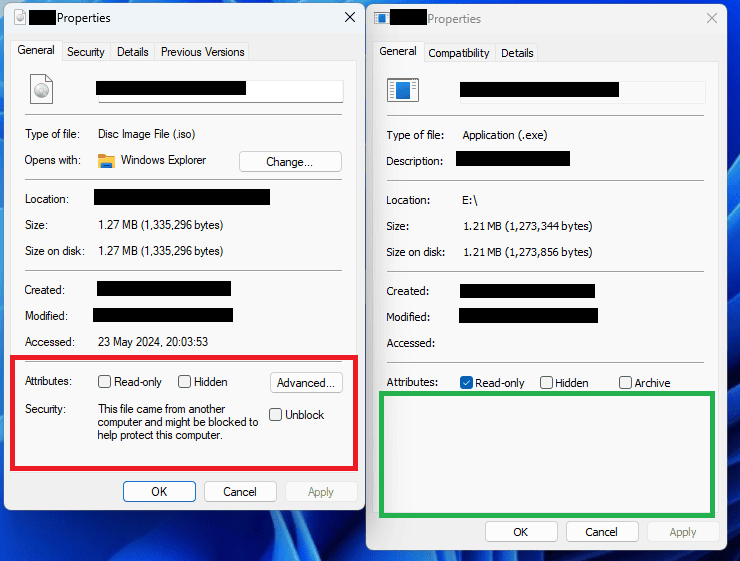
PD: A very cool feature for MOTW mark evasion. Use with love :cool:
-

1. Создайте контейнер, используя что-то вроде этого инструмента: https://github.com/mgeeky/PackMyPayload
Существует множество инструментов с открытым исходным кодом с графическим интерфейсом, которые могут создавать контейнеры, которые необходимо монтировать, как mkisofs и многие другие.

Примечание. Контейнер = .iso/.img.

2.- Сохраните свой контейнер в любом из следующих сетевых проектов.

https://lots-project.com/

Github, Dropbox — все, что вы хотите протестировать.

3.- Я работаю с чистыми полезными нагрузками при статическом анализе и анализе времени выполнения. Мне не известно о вредоносных программах, обнаруженных в статике.

4.- После этого Edge Chrome не будет обнаруживать вашу полезную нагрузку/вредоносное ПО как вредоносную. Это будет чистая загрузка.

Неподписанные исполняемые файлы .exe могут обходить предупреждения Google Chrome с помощью этого метода. Но Microsoft Edge будет отмечен как вредоносный.

Всегда лучше держаться подальше от исполняемых файлов, DLL более скрытны, чем они. Лично я рекомендую использовать их + загрузку неопубликованных DLL.

Удачного взлома! :smile10:


П.Д.: Очень крутая функция для марки MOTW. Используйте с любовью :cool:


test.PNG
 
Последнее редактирование:
W
1.- Build a container using something like this tool: https://github.com/mgeeky/PackMyPayload
There are many GUI open source tools that can build containers that need to be mounted like mkisofs an many others.

Note: Container = .iso/.img

2.- Store your container on any of the following living on the network projects.

https://lots-project.com/

Github, Dropbox, whatever you want to test.

3.- I work with clean payloads on static & runtime analysis I don't know about malware detected on static.

4.- After that Edge, Chrome would not detect your payload/malware as malicious. It will be a clean download.

Unsigned executables .exe, can bypass google chrome alerts with that method. But Microsoft Edge will flag as malicious.

Is always better to stay away from executables, DLLs are stealthier than them. I personally recommend using them + DLL sideloading.

Happy hacking!:smile10:

PD: A very cool feature for MOTW mark evasion. Use with love:cool:
-

1. Create a container using something like this tool: https://github.com/mgeeky/PackMyPayload
There are many open source tools with a GUI that can create containers that need to be mounted, like mkisofs and many others.

Note: Container = .iso/.img.

2.- Save your container in any of the following network projects.

https://lots-project.com/

Github, Dropbox - whatever you want to test.

3.- I work with clean payloads in static and runtime analysis. I am not aware of any malware found in the statics.

4.- After this, Edge Chrome will not detect your payload/malware as malicious. It will be a clean download.

Unsigned .exe files can bypass Google Chrome warnings using this method. But Microsoft Edge will flag it as malicious.

It's always better to stay away from executables, DLLs are more stealthy than that. Personally I recommend using them + sideloading DLLs.

Happy hacking!:smile10:


P.D.: Very cool feature for the MOTW brand. Use with love:cool:


Посмотреть вложение 85231
What is your TG


Напишите ответ...
  • Вставить:
Прикрепить файлы
Верх