• XSS.stack #1 – первый литературный журнал от юзеров форума

VPN->TOR->VPN (pfSense CE on VirtualBox). Trouble with DNS.

walkman

CD-диск
Пользователь
Регистрация
15.12.2021
Сообщения
11
Реакции
3
Hello everybody! There is a problem with which I want to ask you for help. Perhaps it will be useful to someone else.
All this is necessary in order to get a relatively clean IP and DNS of VPN in the last section of network to use any virtual machine through this network.


The host machine is connected to VPN_1, and 3 VirtualBox machines operate on it:

m1. pfSense TOR-gateway configured by
manual
eth0(WAN): NAT
eth1(LAN): internal_network_1 (192.168.168.0/24) DHCP server

m2. pfSense VPN_2-gateway
eth0(WAN): internal_network_1 (192.168.168.0/24) DHCP client
eth1(LAN): internal_network_2 (192.168.1.0/24) DHCP server
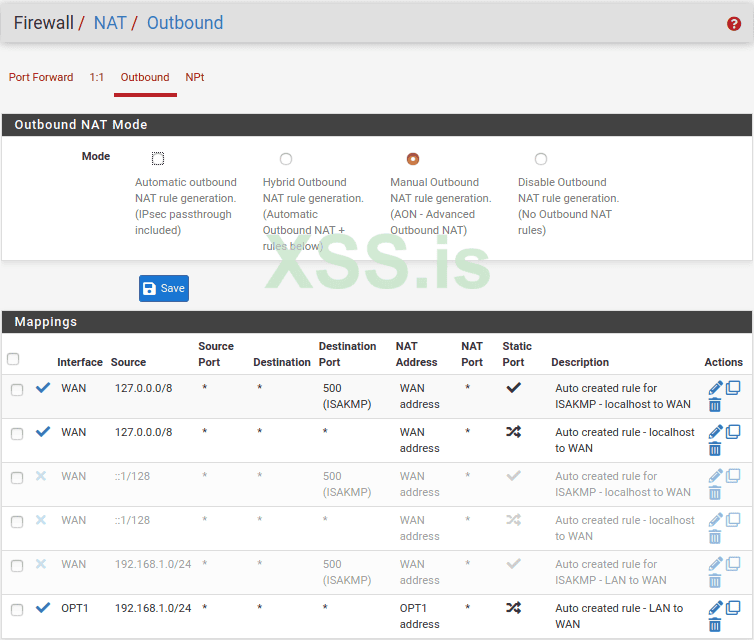
OPT1: ovpn_client (default gateway)
screenshot.png
and has 2 DNS server:​
10.0.254.1 with OPT1_ovpn as gateway
1.1.1.1 with eth0(WAN) as gateway
DNS Server Override is OFF.

m3. Windows /or/ Android_x86
eth0: internal_network_2 (192.168.1.0/24) DHCP client​

From the m2 SSH console DNS will be resolved through OPT1 and from WAN, but from the m3 there is no longer opportunity to use DNS. IP connections work, but DNS - no.
Any idea?
 
does DHCP server of 192.168.1.0/24 network assign DNS servers to the clients?
i.e. what DNS servers appear on Windows/Android clients when they connect to internal_network_2?
 
does DHCP server of 192.168.1.0/24 network assign DNS servers to the clients?
i.e. what DNS servers appear on Windows/Android clients when they connect to internal_network_2?
Yes. 192.168.1.0/24 DHCP clients recieve 192.168.1.1(m2) as DNS server.
m2 should resolve DNS request from m3 through oVPN DNS server, through m1(tor), and return answer from yourself to avoid DNS leaks.

For now "nslookup any.site" on m3 => Address 192.168.1.1 | DNS request timed out
 
Последнее редактирование:
check
Код:
iptables-save
on m2; run
Код:
tcpdump -nnn -vvv 'udp port 53'
on m2 and see what happens, when m3 resolves any domain.
 
check
Код:
iptables-save
on m2;
Firewall is default and was not changed:
Has 2 rules for WAN:​
1. Block private networks​
2. Block bogon networks​

and 3 rules for LAN:​
1. Default anti-lockout rule​
2. Default allow LAN to any rule​
3. Default allow LAN ipv6 to any rule (disabled)​

run
Код:
tcpdump -nnn -vvv 'udp port 53'
on m2 and see what happens, when m3 resolves any domain.
Tcpdump didn't capture a single packet when trying 'nslookup any.site' on m3,
but while trying to 'nslookup any.site' from m2, captured packets to DNS resolver 1.1.1.1 from WAN(m2.eth0), in accordance with settings of second resolver in general settings.
At same time, in m2/diag_dns, timings of answers from 2 resolvers(127.0.0.1, 10.0.254.1) are displayed, but 1.1.1.1 is no response.

I have to configure firewall?
 
try setting the DNS IP explicitly, like
Код:
nslookup any.site 192.168.1.1
and see what happens in the tcpdump.

I think something is wrong with the firewall rules, try to turn it off or clear all rules (so "iptables-save" returns empty result) and check tcpdump again.
 
try setting the DNS IP explicitly, like
Код:
nslookup any.site 192.168.1.1
and see what happens in the tcpdump.
If I set up the m3 firewall to pass all outgoing connections (all incoming connections ofc blocked), when I try 'nslookup any.site 192.168.1.1', => 'm2 can't find any.site: server failed.'.
Output of tcpdump is empty.

I think something is wrong with the firewall rules, try to turn it off or clear all rules (so "iptables-save" returns empty result) and check tcpdump again.
Firewall rules of m2 are configured to pass any IPV4 and IPV6 traffic sourced from Lan subnets(192.168.1.0/24), and have no one block rules.
I'll tryed to turn off all LAN rules and result has not changed.

Did you mean the m2 firewall?
 
Output of tcpdump is empty.
something is wrong here. maybe the DNS traffic does not even leave m3?
run wireshark on m3 and check what happens when you run "nslookup any.site 192.168.1.1"

Did you mean the m2 firewall?
yes, it could mess with tcpdump on m2.
 
something is wrong here. maybe the DNS traffic does not even leave m3?
run wireshark on m3 and check what happens when you run "nslookup any.site 192.168.1.1"
I configured m3 firewall rule for explicit passing nslookup.exe and firefox.exe traffic to the port 53. Sites began to open, nslookup results in answers. Wireshark helped a lot, thanks! Problem was in m3 firewall.
All this time I tested m3 on Windows with a custom filewall. When starting Android, everything worked well.

But tcpdump -nnn -vvv 'port 53' output on m2 is still empty, and I figured out:
By default tcpdump uses first interface on list = eth0(WAN), but it seems that m2 will encapsulate DNS traffic from LAN through OPT1(oVPN) and sends it not directly through eth0(WAN). We will have to look from the other side (LAN). Specify interface:
tcpdump -i eth1 -nnn -vvv 'udp port 53'
And tcpdump has output!

Great thanks!


Напишите ответ...
  • Вставить:
Прикрепить файлы
Верх