• XSS.stack #1 – первый литературный журнал от юзеров форума

Utilizing Redline Logs + making a profit?

sallynice45

RAM
Пользователь
Регистрация
10.08.2022
Сообщения
137
Реакции
8
hey there starting to get some logs in and im just wondering what people do besides SELL them..
id like to make a profit from them, and not quite sure, what steam is valuable, or other things.. or how to spend amazon or paypal.

thanks for youre tme, if youd liek to chat please leave youre telegram
 
I'd like to learn how to use them myself bro, any help is appreciated
login to website where you can manage stranger's resources of any kinds
 
hey there starting to get some logs in and im just wondering what people do besides SELL them..
id like to make a profit from them, and not quite sure, what steam is valuable, or other things.. or how to spend amazon or paypal.

thanks for youre tme, if youd liek to chat please leave youre telegram
Add my tele @sosax36

I can point you in the right direction.
 
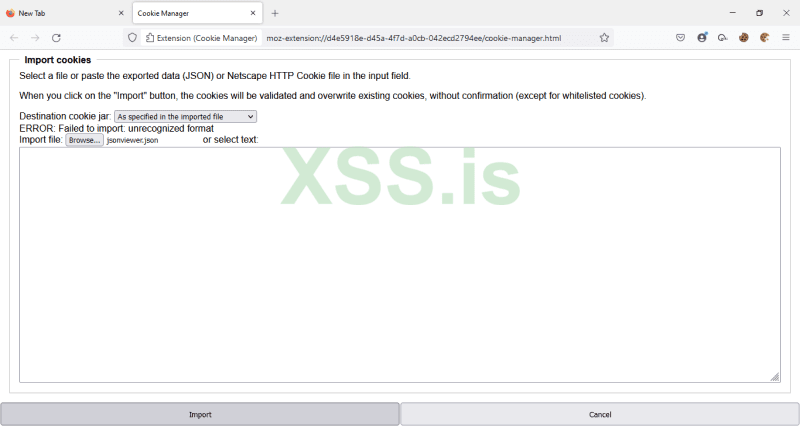
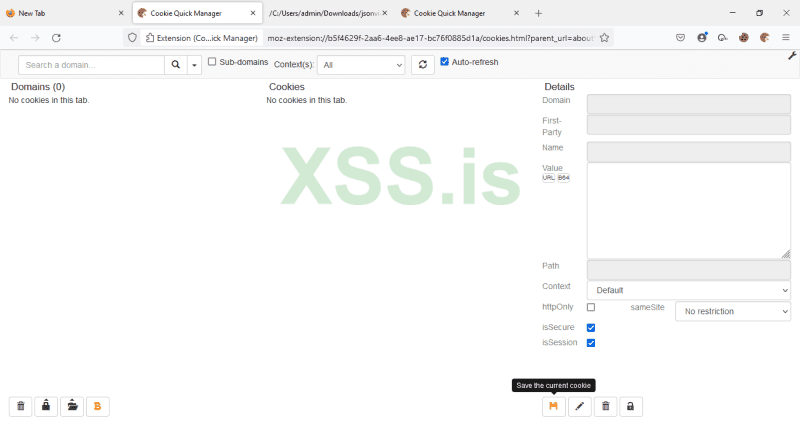
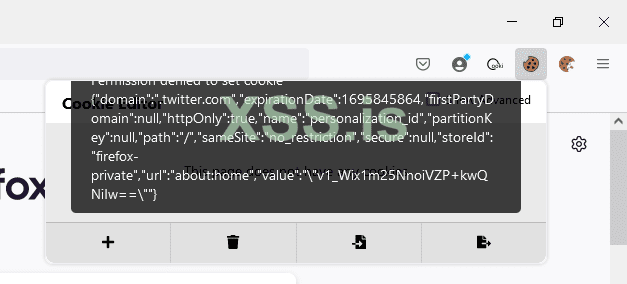
Hello Friends, I am trying to import cookies in "cookie manager, cookie quick manager and cookie editor" extensions in Firefox 106 and 68.6 but unable to import it. I tried many logs but either i got error (Unrecognized format in cookie manager), nothing happened in cookie quick manager and many errors in cookie-editor extension.
I am attaching screenshot, please have a look. My motive is to check balance of crypto sites such as Binance, Coinbase. Who ever give me working solutions i present him small gift in form of log or $$. Thank you.

RU.

Здравствуйте друзья, я пытаюсь импортировать куки в расширениях "cookie manager, cookie quick manager и cookie editor" в Firefox 106 и 68.6, но не могу импортировать. Я перепробовал множество журналов, но либо получал ошибку (Нераспознанный формат в менеджере куки), либо ничего не происходило в быстром менеджере куки, и много ошибок в расширении cookie-editor.

Я прилагаю скриншот, пожалуйста, посмотрите. Моя цель - проверить баланс на криптовалютных сайтах, таких как Binance, Coinbase. Кто даст мне работающее решение, тому я преподнесу небольшой подарок в виде журнала или $$. Спасибо.


cookie manager.png
cookie quick manager.png
cookie-editor.png
 
Пожалуйста, обратите внимание, что пользователь заблокирован
Hello Friends, I am trying to import cookies in "cookie manager, cookie quick manager and cookie editor" extensions in Firefox 106 and 68.6 but unable to import it. I tried many logs but either i got error (Unrecognized format in cookie manager), nothing happened in cookie quick manager and many errors in cookie-editor extension.
I am attaching screenshot, please have a look. My motive is to check balance of crypto sites such as Binance, Coinbase. Who ever give me working solutions i present him small gift in form of log or $$. Thank you.

RU.

Здравствуйте друзья, я пытаюсь импортировать куки в расширениях "cookie manager, cookie quick manager и cookie editor" в Firefox 106 и 68.6, но не могу импортировать. Я перепробовал множество журналов, но либо получал ошибку (Нераспознанный формат в менеджере куки), либо ничего не происходило в быстром менеджере куки, и много ошибок в расширении cookie-editor.

Я прилагаю скриншот, пожалуйста, посмотрите. Моя цель - проверить баланс на криптовалютных сайтах, таких как Binance, Coinbase. Кто даст мне работающее решение, тому я преподнесу небольшой подарок в виде журнала или $$. Спасибо.


Посмотреть вложение 45666Посмотреть вложение 45667Посмотреть вложение 45668
I have the same problem. Fix would be very appreciated.
 
Hi everyone, I have access to several people's onlyfans accounts (all of them are girl and it's nude and sextape) that earn between 2k and 8k per month on average. As I don't have any phishing to spread or malware I resell the access. The proofs will be provided on tg. Add me on tg @CaveBearX
I have also lot of discord token if someone want.
 
None of these posts are about malware at all please post stuff in the proper section
 
Hello guys, I have been using redline stealer logs since years, and successful from the logins I get but never able to monetize cookies of bitcoin accounts like blockchain.com binance.us or coinbase for instance, I know how to use cookies and is using lot of accounts like pinterest, paypal and some sports betting websites cookies logins I have, they work perfectly fine but not bitcoin accounts, why is it so? do they need anything specific process to be followed?

I generally clean cookies and other garbage using Ccleaner professional/business/technical all accounts I have, so that will heal lot of issues regarding cookie dump issues, and it works perfectly fine on all website .. but not bitcoin popular sites, if someone can help me doing so we can share good income daily.. connect for more.
 
Hello guys, I have been using redline stealer logs since years, and successful from the logins I get but never able to monetize cookies of bitcoin accounts like blockchain.com binance.us or coinbase for instance, I know how to use cookies and is using lot of accounts like pinterest, paypal and some sports betting websites cookies logins I have, they work perfectly fine but not bitcoin accounts, why is it so? do they need anything specific process to be followed?

I generally clean cookies and other garbage using Ccleaner professional/business/technical all accounts I have, so that will heal lot of issues regarding cookie dump issues, and it works perfectly fine on all website .. but not bitcoin popular sites, if someone can help me doing so we can share good income daily.. connect for more.
Session cookies are small pieces of data stored by a website on a user's browser that contain information about the user's session. They are used to keep track of a user's login status, preferences, and other session-related data. Session cookies are temporary and are deleted when the user closes their browser or logs out of the website.
To function across devices and browsers, session cookies rely on a few key dependencies, including:
A shared backend server: The server needs to be able to recognize the session ID stored in the cookie and associate it with the correct user session.
A consistent domain and path: The cookie needs to be set with the correct domain and path so that it can be accessed by all the pages on the website, regardless of which device or browser is being used.
A secure connection: If the website is using HTTPS, the cookie should also be set with the "Secure" attribute to ensure that it is only sent over a secure connection.
Session cookies can behave differently than cookies with other attributes. For example, if a session cookie is set without the "HttpOnly" attribute, it can be accessed by client-side scripts, which could make it easier for an attacker to steal the session ID and hijack the user's session. Similarly, if a session cookie is set with the "SameSite" attribute set to "Lax" or "Strict," it can help prevent cross-site request forgery (CSRF) attacks.
If a session cookie has been imported away from localhost, it may not function properly across devices and browsers. To restore imported session cookie functionality, there are a few methods and tools that can be used:

Check the domain and path settings: Ensure that the cookie is set with the correct domain and path settings so that it can be accessed by all pages on the website.
Use a cookie editor: There are various cookie editor tools available, such as EditThisCookie, that allow you to view and edit cookies in your browser. This can help you identify any issues with the cookie settings.
Use a proxy tool: Proxy tools like Burp Suite can intercept and modify HTTP traffic, including cookies. By using Burp Suite, you can modify the cookie settings and test the cookie across different devices and browsers.
Clear cookies: Sometimes, simply clearing your browser cookies can help restore imported session cookie functionality.
In Burp Suite, you can use the "Intercept" feature to intercept and modify HTTP traffic, including cookies. You can also use the "Repeater" feature to test the cookie across different devices and browsers. Additionally, Burp Suite has a "Cookie Jar" feature that allows you to view and modify cookies.
Other device-specific requests, requirements, and identifiers that can impact session migration include the user agent string, IP address, and device ID. These can be used by the server to identify the user and associate their session with the correct device and browser.

The full technical specification details for session cookies can be found in the HTTP State Management Mechanism RFC 6265
 
With just some easy bash script u can filter the data. For example if you want to have a txt file of all vpn combo (most of stealer use "Passwords.txt" or "passwords.txt") :
Bash:
#!/bin/bash

for file in $(find . -name "Passwords.txt" -o -name "passwords.txt"); do
if grep -q "vpn" $file; then
sed -n '/vpn/,+2p' $file >> vpn.txt
fi
done

You can also obtain access to intranet or company vpn and resell this access. I have many access to intranet or company vpn but i don't know if someone is interested.
You have also seeds for wallet in public logs, but most of the time it contains nothings.
 
Session cookies are small pieces of data stored by a website on a user's browser that contain information about the user's session. They are used to keep track of a user's login status, preferences, and other session-related data. Session cookies are temporary and are deleted when the user closes their browser or logs out of the website.
To function across devices and browsers, session cookies rely on a few key dependencies, including:
A shared backend server: The server needs to be able to recognize the session ID stored in the cookie and associate it with the correct user session.
A consistent domain and path: The cookie needs to be set with the correct domain and path so that it can be accessed by all the pages on the website, regardless of which device or browser is being used.
A secure connection: If the website is using HTTPS, the cookie should also be set with the "Secure" attribute to ensure that it is only sent over a secure connection.
Session cookies can behave differently than cookies with other attributes. For example, if a session cookie is set without the "HttpOnly" attribute, it can be accessed by client-side scripts, which could make it easier for an attacker to steal the session ID and hijack the user's session. Similarly, if a session cookie is set with the "SameSite" attribute set to "Lax" or "Strict," it can help prevent cross-site request forgery (CSRF) attacks.
If a session cookie has been imported away from localhost, it may not function properly across devices and browsers. To restore imported session cookie functionality, there are a few methods and tools that can be used:

Check the domain and path settings: Ensure that the cookie is set with the correct domain and path settings so that it can be accessed by all pages on the website.
Use a cookie editor: There are various cookie editor tools available, such as EditThisCookie, that allow you to view and edit cookies in your browser. This can help you identify any issues with the cookie settings.
Use a proxy tool: Proxy tools like Burp Suite can intercept and modify HTTP traffic, including cookies. By using Burp Suite, you can modify the cookie settings and test the cookie across different devices and browsers.
Clear cookies: Sometimes, simply clearing your browser cookies can help restore imported session cookie functionality.
In Burp Suite, you can use the "Intercept" feature to intercept and modify HTTP traffic, including cookies. You can also use the "Repeater" feature to test the cookie across different devices and browsers. Additionally, Burp Suite has a "Cookie Jar" feature that allows you to view and modify cookies.
Other device-specific requests, requirements, and identifiers that can impact session migration include the user agent string, IP address, and device ID. These can be used by the server to identify the user and associate their session with the correct device and browser.

The full technical specification details for session cookies can be found in the HTTP State Management Mechanism RFC 6265
That was just amazing to read, yes definitely my perspective has somewhat changed about the cookies I have, and I will definitely consider your points to go forward hopefully in the right direction with atleast cookies, cheers that was classic mate!

Very well appreciated your time on this particular matter.


Напишите ответ...
  • Вставить:
Прикрепить файлы
Верх