

Пожалуйста, обратите внимание, что пользователь заблокирован
Ну и я сегодня добрый. И еще повлиял тот факт, что де-факто тут выкладывают ЧЬИ-ТО статьи, которыми и так пестрит паблик. Оке) сделаю исключение и поделюсь с Вами совсем приватом. Этого нет нигде, точно. Признаюсь, заметил это не я. Так что выкладываю на языке автора. Хотя, уверен что его родной, все-таки китайский.. Итак:
Since the service I was exploiting executed as NT Authority/System, I got system access.
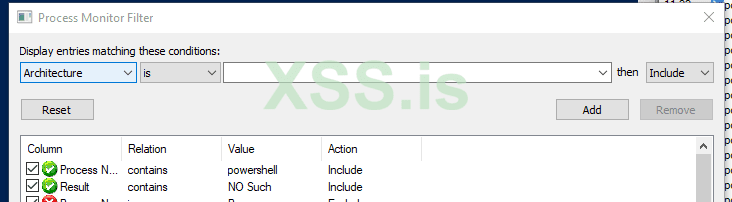

Result of starting Powershell.exe
Now, different scripts will call different cmdlets, so it would be important to audit GPO scripts that execute in the context of the logged in user session, but as an elevated process. This includes any service that might call a powershell cmdlet. As I stated earily, I have gotten SYSTEM level access against 'security' software recently that would call innoculus native cmdlets, only to be hijacked in a user writable directory.
I think Windows 10 build 1909+ are affected.
As you might have already thought of, this can be used a persistence method.
https://msrc-blog.microsoft.com/2018/04/04/triaging-a-dll-planting-vulnerability/
Enjoy!
От себя добавлю - работает замечательно, проверено) Enjoy)
How I found this
I was researching some software and I found a binary planting issue. I thought it was contained to the software itself, but it was not. The service executed a powershell cmdlet native to windows, but I noticed that it browsed the user's AppData directory first before executing the system32 version.Since the service I was exploiting executed as NT Authority/System, I got system access.
How to Recreate
Using procmon, contains NO SUCH as Result and contains powershell as Process Name.
Result of starting Powershell.exe
How to Exploit
Take a binary, that executes code of your choice and name it Get-Variable.exe and place it in C:\Users\<currentloggedinuser>\AppData\Local\Microsoft\WindowsApps\. Launch powershell, get code execution. This only works for powershell.exe itself, you'll need to find what cmdlet is specifically called to the target sotware you are auditing.Now, different scripts will call different cmdlets, so it would be important to audit GPO scripts that execute in the context of the logged in user session, but as an elevated process. This includes any service that might call a powershell cmdlet. As I stated earily, I have gotten SYSTEM level access against 'security' software recently that would call innoculus native cmdlets, only to be hijacked in a user writable directory.
I think Windows 10 build 1909+ are affected.
As you might have already thought of, this can be used a persistence method.
Reporting
I have not reported this to MSRC (and will not) as they do not consider binary planting an issue.https://msrc-blog.microsoft.com/2018/04/04/triaging-a-dll-planting-vulnerability/
Enjoy!
От себя добавлю - работает замечательно, проверено) Enjoy)
 ))
))