CSA mail;pass IMAP/SMTP checker

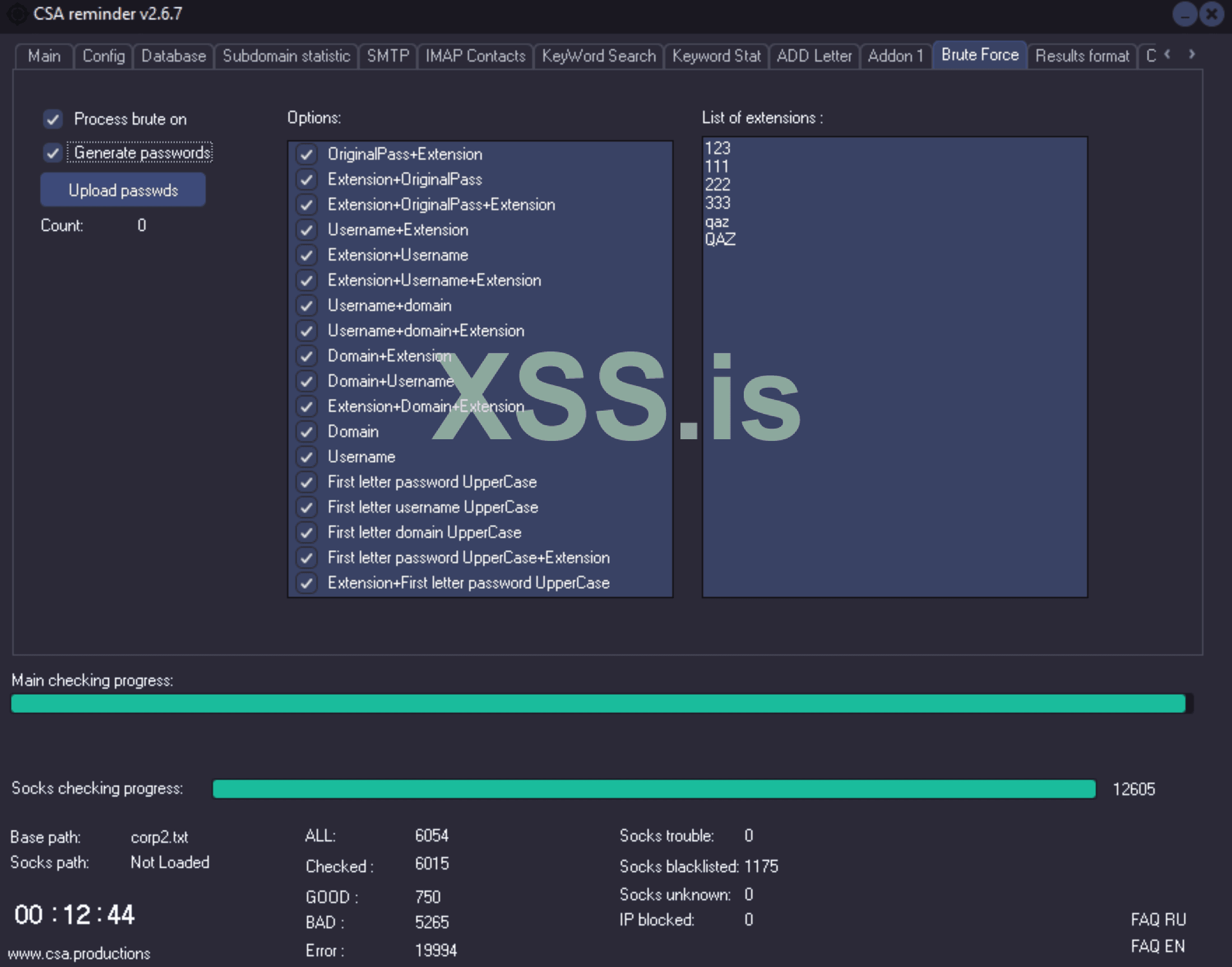
Результат чека Невалид базы с Включеной опцией Брута ( Генерации дополнительных паролей на основе макросов )
Result of checking Invalid base with BruteForce option enabled ( Generating new passwords by macros )
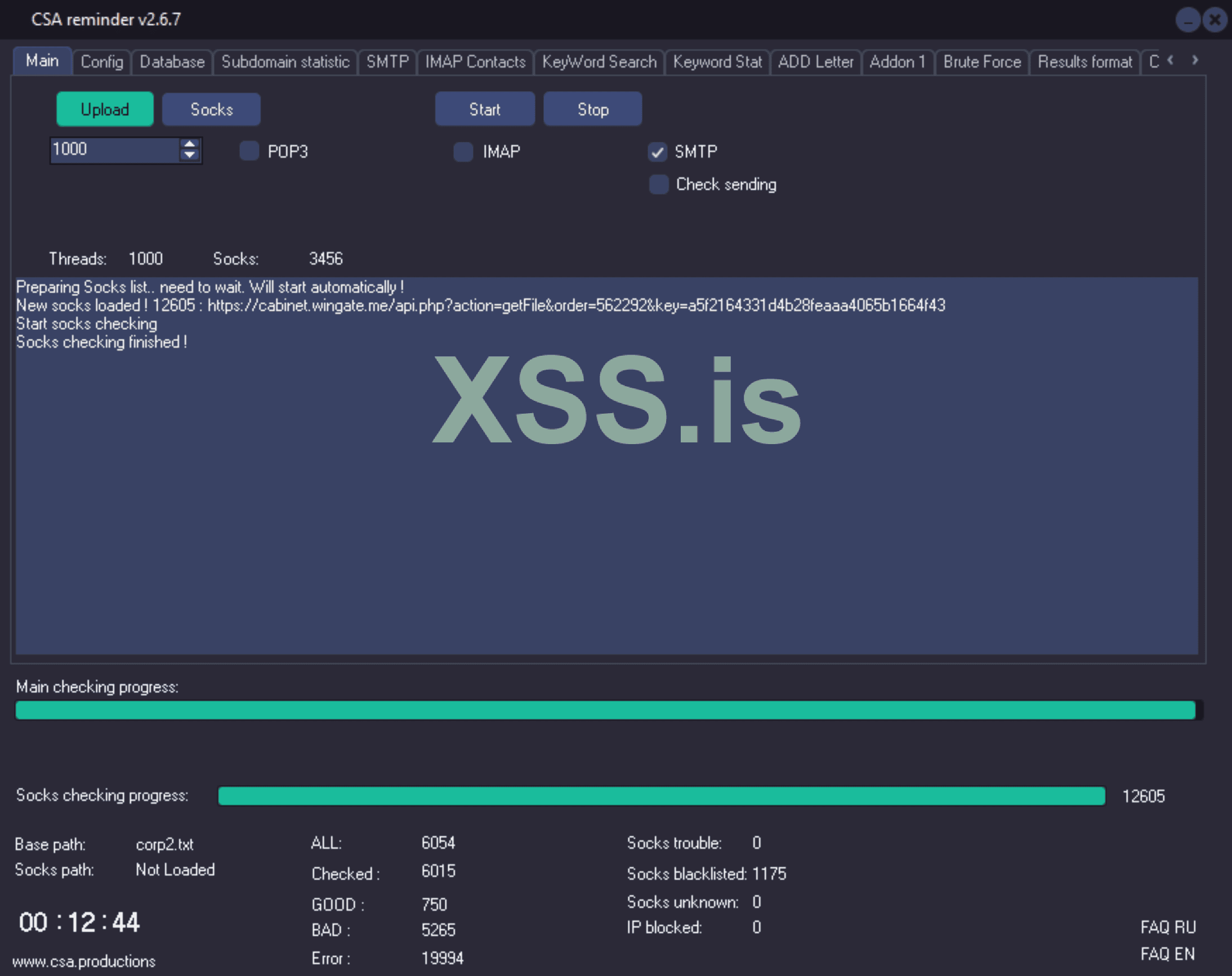
brute2.png

brute22.png
 
v.2.7.1
[RUS]
1. Исправлен баг макроса {to} для функции "KeyWordSearch", можно использоват независимо от регистра {to}/{TO}
2. Исправлен чек соксов при загрузке файлом . P.S. Выдавало ошибку если потоков чека соксов было больше чем самих соксов в списке
3. Уменьшил минимальное значение для "Socks connection attempts" до 1. Теперь стоит по дефолту, если вы не указали другое.
4. Изменения по схеме "Rebrute", сейчас должно чекать лучше.

[ENG]
1. fixed bug of {to} macro for “KeyWordSearch” function, you can use it case-ignored {to}/{TO}.
2. fixed check of socks when loading by file . P.S. An error was generated if there were more socks check threads than socks in the list.
3. Reduced the minimum value for “Socks connection attempts” to 1. Now it is by default, if you have not specified otherwise.
4. Changes in the “Rebrute” scheme, now it should check better.
 
v.2.7.3
[RUS]


1. Добавлен "EML Builder" во вкладке "Add Letter" который позволит вам автоматически создать EML шаблон для добавления в INBOX.
Как работает:
В целом вам нужно сгенерировать EML, закинуть его в отдельную папку и указать путь к папке. Если есть аттач, тоже самое, только путь к папке с аттачами указать во вкладке Addon.
Более подробно :
- Заходите во вкладку "Add Letter"
- Жмете кнопку в правом верхнем углу "EML Builder"
- Заполняете соответствующие поля FROM, Subject, Макросы описанные в FAQ работают ( см. раздел "Добавление/Загрузка вашего письма инбокс." ( стр. 6 ) : https://www.csa.productions/FAQ.pdf
**Добавление Аттача**
* Вам нужно указать только "тип аттача" и "название файла" которое будет отображаться пользователю.
Если типа аттача нету в списке, вам надо будет вручную изенить заголовки в готовом EML.txt , а именно "Content type" для раздела "boundary" где будут заголовки а аттачем. ( Спросите у "chatgpt", он вам подскажет )
* Сами аттачи ложите в отдельную папку, путь к которой указывайте во вкладке "Addon",
Если аттачей несколько, и вы хотите их рендомизировать, во вкладке "Addon" укажите через какое количество писем менять аттач.

- Жмете "Generate" после чего созданный EML будет создан в папке с софтом с именем GeneratedEML.txt


Примечания :
- Затем создайте папку где будут лежать только EML файлы, вы можете положить туда их сколько угодно, они будут добавлены по очереди.
- Путь к папке с EML укажите во вкладке "Add Letter".
- Путь к папке с аттачами ( если есть ), укажите во вкладке "Addon"

2. Мелкие фиксы


[ENG]
1. Added an “EML Builder” on the “Add Letter” tab that will allow you to automatically create an EML template to add to INBOX.

How it works:

Basically you need to generate an EML, drop it in a separate folder and specify the folder path in "Add Letter" tab. If there is an attachment, same thing, just specify the path to the attachment folder in the "Addon" tab.

Read More :
- Click on the “Add Letter” tab.
- Click the button in the top right corner “EML Builder”.
- Fill in the appropriate FROM, Subject, Macros fields are described in the FAQ ( see (page 6) : https://www.csa.productions/FAQ_ENG.pdf
**Add Attach**.
* You only need to specify the “attachment type” and “file name” to be displayed to the user.
If no attachment type is specified, you will have to manually change the headers in the finished "EML.txt" file, particularly the “Content Type” for the “Boundary” section where the attachment headers will be located. (Ask “chatgpt”, he'll give you a hint).
* The attachments themselves should be placed in a separate folder, the path to which should be specified in the “Addon” tab,
If there are several attachments and you want to randomize them, specify on the “Addon” tab after how many emails you want to change the attachments through.

- Click the “Generate” button and the generated EML will be created in the program folder with the name "GeneratedEML.txt".

Notes :
- Then create a folder where only EML files will appear, you can put there as many as you want, they will be added one by one.
- Specify the path to the folder with EML in the "Add Letter" tab.
- The path to the folder with attachments (if any), specify in the "Addon" tab.


2. Minor fixes
EML-builder.png
 
V.2.7.6
[RUS]
1. Фиксы по вкладке BruteForce и генерации паролей
2. Мелкие фиксы в целом по схеме чеке

[ENG]
1. Fixed few bugs in BruteForce tab and password generation
2. Minor fixes in checking scheme

v.2.7.4
[RUS]
1. Исправлена ошибка "Eaccess violation" при Тесте принимающего IMAP для функции "SMTP send" и загруженых соксах через файл.
2. Мелкие фиксы по чеку соксов.


[ENG]
1. Fixed "Eaccess violation" error for option "SMTP Send" when check IMAP with socks loaded from file.
2. Small fixes for socks checking
 
Акция до 1 ноября 2024 года, стоимость PRO версии 300$ !
А также делаю раздачу (
221к 100% валид мейл:пасс ) и приз за владение лицензией софта.
Юзаешь мой софт ? Напиши отзыв в топике, и напиши мне в тикет чтобы получить еще 227к 100% валид корп mail;pass .

Условие получения 227к корпов :
1. Владение CSA PRO
2. Отзыв в топике
 
v.2.7.7

[RUS]
1. Изменения по вкладке KeyWordSearch и поиску/выгрузке аттачей.
- Появилась опция Request+Attach + Подвкладка AttachFilters,
которая позволяет вам задавать тип аттача и его название в качестве аргумента запроса ( Подвкладка AttachFilters ).
Пример :
Задача :
Найти и выгрузить письмо + аттач от отправителя JohnDoe, темой письма Invoice и аттач файлом Invoice с разрешением ".pdf" . Т.е. не все письма от отправителя JohnDoe, а именно те где есть нужный вам аттач.
Выполнение :
Включаем опции : Download Letters ( Выкачивать тело письма ) + Mixed Request ( так как у нас FROM + subject ) + DownloadAttach ( Если аттач надо выгрузить ) + Request + AttachFiles ( Если в гуды нужно показывать только письма с фильтрами аттача ). Вкладка Loading filters ( Включаем LoadOnlyAttachments и выбираем .pdf ), иначе если в письме будут несколько аттачей, один из которых будет подходить по вашему запрос Invoice***.pdf , то кроме .pdf будут выкачены все аттачи этого письма. Вкладка Attach Filters - включаем "Request true if attach extension" , выбираем ".pdf", включаем "Request true if Attach Name" и указываем "Invoice" .


Логика работы : Вхождение подстроки в строку.
Например : Если вы указываете имя аттача Invoice - то будут взять все аттачи где содержится это слово.
Если нужен какой-то конкретный аттач с конкретным именем, конкретизируйте запрос, например Invoice293948 .

Скрипт сработает по такой схеме :
- Найдет письма FROM+subject
- Посмотрит аттачи
-- Посмотрит есть ли там аттачи .pdf со словом Invoice в имени файла
--- Если есть, то скачает само письмо + только нужный вам аттач invoice**.pdf

Примечания :
- Если вам нужно просто найти письма с заданным аттачем, то включать его выгрузку "Download Attach" не обязательно
- Чтобы искались письма только с фильтрами вашего аттача, включите опцию Request+Attach

Подробно по подвкладкам :
Settings - общие настройки, как искать .
Loading filters - какие аттачи выгружать. Допустим вам надо выкачивать только .doc
Attach Filters - Фильтры Аттача как аргумента запроса.

2. Мелкие фиксы.


[ENG]

1. Changes in KeyWordSearch tab and attachment search/download.
- There is now a Request+Attach + AttachFilters sub tab,
which allows you to specify the type of attachment and its name as a request argument (AttachFilters sub tab).


Example :
Task :
Find and upload an email + attachment from sender JohnDoe, email subject "Invoice" and attachment file with name "Invoice" with extension “.pdf” . I.e. not all emails from sender JohnDoe, but exactly those where there is the necessary attach.

Execution :
Enable options : Download Letters ( Download body ) + Mixed Request ( since we have FROM + subject ) + DownloadAttach ( if the attachment should be downloaded ) + Request + AttachFiles ( if only emails with attachment filters should be shown as good ). Tab Loading filters ( Enable LoadOnlyAttachments and select .pdf ), otherwise if there will be several attachments in the e-mail, one of which will fit your request Invoice***.pdf , then all attachments of this e-mail will be downloaded. Attach Filters tab - enable “Request true if attach extension”, select “.pdf”, enable “Request true if Attach Name” and specify “Invoice”.

Logic of work : Inclusion of a substring in a string.
For example : If you specify the attachment name Invoice - all attachments containing this word will be taken.
If you need a specific attachment with a specific name, specify the request, for example Invoice293948 .

The script will work like this :
- Find FROM+subject letters
- Look at the attachments.
-- See if there are any ".pdf" attachments with the word I"nvoice" in the file name.
--- If there are, it will download the letter itself + only the "invoice**.pdf" attachment you need.


Notes :
- If you just need to find emails with a given attachment, you don't need to enable its "Download Attach" option
- To search emails with filters of your attachment only, enable "Request+Attach option".

Details on sub tabs :
Settings - general settings, how to search .
Loading filters - which attachments to download. Let's say you need to upload only ".doc".
Attach Filters - Attach filters as request argument.

2. Small fixes.


Постараюсь вскоре сделать подробный видео FAQ по софту..
 
Прошу всех обновится до версии 2.8.1. Исправлены некоторые критические баги

v.2.8.1
[RUS]

1. Исправлена ошибка "EAccessViolation" для IMAP/POP3/SMTP при чеке субдоменов корп. доменов
2. Мелкие фиксы

[ENG]
1. Fixed "EAccessViolation" for IMAP/POP3/SMTP corps sbudomains checking
2. Minor fixes
 
v.2.8.2
[RUS]

1. Изменения в Corp.ini для некоторых корпов, хосты которых отсутствуют в паблик конфигах, например ionos.de. Замените Corp.ini
2. Изменения по схеме брута хостов для Опции Always brute host
3. Добавлена новая опция в Config, "Do not brute IMAP if POP3 exists", подразумевается, что если чекается домен для которого в конфиге есть только POP3, софт не будет брутить IMAP хост, т.е. Always brute host не сработает.
Обусловлено тем что "Always brute host" предназначен в основном для корпов, хосты которых неизвестны и требуется анализ MX, DNS, брут субдоменов. Включение данной опции "Do not brute IMAP if POP3 exists" значительно ускорит чек бигов, особенно если у вас в базе много таких хостов как @rediffmail.com, @eyou.com для которых есть только POP3. При этом брут корпов всеравно будет, так как для них нету конфига в базе.
4. Мелкие фиксы по таймаутам

[ENG]
1. changes in Corp.ini for some corps whose hosts are missing in public configs, e.g. ionos.de. Replace Corp.ini
2. changes to the host brute scheme for the "Always brute host" option
3. Added new option in Config, ‘Do not brute IMAP if POP3 exists’, it means that if a domain is checked for which only POP3 exists in the config, the software will not brute IMAP host, i.e. "Always brute host" will not work.
The reason is that ‘Always brute host’ is intended mainly for corporate domains whose hosts are unknown and require MX, DNS, subdomain brute force analysis. Enabling this option ‘Do not brute IMAP if POP3 exists’ will significantly speed up the brute check, especially if you have a lot of hosts like @rediffmail.com, @eyou.com for which there is only POP3 available. At the same time, the brute force of corps will still be enabled, as there is no config for them in the database.
4. Small fixes for timeouts
 
v.2.8.3
[RUS]

1. Функция Grab Contacts:
- Фиксы по обходам папок "Exclude"
- Добавлена максимальная дата сегодняшняя, чтобы не собирало куча мусора который добавляют через Add Letter с датами за 3050 год и т.д..
2. Ускорение чека корпов.
3. Оптимизирована схема брута поддоменов
4. Мелкие фиксы.

[ENG]
1. Grab Contacts function:
- Fixes for folders to "Exclude"
- Added today's maximum date, so that it does not collect a bunch of garbage that is added via "Add Letter" with dates for 3050 year, etc..
2. Acceleration of the check of corp domains
3. Optimized brute force scheme of subdomains
4. Small fixes.
 
Обновите не только ЕХЕ но и Corp.ini

[RUS]
v.2.8.4

1. Фикс зависания чека
2. Фиксы по ошибкам EAccessViolation
3. Изменение по схеме чека корпов
4. Изменение по Corp.ini,
Подробнее : Для некоторых доменов может быть несколько конфигов, например для .rr.com, по этому чтобы внести несколько конфигов в Corp.ini для одного домена добавлена нумерация.
Например :

[.rr.com#1]
POP.TargetHost=mail.twc.com
POP.TargetPort=995
IMAP.TargetHost=mail.twc.com
IMAP.TargetPort=993
SMTP.TargetHost=mail.twc.com
SMTP.TargetPort=587

[.rr.com#2]
POP.TargetHost=mail.brighthouse.com
POP.TargetPort=995
IMAP.TargetHost=mail.brighthouse.com
IMAP.TargetPort=993
SMTP.TargetHost=mail.brighthouse.com
SMTP.TargetPort=587

При ручном изменении конфига обязательно вносить номер записи ( на свое усмотрение ) через знак # .
Напоминаю что в этом файле стоит указывать только часть МХ или DNS записи по которой софт должен идентифицировать "Конфиг".
Например :
МХ домена : ****.&&&&.outlook.protect.com
где * и & допустим не постоянные значение, разные в зависимости от домена. Создаем Конфиг с названием [.outlook.]
Теперь все домены где в МХ есть ".outlook." будут брать указанный вами конфиг [.outlook.]
Т.е. работает по принципу "Вхождения строки в подстроку" .
5. Мелкие фиксы по скорости и структуре.

[ENG]
v.2.8.4

1. Check freeze fix
2. EAccessViolation error fixes
3. Changes on the scheme of the check for corp domains
4. Changes for Corp.ini,
Details : Some domains may have several configs, for example .rr.com, so to make several configs in Corp.ini for one domain, i added numbering.

For example :
[.rr.com#1]
POP.TargetHost=mail.twc.com
POP.TargetPort=995
IMAP.TargetHost=mail.twc.com
IMAP.TargetPort=993
SMTP.TargetHost=mail.twc.com
SMTP.TargetPort=587

[.rr.com#2]
POP.TargetHost=mail.brighthouse.com
POP.TargetPort=995
IMAP.TargetHost=mail.brighthouse.com
IMAP.TargetPort=993
SMTP.TargetHost=mail.brighthouse.com
SMTP.TargetPort=587

When manually modifying the config, be sure to enter the record number (at your discretion) through the # sign.
I remind you that in this file you should specify only the part of MX or DNS record by which the software should identify the “Config”.
For example :
MX domain : ****.&&&&.outlook.protect.com
where * and & are not constant values, different depending on the domain. Create a Config named [.outlook.].
Now all domains where MX has “.outlook.” will take the config [.outlook.] you specified.
I.e. works on the principle of “String occurrence in substring” .
5. Small fixes on speed and structure.
 
Теперь доступен ютуб канал с видео FAQ . Если вам нужен обзор и разъяснения по какой-то конкретной функции, пишите по контактам или в тикеты на сайте, я сделаю. Канал будет постепенно наполнятся контентом.
The youtube channel with FAQ videos available . If you need a review and clarification on a specific feature, write by contacts or ticket on the site, I'll do it. The channel will be gradually filled with content.

 
v.2.8.7
[RUS]
1. Мелкие изменения в анализе ответов сервера при бруте хоста корп доменов. Ускорил чек.
2. Изменил дефолтные таймауты на соединение. Ускорил чек.
3. Добавлен вывод в ЛОГ проверяемой пары и ответа сервера при Дебаг режиме для наглядности. ( Полный лог диалога с сервером все так же в .slog файле в папке с проектом )
4. Мелкие фиксы по структуре.

[ENG]
1. Minor changes in analyzing server responses when brute force host corp domains. Accelerated the check.
2. Changed default timeouts on connection. Accelerated the check.
3. Added output in the LOG of the checked pair and the server response in Debug mode for clarity. ( Full log of the dialog with the server is still in .slog file in the folder with the project )
4. Small fixes on the structure.
 
Много лет назад купил этот чекер, похоже на самом старте продаж и совершенно забыл об этом. Пару дней назад в старом жабере нашел историю, где договаривался с тс о покупке. Отписал ему, спросил действительна ли еще та лицензия, прислал пруфы, которые смог найти. ТС восстановил мою лицензию без вопросов. Было очень приятно, клиентоориентированный сервис!


Напишите ответ...
Верх