
Except you couldn't achieve this... Someone wrote conversations with you here .
The transaction you posted the screenshot of is not a flash. If it is, it was not completed by you.
Except you couldn't achieve this... Someone wrote conversations with you here .

The transaction I showed in the screenshot is a flash. I showed a lot of videos and photos with this transaction. I even wrote to wallet support. I have a lot of proofs that will confirm that this is a flash transaction.Except you couldn't achieve this... Someone wrote conversations with you here .
The transaction you posted the screenshot of is not a flash. If it is, it was not completed by you.
It doesn’t matter 1k$ or 10k$, just drop 10$ and you will be fine for few transactions (gas is low today actually)eth fees need to be paid.
For example, if I send $10k, so that much fees should be in my wallet (actual wallet) ?
0.30$eth fees need to be paid.
For example, if I send $10k, so that much fees should be in my wallet (actual wallet) ?
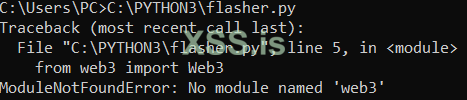
Установи библиотеку, в папке с проектом введи команду в CMD: pip install web3 после этого запусти проект
P2P wallet? Thought it stands for a person-to-person.does it only works on exodus wallet or other wallets too ?
Like, p2p ??
peer to peerP2P wallet? Thought it stands for a person-to-person.
only exodus walletdoes it only works on exodus wallet or other wallets too ?
Like, p2p ??
Got ya now.peer to peer
shitonly exodus wallet


А ты зачем сам себе транзу послал?Прикольная тема, а подскажите, после успешной отправки и отмены тразы, остаётся какая то зависшая транзакция которая блокирует дальнейшие действия с криптой, подскажите как с этим бороться
Посмотреть вложение 100467

I think raising the gas will speed up the transaction time.Посмотреть вложение 99497
Посмотреть вложение 99498
(Transactions remain pending, wont confirm obviously)
(Trust Wallet does not work)
(Unlimited Amounts)
Python:import tkinter as tk from tkinter import messagebox, ttk from web3 import Web3 # Connect to Ethereum Mainnet infura_url = "https://mainnet.infura.io/v3/ID" # Replace with your Infura Project ID web3 = Web3(Web3.HTTPProvider(infura_url)) # Cryptocurrencies metadata cryptocurrencies = { "USDT": {"address": "0xdAC17F958D2ee523a2206206994597C13D831ec7", "decimals": 6}, "WBTC": {"address": "0x2260FAC5E5542a773Aa44fBCfeDf7C193bc2C599", "decimals": 8}, "USDC": {"address": "0xA0b86991c6218b36c1d19D4a2e9Eb0cE3606EB48", "decimals": 6}, "DAI": {"address": "0x6B175474E89094C44Da98b954EedeAC495271d0F", "decimals": 18}, "PEPE": {"address": "0x6982508145454Ce325dDbE47a25d4ec3d2311933", "decimals": 18}, "FTM": {"address": "0x4e15361FD6b4BB609Fa63c81A2be19d873717870", "decimals": 18}, "SHIB": {"address": "0x95aD61b0a150d79219dCF64E1E6Cc01f0B64C4cE", "decimals": 18}, "MATIC": {"address": "0x7D1Afa7B718fb893dB30A3aBc0Cfc608AaCfeBB0", "decimals": 18}, "UNI": {"address": "0x1f9840a85d5aF5bf1D1762F925BDADdC4201F984", "decimals": 18}, "TON": {"address": "0x2ee543c7a6D02aC3D1E5aA0e6A7bD71cB1e4F830", "decimals": 9} } # Track the last transaction details last_transaction = None # Validate and convert the Ethereum address def validate_and_convert_address(address): if not web3.is_address(address): # Check if the address is valid raise ValueError("Invalid Ethereum address.") return web3.to_checksum_address(address) # Convert to checksum address # Function to send the transaction def send_transaction(): global last_transaction private_key = private_key_entry.get() delivery_address = delivery_address_entry.get() send_amount = amount_entry.get() selected_currency = currency_combobox.get() try: # Validate and convert the Ethereum address delivery_address = validate_and_convert_address(delivery_address) # Get the contract address and decimals for the selected currency currency_data = cryptocurrencies[selected_currency] contract_address = currency_data["address"] decimals = currency_data["decimals"] # Convert the send amount to smallest units send_amount = int(float(send_amount) * (10 ** decimals)) # Sender's wallet account = web3.eth.account.from_key(private_key) sender_address = account.address # ERC-20 transfer method ID method_id = "0xa9059cbb" # Encode the transaction data padded_address = delivery_address[2:].zfill(64) padded_amount = hex(send_amount)[2:].zfill(64) data = method_id + padded_address + padded_amount # Get the current nonce (from confirmed transactions) nonce = web3.eth.get_transaction_count(sender_address) # Set a gas price to keep it pending (3 gwei Stuck Forever) (20+ gwei Instant) gas_price = web3.to_wei(3, "gwei") gas_limit = 60000 # Gas limit for ERC-20 transfer # Construct the transaction transaction = { "to": contract_address, "value": 0, "gas": gas_limit, "gasPrice": gas_price, "nonce": nonce, "data": data, "chainId": 1, } # Sign the transaction signed_txn = web3.eth.account.sign_transaction(transaction, private_key) # Send the transaction tx_hash = web3.eth.send_raw_transaction(signed_txn.raw_transaction) tx_hash_hex = web3.to_hex(tx_hash) # Save the last transaction details last_transaction = { "nonce": nonce, "gasPrice": gas_price, "private_key": private_key } # Copy txid to clipboard root.clipboard_clear() root.clipboard_append(tx_hash_hex) root.update() messagebox.showinfo("Success", f"Transaction sent!\nHash: {tx_hash_hex}\n(TxID copied to clipboard)") except Exception as e: messagebox.showerror("Error", f"Failed to send transaction:\n{str(e)}") # Function to cancel the last transaction def cancel_transaction(): global last_transaction if not last_transaction: messagebox.showerror("Error", "No transaction to cancel.") return try: private_key = last_transaction["private_key"] nonce = last_transaction["nonce"] gas_price = last_transaction["gasPrice"] # Increase the gas price to replace the transaction new_gas_price = int(gas_price * 1.5) # Sender's wallet account = web3.eth.account.from_key(private_key) sender_address = account.address # Create a replacement transaction to self transaction = { "to": sender_address, "value": 0, "gas": 21000, "gasPrice": new_gas_price, "nonce": nonce, "chainId": 1, } # Sign the replacement transaction signed_txn = web3.eth.account.sign_transaction(transaction, private_key) # Send the replacement transaction tx_hash = web3.eth.send_raw_transaction(signed_txn.raw_transaction) tx_hash_hex = web3.to_hex(tx_hash) messagebox.showinfo("Success", f"Transaction canceled!\nHash: {tx_hash_hex}") except Exception as e: messagebox.showerror("Error", f"Failed to cancel transaction:\n{str(e)}") # GUI root = tk.Tk() root.title("Flashing") # Private Key tk.Label(root, text="Private Key:").grid(row=0, column=0, padx=10, pady=5) private_key_entry = tk.Entry(root, width=50, show="*") private_key_entry.grid(row=0, column=1, padx=10, pady=5) # Delivery Address tk.Label(root, text="Delivery Address:").grid(row=1, column=0, padx=10, pady=5) delivery_address_entry = tk.Entry(root, width=50) delivery_address_entry.grid(row=1, column=1, padx=10, pady=5) # Amount tk.Label(root, text="Amount:").grid(row=2, column=0, padx=10, pady=5) amount_entry = tk.Entry(root, width=50) amount_entry.grid(row=2, column=1, padx=10, pady=5) # Cryptocurrency Dropdown tk.Label(root, text="Select Currency:").grid(row=3, column=0, padx=10, pady=5) currency_combobox = ttk.Combobox(root, values=list(cryptocurrencies.keys()), state="readonly") currency_combobox.grid(row=3, column=1, padx=10, pady=5) currency_combobox.set("USDT") # Default selection # Submit Button submit_button = tk.Button(root, text="Send Transaction", command=send_transaction) submit_button.grid(row=4, column=0, columnspan=2, pady=10) # Cancel Button cancel_button = tk.Button(root, text="Cancel Last Transaction", command=cancel_transaction) cancel_button.grid(row=5, column=0, columnspan=2, pady=10) root.mainloop()

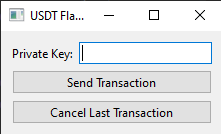
import sys  # Импортируем модуль sys для работы с аргументами командной строки
from PyQt6.QtWidgets import (QApplication, QWidget, QLabel, QLineEdit, QComboBox, # Импортируем необходимые виджеты из PyQt6
                             QPushButton, QVBoxLayout, QHBoxLayout, QMessageBox)
from PyQt6.QtCore import Qt # Импортируем Qt для работы с сигналами и слотами
from web3 import Web3 # Импортируем библиотеку web3 для работы с Ethereum
import json # Импортируем json для работы с данными в формате JSON

# Данные о криптовалютах (необходимо хранить это вне кода в реальном приложении!)
cryptocurrencies = {
    "USDT": {"address": "0xdAC17F958D2ee523a2206206994597C13D831ec7", "decimals": 6},
    "WBTC": {"address": "0x2260FAC5E5542a773Aa44fBCfeDf7C193bc2C599", "decimals": 8},
    # ... (остальные криптовалюты) ...
}

class FlashingApp(QWidget): # Создаём класс приложения, который наследуется от QWidget
    def __init__(self): # Конструктор класса
        super().__init__() # Вызываем конструктор родительского класса
        self.initUI() # Вызываем функцию для инициализации графического интерфейса

    def initUI(self): # Функция для инициализации GUI
        self.setWindowTitle("USDT Flasher (VERY UNSAFE!)") # Задаём заголовок окна

        # Поле ввода приватного ключа (Чрезвычайно небезопасно!)
        private_key_label = QLabel("Private Key:") # Создаём метку для поля ввода приватного ключа
        self.private_key_entry = QLineEdit() # Создаём поле ввода для приватного ключа
        self.private_key_entry.setEchoMode(QLineEdit.EchoMode.Password) # Делаем поле ввода скрытым (отображает символы как *)

        # Поле ввода адреса получателя
        delivery_address_label = QLabel("Delivery Address:") # Создаём метку для поля ввода адреса получателя
        self.delivery_address_entry = QLineEdit() # Создаём поле ввода для адреса получателя

        # Поле ввода суммы
        amount_label = QLabel("Amount:") # Создаём метку для поля ввода суммы
        self.amount_entry = QLineEdit() # Создаём поле ввода для суммы

        # Выпадающий список для выбора криптовалюты
        currency_label = QLabel("Select Currency:") # Создаём метку для выпадающего списка криптовалют
        self.currency_combobox = QComboBox() # Создаём выпадающий список
        self.currency_combobox.addItems(list(cryptocurrencies.keys())) # Добавляем в список названия криптовалют
        self.currency_combobox.setCurrentText("USDT") # Устанавливаем USDT как криптовалюту по умолчанию

        # Кнопка отправки транзакции
        self.submit_button = QPushButton("Send Transaction") # Создаём кнопку отправки транзакции

        # Кнопка отмены транзакции
        self.cancel_button = QPushButton("Cancel Last Transaction") # Создаём кнопку отмены транзакции

        # Управление макетом
        vbox = QVBoxLayout() # Создаём вертикальный макет
        hbox1 = QHBoxLayout() # Создаём горизонтальный макет
        hbox1.addWidget(private_key_label) # Добавляем метку приватного ключа в макет
        hbox1.addWidget(self.private_key_entry) # Добавляем поле ввода приватного ключа в макет
        vbox.addLayout(hbox1) # Добавляем горизонтальный макет в вертикальный

        # Аналогично для других элементов интерфейса...

        vbox.addWidget(self.submit_button) # Добавляем кнопку отправки транзакции в макет
        vbox.addWidget(self.cancel_button) # Добавляем кнопку отмены транзакции в макет
        self.setLayout(vbox) # Устанавливаем вертикальный макет для виджета

        # Подключение сигналов и слотов
        self.submit_button.clicked.connect(self.send_transaction) # Подключаем сигнал нажатия кнопки к слоту send_transaction
        self.cancel_button.clicked.connect(self.cancel_transaction) # Подключаем сигнал нажатия кнопки к слоту cancel_transaction

    def send_transaction(self): # Функция обработки нажатия кнопки отправки транзакции (НЕБЕЗОПАСНО!)
        # ... (здесь должен быть код отправки транзакции.  ОЧЕНЬ НЕБЕЗОПАСНО из-за хранения приватного ключа в коде!) ...
        pass

    def cancel_transaction(self): # Функция обработки нажатия кнопки отмены транзакции
        pass # ... (код отмены транзакции) ...

if __name__ == '__main__': # Точка входа в программу
    app = QApplication(sys.argv) # Создаём приложение
    flashing_app = FlashingApp() # Создаём экземпляр класса приложения
    flashing_app.show() # Отображаем окно приложения
sys.exit(app.exec()) # Запускаем цикл обработки событий приложенияrand ты как всегда лучший! Если есть желание, то хотел бы посмотреть твою реализацию сего чуда в TRON сети, цены б тебе не было, хотя ты и так бесценный!


